change CredSSP setting for all RDP sessions

Hi,
i need to configure on all RDP session (we have mor then 1000) this two settings
enable CredSSP support = false
Activate NLA (SSO) = false
to give our admins the possibility to change a expired password.
Where can i change the config to set this 2 settings for all connections ?
thanks
simon
All Comments (5)
Hello,
A quick way to do this would go in View - Advanced Search and search by Connection Type - RDP (Microsoft Remote Desktop) 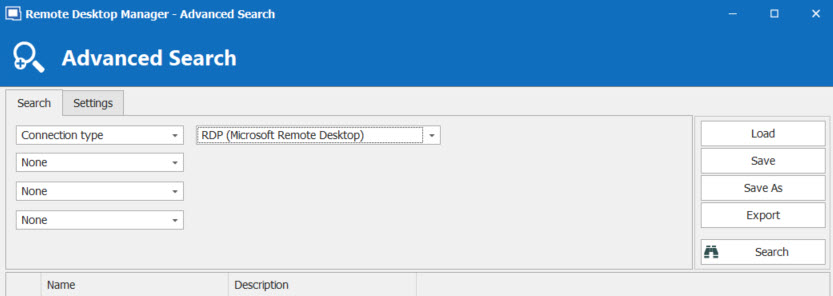
From there, make a CTRL + A to select them all, make a right-click on one of them -> Edit -> Edit (Special Actions) -> Custom Powershell Command 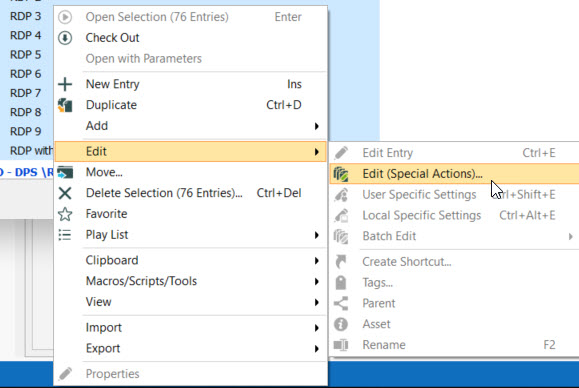
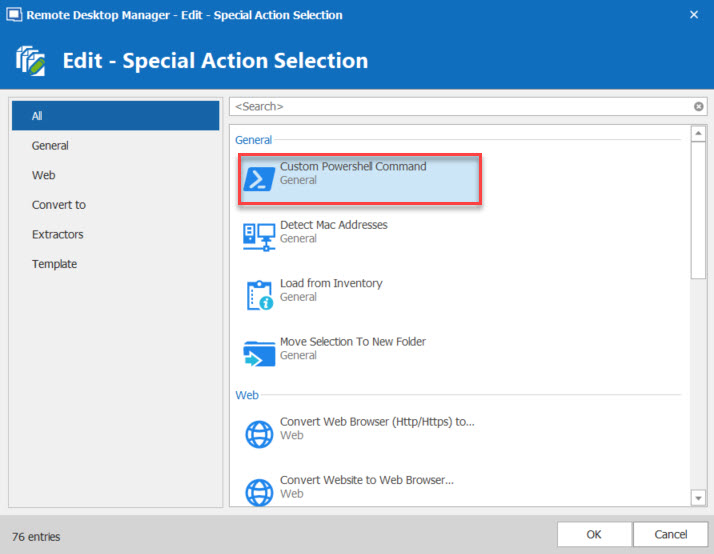
Lastly, run the following command :
$connection.rdp.EnableCredSSPSupport = "False";
$connection.rdp.NetworkLevelAuthentication = "";
$RDM.Save();
Best Regards,
Etienne Lord
powershell.jpg
edit.jpg
AdvancedSearch.jpg
Thanks Etienne. It worked but no i'm getting on some servers this error. so i had to rollback.
I need to find another solution to get the admins the possiblity to change their expired password over RDP. I can't change the security setting HKEY_LOCAL_MACHINE\SYSTEM\CurrentControlSet\Control\TerminalServer\WinStations\RDP-Tcp on all servers.
Do you have any idea?
Maybe with a customized script integrated in the context menu of RDM, where i have to enter only a new password. Do you think that could be possible?
Simon
New Bitmap Image.bmp
Hello,
Correct me if I'm wrong but I believe this would be something handle outside of Remote Desktop Manager. If you make it work outside of Remote Desktop Manager, it will work inside. That being said, are you able to make it work outside RDM?
Best Regards,
Etienne Lord
Hi Etienne,
sure it can be handeled also outside of RDM, but RDM is one of our maintools that we are using for our daily work, so it would be perfect to implement also this.
RDM has implemented a lot of features that are normally done outside of a remote desktop tool so this would be another very usefull feature.
best regards,
Simon
Hello,
With your last post, I suspect you mean that using Microsoft RDP (mstsc) the connection is working as expected. In that case, could you create a .rdp file via mstsc.exe and import this file inside RDM. Then, launch the connection in RDM. Is it working?
Best regards,
Jeff Dagenais