
cchilderhose
BUG - 2026.3.12 (Not sure about 2026.3.13 yet) - Connect to RDP session throws error
I am on 2026.3.13 now so will report back if the issue occurs again. Have not seen it just yet.
BUG - 2026.3.12 (Not sure about 2026.3.13 yet) - Connect to RDP session throws error
When using 2026.3.12 and trying to connect to RDP sessions I would see this popup every so often and once you click close the connection would proceed anyway. Just more of a nuisance or possibly a bug?
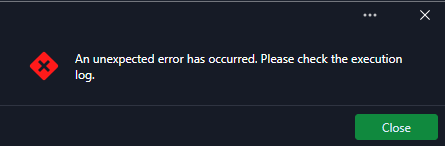
I have not tested 2026.3.13 much yet just updated today. I will post back if I see it in that release.
Steps -
Highlight an RDP session
Use either the Connect button or double-click to open
Popup comes up
Click close
RDP session proceeds or sometimes you need to invoke again
BUG - 2026.3 Beta - Update Option
Thanks for the update and look forward to the fix. I used option 1 and it worked fine to upgrade RDM. Nice changes with things I reported being fixed. Looking excellent now. 😎
BUG - 2026.3 Beta - Update Option
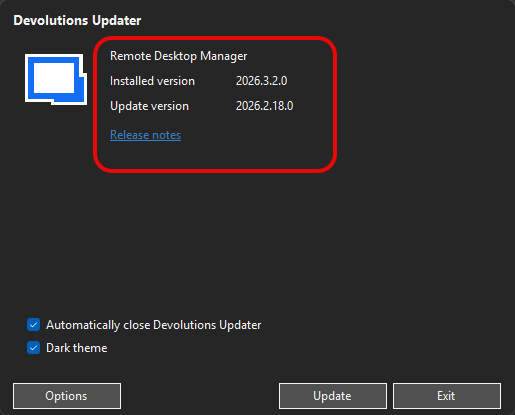
Today I was prompted with an update available - 2026.3.3 so I clicked the Download button then Download & Install Now option. The issue here is the Update version was the prior release 2026.2.18 (see screenshot). Think there is something wrong or bug in the updater.
BUG - 2026.3 - Pasting in to an entry not working
My apologies as it seems to be working now. Unsure why it did not work, but I was in an RDP session and on VMware vCenter via a web browser. I highlighted a server name and tried to paste it to the NAME line in the properties of an RDP connection in RDM.
Seems to be working again maybe a system glitch.
BUG - 2026.3 - Pasting in to an entry not working
I copied the name of a server and when trying to paste it in to the NAME box in RDM the paste option is not working. I tried in notepad and the name pastes. Something to fix.
2026.3 - Selecting Folder - Entries not showing subfolders - just a large list
Yes, that is what I am referring to. That does not show in the 2026.3 beta where it did in 2026.2.
2026.3 - Connect button (top right) - not working as expected (BUG)
In 2026.3 — highlighted an entry for an RDP session and when clicking on Connect button (green — top right) it tried to connect to the first entry in the list not the one highlighted and showing in the status bar where the Connect button is.
2026.3 - Selecting Folder - Entries not showing subfolders - just a large list
In the previous 2026.2 release when you selected a main folder that had subfolders in it the entry list showed those folders to divide things. In 2026.3 the list is just all the entries with no divide to show the subfolders - you need to expand the main entry, select the subfolder, and then can see the specific entries you need.
Please fix this or revert it to be like the 2026.2 version.
Beta 2026.3 - Properties Button not working like previous 2026.2
Thanks, Hubert. I just unchecked the Show Folder details as selected and left the entry one. That shows like it did in the previous release and Properties works as it did for the entry not the folder.
Beta 2026.3 - Properties Button not working like previous 2026.2
In the previous release 2026.2 when you were in a folder (not expanded) and click on an entry in the folder then pressed the Properties button it opened the properties for that connection.
Now in 2026.3 you need to expand the folder then highlight the entry and when pressing Properties it works as expected. Why did the new release change the workflow of allowing the entry in to be selected and Properties used?
1Password no loger works
@Jonathan Del Signore - UPDATE - the newest release 2026.1.11 fixed the 1Password issue for me. Hopefully, that addresses others.
1Password no loger works
@Jonathan Del Signore - is there an ETA on release for the .11 release? The link showing that it is fixed goes to release notes but still at .10?
1Password no loger works
Once the fix releases, I will test and report back.
1Password no loger works
I am using Authenticator App MFA (2FAS app).
1Password no loger works
Adding a +1 here to monitor for a fix - same issue as OP.
Issue with 1Password and BitWarden integration
Hello,
Thank you for your reply,
I'm glad to hear this is now working.
Did your colleagues also encounter the same error message? I'm also wondering if the behavior reoccurred since you changed the entry Properties?
Let me know,
Best regards,
@Samuel Dery
I have not seen the issue since editing and saving the entries. Not sure why that was required but glad it is working as well as the Open Session button again. :)
Issue with 1Password and BitWarden integration
@Léon Le Brun @Samuel Dery @Hubert Mireault
I have actually fixed the 1Password issue as well as BitWarden. I had to edit each of the credentials I had set up for both integrations and select the same credential from the app again, then Save the entry in RDM. Once I did that connections started to work.
@Samuel Dery -- FYI for you - the Open Session button now works in the tree without issue on the new 2025.3 release. The one we tested on our remote session so all good now. :)
Issue with 1Password and BitWarden integration
Hello,
We have successfully resolved the 1Password and Bitwarden issues. The correct behavior will be available in the upcoming 2025.3 version.
Regards,
Léon Le Brun
@Léon Le Brun @Samuel Dery @Hubert Mireault
I installed the 2025.3 release and still have the same problem with the 1Password credentials being used so it is not fixed. I am testing BitWarden now.

Issue with 1Password and BitWarden integration
@Samuel Dery - yes you can use the email associated to the forums for the case and link to remote session.
Issue with 1Password and BitWarden integration
@Samuel Dery -- as noted the Open Session button is still broken in 2025.3 after going back to this to get RDP sessions to work. I can wait on the next release to fix the 1Password/BitWarden issues but can we check the Open Session button? It works on another system that I have with 2025.3 but the only difference is that does not use SQL Server for datasource and it is Windows 10 not 11. OS should not make a difference here though.
Issue with 1Password and BitWarden integration
Hello,
Thank you for your reply,
You mentioned that you were having an issue with the Open Session on both the Beta version 2025.3 and when you reverted to 2025.2. Is it now working as expected when using the Open session on 2025.3?
Let me know,
Best regards,
@Samuel Dery
It is still broken in 2025.3
Issue with 1Password and BitWarden integration
Hello,
Thank you for your reply,
I would like to have a remote session with you to have a look at your Open Session issue. To do so, I would need to open a case.
Would the email used for your Forum Account be the correct one to use?
If not, let me know and I can send you a private message so that you can provide me with the correct email to use.
Best regards,
@Samuel Dery
Is this for the 2025.2 issue? If so I have gone back to 2025.3 and changed connections to use KeePass until the other apps are fixed or is it for the Open Session issue with 2025.3? Let me know.
Issue with 1Password and BitWarden integration
Hello,
For the compatibility between DVLS 2025.3 and RDM 2025.2, I checked with the DVLS team lead, and while it's not recommended to stick with 2025.2, it should still be supported for the most part. New features from 2025.3 will not work with that client, and if you are using Privileged Access there might be certain unavailable endpoints, though all of the crucial ones should still be available and work fine.
Are you using both SQL Server and DVLS as datasources, or do you mean you did a manual export of the data in your SQL Server where DVLS is hosted, and reimported it? I will ask one of our support agents to open a case with you in high priority as it sounds like you might be unable to work after this manipulation.
Regards,
@Hubert Mireault
Yes I exported to RDM format the data from my SQL Server DB - all entries, passwords, etc. which was on 2025.3 with DVLS 2025.3. I then uninstalled 2025.3 version and cleaned up files/directories. Installed 2025.2 and created a new SQL Server DB for use with the program. I then imported the exported RDM file to get all my connections back and credentials but now the program is useless to use nothing works. It fixes the 1Password issue but no connections open with Open Session button or double-click. So I was stuck. I removed 2025.2 and went back to 2025.3 with my other SQL Server datasource and now can at least use my RDP connections once I change them to use KeePass creds intead of the problem apps.
Issue with 1Password and BitWarden integration
So I exported my entries from SQL in 2025.3 and downgraded to 2025.2 with a new DB and imported entries. But now, nothing connects when I click Open Session, or double-click an entry; it will not connect via RDP at all. So I am stuck, and it looks like I will need to continue with the broken 2025.3 to at least make this usable. Not happy.