BUG - 2026.3 Beta - Update Option

Today I was prompted with an update available - 2026.3.3 so I clicked the Download button then Download & Install Now option. The issue here is the Update version was the prior release 2026.2.18 (see screenshot). Think there is something wrong or bug in the updater.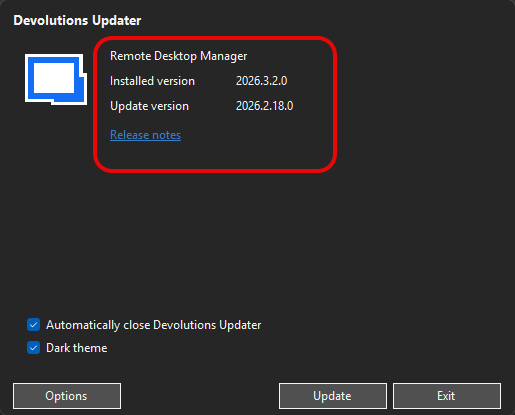
c7faafef-48b1-42d5-81b8-c7ca68a13e37.png
All Comments (3)
Hi Chris,
Thanks for the report, and sorry for the confusion. This is actually a known issue with the in-app updater on the 2026.3 beta channel: it can display a newer version as available (in your case 2026.3.3) but then download and install an older build (2026.2.18) when you use "Download & Install Now." Our team has already reproduced this internally and has a fix scheduled for an upcoming build.
In the meantime, here are two options:
1. Use the "Download update using your default browser" option instead of "Download & Install Now." That path pulls the correct version.
2. Manually download the 2026.3.3 installer from our website and run it directly.
Let me know if you run into any issues with either option.
Best regards,
Samuel Dery
Thanks for the update and look forward to the fix. I used option 1 and it worked fine to upgrade RDM. Nice changes with things I reported being fixed. Looking excellent now. 😎
Hello,
Thank you for your reply,
Perfect, glad to hear this is now working as expected for you,
Best regards,
Samuel Dery