Beta 2026.3 - Properties Button not working like previous 2026.2
Beta 2026.3 - Properties Button not working like previous 2026.2

In the previous release 2026.2 when you were in a folder (not expanded) and click on an entry in the folder then pressed the Properties button it opened the properties for that connection.
Now in 2026.3 you need to expand the folder then highlight the entry and when pressing Properties it works as expected. Why did the new release change the workflow of allowing the entry in to be selected and Properties used?
All Comments (2)
Hello,
You can change this value with the "[...]" menu in the folder entry list: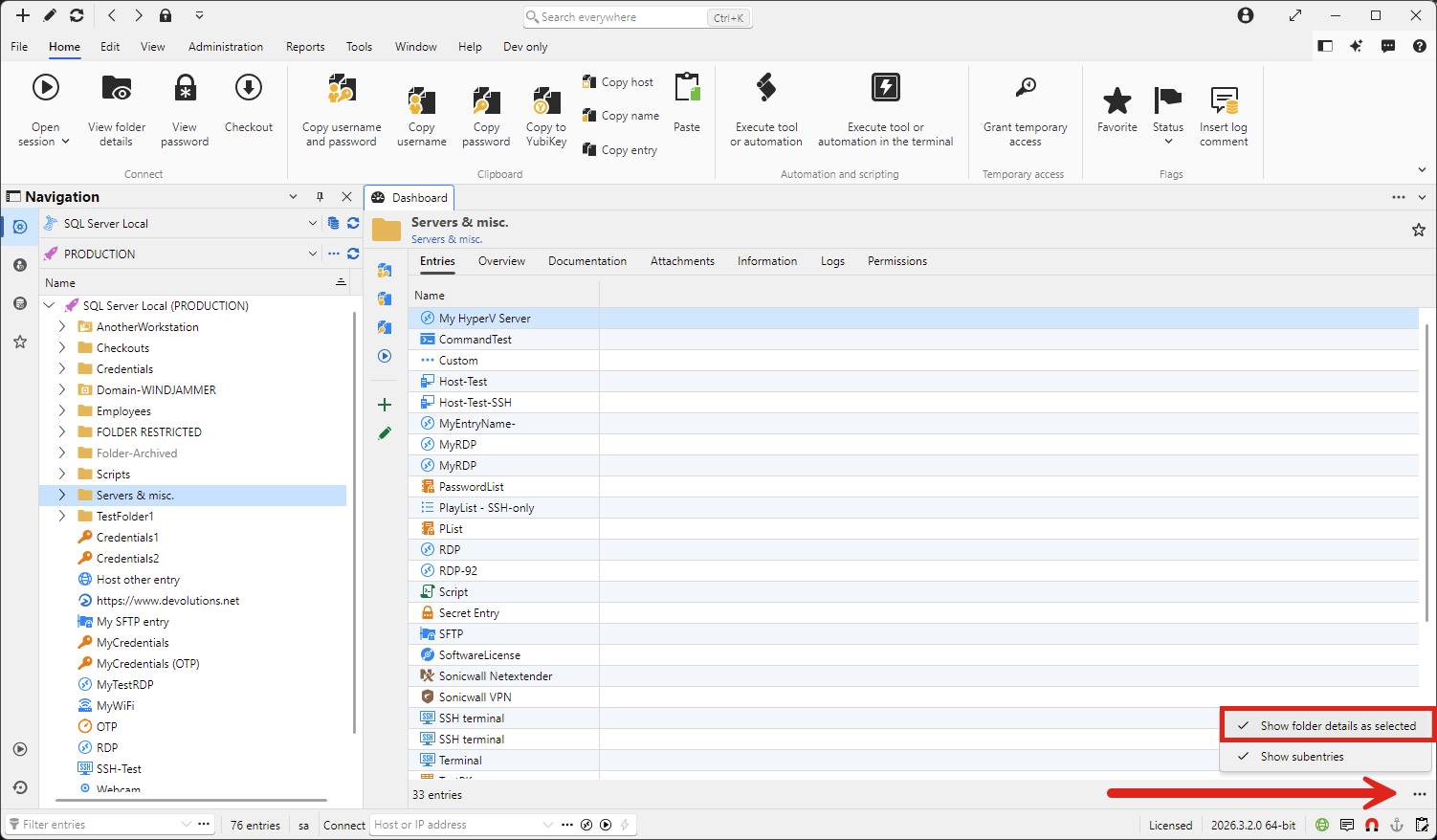
Additionally, you can use the right click menu in the entry list to use menus specific to that entry and not the folder.
We changed the default value of this setting in 2026.3 as we consider it to be a more logical behavior. Every other entry type's "action" pane applies to the entry itself, but for folders, it applied to the currently selected value in its entry list. Your feedback is appreciated and if we see that it's too confusing of a change for our users, we'll either roll it back or find a more appropriate solution.
Regards,
Hubert Mireault
a07a8397-3fca-411a-9f5e-1ee2a58dba14.png
Thanks, Hubert. I just unchecked the Show Folder details as selected and left the entry one. That shows like it did in the previous release and Properties works as it did for the entry not the folder.