
claudiu
RDM crashes when SSH tunnel crashes
Hi, this was exactly my test this morning as I was searching for the differences between my ssh connections. And it works. Apparently I had SFTP enabled (and started minimized) on this connection. Thank you.
On the other hand, a better SFTP implementation would be necessary on ssh connections, maybe just clicking on a button when already connected ssh would be easier and less prone to this error.
Thanks again.
RDM crashes when SSH tunnel crashes
Only when switching to RDM after hibernation or other connection interruption or when shutting down that ssh server. Basically when RDM is focused and looses abruptly the ssh connection to this server, it crashes. It only happens with certain servers. This one was a Centos 7.2 which I updated to 7.9 and does the same.
As a workaround, now I use a ssh gateway through another server on the network. Like that, when the connection crashes, it only closes that tab and RDM remains open.
RDM crashes when SSH tunnel crashes
Update: it does the same thing when rebooting the ssh server, RDM crashes in 2 seconds with no message.
RDM crashes when SSH tunnel crashes
Windows 11, always updated. Happens on other computers too, Windows 10 and 11. Happened this morning too, when waking up computer up from hibernation, going to RDM with a ssh connection which remained open at lid close.
This is the error:
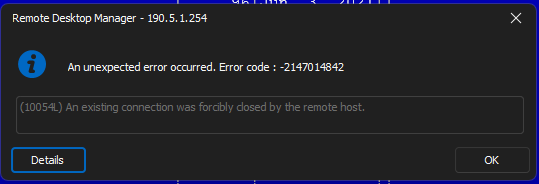
After this, in a few seconds RDM closes with no message. It's strange as this is not happening on all ssh connections, so this might be something related to ssh servers also.
RDM crashes when SSH tunnel crashes
When I open RDM after a connection is interrupted and go to the SSH tab, it throws a message that the connection was closed by the server and after a few more seconds RDM closes with no error.
Putty just shows a message the connection was interrupted, it does not close.
I found these in Event Viewer, this morning, after coming out from hibernation:
Application: RemoteDesktopManager.exe
Framework Version: v4.0.30319
Description: The process was terminated due to an unhandled exception.
Exception Info: exception code c0000005, exception address 00007FF92E5C3ACA
Stack:
Faulting application name: RemoteDesktopManager.exe, version: 2023.3.39.0, time stamp: 0xe5669141
Faulting module name: ntdll.dll, version: 10.0.22621.3085, time stamp: 0xbced4b82
Exception code: 0xc0000005
Fault offset: 0x0000000000033aca
Faulting process id: 0x0x35CC
Faulting application start time: 0x0x1DA65909F212B18
Faulting application path: C:\Program Files\Devolutions\Remote Desktop Manager\RemoteDesktopManager.exe
Faulting module path: C:\WINDOWS\SYSTEM32\ntdll.dll
Report Id: dcd9d530-cfbf-4c99-8bd6-aba86300f329
Faulting package full name:
Faulting package-relative application ID:
Fault bucket 1298252109064037629, type 4
Event Name: APPCRASH
Response: Not available
Cab Id: 0
Problem signature:
P1: RemoteDesktopManager.exe
P2: 2023.3.39.0
P3: e5669141
P4: ntdll.dll
P5: 10.0.22621.3085
P6: bced4b82
P7: c0000005
P8: 0000000000033aca
P9:
P10:
Attached files:
\\?\C:\ProgramData\Microsoft\Windows\WER\Temp\WER.45f0a0d6-33cd-45c0-8a46-c5918f2ebd42.tmp.dmp
\\?\C:\ProgramData\Microsoft\Windows\WER\Temp\WER.c2a0a543-d2c4-4c30-9e6e-8d122ee8cc7b.tmp.WERInternalMetadata.xml
\\?\C:\ProgramData\Microsoft\Windows\WER\Temp\WER.b1e4941e-9646-4f0d-8194-fb72e618364d.tmp.csv
\\?\C:\ProgramData\Microsoft\Windows\WER\Temp\WER.5de1257e-ace1-408d-b1e3-66e38218d692.tmp.txt
\\?\C:\ProgramData\Microsoft\Windows\WER\Temp\WER.f9a2b908-6ec8-4d92-b858-e3a87a196b57.tmp.xml
These files may be available here:
\\?\C:\ProgramData\Microsoft\Windows\WER\ReportArchive\AppCrash_RemoteDesktopMan_bfefb2d613a3e116949f9b5d3c87f1c2e373e3a_16eae7ba_bac5bd48-d926-4dab-98e1-79a62ead663e
Analysis symbol:
Rechecking for solution: 0
Report Id: dcd9d530-cfbf-4c99-8bd6-aba86300f329
Report Status: 268435456
Hashed bucket: b9327be42fd626c5b204516a2da9e4fd
Cab Guid: 0
RDM crashes when SSH tunnel crashes
Hi.. there is nothing in that log, I kept looking these days. I can replicate the issue almost everytime by loosing the ssh connection somehow, closing the vpn, hibernating the computer, connection timeout and when coming back into the app and clicking on that tab, in a few seconds RDM closes with no error message. I would say it mostly happens on certain ssh servers, not so much on others. But it's starting to be annoying as this happens a few times a day and closes in the processes all other terminals, loosing work.
RDM crashes when SSH tunnel crashes
Hi,
All versions since at least 6 months, free version.
RDM crashes when SSH tunnel crashes
Same thing happens to me, several times a day, but it's random.
Random RDM Not Responding on 2023.2.18.0
Same here, it just throws a message like this:

After that, it just freezes, one can not press the OK button or anything else, only end it from Task Manager.
Native SFTP client as a tool instead of individual entry
Thank you very much for your help!
Native SFTP client as a tool instead of individual entry
With the last version I can see the button but on two different installations, SFTP does not start minimized, the checkbox doesn't seem to work.
Also, I understand there is a HowTo for using templates in the commercial version for getting a SFTP tool option, could you point me to it?
Thank you.
Native SFTP client as a tool instead of individual entry
I run 2021.2.28.0 64-BIT. It is also the free version, if that might be the culprit here.
LE: I can now see it is not the latest.
Native SFTP client as a tool instead of individual entry
Hmm.. I don't have that button, I looked everywhere for something like that.
Here is what I got:

I don't find a way to show it, any idea?
Thank you.
Native SFTP client as a tool instead of individual entry
Apparently the SFTP connection takes some time to log in. It seems that the first time connecting takes the most time, after that it's faster, 2-3 seconds.
The minimized option seems useful, but how do I bring the file browser back to use SFTP? I can not find it.
Thank you.
Native SFTP client as a tool instead of individual entry
Hi, thank you for answering. I was aware of this option but this does not work as asked and it also does not work well. The check box always opens a file browser which most of the time is not needed and it also takes a LOT of time to login. At least on my servers, this could take even 10 seconds to open a connection who otherwise opens instantly.
Something la right clicking a SSH connection or the opened ssh tab and choosing SFTP would be a lot more useful. Or in the current implementation you described, it would be useful to open the file browser only when needed and resolve the login problems.
Native SFTP client as a tool instead of individual entry
Hi, old thread, but I'd like the same thing and the goto link does not work anymore.
So, how can we easily start a SFTP connection directly from a SSH one, without creating a new session?
Thank you.
SSH connections fail with code 10057L
Hi, with the new version my ssh connections work after enabling all the algorithms, but I do get a lot of disconnections after some time, especially on ssh port forwarding sessions, with the 10057L error, which I didn't have before. Could this be related? If not, sorry to hijack the thread. Is there anything I can do to keep the connection alive, reconnect etc?
Thank you.
Built-in SCP
Ah sorry, that was it.. I wasn't on the last version.
Thank you again.
Claudiu
Built-in SCP
Hi, where is this option, starting location..? I don't see it.
Thank you,
Claudiu
Built-in SCP
Nice. But is it jailed to the user's home directory?
Thank you.
Lost focus in RDM after Alt+Tab
I am using Local Data Source, default settings.
Maybe try waiting a few minutes before returning to RDM from another app. I would say in the last days this happens to me even more, maybe 30% of times. I usually keep RDM open with SSh sessions several days if that could be a clue.
Lost focus in RDM after Alt+Tab
Thank you. Sorry for not being able to give a reproduction procedure, this is pretty random, I couldn't identify any pattern.
Claudiu
Lost focus in RDM after Alt+Tab
I didn't noticed this on RDP, but I rarely use it. And in RDP one usually uses the mouse, so it's hard to observe.
Lost focus in RDM after Alt+Tab
Thank you for your response.
No control, I can do absolutely with the keyboard. Tab is not working, nor any other combination. The window bar is dimmed, though RDM comes in front after Alt-Tab from another app.
Lost focus in RDM after Alt+Tab
Hi,
I know this is an old subject, but none of the resolutions work for me. Maybe 10% of the times I switch to another application and return with Alt+Tab, RDM loses focus, the keyboard does not work at all. I have to reach for the mouse and click somewhere to restore focus. I use the free version of RDM, 99% for SSH connections. I hardly use the mouse so this is incovenient and strange. Is there any solution or workaround?
Thank you.