RDM crashes when SSH tunnel crashes

Hey
I am using RDM Free to open an ssh tunnel.
When this tunnels crashes (eg due to connectivity issues), the entire RDM program crashes, rather than only closing the tab with the tunnel.
If you cannot reproduce, please tell me how I can provide logs etc so this could be fixed
Thanks
Jan
All Comments (20)
Hello,
How can I reproduce a connectivity issue? If I close my network connexion, does RDM will freeze and crash?
Best regards,
David Grandolfo
Hi
No sorry I have no easy reproduce steps.
When I power off the device we tunnel to in the office, it is only the tab that crashes.
I will try to pinpoint it more and keep you posted
-Jan
Hi,
Thanks if you have further details or any way to reproduce it please let us know.
Best regards,
David Grandolfo
Same thing happens to me, several times a day, but it's random.
Hello,
Could you confirm your Remote Desktop Manager version?
Best regards,
Etienne Lord
Hi,
All versions since at least 6 months, free version.
Hello,
Do you have something relevant under Help -> Application Logs ?
Best regards,
Jeff Dagenais
Hi.. there is nothing in that log, I kept looking these days. I can replicate the issue almost everytime by loosing the ssh connection somehow, closing the vpn, hibernating the computer, connection timeout and when coming back into the app and clicking on that tab, in a few seconds RDM closes with no error message. I would say it mostly happens on certain ssh servers, not so much on others. But it's starting to be annoying as this happens a few times a day and closes in the processes all other terminals, loosing work.
Hello,
Is there something relevant in Windows Event Viewer when the crash occurs?
If you are using a tool like Putty, does it crash when connecting on the same ssh servers?
Best regards,
Jeff Dagenais
When I open RDM after a connection is interrupted and go to the SSH tab, it throws a message that the connection was closed by the server and after a few more seconds RDM closes with no error.
Putty just shows a message the connection was interrupted, it does not close.
I found these in Event Viewer, this morning, after coming out from hibernation:
Application: RemoteDesktopManager.exe
Framework Version: v4.0.30319
Description: The process was terminated due to an unhandled exception.
Exception Info: exception code c0000005, exception address 00007FF92E5C3ACA
Stack:
Faulting application name: RemoteDesktopManager.exe, version: 2023.3.39.0, time stamp: 0xe5669141
Faulting module name: ntdll.dll, version: 10.0.22621.3085, time stamp: 0xbced4b82
Exception code: 0xc0000005
Fault offset: 0x0000000000033aca
Faulting process id: 0x0x35CC
Faulting application start time: 0x0x1DA65909F212B18
Faulting application path: C:\Program Files\Devolutions\Remote Desktop Manager\RemoteDesktopManager.exe
Faulting module path: C:\WINDOWS\SYSTEM32\ntdll.dll
Report Id: dcd9d530-cfbf-4c99-8bd6-aba86300f329
Faulting package full name:
Faulting package-relative application ID:
Fault bucket 1298252109064037629, type 4
Event Name: APPCRASH
Response: Not available
Cab Id: 0
Problem signature:
P1: RemoteDesktopManager.exe
P2: 2023.3.39.0
P3: e5669141
P4: ntdll.dll
P5: 10.0.22621.3085
P6: bced4b82
P7: c0000005
P8: 0000000000033aca
P9:
P10:
Attached files:
\\?\C:\ProgramData\Microsoft\Windows\WER\Temp\WER.45f0a0d6-33cd-45c0-8a46-c5918f2ebd42.tmp.dmp
\\?\C:\ProgramData\Microsoft\Windows\WER\Temp\WER.c2a0a543-d2c4-4c30-9e6e-8d122ee8cc7b.tmp.WERInternalMetadata.xml
\\?\C:\ProgramData\Microsoft\Windows\WER\Temp\WER.b1e4941e-9646-4f0d-8194-fb72e618364d.tmp.csv
\\?\C:\ProgramData\Microsoft\Windows\WER\Temp\WER.5de1257e-ace1-408d-b1e3-66e38218d692.tmp.txt
\\?\C:\ProgramData\Microsoft\Windows\WER\Temp\WER.f9a2b908-6ec8-4d92-b858-e3a87a196b57.tmp.xml
These files may be available here:
\\?\C:\ProgramData\Microsoft\Windows\WER\ReportArchive\AppCrash_RemoteDesktopMan_bfefb2d613a3e116949f9b5d3c87f1c2e373e3a_16eae7ba_bac5bd48-d926-4dab-98e1-79a62ead663e
Analysis symbol:
Rechecking for solution: 0
Report Id: dcd9d530-cfbf-4c99-8bd6-aba86300f329
Report Status: 268435456
Hashed bucket: b9327be42fd626c5b204516a2da9e4fd
Cab Guid: 0
Hello,
Regarding your system, does all your Windows Updates are installed?
Have you tried to run a System File Checker (https://support.microsoft.com/en-au/topic/use-the-system-file-checker-tool-to-repair-missing-or-corrupted-system-files-79aa86cb-ca52-166a-92a3-966e85d4094e) . Sometimes it could help for this type of issue.
Best regards,
Jeff Dagenais
Windows 11, always updated. Happens on other computers too, Windows 10 and 11. Happened this morning too, when waking up computer up from hibernation, going to RDM with a ssh connection which remained open at lid close.
This is the error: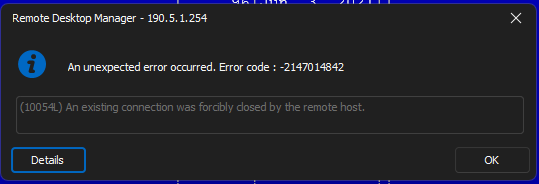
After this, in a few seconds RDM closes with no message. It's strange as this is not happening on all ssh connections, so this might be something related to ssh servers also.
7a1a7f80-0c29-4b09-ab73-be0efa277de9.png
Update: it does the same thing when rebooting the ssh server, RDM crashes in 2 seconds with no message.
Hello,
Does the crashes always occurs when opening the lead after hibernation or it could happen when you simply launching a SSH session type?
Best regards,
Jeff Dagenais
Only when switching to RDM after hibernation or other connection interruption or when shutting down that ssh server. Basically when RDM is focused and looses abruptly the ssh connection to this server, it crashes. It only happens with certain servers. This one was a Centos 7.2 which I updated to 7.9 and does the same.
As a workaround, now I use a ssh gateway through another server on the network. Like that, when the connection crashes, it only closes that tab and RDM remains open.
Hello,
Thank you for the explanation and the workaround.
I opened a case with our QA team. We will try to reproduce on our end.
Best regards,
Jeff Dagenais
Hello,
I had a chat with our QA team and Development team and we may have a path to a solution.
Firstly, in the properties of your SSH Session, under the Terminal tab , then Advanced tab, there's an option call Use SFTP connection for remote file transfer.
Is this option checked? If yes, could you disable it. I think this may help with the crash of the app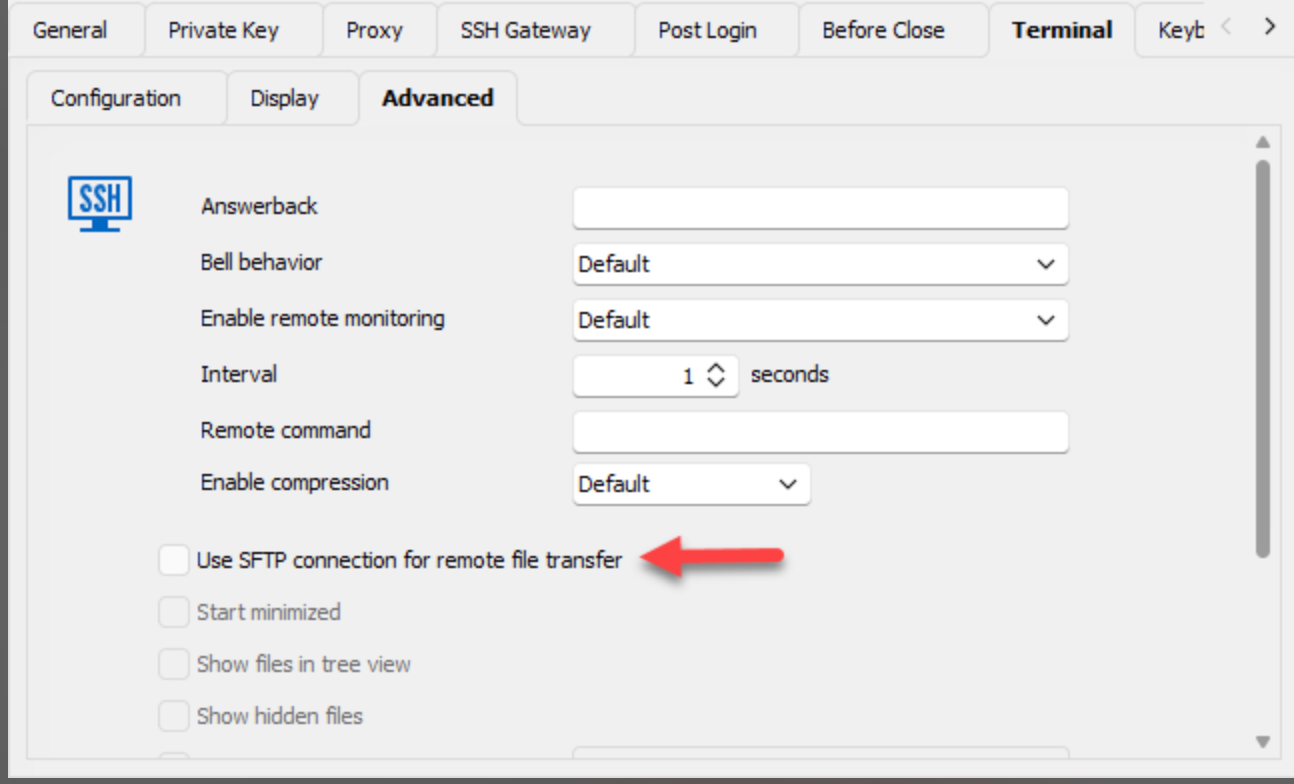
Secondly, we have a beta version of RDM online that you may want to try as well. The version is 2024.1.11.0 and it can be download here
https://devolutions.net/remote-desktop-manager/home/download/
In conclusion, let us know if the situation is better know.
Best regards,
Jeff Dagenais
41694a05-f873-42d4-8185-097a53816de9.png
Hi, this was exactly my test this morning as I was searching for the differences between my ssh connections. And it works. Apparently I had SFTP enabled (and started minimized) on this connection. Thank you.
On the other hand, a better SFTP implementation would be necessary on ssh connections, maybe just clicking on a button when already connected ssh would be easier and less prone to this error.
Thanks again.
Hello,
Thank you for your feedback.
Glad that we have found the culprit.
Best regards,
Jeff Dagenais
Hello,
We have a fix in version 2024.1.12.0 available here https://devolutions.net/remote-desktop-manager/home/download
I would suggest you try it in a portable installation (more on the subject here: https://help.remotedesktopmanager.com/installation_portableusb.html
Thanks for reporting this, have a great one.
Best regards,
Alex Belisle