
4
rustdesk password notaccepted in second session
hi, after some additional research around the net that seems to mbe the solution (for me it actually works now):
> https://www.reddit.com/r/rustdesk/comments/1hzjv4t/permanent_password_not_working/?tl=de
last post in the thread
so it is NOT an issue caudes by rdm
perhaps this may help some others
thx
georg
rustdesk password notaccepted in second session
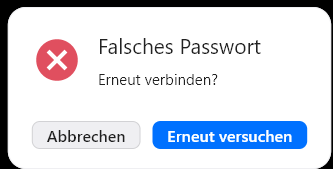
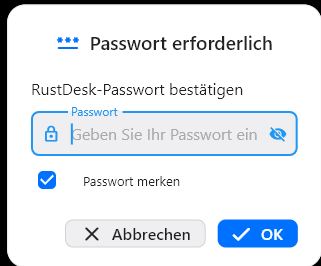
hi, i've configurated several host with rustdesk (permanent password, access only with passwords, no click required) - credentials are stored in the rdm config.
when i open the 1st session (out auf rdm) > everything is fine, access granted, the 2nd and following sessions show me "wrong / missing password".
that happens with the same and with different passwords and it doesn't matter which is 1st opened.
any idea?
thx, georg
integrate hoptodesk
to whom it may concern and / or help
new
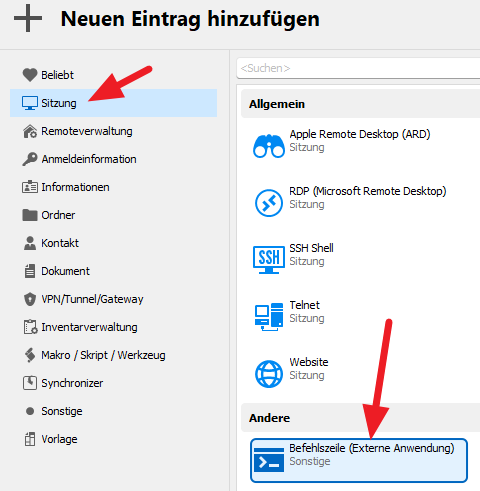
session
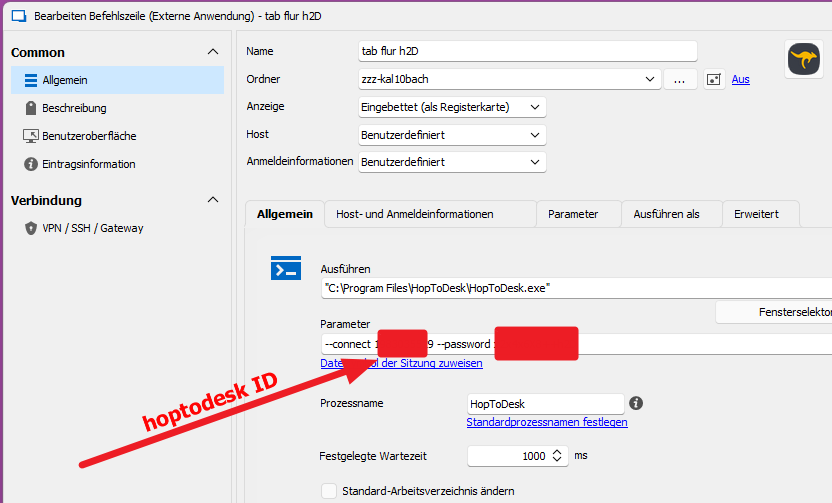
command line (external..)
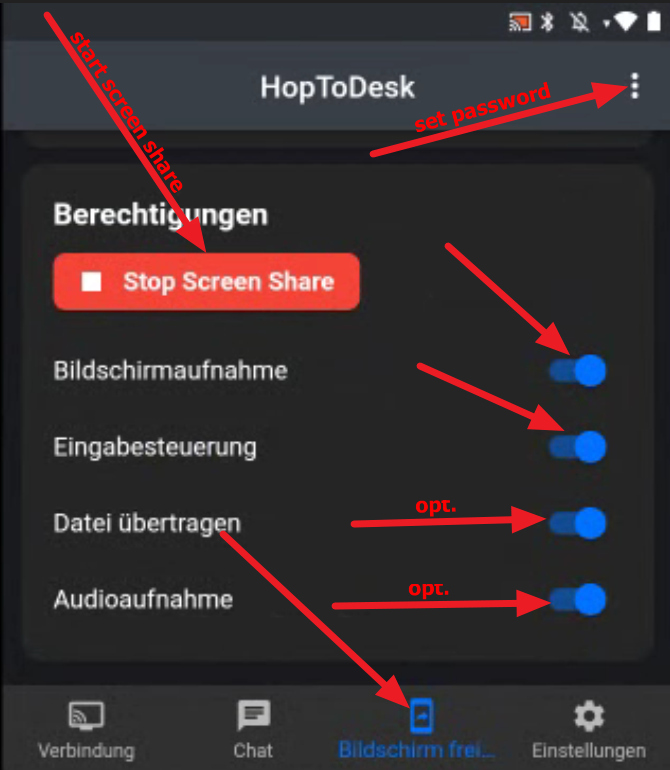
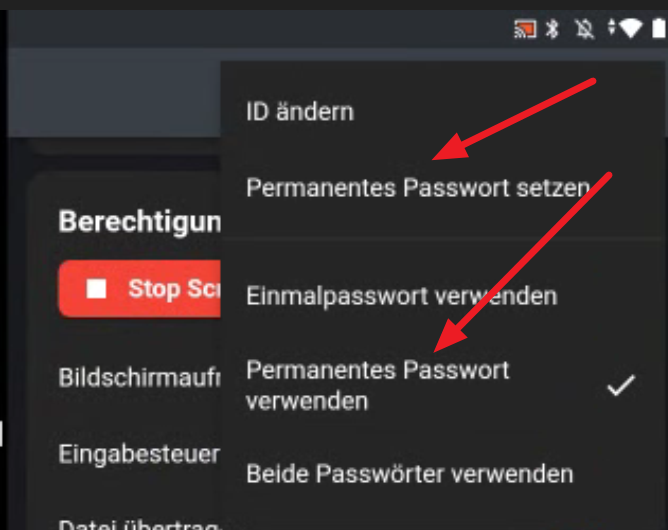
config like screenshots
password has to be put manually (request for command line parameter to hoptodesk is on the way)
! if you use integrated tabs:
after connected change the window size of rdm a little bit to get a view (don't know why, but it works)
add. config for unattended permanent access 2 android devices (4ex > tab 4 smarthome control reachable from outside)
georg
integrate hoptodesk
that has beren the answer of h2d>
perhaps it's more efficient 2 contact them directly > contact@hoptodesk.com
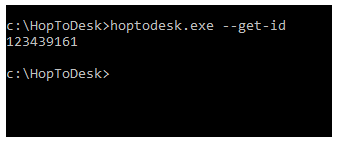
Sie können die EXE-Datei mit dem
Parameter „--get-id“ ausführen, wie in diesem Screenshot dargestellt. Wird es
für Ihre Bedürfnisse funktionieren?
Best
Regards,
Dan B.
HopToDesk
integrate hoptodesk
hi,
is there an option to integrate hoptodesk as an session-addon?
it is a fork of rustdesk, so the basic should be already done - i pressume
> https://www.hoptodesk.com/de
thx
georg
anydesk addon
actual beta just installed
-> got it!!!!
great, thx
georg
anydesk addon
hi,
yesterday installed the beta-version 2022.3.10.0 64-bit (Beta) and can't find the anydesk-addon anymore!
is that gone?
4 me the main reason 2 use rdm
the stored connections are still working.
thx
georg
rdm and iperius remote
hi, has anybody got the combination rdm and iperius 2 work?
addon activated
hosts installed
credentials (id & passwort) stored in rdm
but each time i will test it, my LOCAL installed iperius opens and asks for the credentials 2 access
thx
georg
Verbindung mehrfach Starten/Ausführen
Hallo,
Ich bin korrigiert, nachdem ich mich weiter damit befasst habe, glaube ich, dass die Aktivierung der Option "Öffnen und mehrere Verbindungen zulassen" das ist, wonach Sie suchen. Sie finden dies auf der Registerkarte "Erweitert" Ihres Eintrags "Eigenschaften", um es zu sehen Sie werden Wenn Sie den „Erweiterten Modus“ aktiviert haben müssen, können Sie dies in der unteren linken Ecke Ihres Eintrags „Eigenschaften“ aktivieren.
Sie können dies für mehrere Einträge gleichzeitig ändern, indem Sie die Funktion „Stapelbearbeitung“ verwenden: https://help.remotedesktopmanager.com/commands_batchedit.html
Lassen Sie mich wissen, ob das hilft,
Mit freundlichen Grüßen,
top, das war es.
c'est ca !
merci
Verbindung mehrfach Starten/Ausführen
hallo,
ich schließe mich mit der gleichen frage an.
hintergrund:
ich arbeite als it-berater / -betreuer primär über anydesk und habe die ganzen ziele im rdm gespeichert (macht wirklich spaß so!).
nun wird die anzahl der 2 oder sogar 3 monitor-benutzer immer größer, der lösungsansatz von anydesk (und ich glaube auch teamviewer) ist: die gleiche sitzung 2 mal zu starten und dann je eine sitzung für einen monitor am host-pc zu bestimmen.
direkt über anydesk geht das, ich habe auch anwender, die so aus dem heimbüro durchgängig arbeiten.
> https://support.anydesk.com/knowledge/how-do-i-work-with-multiple-displays
georg
anydesk client-token via rdm auf dem host speichern
hallo,
irgendwas neues am horizint?
;-)
danke
laufende / offene anydesk-sitzungen in miniaturansicht
hallo, ja, ich meine das miniaturbildfenster (im anhang beispiel mit 3 rdp-sitzungen).
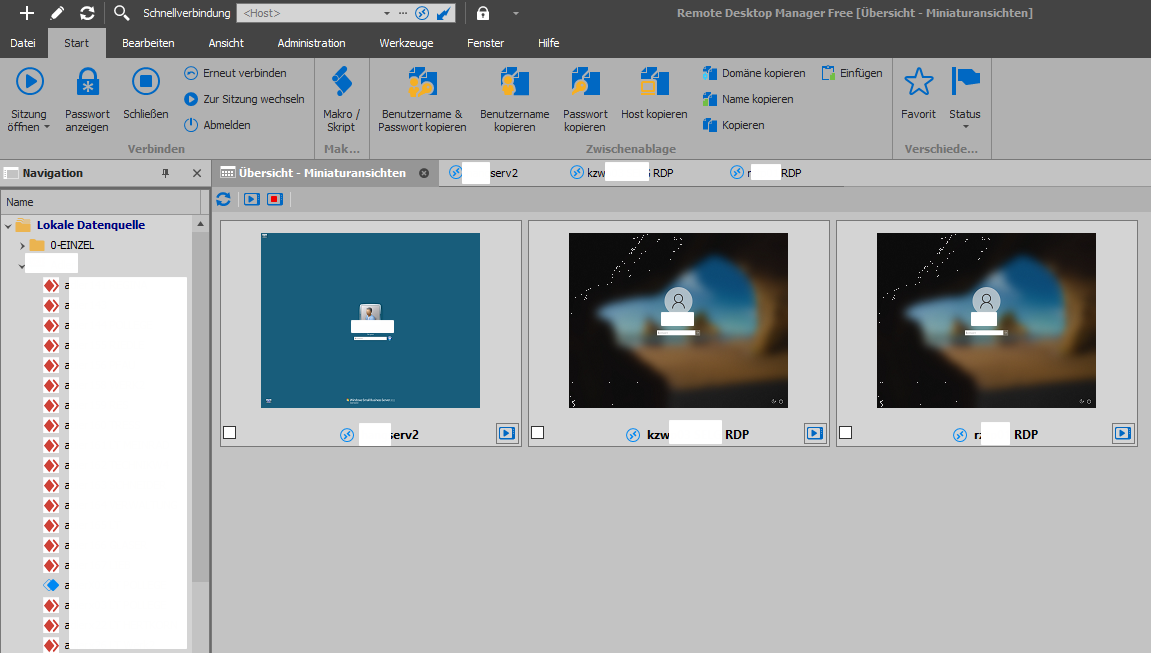
anydesk client-token via rdm auf dem host speichern
hallo,
es gibt ja die möglichkeit bei anydesk, durch setzen der checkbox "Zukünftig automatisch anmelden" einen indivduellen-grant-access-token für den client pc auf dem host pc zu speichern.
kann das über den aufruf aus rdm auch ausgeführt werden?
hintergrund: ich starte die ziele aus dem rdm, wenn dann updates, unterbrechungen host-neustarts oder sonstwas auftreten, bleibt zwar das anydesk-fenster offen, aber ich kann mich darüber nicht ohne eingabe des passwortes wieder anmelden, weil das ja beim aufruf über rdm indivduell mitgeschickt wird, d. h. ich muß das anydesk-fenster schliessen und das ziel wieder aus dem rdm starten
danke
georg
laufende / offene anydesk-sitzungen in miniaturansicht
hallo, kennt jemand einen trick, die anydesk-sitzungen auch in der miniatur-übersicht anzeigen zu lassen?
wäre fein - danke
georg
other / individual themes
hi, are there anywhere additional themes for the rdm (other than included)?
i would like to have a special main color (4 example red) that is easy to identify at 1st look and visibly different to other running applications..
thx
georg
anydesk sitzung INTERN öffnen
hi, anything new?
perhaps a workaround?
thx
user interface theme coloured - not everything visible
hi jean,
as u can see in the screen attached
the arrow, that indicates related sessions under this directory is BLUE (A)
the chosen directory or session (marked) is also BUE (C)
so that it is very difficult / unable to recognize wether there are (indicated by the BLUE) arrow further sessions in this directory (B)
if there are NONE -> NO arrow
in the case of existing sessions / objects -> ARROW (but nearly of the same color!)
user interface theme coloured - not everything visible
hi,
if u have chosen the theme colored and the directory is highlighted u r not able 2 c wether there are already related sessions configured or not because of the same color
georg
anydesk sitzung INTERN öffnen
ok, right translation - thx
let's hope
;-)
neue sitzung optionen / einträge bearbeiten
STORNO
hab's über einen anderen beitrag dann bei vorlagen gefunden, wußte erst nur nicht, nach welchen stichworten ich suchen sollte.
neue sitzung optionen / einträge bearbeiten
hallo,
gibt es die möglichkeit, die umfangreiche auswahl an verbindungsoptionen
- zu bearbeiten (reduzieren!)
- anders zu sortieren, damit bestimmte 1träge ganz oben erscheinen?
- evtl. optional eine feste auswahl zu definieren, welche im bedarfsfall angepaßt werden kann?
meist hat man bei der nutzung von rdm als supporter / fernwarter ja seine vorlieben.
danke
georg
anydesk sitzung INTERN öffnen
hallo,
gibt es nicht die möglichkeit, daß anydesk-verbindungen im rdm-fenster geöffnet werden können?
das macht das ganze sehr viel übersichtlicher und schneller.
danke
georg
AnyDesk Passwort Eintrag mit Anmeldeinformation aus dem Repository
hallo,
hab aktuell die 2019.1.39.0 drauf und es mittlerweile auch so weit hinbekommen - danke
Importing from mRemoteNG and batch changing connection types
great
worked
with the free edition
thx
georg
AnyDesk Passwort Eintrag mit Anmeldeinformation aus dem Repository
hallo,
habt ihr für die übermittlung des passwortes schon eine lösung gefunden?
suche gerade auch danach.
danke
georg