Importing from mRemoteNG and batch changing connection types
Hi there,
I'm trying to import connections from mremote ng into the free edition, all the connections are imported correctly but no one contains the password. Is that a bug or a configuration to set?
Also, once imported (many of them are SSH connections) i see they are configured as putty.
Is there any way we can change the configuration to use the internal ssh shell instead of putty for all ?
All Comments (15)
Hello,
A ticket has been created and assigned to our engineering department in order to see what can be done regarding the lack of credentials after the importation. For further reference, the ticket number is Win-1347.
The conversion of a Putty entry into an SSH Shell entry can only be done using the "Edit-Special Action" feature from the Enterprise version of Remote Desktop Manager.
For more information on that matter, please consult the following link https://help.remotedesktopmanager.com/batch_actions.htm
I will contact you via email to provide you a trial version of RDM Enterprise to allow you to convert your entries.
Best regards,
James Lafleur
Hello,
I forgot to mention that our engineering department will change how entries from mRemoteNG are imported in RDM. After this change, the entries will be imported as SSH Shell entries by default.
Best regards,
James Lafleur
Oh wonderful! Any roadmap on when we'll see this new update? I'd really love to test if freedesktopmanager is worth the switch as my daily driver for ssh connections ;)
Hello,
Unfortunately, since the ticket has only been opened this morning, I cannot provide any information on that matter at the moment.
I will notify you as soon as I have any update on that topic.
Best regards,
James Lafleur
Hello,
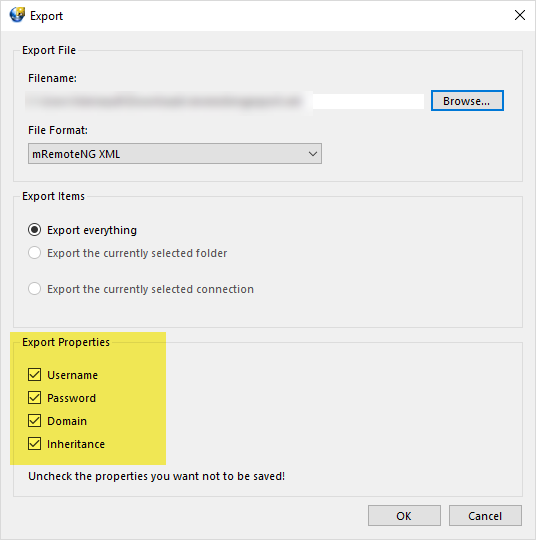
While exporting from MRemoteNG, please make sure to check the following options:
Doing so, should allow you to export your entries along with your credentials.
Best regards,
James Lafleur
MRemoteNG.png
Hi James.
I already did that but didn't change the outcome :( I can give you an example file if needed
Hello Andrea,
That is unfortunate, I though that this would solve this issue.
That being said, a sample of your export file would be helpful. You can send it to us using the following Sharefile link:
https://devolutions.sharefile.com/r-raba75bde4424504b
Best regards,
James Lafleur
Uploaded, thanks!
Hello,
Thank you for your sample!
A new ticket has been opened regarding the issue with the importation of a password from MRemoteNG into RDM.
I will notify you as soon as I have more information on that matter.
For further reference, the ticket number is Win-1358
Best regards,
James Lafleur

Hi.
I know this case is 7 months old... but is there an update yet as I am in exactly the same situation.... I have about 2000 entries in mRemoteNG in multiple folders (some are folders within folders within folders!) and all have passwords... But when I try to import into RDM, I get everything except the passwords.
Many Thanks
Darren
Hello,
The ticket RDMW-1358 is still opened to the engineering department.
The encryption method has changed since then, so we are still investigating if this can be possible or not.
Best regards,
Jeff Dagenais
Hello,
This issue has been solved in the latest version of RDM. Would it be possible for you to update to this version and see if it persist? To do so, you will need to make sure that your maintenance period is still valid.
Prior to performing this update, I would recommend creating a backup of your environment:
https://help.remotedesktopmanager.com/bestpractices_backups.htm
This version can be downloaded here:
https://remotedesktopmanager.com/home/thankyou/rdmsetup
Best regards,
James Lafleur
Hi there, I was using the free version. Any plans to update that too?
It's coming really soon. Later today if everything goes well.
Regards
David Hervieux
great
worked
with the free edition
thx
georg