
martin25
High RAM ussage
I think so, even though I tried turning auto refresh back on. I don't mind leaving it off and I'll refresh via F5. It's already solved for me too. Thanks
High RAM ussage
This happened when using it even with the screen locked and the program minimized to the taskbar, but it didn't happen when minimizing to the system tray.
High RAM ussage
I have uploaded two memory dump files.
rdm.dmp is a full memory dump captured when memory usage reached 2.2 GB (created via Task Manager > Create memory dump). The second file was generated using the command: cmd /c '"C:\Program Files\Devolutions\Remote Desktop Manager\RemoteDesktopManager.exe" /dump' Afterwards, I noticed RAM usage dropped to just 600 MB. Auto-refresh is disabled.
High RAM ussage
I use a workspace stored on OneDrive. For this test, I saved connections.db locally.
I have 397 entries and 43 folders, and the database is 9.5 MB.
I had auto-refresh enabled with a 10-second interval.
When auto-refresh was disabled, RAM usage stayed around 880 MB. When I enabled it, RAM usage jumped to 1,100 MB. However, after disabling it again, the memory was not released.
I'll keep auto refresh turned off and see what it does. RAM did not increase above 1.5GB
High RAM ussage

High RAM ussage

High RAM ussage
I updated to version 2026.3.15, but the problem persists. I deleted the folder, connected to a server, and then disconnected, but RDM still doesn't release RAM and continues to consume more memory over time.
After disconnecting from the server, RDM uses around 600 MB of RAM. Shortly afterwards, it increases to 1 GB, and a little later to 1.5 GB. This happens within approximately half an hour.
I'm not connecting to or disconnecting from any servers, and I don't have any open sessions. However, I can see in Task Manager that RAM usage keeps increasing.

High RAM ussage
However, I don't want to lose all the settings I created. Yes, I understand, I will import them, but that won't solve the problem if one of the settings is causing this problem. For example, I have two SSH connections open and RDM takes 10GB of RAM, is it ok? I don't think so, but I will try your reset.
High RAM ussage
Hi everyone,
I have a desktop PC running Windows 11 25H2, fully up to date, with RDM version 2026.3.12.0 installed. If I leave RDM running for a week, it gradually consumes all available memory, even though it is mostly idle and I only connect to remote sessions occasionally.
The only solution is to restart the entire system, after which everything works fine again. This issue has been occurring across several consecutive RDM versions.
Interestingly, when I connect to the desktop via RDP, the RAM usage starts to decrease gradually. When I started writing this post, RDM was consuming 17 GB of RAM. After approximately 10–15 minutes of being connected via RDP, its memory usage had dropped to just 2 GB and was still decreasing.
On my other laptop, RDM uses only around 390 MB of RAM.
The desktop has the following specifications:
CPU: Intel(R) Core(TM) i7-7700
RAM: 32 GB
Storage: 2 TB SSD
Has anyone experienced
This is how RAM was used after the first login:
Remote Desktop Manager 2026.3.12.0 64-bit (PreJIT)
Runtime: .NET 10.0.12
Platform: Microsoft Windows 10.0.26200
Allocated memory: 17390 MB
...after 10-15min

now after 30min it is still using 1.2GB RAM
backup retention
hi,
Hello,
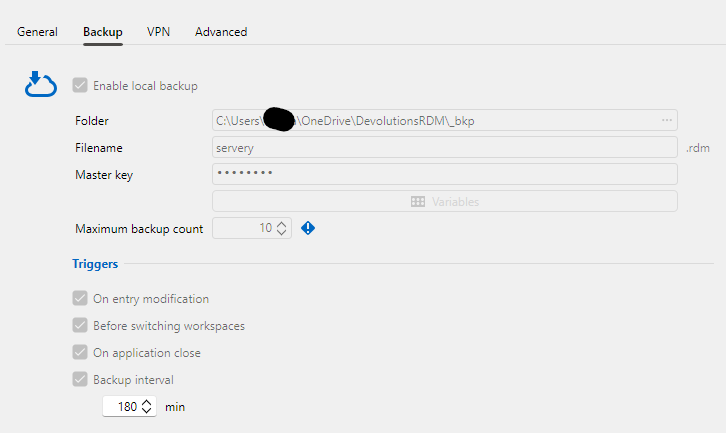
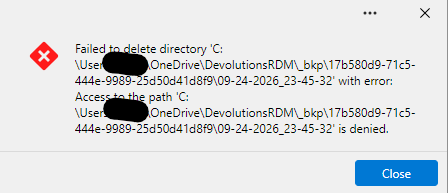
I have set the backup to 10 backups so that they don't multiply but I keep getting errors that it can't be deleted because access is denied, what rights do I need to grant to delete it?
RDM v2026.3.5.0: RDP Session Display Issue
Hello,
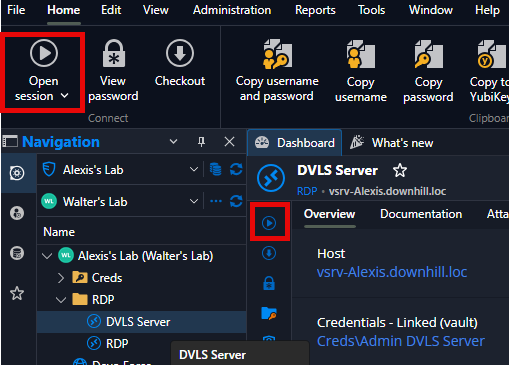
We found a simpler workaround.Instead of double-clicking an RDP entry, select it and then click on "Open session" in the ribbon.
If you have any other questions, please feel free to contact us.
Best regards,
@Alexis Beauparlant
thank you
Keepass missing in Credential manager
thank you
Keepass missing in Credential manager
Hello,
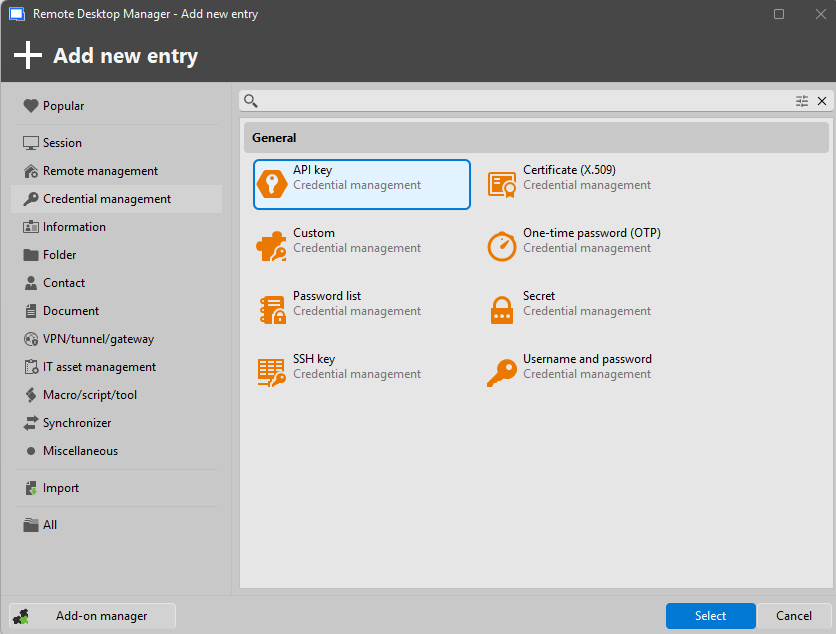
I'm trying to add Kepass 2.6 to RDM 2025.3.20.0, I have the plugin installed and I have also set the path to Kepass in the settings. However, when I go to add according to the procedure here https://docs.devolutions.net/rdm/kb/how-to-articles/configure-keepass-rdm/ I end up at point 11. (10. Create a new entry. 11. Select the KeePass entry, which is under Credential Management – Password Management.). I don't have any Keepass entry there, except for import and I don't want to use it.
Is it the version? Is it in the settings? Thanks for any advice.

Memory Issues and Frequent Freezes
I have the same problem, W11 (latest 23h2) on vmware, physical pc on the same version everything ok, notebook on the same version everything ok too
API hooking disabled
RDM v. 2023.3.22.0 64-bit
System.OutOfMemoryException: Insufficient memory to continue the execution of the program.
at MSTSCLib.IMsRdpClient9.Connect()
at AxMSTSCLib.AxMsRdpClient9NotSafeForScripting.Connect()
at Devolutions.RemoteDesktopManager.Frames.Embedded.FreEmbeddedRDP.Connect()
Hello,
How much RAM was given to your virtual machine ?
Is the Windows 11 version the same on your Physical PC as your VM ?
I ask because if it's working on your physical PC and notebook and yet not working on your virtual machine I suspect the virtual machine and/or the OS build being used may be a fault.
Best regards,
Hello thanks for your reply ....
Windows 11 is not the same, I wrote mistake, VM is 22h2 22621.2506, physical pc is 23h2 22631.2506
Physical pc has 16GB ram VM has 8GB and I have only 50% memory allocated.
I forgot to write, this error shows when I want connect to specific computer through rdp, when I click "Open session"
Memory Issues and Frequent Freezes
I have the same problem, W11 (latest 23h2) on vmware, physical pc on the same version everything ok, notebook on the same version everything ok too
API hooking disabled
RDM v. 2023.3.22.0 64-bit
System.OutOfMemoryException: Insufficient memory to continue the execution of the program.
at MSTSCLib.IMsRdpClient9.Connect()
at AxMSTSCLib.AxMsRdpClient9NotSafeForScripting.Connect()
at Devolutions.RemoteDesktopManager.Frames.Embedded.FreEmbeddedRDP.Connect()
SSH connections fail with code 10057L
Hi Samuel,
thank you for your reply but I am so stupid :) I enter wrong IP address .... I am so sorry, my mistake.
In logs I have only this
[5. 5. 2023 15:57:00] Devolutions Protocols version: 2023.4.26.1 Windows
[(10057L) A request to send or receive data was disallowed because the socket is not connected and (when sending on a datagram socket using a sendto call) no address was supplied.]
[5. 5. 2023 15:57:00] SSH Error reading raw input
All working now.
I am sorry again.
SSH connections fail with code 10057L
Hi all ,
I have the same problem, I run script above without success, I try any suggestions from this forum nothing helped. I try connect to Ubuntu 20.04, I am connected to CiscoAnyConnect VPN.
(10057L) A request to send or receive data was disallowed because the socket is not connected and (when sending on a datagram socket using a sendto call) no address was supplied.