Keepass missing in Credential manager

Hello,
I'm trying to add Kepass 2.6 to RDM 2025.3.20.0, I have the plugin installed and I have also set the path to Kepass in the settings. However, when I go to add according to the procedure here https://docs.devolutions.net/rdm/kb/how-to-articles/configure-keepass-rdm/ I end up at point 11. (10. Create a new entry. 11. Select the KeePass entry, which is under Credential Management – Password Management.). I don't have any Keepass entry there, except for import and I don't want to use it.
Is it the version? Is it in the settings? Thanks for any advice.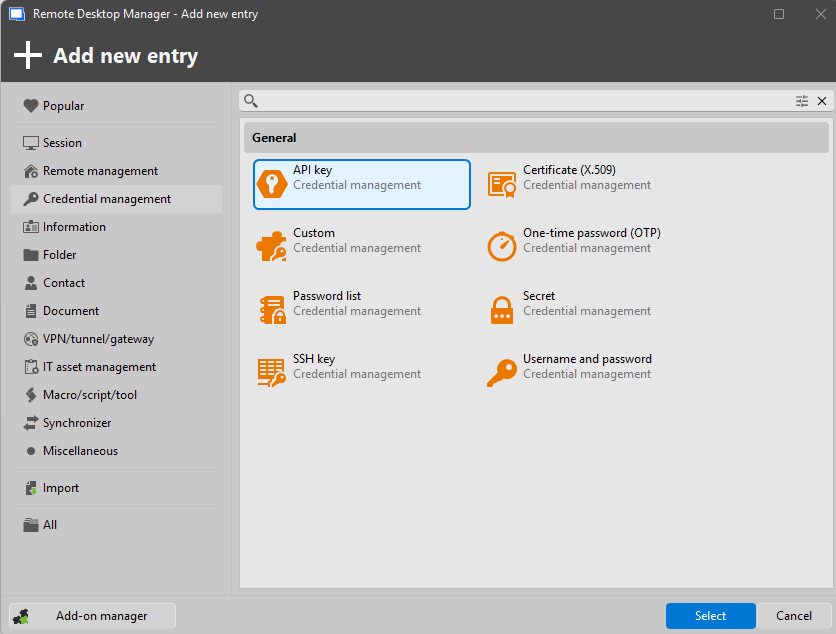

dea244f6-e945-4eae-abae-3d21114fd58f.png
6fa670a9-aa00-4f2c-be26-1f96e03d5d77.png
Recommended Answer
Hello Martin,
I assume you are using the Solo version - for the integration of 3rd party credential managers, you will need the Team version:
https://devolutions.net/remote-desktop-manager/compare
You can register for a free 30-day trial here.
Regards,
Min
d91ae44c-4539-449b-8e0b-1798420f2750.png
All Comments (2)
Hello Martin,
I assume you are using the Solo version - for the integration of 3rd party credential managers, you will need the Team version:
https://devolutions.net/remote-desktop-manager/compare
You can register for a free 30-day trial here.
Regards,
Min
d91ae44c-4539-449b-8e0b-1798420f2750.png
thank you