backup retention

hi,
Hello,
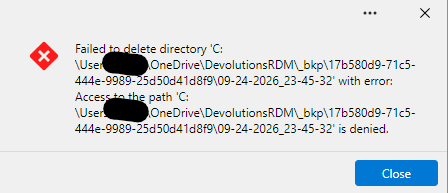
I have set the backup to 10 backups so that they don't multiply but I keep getting errors that it can't be deleted because access is denied, what rights do I need to grant to delete it?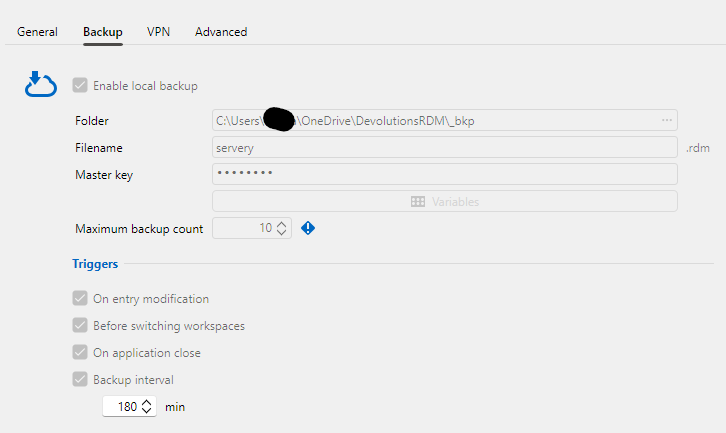
f72c11c5-ff8b-4b06-99b5-b418d3844321.png
6e8366f5-8519-4bc4-8f90-830d973ba7f6.png
All Comments (2)
Hello,
We have created a ticket to investigate this. It might be related to the fact that it's stored in onedrive or maybe you have write access to that specific folder but not delete rights.
We will let you know when we have more information on the case or a fix for the issue.
Best Regards,
Michaël Beaudin
Hello,
I think the error you're receiving is a little misleading (if my analysis/assumptions are correct). If you verify your backups, they should in fact be deleted you should only have the "last 10" (+ any favorited, as these do not count towards the maximum).
That said, Onedrive is preventing deleting the folders that contained them because it's syncing, and this is giving you this error. If you change the backup path to a local one (say, C:/Backup, or anywhere when you're allowed to), the errors should stop.
That said, I think we can still improve this process. It should be possible for us to catch this specific error and instead of giving an invasive popup, we will add it to the logs (meaning you won't be bothered while you work). We will also attempt to better handle Onedrive syncing failing at deleting folders.
This should be fixed with the upcoming version 2026.3.11
Regards,
Jafran Majeau