
chris16
WireGuard VPN Add-on
Hello,
We understand that the integration is not perfect due to the way we decided to implement it, through command line rather than through the "embedded DLL" method. We preferred to make a first version of the add-on that could help our users quicker, rather than waiting even longer to have anything available.
As mentionned by Jonathan here, the embedded DLL method is more complicated to integrate. It requires us creating a service to communicate with Wireguard, and for most add-ons, this is overkill. It's not off the table, but for a first version of the add-on, it's not something we wanted to do. That doesn't mean we can't add this integration method in the future. If we see that there's a lot of demand for Wireguard and our users would benefit from the embedded DLL integration, then we are absolutely willing to improve the integration.
I hope this helps explain why we went with the current integration method.
Regards,
Hi Hubert,
Has their been any movement on a second version (embedded DLL) of the Wireguard add-on?
The benefits and challenges have been well discussed already.
PowerShell "Set-HubEntryPermission" issues
That's exactly what I needed.
New seems a bit odd initially; however, now that I have seen what it does and how it differs from 'set' in practice it makes more senses.
Thank you. :)
PowerShell "Set-HubEntryPermission" issues
Hi,
I am making a script that will go through an check and update user groups and roles at the folder level inside a vault.
So far its been going well, I have been able to find and check my folders but not update their permissions. Each time I try to execute the Set-HubEntryPermission command I get a error "Set-HubEntryPermission: Sequence contains no matching element"
The below doc shows an example of setting a user group to a role it uses the flag "-PSEntryRole" however this flag appears to be no longer in use as the command errors when I try to use it; vscode also does not show it as a valid parameter.
This is what I have been referencing:
https://docs.devolutions.net/hub/powershell-module/powershell-commands/#set-hubentrypermission
I have been substituting "-PSEntryRole" with "-EntryRoleId" as this is what the powershell help says to use:
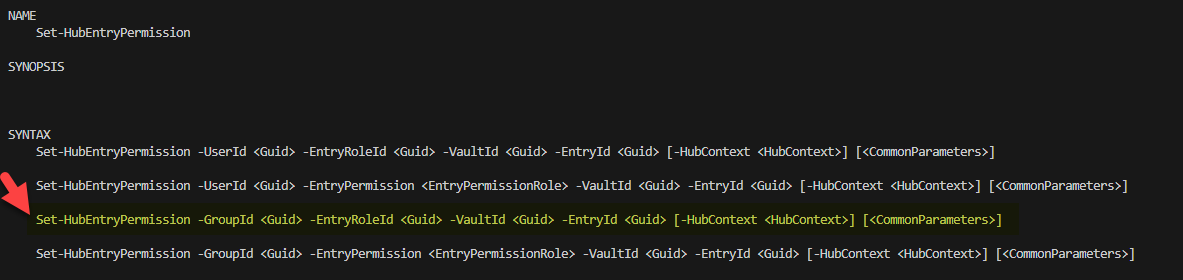
Here is my output, as you can see the vauldId, entryId, groupId and roleId Ids are all valid as they are used successfully in the three commands before I use them all in Set-HubEntryPermission:
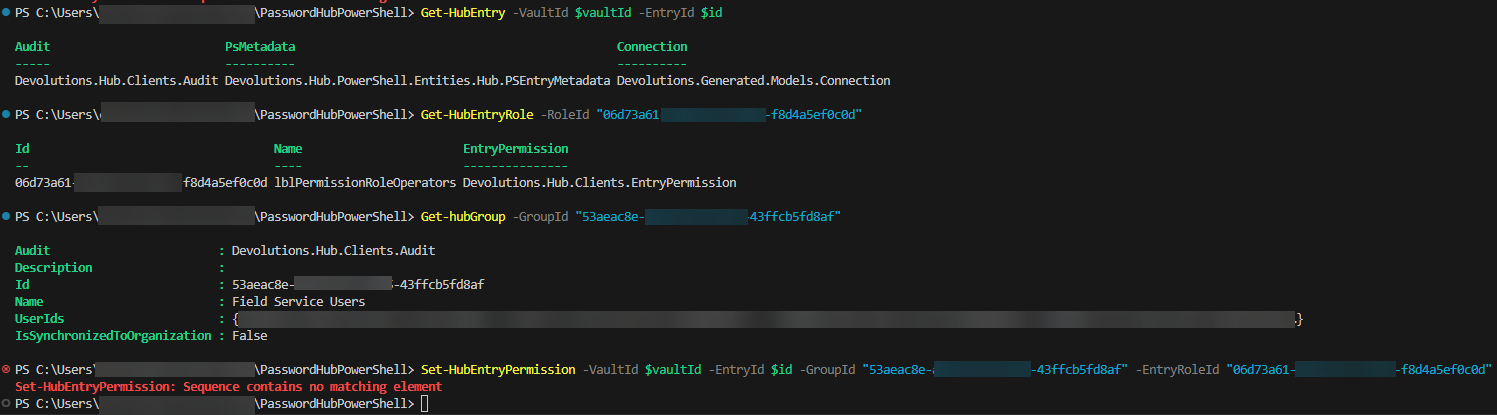
I am invested in this and I would really like to find out what I am doing wrong.
Thanks in advance for any help I can get.
RDM PowerShell via Batch Edit unable to modify existing Folders
UPDATE: Never Mind - found out I need to use "Advance search" and then batch edit the results to include folders. It would be good if this information was included in the powershell manual and github pages:
https://forum.devolutions.net/topics/27878/batch-edit-folder-security-permissions-from-gui
Hi,
As an initial test I just want to change the icon ('ImageName') of my folder using batch edit powershell, but it does not seem to work.
Going forward I would like to updates the permissions on the folders based on the folder names; but I cant seem to edit the simplest thing like the icon or Name of the folder.
I have followed the examples in the below two links and I have been able to successfully edit entries inside my folder structure. However I don't seem to be able to edit the actual folders/groups:
https://github.com/Devolutions/RDMSamples-ps/blob/main/custom_batch_actions/README.md
I have been copying the folder to a text editor and I can see:
<?xml version="1.0" encoding="utf-8"?>
<RDMExport>
<Connections>
<Connection>
<ConnectionType>Group</ConnectionType>
<CreatedBy>Chris Wyllie</CreatedBy>
<CreationDateTime>2024-04-16T01:16:45</CreationDateTime>
<Group>Restricted Site 1</Group>
<ImageName>SampleOffice2Green</ImageName>
So for example I would like to change the folder icon for SampleOffice2Green from to SampleOffice2Red:
if ($Connection.ConnectionType -like 'Group'){
if ($Connection.ImageName -like 'SampleOffice2Green'){
$Connection.ImageName = 'SampleOffice2Red';
$RDM.Save();
}
}
However running the above script at the top level of the folder results in no changes:
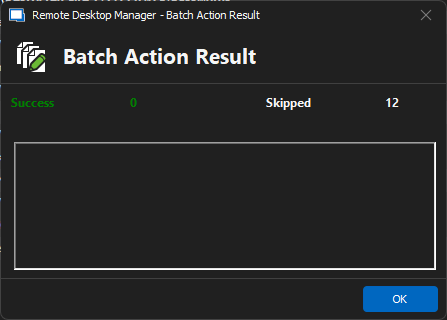
I have 12 non-folder entries under the folder I am right clicking on.
Its like the Batch action ignores all folder.
WireGuard VPN Add-on
Also the idea of having embedded wireguard rather than having to install externally would be fantastic. And might also help with the errors we've been getting.
AMEN BROTHER!
Clearly the RDM devs have a defined process for how something is to be integrated into RDM and command line parameter passing is a one side fits none approach. I don't believe you can truly say wireguard is intergrated if your app is blindly sending commands into the ether and assuming its going to "just work". This is a very old school way of doing things. Embed, use APIs and if all else fails use this approact, but it should not be the default when there are other better options.
The wireguard devs encourage embedding there application as its not meant to be a user facing application. The issues discussed above where foreseen over a year ago. OS compatibility would also have be addressed as there is a "WireGuardKit" for embedding wireguard in MacOS software. Paying users should not be making hacky workarounds to make up for the shortcomings of this integration. Its not like this is beta software.
I know its not simple and its got to work within the existing RDM framework that is clearly geared towards the command line but surly it would have been better to delay and take the time (1.5, 2+ years?) to get it right. But its been release now and real people have jumped on it and are now stuck supporting it for their end users, having say things like "close the VPN in RDM, I know the VPN failed to open but RDM thinks its open so you have to close it in RDM before RDM will let you try again.", very frustrating after the 10th time. Or these people are wasting deployment time trying to make it reliable for their end users.
I dislike being negative, but this was all clearly foreseeable and its not like they did not know it could be done any other way. I tried being encouraging, positive and helpfull over a year ago but RDM devs seem stuck in there ways.
Maybe Ill check in again a year from now, but I will not be using this in the mean time as I don't need another VPN intergration that kinda works 80% of the time.
OpenVPN custom name
Hi Jafran,
OpenVPN client: v11.29.0.0
RDM: 2022.3.35.0 64-bit
Open the VPN through RDM:

VPN is connected and OpenVPN client confirms this:

I click the close button on the VPN in RDM:

RDM shows the VPN as closed (not Green):

However OpenVPN shows the connection as still active:

VPN setting in RDM:


This has only been an issue since I started using the "Custom File name" option. It will close find if I dont use this.
Could it be because I am using a variable for the "Custom File name"?
We are using the variable as we have many sites and we duplicate the site structure, We don't want to have to apply the same name in multiple locations every time we create a new site.
OpenVPN custom name
Hello,
We've been able to replicate both issues, and have fixed them. These changes should be available for 2022.3.19. Thanks for bringing this to our attention!
Regards,
Hi Jafran Majeau,
I am running version 2022.3.35.0 64-bit and RDM still seems unable to close an OpenVPN connection when using the "Custom File Name" option. To be clear, RDM shows the connection as closed however if you check the OpenVPN GUI the connection remains up.
This issue is another road block for us deploying RDM to the rest of the organization as it will confuse and cause problems for the users.
WireGuard VPN Add-on
Support for WireGuard VPN has been implemented and will be included in our 2023.1 release.
Fantastic, Thankyou!!
Out of curiosity how was it implemented, did you embed it or does it require Wireguard to be installed alongside RDM?
OpenVPN custom name
Hello,
We've added the Custom file name feature, which should be available in the Advanced section of the entry. This will allow you to customize the folder and file name of the configuration files. This will be available in our next major release, 2022.3.
Regards,
Hi Jafran Majeau,
There are some issues with this new feature, one of them is a major issue.
Small issue:
I use the "OpenVPN GUI>Connection>Login>Enable automatic authentication" option to get RDM to automatically type in the user name and password. It looks like when the new "OpenVPN GUI>Connection>Advanced>Custom File name" option is used automatic detection no longer detects the OpvenVPN login prompt. This can be overcome by using checking the "OpenVPN GUI>Connection>Login>Login window title" option and entering the same text that was used with the "Custom File name" setting. This could catch a lot of people out as it just looks broken.
Major issue:
The bigger issue here is that when using the "Custom File name" RDM seems unable to close the OpenVPN connection. Selecting the VPN entry and selecting "Close" looks like it closes the VPN from RDMs prospective however the OpenVPN GUI shows the connection is still active.
I cannot upgrade the rest of the fleet to this version as we have VPN connections that will conflict and cause issues if they are not closed down when they are meant to be.
WireGuard VPN Add-on
Hello,
Just to update you, unfortunately I don't think we will be able to add a Wireguard integration for RDM 2022.3, we will instead shoot for a future roadmap. We will update this thread once we have more information.
Regards,
I understand these things take time however please keep some priority on this. WireGuard is becoming more and more relevant as a secure and fast VPN solution. I will be using it day one when it is implemented into RDM.
WireGuard VPN Add-on
I would love to see a Devolutions implementation of Wireguard in RDM.
We have a lot of remote sites that are capable of using Wireguard. However as RDM does not properly support it we are currently using OpenVPN GUI which is our next best option. OpenVPN GUI is a much more ad-hoc implementation either simulating a keyboard to "manually" type in credentials into a GUI window or passing a plan text file with the credentials in it. I understand that this is the best Devolutions can do as these limitations are due to how OpenVPN GUI works, but we are actively looking for alternative solutions because of this.
The workaround for wireguard suggested above is a good one however pushing config files to our end users is not a good option for us. We would need a native solution that does not rely on external files being available before we could use Wireguard.
I will be checking out the RDM Wireguard solution when it is available. I hope we don't have to wait too much longer.
OpenVPN custom name
This was the last major issue stopping us from deploying RDM and Password hub more widely in our organisation.
Thank you Jafran.
Feature Request: VPN Confirm On Session Close
A VPN "Session" with the close option "On Session Close" will immediately disconnect the VPN when the last tab for that VPN group is closes. This is an issue as end users will frequently close the last tab before opening a new tab in the same VPN group less than 5 seconds later. As RDM disconnects the VPN immediately the user needs to wait for the connection to fully disconnect before RDM then re-connects the same VPN again. This impacts the user experience and productivity.
Feature request:
A new entry called "Confirm On Session Close" when when the last tab of the VPN group closes, RDM will prompt the user to either "keep VPN open" or "Close VPN". If the user opts to keep the VPN open then RDM will:
Keep the VPN open forever until it is manually closed
Keep the VPN open allowing users to open new tabs for the same VPN group, then when this new group of tabs is closed re-prompt the user to "keep VPN open" or "Close VPN".
Alternative Option:
Modify the "On Session Close" to have an additional option called "Delay close by" which consists on an enable checkbox and a configurable delay text box. Which when enabled will prevent the close of the VPN for the time specified. Then if a user re-opens a new entry tab for the same VPN group before the delay expires then the VPN will remain open.
Existing support ticket number: 00006386
OpenVPN custom name
Hello,
Thank you for the request. We've opened a ticket so we can add this to the integration.
Regards,
Thanks. If this is adopted, will I be notified and how?
OpenVPN custom name
Hi,
I would like to request a usability improvement with how with RDM interacts with the OpenVPN GUI client.
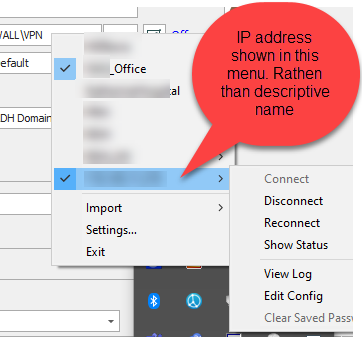
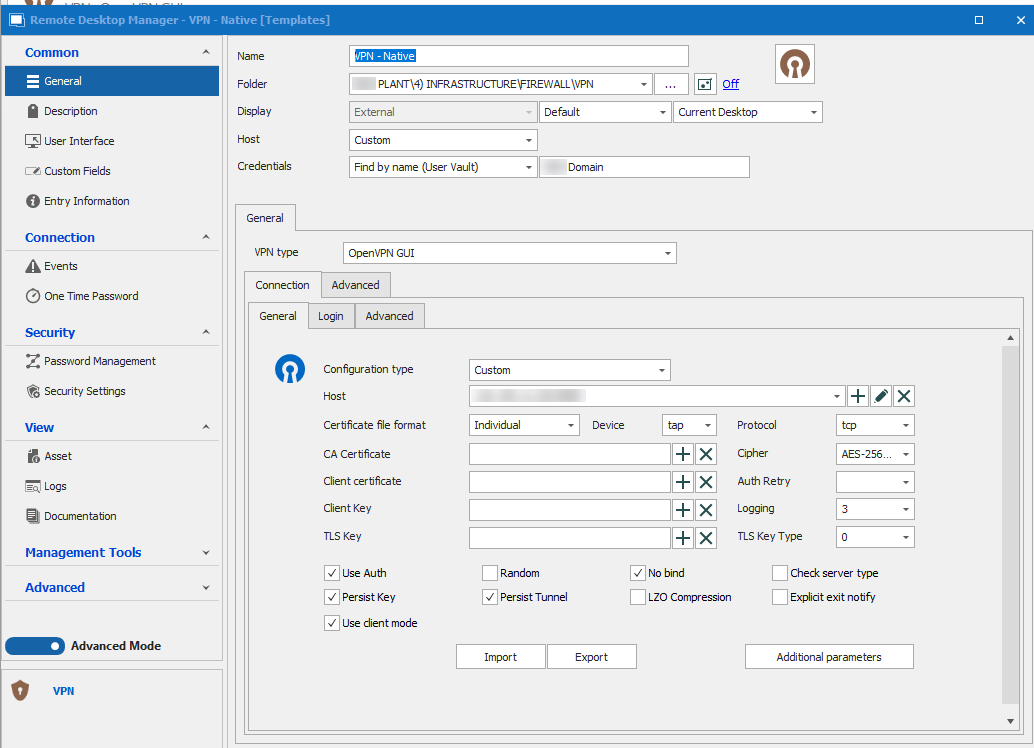
When using the VPN with the type “OpenVPN” and “custom” configuration types (screenshot below) the OpenVPN GUI will show the connection as the IP address.
This is confusing for our technicians when they need to manually interact with OpenVPN GUI client.
Can you please provide a new “GUI Name” field. RDM can then use the text in this field to name the folder and opvn files it creates thus giving the connection a user friendly name in the OpenVPN client. Can this “GUI Name” field be either:
A mirror the host field which can be overwritten (much like the name and Host fields in an RDP entry works)
Or have an optional checkbox to enable the use of the “GUI Name” field
(Support ticket number: 00006197)
The files that RDM creates:
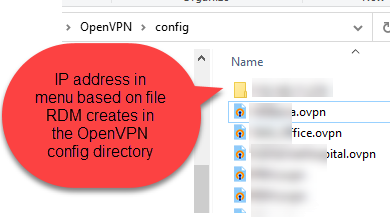
The OpenVPN GUI client showing all active connections. The text used is based on the files names (above):
The VPN configuration type I am talking about (VPN > OpenVPN GUI > Configuration Type: Custom):
Feature Request - Option to expand folder automatically when opening a Repositorie
Hi,
I have been recently deploying a new RDM setup with many (~35) remote sites. I am using repositories as is best practices and only giving users who work on these sites access.
Seeing most of these sites have almost exactly the same structure/requirements I found it was much quicker and consistent to build up a folder structure with pre-applied permissions and use this as a kind of template. From here I copied this structure to the new repositories (using new IDs) as there is no way to quickly copy root permissions from one repository to another.
Doing this just saves a lot of time, no scripts required or time spend applying the same permission over and over again to each site.
It has turned out well but every time a user goes to the repository they have to expand out this top folder before they can see anything else. It would be good to have a checkbox option on any type of folder making it automatically expanded.
This could also be useful to automatically expand frequently used sub folders saving more time/clicks??
thoughts?