OpenVPN custom name
0 vote

Hi,
I would like to request a usability improvement with how with RDM interacts with the OpenVPN GUI client.
When using the VPN with the type “OpenVPN” and “custom” configuration types (screenshot below) the OpenVPN GUI will show the connection as the IP address.
This is confusing for our technicians when they need to manually interact with OpenVPN GUI client.
Can you please provide a new “GUI Name” field. RDM can then use the text in this field to name the folder and opvn files it creates thus giving the connection a user friendly name in the OpenVPN client. Can this “GUI Name” field be either:
- A mirror the host field which can be overwritten (much like the name and Host fields in an RDP entry works)
- Or have an optional checkbox to enable the use of the “GUI Name” field
(Support ticket number: 00006197)
The files that RDM creates: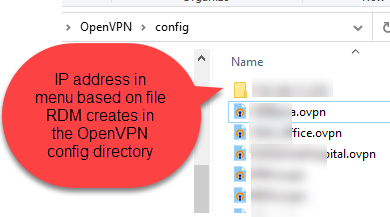
The OpenVPN GUI client showing all active connections. The text used is based on the files names (above):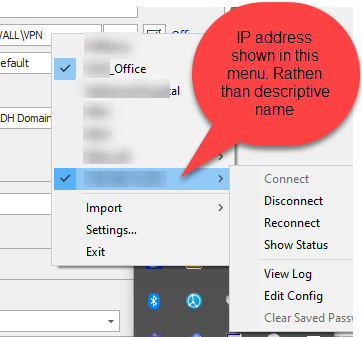
The VPN configuration type I am talking about (VPN > OpenVPN GUI > Configuration Type: Custom): 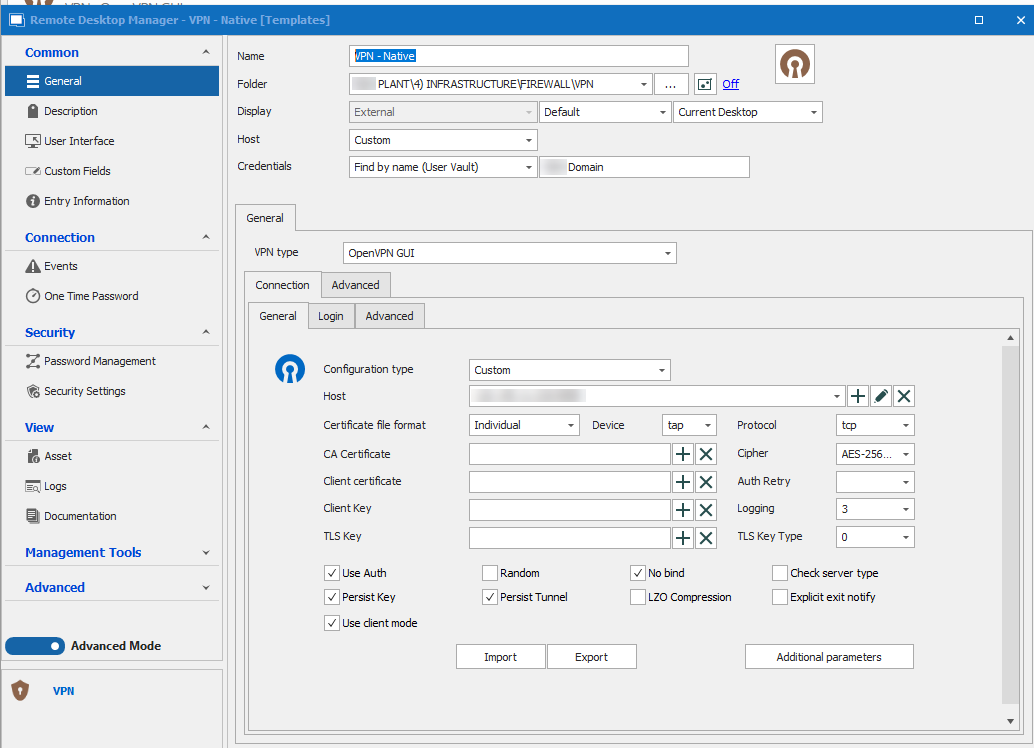
3.png
2.png
1.png
All Comments (12)
Hello,
Thank you for the request. We've opened a ticket so we can add this to the integration.
Regards,
Hubert Mireault
Hello,
Thank you for the request. We've opened a ticket so we can add this to the integration.
Regards,
Thanks. If this is adopted, will I be notified and how?
We will post in this thread to let you know once this is available.
Regards,
Hubert Mireault
Hello,
We've added the Custom file name feature, which should be available in the Advanced section of the entry. This will allow you to customize the folder and file name of the configuration files. This will be available in our next major release, 2022.3.
Regards,
Jafran Majeau
This was the last major issue stopping us from deploying RDM and Password hub more widely in our organisation.
Thank you Jafran.
Hello,
We've added the Custom file name feature, which should be available in the Advanced section of the entry. This will allow you to customize the folder and file name of the configuration files. This will be available in our next major release, 2022.3.
Regards,
Hi Jafran Majeau,
There are some issues with this new feature, one of them is a major issue.
Small issue:
I use the "OpenVPN GUI>Connection>Login>Enable automatic authentication" option to get RDM to automatically type in the user name and password. It looks like when the new "OpenVPN GUI>Connection>Advanced>Custom File name" option is used automatic detection no longer detects the OpvenVPN login prompt. This can be overcome by using checking the "OpenVPN GUI>Connection>Login>Login window title" option and entering the same text that was used with the "Custom File name" setting. This could catch a lot of people out as it just looks broken.
Major issue:
The bigger issue here is that when using the "Custom File name" RDM seems unable to close the OpenVPN connection. Selecting the VPN entry and selecting "Close" looks like it closes the VPN from RDMs prospective however the OpenVPN GUI shows the connection is still active.
I cannot upgrade the rest of the fleet to this version as we have VPN connections that will conflict and cause issues if they are not closed down when they are meant to be.
Hello,
We've been able to replicate both issues, and have fixed them. These changes should be available for 2022.3.19. Thanks for bringing this to our attention!
Regards,
Jafran Majeau
Hello,
We've been able to replicate both issues, and have fixed them. These changes should be available for 2022.3.19. Thanks for bringing this to our attention!
Regards,
Hi Jafran Majeau,
I am running version 2022.3.35.0 64-bit and RDM still seems unable to close an OpenVPN connection when using the "Custom File Name" option. To be clear, RDM shows the connection as closed however if you check the OpenVPN GUI the connection remains up.
This issue is another road block for us deploying RDM to the rest of the organization as it will confuse and cause problems for the users.
Hello,
Thank you for this information, the engineers in charge of this feature have been contacted and we will be in touch as soon as we will have more details to provide on that matter.
Best regards,
James Lafleur
Hello chris16,
I've been trying to replicate your issue, but RDM seems to properly close OpenVPN connections on our end. Whether launching multiple connections or not.
Are you referring to the custom folders menus (that are kept in OpenVPN memory) ? (See screenshot for clarity)
The actual connections close properly on our end when using the "Close" button in the dashboard.
Could you provide screenshots of the steps to reproduce your issue (along with how the issue presents itself, if that makes sense)?
Regards,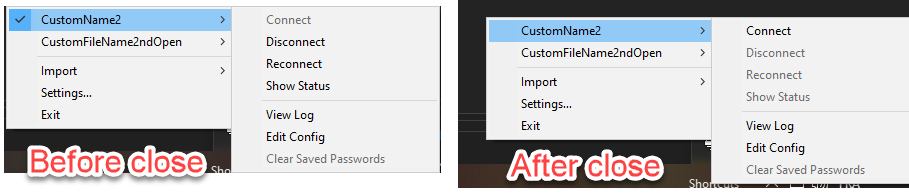
Jafran Majeau
OpenVPNBeforeAfterClose.png
Hi Jafran,
OpenVPN client: v11.29.0.0
RDM: 2022.3.35.0 64-bit
- Open the VPN through RDM:

- VPN is connected and OpenVPN client confirms this:

- I click the close button on the VPN in RDM:

- RDM shows the VPN as closed (not Green):

- However OpenVPN shows the connection as still active:

VPN setting in RDM: 


This has only been an issue since I started using the "Custom File name" option. It will close find if I dont use this.
Could it be because I am using a variable for the "Custom File name"?
We are using the variable as we have many sites and we duplicate the site structure, We don't want to have to apply the same name in multiple locations every time we create a new site.
Hello,
We've indeed been able to replicate the issue with Variables. We've found and fix this issue, and this should be available for the next 2023.1.10 version.
Regards,
Jafran Majeau