WireGuard VPN Add-on
0 vote
Hi,
Currently, WireGuard (https://www.wireguard.com/) is already in widespread use in the private sector, and this is rising steadily. As this is a slim, fast and secure VPN technology, it will also be used in the industrial environment as soon as a stable version is available. Not least because WireGuard will be integrated into the Linux kernel 5.6.
Therefore, I would welcome a WireGuard VPN add-on.
I've also successfully tested the CLI of version 0.0.38 (https://chocolatey.org/packages/wireguard):
Connect:
& 'C:\Program Files\WireGuard\wireguard.exe' /installtunnelservice '<Path to config file>'
Disconnect:
& 'C:\Program Files\WireGuard\wireguard.exe' /uninstalltunnelservice '<Tunnel name>'
Best Regards
All Comments (59)
Hello,
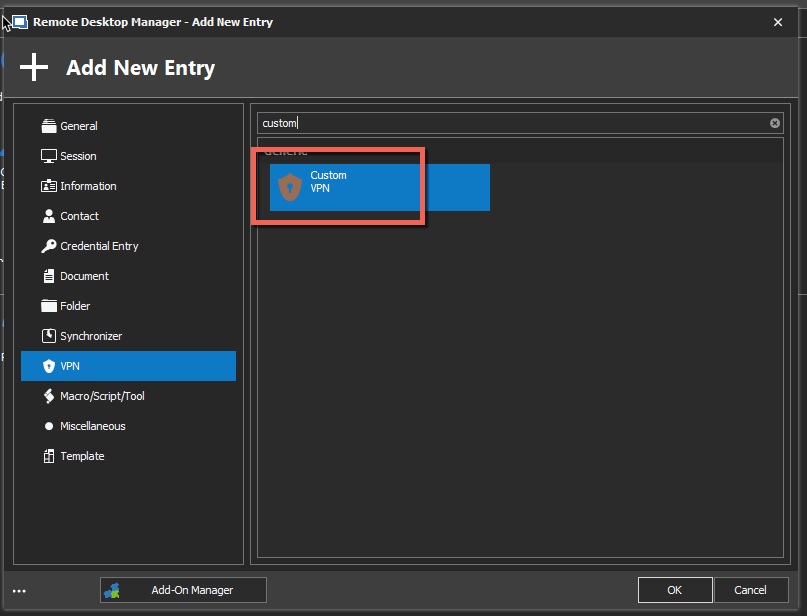
As of now, I would suggest using the Custom VPN entry type to be able to launch your VPN inside RDM.
Best regardsm
Jeff Dagenais
2020-02-17_08-22-12.png

Dear Jeff,
is t here a release date/version for supporting Wireguard?
@backdoor,
The solution proposed by myself previously is still the one to use. There's no integration of Wireguard for the moment, but I will see with our engineering department if it's on our list.
Best regards,
Jeff Dagenais
Hello,
After verification, we may have something in RDM 2020.3.x, but we cannot guarantee a timeline for it's delivery.
Best regards,
Jeff Dagenais
Are there some news, on wireguard Integration?
Hello,
Nothing for now but we will raise the priority. It's assigned to a developer as well.
For now using a Custom VPN with the command line provided in the first post is the workaround.
Regards,
Hubert Mireault
Also looking forward for this feature. Especially the connection based VPN's will add some security too, rather using some general "open" VPN's.
Hello, now we have mid 2022 and WireGuard is more used than ever. Is there any update on this?
Hello,
We will be able to work on this hopefully soon, but right now the workaround is to use a Command Line entry with the line that was mentioned in the first post.
Regards,
Hubert Mireault
I would love to see a Devolutions implementation of Wireguard in RDM.
We have a lot of remote sites that are capable of using Wireguard. However as RDM does not properly support it we are currently using OpenVPN GUI which is our next best option. OpenVPN GUI is a much more ad-hoc implementation either simulating a keyboard to "manually" type in credentials into a GUI window or passing a plan text file with the credentials in it. I understand that this is the best Devolutions can do as these limitations are due to how OpenVPN GUI works, but we are actively looking for alternative solutions because of this.
The workaround for wireguard suggested above is a good one however pushing config files to our end users is not a good option for us. We would need a native solution that does not rely on external files being available before we could use Wireguard.
I will be checking out the RDM Wireguard solution when it is available. I hope we don't have to wait too much longer.
Hello,
Do you think having an option to store the file's data in RDM, which RDM would then write locally for the duration of the connection with WireGuard, would be a good solution? Since the command line for WireGuard necessitates a file, I assume this is the best we could do.
As a note we are hoping to get to integrating WireGuard for RDM 2022.3, which is planned for release later this year. The more information you can give us on how you'd like to be able to use WireGuard in RDM, the better we'll be able to make the integration suit your needs.
Regards,
Hubert Mireault
If you are going for a "native" addon. I would have thought you would build an add-on that would embed wireguard into RDM.
I have not done this myself so the following is speculation but by embedding wireguard you should avoid the need for passing files or command line arguments to external applications.
For information on how to embed wireguard I found this, it looks very useful:
https://www.wireguard.com/embedding/
Some people may still want something that integrates with the external application but by embedding it the addon should be much more secure (no external credential passing), quicker (RDM will have the exact status of the VPN so no waiting for timers/delays and then assuming it worked) and reliable (RDM will be working with a known version of wireguard that devolutions implements at build time, not whatever crusty old version is on the end users PC).
I believe I read somewhere that wireguard is meant to be embedded into other applications to provide more end user friendly features that the wireguard devs don't want to focus on, they just focus on making a good slim VPN.
Hello,
That's very interesting, I wasn't aware of this possibility with WireGuard. We will have to look into it, thank you!
Regards,
Hubert Mireault
Any updates / ETA about wireguard implementation?
Hello,
It is assigned to a developer and we are hoping to be able to add the integration for version 2022.3.
Regards,
Hubert Mireault
Hello,
Just to update you, unfortunately I don't think we will be able to add a Wireguard integration for RDM 2022.3, we will instead shoot for a future roadmap. We will update this thread once we have more information.
Regards,
Hubert Mireault
Hello,
Just to update you, unfortunately I don't think we will be able to add a Wireguard integration for RDM 2022.3, we will instead shoot for a future roadmap. We will update this thread once we have more information.
Regards,
I understand these things take time however please keep some priority on this. WireGuard is becoming more and more relevant as a secure and fast VPN solution. I will be using it day one when it is implemented into RDM.
Of course, we're not lowering priority at all, it's simply that our roadmap for 2022.3 was ambitious and in the end we had to cut the Wireguard integration. It will be in our early tasks when we start work on 2023.1.
Regards,
Hubert Mireault
Hello,
Support for WireGuard VPN has been implemented and will be included in our 2023.1 release.
Regards
Jonathan Del Signore
Support for WireGuard VPN has been implemented and will be included in our 2023.1 release.
Fantastic, Thankyou!!
Out of curiosity how was it implemented, did you embed it or does it require Wireguard to be installed alongside RDM?
That are great news!
Hi Chris,
For now, it will require WireGuard to be installed. We build the config file and save it temporarily in localappdata to start the vpn via command line.
The embedded dll mode will require a bit more investigation on our part, as we're not sure if it's realistically doable with RDM.
Regards
Jonathan Del Signore
Hi,
Is it in the beta 2023.1.6 ?
Hello,
Yes this is included in the beta 2023.1.6.
Regards
Jonathan Del Signore
I'm not able to find the Wireguard choice.
Hello,
Since this is an add-on, you first need to enable it through Tools -> Add-on Manager :
Regards
Jonathan Del Signore
Thanks... feel stupid....
Hallo, aktivieren lässt sich das Addon bei mir schon und auch die Konfigurationsdaten importieren. Doch bei Start der Verbindung kommt eine Meldung "Access is denied". Per Wireguard Client - also manuell - funktioniert die Verbindung. Irgendeine Idee ?
(Ich verwende die Version 2023.1.20.0 64-bit)
Hallo, aktivieren lässt sich das Addon bei mir schon und auch die Konfigurationsdaten importieren. Doch bei Start der Verbindung kommt eine Meldung "Access is denied". Per Wireguard Client - also manuell - funktioniert die Verbindung. Irgendeine Idee ?
(Ich verwende die Version 2023.1.20.0 64-bit)
Ja: Programm mit admin-Rechten starten ...
Hallo, aktivieren lässt sich das Addon bei mir schon und auch die Konfigurationsdaten importieren. Doch bei Start der Verbindung kommt eine Meldung "Access is denied". Per Wireguard Client - also manuell - funktioniert die Verbindung. Irgendeine Idee ?
(Ich verwende die Version 2023.1.20.0 64-bit)
Ja: Programm mit admin-Rechten starten ...
Hello,
Forgive the intervention in Engish,
I was wondering if you would allow me to open a case for your issue with the Wireguard VPN entry in RDM ?
Our engineers mentioned this isn't the first time they've seen this issue and we'd like to look into it.
Best regards,
I'm getting the command line options (help) popup from wireguard.exe when I connect. It then does not create a tunnel although RMD thinks its 'connected'. When you close the connections you get the same popup.
It makes no difference if I choose a linked file or import the data.
I was running version 1.20. I now updated to 1.22 (enterprise) and now when I close connection I get access denied.
Running as admin makes no diference.
I then set Wireguard to always launch elevated. Connecting still the same, but when disconnecting I get: The specified service does not exist as an installed service
What's going wrong here?
@joergjordan I find it strange to when people reply in their native language while the entire topic is posted in English...
Dat kan ik ook wel doen, maar dan moet iedereen gokken welke taal dit is en het door Google Translate halen ;)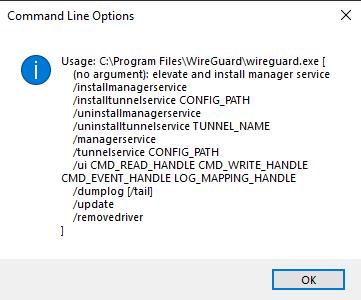
cli.png
In my case, it actually seems to help if I start the RDP manager (I use the portable version) with admin rights. I use the app version 0.5.3, driver 0.10.1 and Go version 1.18beta1 for WireGuard. (And another apology for using my mother tongue ! I wasn't thinking anything and was just busy asking the question ...)
Hello,
Would you mind telling me from where you're downloading Wireguard? I have the latest version from the official website (https://www.wireguard.com/install/) and the version is 0.5.3 (Go 1.18).
I can't reproduce your issue so I'd like to have the same setup as you if possible.
Regards
Jonathan Del Signore
Hi, thx for your reply.
I installed it directy from the url you provided. To be sure I reinstalled it and still the same problem.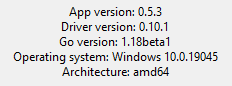
I just check with 2 collegues (1 on laptop, 1 on desktop) and they both have the same errors.
Might there be something missing from the conf files?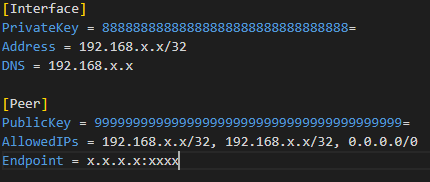
conf.png
ver.png
The configuration file looks fine to me. Normally when there's a popup showing the command line options, it means the program doesn't recognize what we're sending to it.
Could you test directly in command line, just to confirm that the issue comes from RDM? The command we're sending is :
"C:\Program Files\WireGuard\wireguard.exe" /installtunnelservice CONFIG_PATH
Maybe there's a special character in your config path that's breaking the command.
Regards
Jonathan Del Signore
I didn't find "Add-on Manager" in "tools" of rdm for mac (2023.1.11), but only "Extensions Manager"
How can I do to use wireguard
Hello,
Since this is an add-on, you first need to enable it through Tools -> Add-on Manager :
Regards
I didn't find "Add-on Manager" in "tools" of rdm for mac (2023.1.11), but only "Extensions Manager"
How can I do to use wireguard
Hi lmstear,
WireGuard is not available on RDM Mac. In Windows, they use command lines to communicate with the application. Something like: "c:\Program Files\WireGuard\wireguard.exe" /installtunnelservice c:\wg0.conf. Do you know if anything of the sort is possible with the Mac client?
Best regards,
Xavier Fortin
Hi lmstear,
WireGuard is not available on RDM Mac. In Windows, they use command lines to communicate with the application. Something like: "c:\Program Files\WireGuard\wireguard.exe" /installtunnelservice c:\wg0.conf. Do you know if anything of the sort is possible with the Mac client?
Best regards,
Hi Xavier Fortin,
Thanks for your reply.
I will try this command lines. But how to use the command lines in RDM Mac? I have been using RDM for a few days.
Hi,
You'd need to launch the Terminal application. That being said, I don't expect the same command line to work in Mac. For instance, the "/" switch is a very Windows-specific thing. I was just wondering if you were aware of any command line support for the Mac client because I could not easily find documentation for it.
I found this blog post: https://blog.scottlowe.org/2021/06/28/using-wireguard-on-mac-via-cli/
It requires installing the following: https://github.com/WireGuard/wireguard-tools and it also seems to require installing WireGuard configuration files on disk which would not be compatible with the Windows WireGuard entries that allows passing the configuration dynamically (without having to install it in a folder first).
I've tried using the "up" and "down" command and they also appear to require root privilege (and so the filling of your admin password on execution), which all seems to indicate that this would be quite problematic to implement as an entry in RDM.
Unfortunately, unless you are aware of another means of communicating with the app programmatically, I don't think we will be able to implement this.
Best regards,
Xavier Fortin
Hi,
I'll try again, it won't work probably , but it will make me more familiar with rdm.
Perhaps I need to use wireguard in Macos until something like the windows version comes out.
Thanks for your help.
Hi,
You'd need to launch the Terminal application. That being said, I don't expect the same command line to work in Mac. For instance, the "/" switch is a very Windows-specific thing. I was just wondering if you were aware of any command line support for the Mac client because I could not easily find documentation for it.
I found this blog post: https://blog.scottlowe.org/2021/06/28/using-wireguard-on-mac-via-cli/
It requires installing the following: https://github.com/WireGuard/wireguard-tools and it also seems to require installing WireGuard configuration files on disk which would not be compatible with the Windows WireGuard entries that allows passing the configuration dynamically (without having to install it in a folder first).
I've tried using the "up" and "down" command and they also appear to require root privilege (and so the filling of your admin password on execution), which all seems to indicate that this would be quite problematic to implement as an entry in RDM.
Unfortunately, unless you are aware of another means of communicating with the app programmatically, I don't think we will be able to implement this.
Best regards,
Hi,
Good day.
I think I've solved the problem of using wireguard in RDM Mac.
I installed wireguard in appstore that is a GUI app. I created some profiles to use wireguard and running very well.
I created vpn type is apple vpn in RDM Mac. First fill the name that you like in General , and than choose applescript to Method in apple vpn. The end is choose the wireguard profile which you want to use in vpn name.
Note: To cancel "send credentials through keystrokes"
Save !
If you open this vpn session you can connect the wireguard network.You can set and use it in any session's label or option which need this wireguard vpn
Hope these can be helpfull
Best regards,
Glad to hear you could make this work!
Xavier Fortin
I'm getting the command line options (help) popup from wireguard.exe when I connect. It then does not create a tunnel although RMD thinks its 'connected'. When you close the connections you get the same popup.
It makes no difference if I choose a linked file or import the data.
I was running version 1.20. I now updated to 1.22 (enterprise) and now when I close connection I get access denied.
Running as admin makes no diference.
I then set Wireguard to always launch elevated. Connecting still the same, but when disconnecting I get: The specified service does not exist as an installed service
I was getting the same issues. The command line window, and then started getting the Access Denied issue. I closed and relaunched Remote Desktop Manager as an Admin, but that's not ideal either. Would be much better if it just worked first time.
Also the idea of having embedded wireguard rather than having to install externally would be fantastic. And might also help with the errors we've been getting.
After verification, we may have something in RDM 2020.3.x, but we cannot guarantee a timeline for it's delivery.
Also the idea of having embedded wireguard rather than having to install externally would be fantastic. And might also help with the errors we've been getting.
AMEN BROTHER!
Clearly the RDM devs have a defined process for how something is to be integrated into RDM and command line parameter passing is a one side fits none approach. I don't believe you can truly say wireguard is intergrated if your app is blindly sending commands into the ether and assuming its going to "just work". This is a very old school way of doing things. Embed, use APIs and if all else fails use this approact, but it should not be the default when there are other better options.
The wireguard devs encourage embedding there application as its not meant to be a user facing application. The issues discussed above where foreseen over a year ago. OS compatibility would also have be addressed as there is a "WireGuardKit" for embedding wireguard in MacOS software. Paying users should not be making hacky workarounds to make up for the shortcomings of this integration. Its not like this is beta software.
I know its not simple and its got to work within the existing RDM framework that is clearly geared towards the command line but surly it would have been better to delay and take the time (1.5, 2+ years?) to get it right. But its been release now and real people have jumped on it and are now stuck supporting it for their end users, having say things like "close the VPN in RDM, I know the VPN failed to open but RDM thinks its open so you have to close it in RDM before RDM will let you try again.", very frustrating after the 10th time. Or these people are wasting deployment time trying to make it reliable for their end users.
I dislike being negative, but this was all clearly foreseeable and its not like they did not know it could be done any other way. I tried being encouraging, positive and helpfull over a year ago but RDM devs seem stuck in there ways.
Maybe Ill check in again a year from now, but I will not be using this in the mean time as I don't need another VPN intergration that kinda works 80% of the time.
Hello,
We understand that the integration is not perfect due to the way we decided to implement it, through command line rather than through the "embedded DLL" method. We preferred to make a first version of the add-on that could help our users quicker, rather than waiting even longer to have anything available.
As mentionned by Jonathan here, the embedded DLL method is more complicated to integrate. It requires us creating a service to communicate with Wireguard, and for most add-ons, this is overkill. It's not off the table, but for a first version of the add-on, it's not something we wanted to do. That doesn't mean we can't add this integration method in the future. If we see that there's a lot of demand for Wireguard and our users would benefit from the embedded DLL integration, then we are absolutely willing to improve the integration.
I hope this helps explain why we went with the current integration method.
Regards,
Hubert Mireault
Well if we can get the error messages to be more helpful in the meantime that would be a good step forward.
Developers need to make sure that they're not debugging in elevated mode, otherwise they're not going to be able to replicate what most users are experiencing.
And then if there's any form of response that you get back from Wireguard when sending a command line, be helpful to actually display that, and provide relevant instructions on what to do - eg, close Wireguard if it's running in the background already connected or anything else like that.
Right now as far as we can tell, there's no way to get a message back through the command line, so with this first version of the integration I don't think it would be possible.
For the requirement to run in elevated, we will investigate, but as far as we can tell, Windows itself requires an application to be elevated to establish a tunnel, and a non-elevated application can't start a different application as elevated. So the only way RDM can start the Wireguard executable with elevated privileges is by being elevated itself.
As was said before, these limitations would not be there with the embedded DLL method of integration, but that method brings its own set of challenges.
Regards,
Hubert Mireault
Well in that case it would be simple enough to check if RDM is running in elevated mode when someone tries to open the VPN, and inform them if not that they need to close and reopen as admin. Going to be a lot more relevant than 'Access is denied'
Hello,
We'll open a ticket to investigate if it's possible to force the vpn to run as admin even if RDM isn't elevated. If that can't be done quickly, we'll at least improve the error message like you said to avoid confusion.
Regards
Jonathan Del Signore
Hello,
We were able to force Wireguard to run as administrator even when RDM isn't elevated, so there shouldn't be access denied errors anymore.
This fix will be included in our next beta version 2023.2.7 next week.
Please note that if your computer has UAC enabled, you might encounter a small delay when closing the VPN.
Regards
Jonathan Del Signore
Hello everyone,
I ran into the same problem, wireguard shows me the commandline options when using the RDM Addon.
The solution might be, to set the configuration path in quotes as my username includes a space.
Meanwhile the only solution is to link to a wireguard configuration file previously saved on disk without spaces in the whole path.
Sorry for the non english screenshot.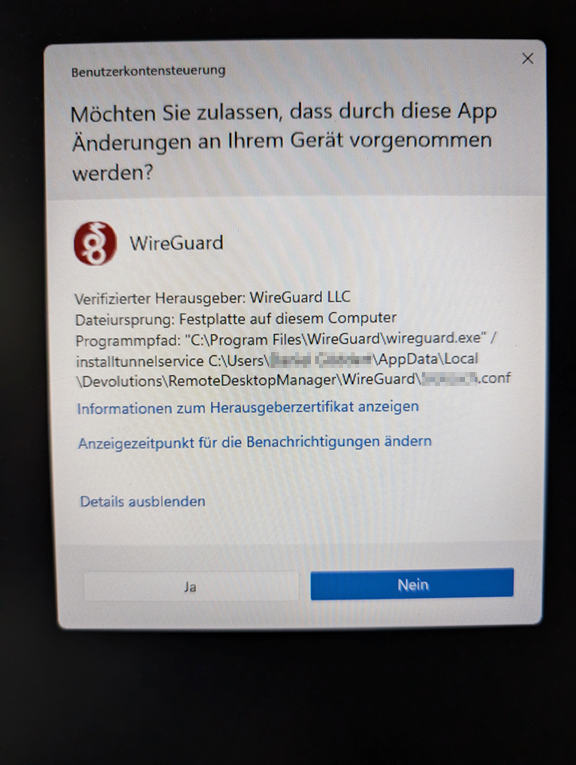
grafik.png
Hello Daniel,
Thank you for getting in touch with us. To better assist you, could you kindly provide us with the following information:
- Your current RDM version.
- The operating system you are using and its version.
- The data source you are utilizing.
- Are you using a Terminal Server or Citrix?
- Screenshots of your Wireguard entry configuration without showing any sensitive information.
Once we have this information, we will be better equipped to diagnose and resolve the issue.
Best regards,
Maxim Robert
Hello,
We understand that the integration is not perfect due to the way we decided to implement it, through command line rather than through the "embedded DLL" method. We preferred to make a first version of the add-on that could help our users quicker, rather than waiting even longer to have anything available.
As mentionned by Jonathan here, the embedded DLL method is more complicated to integrate. It requires us creating a service to communicate with Wireguard, and for most add-ons, this is overkill. It's not off the table, but for a first version of the add-on, it's not something we wanted to do. That doesn't mean we can't add this integration method in the future. If we see that there's a lot of demand for Wireguard and our users would benefit from the embedded DLL integration, then we are absolutely willing to improve the integration.
I hope this helps explain why we went with the current integration method.
Regards,
Hi Hubert,
Has their been any movement on a second version (embedded DLL) of the Wireguard add-on?
The benefits and challenges have been well discussed already.
Hello Daniel,
Thank you for getting in touch with us. To better assist you, could you kindly provide us with the following information:
- Your current RDM version.
- The operating system you are using and its version.
- The data source you are utilizing.
- Are you using a Terminal Server or Citrix?
- Screenshots of your Wireguard entry configuration without showing any sensitive information.
Once we have this information, we will be better equipped to diagnose and resolve the issue.
Best regards,
Hi Maxim,
here are the additional informations
- Your current RDM version.
- 2024.3.14.0
- The operating system you are using and its version.
- Windows 11 Professional (Ger, x64) 22H2 Build 22621.4317
- The data source you are utilizing.
- Local Datasource v1.149
- Are you using a Terminal Server or Citrix?
- No, this is a standalone local Workstation
- Screenshots of your Wireguard entry configuration without showing any sensitive information.
- Screenshots are supplied as attachments
If i try using the wireguard command as RDM will execute it, the startup fails and the help information from wireguard comes up.
Wireguard is using the following startup command to load the tunnel configuration:"C:\Program Files\WireGuard\wireguard.exe" /installtunnelservice C:\Users\My User\AppData\Local\Devolutions\RemoteDesktopManager\WireGuard\Cust-Legaloffice.conf
This command fails on load, as my profile directory inherits a space.
When execution this command while setting the configuration file in quotes the command can successfully be executed and the tunnel is setup."C:\Program Files\WireGuard\wireguard.exe" /installtunnelservice "C:\Users\My User\AppData\Local\Devolutions\RemoteDesktopManager\WireGuard\Cust-Legaloffice.conf"
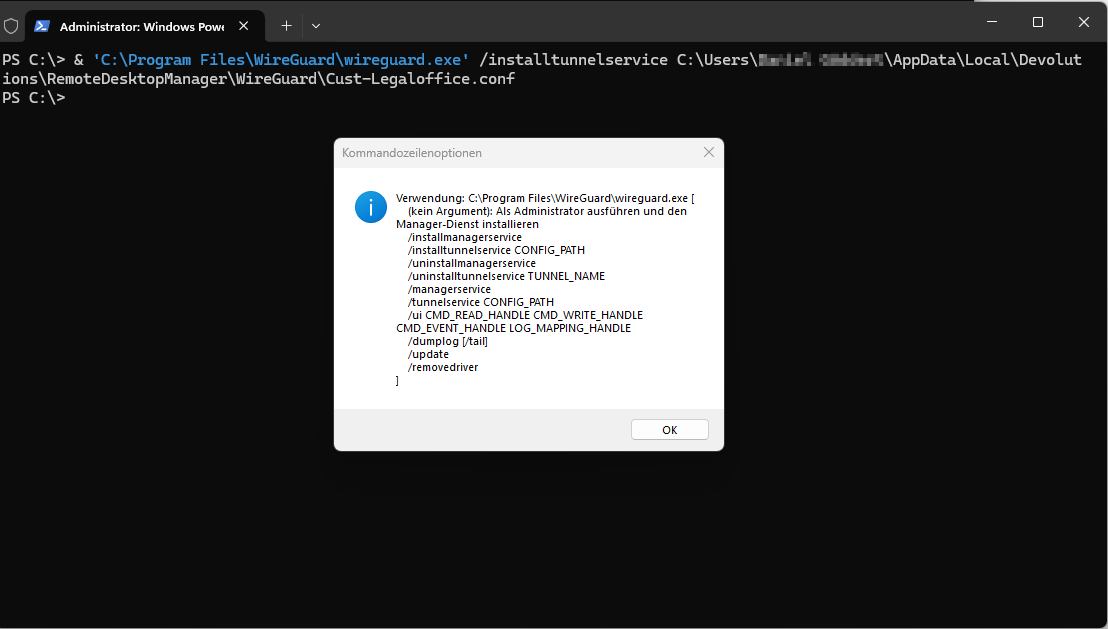
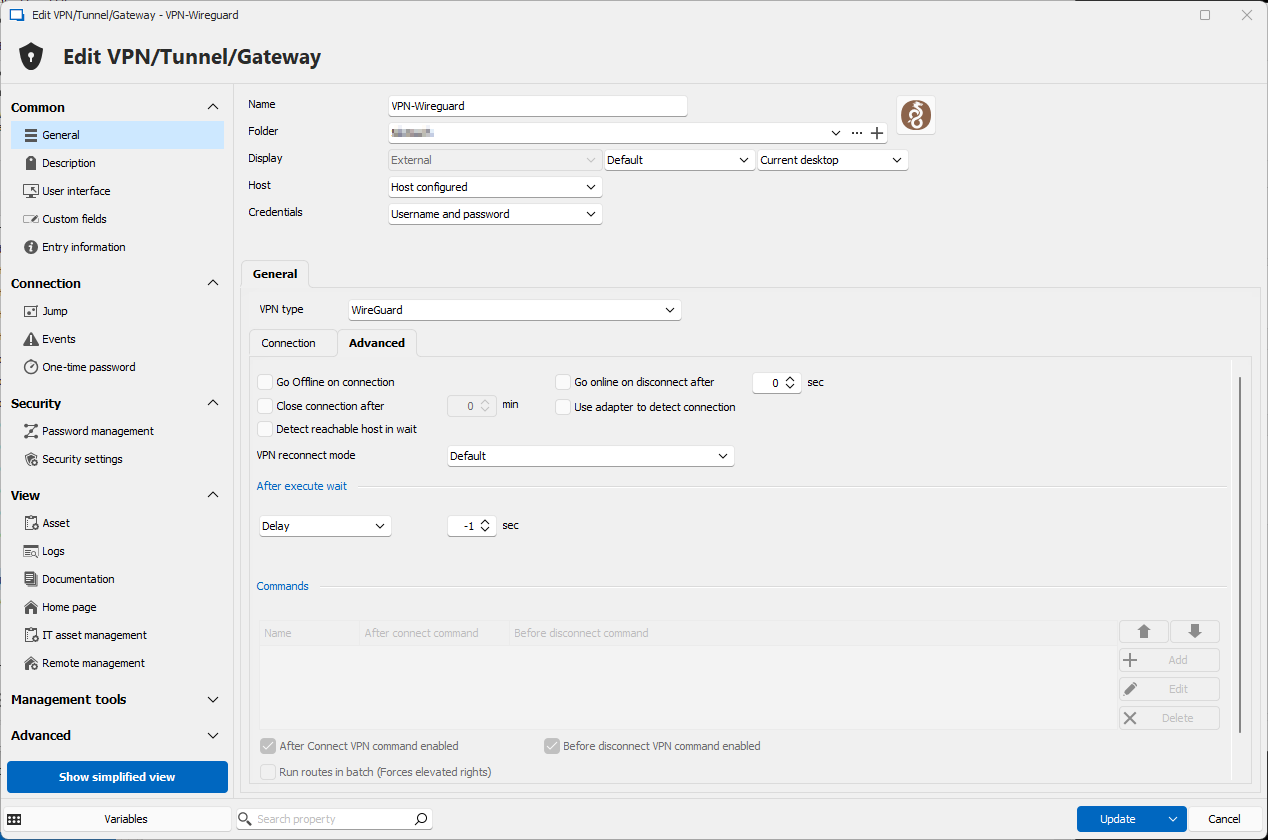
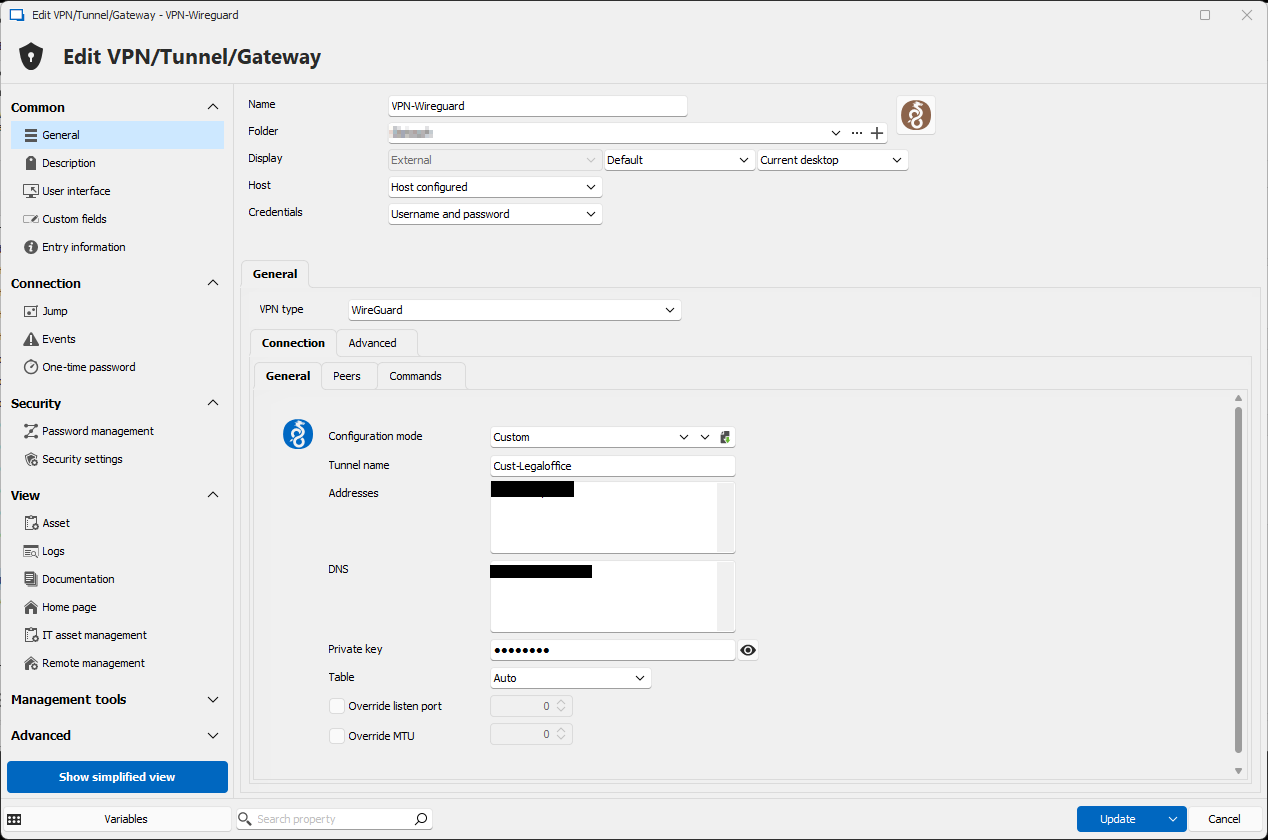
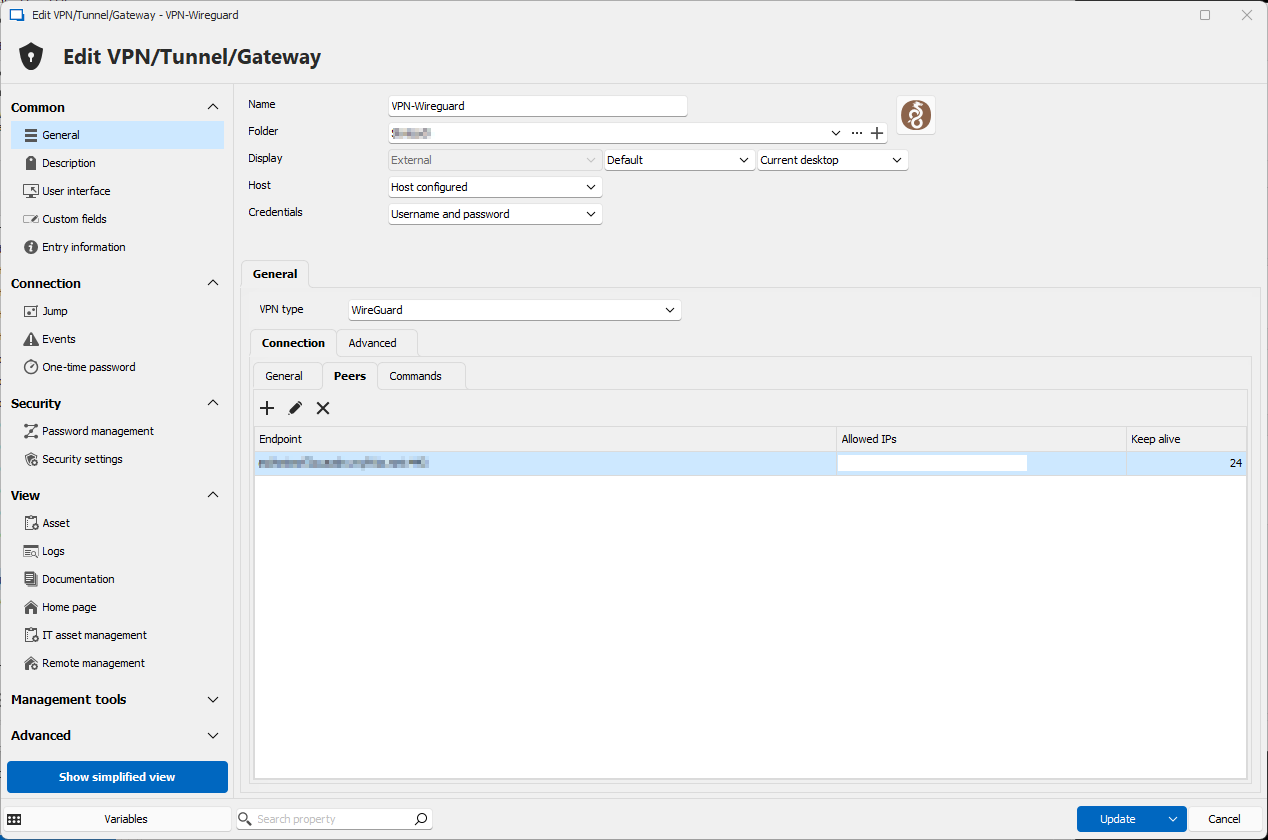
RDM_Wireguard111.png
RDM_Wireguard2222.png
Wireguard_Command_working.png
Wireguard_Command_notworking.png
RDM_Wireguard_Config_3.png
RDM_Wireguard_Config_2.png
RDM_Wireguard_Config_1.png
Hello Daniel,
Thank you for your response!
I've provided the information to our QA Team, and I will let you know with more details as soon as possible.
If you have any other questions, feel free to let us know.
Best regards,
Maxim Robert
@chris16:
Hi Hubert,
Has their been any movement on a second version (embedded DLL) of the Wireguard add-on?
The benefits and challenges have been well discussed already.
For now we're still waiting for additional feedback regarding this, as it would require a substantial amount of development time to integrate Wireguard more deeply within RDM.
Regards,
Hubert Mireault