hbas
Internet Explorer Mode
@Sam Moynihan can you verify that those instructions for configuring IE Mode in RDM are still accurate. I know for a fact that this worked in previous RDM versions (going back several years), however the settings structure has changed since then. I would suspect that "File - Settings - Type - Web" would have translated to "File - Settings - Entry Types - Sessions - Website", but I'm not seeing any "IE Mode" setting like I have previously.
To be clear, I can still see and set the IE legacy mode on a per-connection basis, I just can't set the global IE compatibility mode from RDM itself, as before. However, referring to my previous posts on this stuff, I was able to go ahead and manually set the registry key behind this setting and RDM (ActiveX really) would respect it, so that's getting me by, but not very convient for non-techie users who just need it to be easy to configure.
Let me know if configuring the IE Mode feature was deprecated from RDM itself, although I'd be confused on why since RDM is still setting it on application start to the default "IE 11" mode (if blank/missing that is).
Windows authentication (Custom user) not working?
Hello,
We just upgraded to latest RDM (2026.2.11.0), and I happened to notice under the workspace datasource settings that we can now use windows authentication to log into SQL server WITH a custom user rather than the current user (different than the custom login feature). I tracked this down to a feature that was released recently with 2026.2.5.0 per change notes here. I tested out this feature, however it doesn't appear to be working as expected. No matter how I fill out the credential fields, the error "Unable to connect to the server. Login failed for user ''" is shown. Notice how it doesn't actually show a username, just a blank string, so something in RDM is not passing along the correct value for whatever reason.
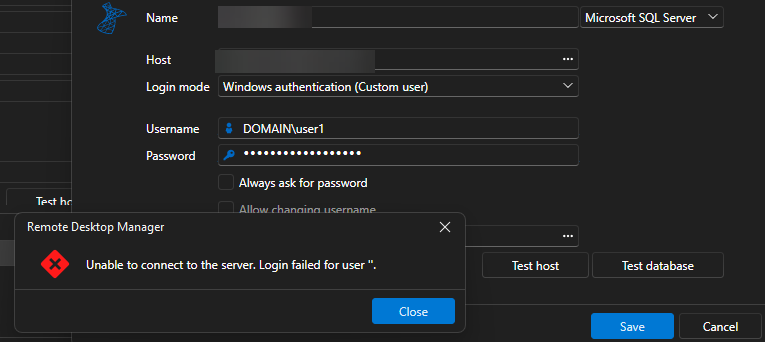
If I save and force close RDM, after re-opening I get the same error and still a blank username. Here's the popup with details expanded:
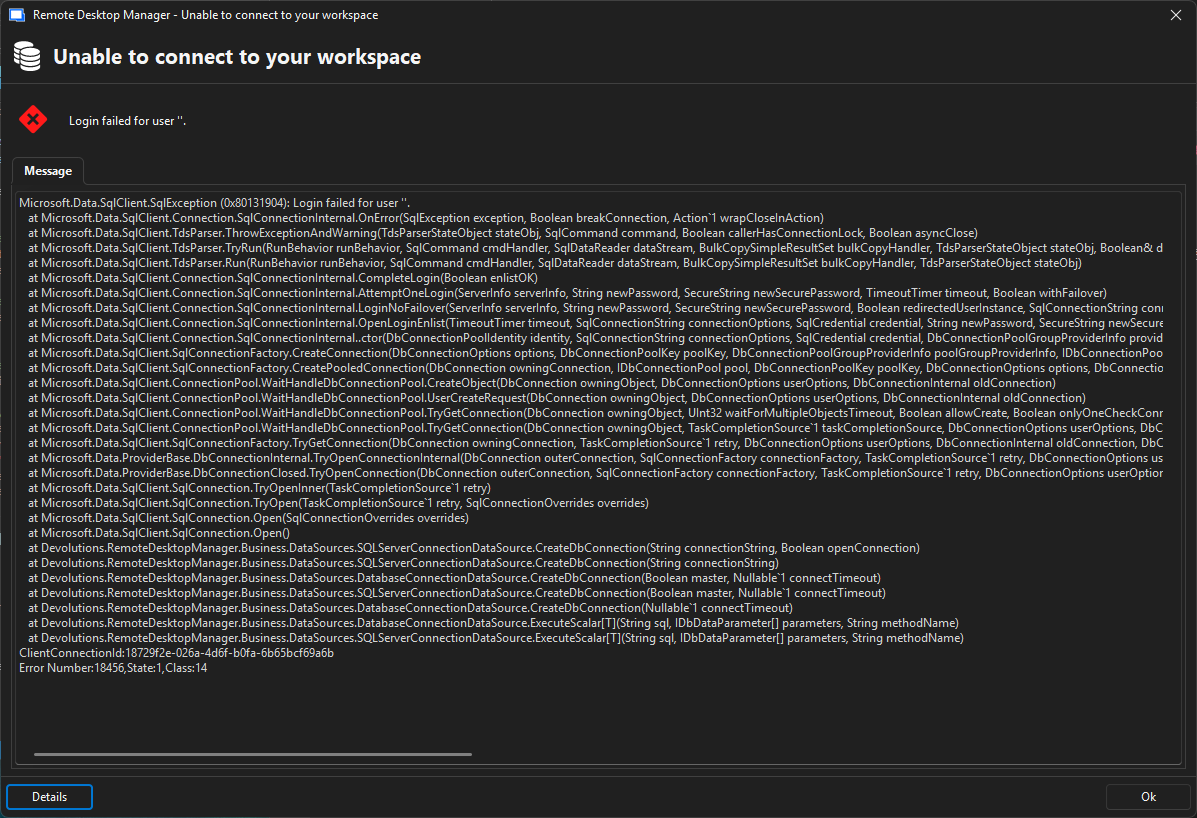
This would be a very welcomed feature, so would love to get this to work.
Note: We use RDM with 2017 SQL server (not Azure). And I do know for a fact that it works with windows authentication logins.
Devolutions Password Manager Extension: annoying JS console error
Just wanted to say thank you again for correcting this browser extension dev console bug. It has been a night-and-day enhancement for my development experience 💖!!
Showing User Expiring Credentials On Main Vault When Using SQL
Update: Does look like the Action Center is displaying as expected now in latest version, thanks!
Expired/Expiring Notification Improvements
Crazy indeed, but in a good way I believe lol.
Another crazy idea would be to consider using XQuery, which IMO, reads and writes a LOT better than XSLT. For example, to produce the equivalent output to the above:
<RDMOConnectionMetaData>
    { //Expiration }
</RDMOConnectionMetaData>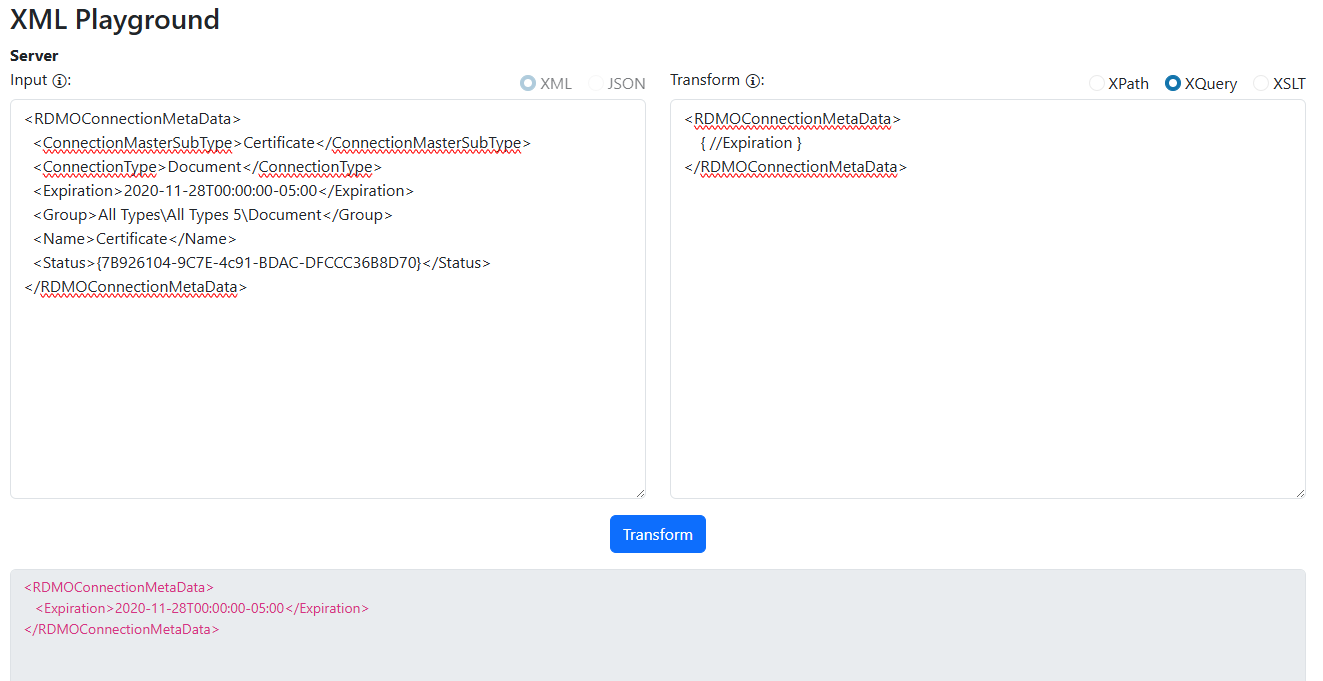
Or perhaps simply use a list of XPath's, and store a list of <Key, XPath> in the settings UI:
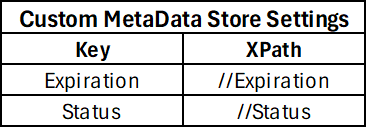
And translate those into the stored metadata column.
Personally I like the XQuery approach, but that tends to require adding another third party dependency to the stack since it's not natively supported in .NET (I like to use Saxon.NET). But If it comes down to XPath or XSLT, I'll take whatever approach y'all decide. Just my two cents.
Expired/Expiring Notification Improvements
Hi Stéfane,
I understand and appreciate you sharing your thoughts on the topic. I'm glad to hear that some thought is being given for how something like this could be achieved, and the approach you've outlined does seem beneficial & desirable for my use case. If it ever comes to light (and I realize that doesn't mean there is any sort of concrete timeline), I'll be eager to test it out.
Thanks!
Expired/Expiring Notification Improvements
1) While this doesn't benefit me directly, I would think this would help your other customers.
2) I'll have to explore this idea, but it does seem quite a bit overkill for what I'm trying to do here. I'll keep this approach in mind, thanks.
Understood on the meta field limitation. Makes perfect sense and pretty much what I expected. Although I still feel that as an Admin user, I should be able to use the powershell lib to pull the encrypted column data from the database and decrypt it. If you have any recommendations on that, I'd appreciate it. If not, again I understand. Although I must say it's a little bit frustrating to self-host the data and not have full access to the underlying data in some way (SQL, PS, or otherwise).
Showing User Expiring Credentials On Main Vault When Using SQL
Perfect! Thanks for getting this taken care of. This will help us drastically until those other dashboard features can be developed further.
Much appreciated!
Showing User Expiring Credentials On Main Vault When Using SQL
Thanks for the confirmation! Nice to know I was not crazy. I was also in the middle of trying with the old version to verify the existing behavior, but you beat me to it. Hopefully something y'all can reincorporate.
Showing User Expiring Credentials On Main Vault When Using SQL
Hi Hubert,
Appreciate the follow-up and quick fixes. However I want to challenge the below statement:
In our next minor version (2025.2.27.0), the action center will take the context of the current vault like it did previously... This basically restores the previous behavior.
This actually is not what the previous behavior was (going back to version 2023.2.14.0 at least). The Action center (formerly Notification center) would should all expired entries from all vaults, regardless of which vault was selected. I'm afraid the proposed fix still leaves some room for confusion on the users end.
Showing User Expiring Credentials On Main Vault When Using SQL
Appreciate the follow-up. My main grip is this part:
Additionally, when clicking the ticket panel under the user vault, it takes you to the action/notification center, which is fine, except for the fact that it doesn't actually show the expired/expiring user vault entries (just blank). We just updated RDM (now 2025.2.22.0) and previously this worked/displayed fine (prev 2023.2.14.0).
Specifically the underlined part, as this is a regression from the previous RDM version that we heavily relied on.
Showing User Expiring Credentials On Main Vault When Using SQL
@Michael Beaudin Just checking to see if there has been any progress on any of these enhancements? I recently just missed the expiration window on some user vault credentials because they were not visible in the "Action Center" like they used to be from prior to our RDM upgrade. Unfortunately, when these particular credentials expire, it becomes a huge pain to rectify, so missing the expiration window is not ideal.
Expired/Expiring Notification Improvements
Understood. Please let me know if you need further clarification until then.
Thank you.
Expired/Expiring Notification Improvements
@Maxime Bernier Just checking to see if there was any movements on this?
Expired/Expiring Notification Improvements
Thanks @Maxime Bernier. Just remember, the main goal here is to report on and automatically alert user's of their expiring user/private vault entries.
FYI, I mentioned this briefly above, but I did devise the below SQL query to pull this data directly:
;with t1 as (
select c.Name,
	coalesce(IIF(u.FullName = '', null, u.FullName), u.Name) as FullName,
	cast(cast(metadata as varchar(max)) as xml).value('(//Expiration)[1]', 'date') as Expires
from RDMConfig.dbo.Connections c
left join RDMConfig.dbo.UserInfo u on u.ID = c.RepositoryID
-- either tied to active user or part of system data source
where c.RepositoryID = '00000000-0000-0000-0000-000000000000'
	or exists(select ID from RDMConfig.dbo.UserSecurity
		where HasAccessRDM = 1 and Assigned is not null and ID = u.ID)
) select * from t1
where Expires <= dateadd(day, 8, getdate())
order by Expires
However, that [Connections].[metadata] column doesn't seem to be updated regularly anymore (for me it's out of sync with live data). The ones that do output valid expiration dates are the ones modified prior to our recent RDM upgrade (from 2023.2.* to latest 2025.*). There is a [Connections].[Data] column that looks to be encoded/encrypted, which is what I was hoping the Powershell module would help me with deciphering.
Ultimately, I don't care if my solution is a powershell one, a SQL one, or a bit of both, right-now I can't even get the correct data points out of the system to move forward with this workflow.
Devolutions Password Manager Extension: annoying JS console error
Updated and it does appear that the console errors are gone. This is great news! I'll report back if I notice any edge cases.
Thanks for looking into this, much appreciated.
Expired/Expiring Notification Improvements
@RDM Folks,
Using "Get-RDMUserVaultSession" I can get the current user's vault sessions and their expiration dates, however how can I retrieve the sessions out of other user's private vaults and check their expiration dates? I am using a global admin account, so in theory I should have access to see all this info.
I did try reviewing the output of the "Export-RDMPasswordAnalyzerReport" command, which does have a "-Private" switch, but it doesn't really seem to return the expected results.
The "Expired entry list" report (id: ConnectionExpiredEntry) within RDM is kind of what I'm looking for, just need to be able to execute it for all users and via this powershell module ideally.
Initially I was attempting to pull this data out of the raw SQL database (since we host it), however looks like y'all encode/encrypt this data now (compared to previous RDM versions), so the metainformation column isn't updated, hence why I need one of the above approaches to work.
Let me know if y'all have any ideas on how I could accomplish this.
Expired/Expiring Notification Improvements
Appreciate the assist. For those of you interested, my goal was to run some sort of headless RDM automation within a docker container (we already had a docker host). Below is a starting docker compose & PS script (for SQL server instances):
docker-compose.yaml
version: '3.9'

services:
  rdm:
    image: mcr.microsoft.com/powershell:7.5-ubuntu-24.04
    command: pwsh /workspace/run.ps1
    volumes:
      - ./:/workspace
    environment:
      RDM_SQL_USER: ${SQL_USER}
      RDM_SQL_PASSWORD: ${SQL_PWD}
      RDM_SQL_SERVER: ${SQL_SERVER}
      RDM_SQL_DB: ${SQL_DB}
run.ps1
Install-Module -Name Devolutions.PowerShell -Force

$pwd = ConvertTo-SecureString -AsPlainText $env:RDM_SQL_PASSWORD -Force

$ds = New-RDMDataSource -SQLServer -Database $env:RDM_SQL_DB -Password $pwd -Server $env:RDM_SQL_SERVER -Username $env:RDM_SQL_USER -Name "RDMDB"

Set-RDMCurrentDataSource $ds

$ds

Get-RDMEntry | select Name -First 10

# TODO: generate expired entries report/notifications
I can confirm that the Devolutions.PowerShell cmdlets were all that was needed. The RDM desktop app did NOT need to be installed (yay!).
Next part will be to pull a list of expired/expiring entries and report on that based on a trigger somehow...
Unable to connect to DVLS datasource on "Clean" machine(s)
@Jonathan Lafontaine still an issue two years later (using PS module version 2025.2.3). Installing latest Microsoft Visual C++ Redistributable (here), does work however, so something just needs to warn/prompt to install that dependency. Otherwise user's have to go dig through the forums like I just did to find the expected solution.
Expired/Expiring Notification Improvements
@Hubert Mireault could you help me figure out how to use the powershell cmdlet w/o installing RDM? I couldn't quite figure it out and the RDM documentation just mentions it but doesn't show how to actually do that.
Devolutions Password Manager Extension: annoying JS console error
Wow, that would be amazing! I'll keep my eyes peeled. Just to be clear, this would be a fix at the browser extension level, not RDM desktop app, right? Just want to make sure I know which I end I need to update.
Out of curiosity, any idea what the main culprit was (like I said, spent a lot of time debugging this from a 3rd party perspective).
Expired/Expiring Notification Improvements
No I had not seen that, but I'll keep it in mind. Although I'm not sure it'll cleanly accomplish what I was looking for, which was for users to receive automatic reports (emails/popup notifications) of their expiring/expired entries. This sort of approach would require manual setup for every user, on each machine. A bit too cumbersome.
In RDM today, is there any sort of feature for say executing a certain script on a schedule (i.e. I can store a PS script at the data-source level, bind it to a trigger that get's executed down stream for each user to do/show something)?
Alternatively, do you know if it's possible to install RDM as a windows service (or maybe as a docker container), so that I can have RDM running in the background on cloud hosted server and trigger a background service to interact with it and do what I need to do with it? In this situation, we'd basically want a headless RDM (no UI), and just want to interact with it as an API service or something. I did find this verbiage when reviewing the latest powershell cmdlets docs, making me think that I don't really need to install RDM at all. Thoughts?
... This also means that there is no need to install Remote Desktop Manager on a machine to run PowerShell scripts: the module is now sufficient.Just looking for ideas that we can implement within our environment (we prefer self-hosted). Of course, I'd prefer as much of this as possible to be done within RDM itself and prevent external solutions.
Showing User Expiring Credentials On Main Vault When Using SQL
Answer #1: For example, if I open user vault dashboard, click the expired/expiring entries ticker panel item, it takes me to the "Action Center" (previously notification center?), of which the action center doesn't show anything related to the user vault. Again, it used to show user vault expired/expiring entries in previous RDM versions, but no longer. To my knowledge, there is only one action/notification center, not an individual one for system/user vaults (correct me if I'm wrong). Also, I can confirm that the entries in question where not marked to be excluded. Attached a screen recording to demonstrate the issue.
Answer #2: In my case, I would want consistent behavior for all of my users, so one place to update for all users would be great. I know a more sophisticated answer would probably be flexibility. Perhaps a middle ground would be let the admin set the default at the data source level, but let the user override it if they need to. From my perspective, this is something that should be on by default.
Devolutions Password Manager Extension: annoying JS console error
One more thing I wanted to include:
I did find this potentially related github issue, so maybe it might shed some light on the situation.
Devolutions Password Manager Extension: annoying JS console error
For the last couple years, we have been seeing the below VERY annoying JS console error which seems to be repeated for any # of frames located on the current page. In particular, we have a webpage that loads hundreds of iframes (trust me, I ain't happy about it either) during EACH navigation, meaning these console error's are shown all the time everywhere (we have dev tools opened all day every day). Generally I just have my console filter set to `-listener` to exclude these entries, but dev tools has some sort of bug where that doesn't apply to active messages or something (another issue entirely really). The errors also seem to appear when other pages are loaded, likely the bg service pushing out updates I'd imagine.
Uncaught (in promise) Error: A listener indicated an asynchronous response by returning true, but the message channel closed before a response was received
Anyhow, I spent a significant amount of time looking into this today, and while I can't specifically point to the line of code that causes this, I did find a few things:
1) Within `autofiller.js`, there is the following JS code block (unminified):
const s = {
    action: "Request_Auto_Fill_On_Load",
    isBrowserReloadOperation: r && window === window.top
};

chrome.runtime.sendMessage(s)
If I remove this set of code (or just change the `action` property to something else), then the errors go (and stay) away. Of course this probably is not the intended fix, but it does show us that this is the code path the produces the error eventually.
I did try to trace the background server script `background.bundle.js`, which is how I made the above find mostly, however all I could really determine was: `chrome.runtime.sendMessage()` triggers `handleContentScriptMessage()` which calls `requestAutoFillOnLoad()` which calls `requestAutoFill()`, and from there it was unclear which code path leads to the actual error. I'd imagine that it's got to be something on the client-side script and not the bg svc script, but I was unable to get any more specific than this (since the original console error has no stack trace or line of code reference).
2) The issue can be reproduced from a fresh Windows 11 system w/ Edge (tested with Windows Sandbox feature) w/ no RDM installed and just the fresh Devolutions Workspace browser extension installed. I have attached a video that demonstrates the issue, which reproduces easily with bing.com. Notice in the video how you tend to have to load the site in multiple tabs a few different times to get it to reproduce, but it eventually does. I don't think this issue is specific to any one site or configuration, but it is more noticeable on sites with tons of nested iframes (try here maybe). Unfortunately, the issue can be a bit random at times, but it will reproduce eventually.
3) Can reproduce in latest Edge/Chrome (tried Edge: 138.0.3351.109 and Chrome: 138.0.7204.169) on Windows 11 using latest browser extension (2025.2.1.0 MV3).
This issue has been very annoying to deal with and we have to deal with it EVERY SINGLE DAY. I was hoping it would work itself out eventually, but it's been almost two years with this issue IIRC. We really need this addressed as it muddles up our dev experience with web apps and makes us want to discontinue using RDM browser extension.
Please let me know if there is anything else I can provide. I am more than willing to do a web session so I can show you what my experience is like.
Screenshot of console errors (from single navigation):