Showing User Expiring Credentials On Main Vault When Using SQL
Showing User Expiring Credentials On Main Vault When Using SQL

Good morning.
Is there a way to show expiring User Credentials when utilizing SQL implementation?
Currently, when I log on, it shows the expiring credentials of assets which we don't utilize:
All the users have to switch to their User Vault in order to see if there are, in fact, any expiring credentials:
Is there a way to have this show on the main screen when connecting to the Vault so the user knows they have an expiring credential?
--- Chuck
Overgaard, AZ (-7 MST / Zulu Year-Round)
RDM Version: 2026.3.2.0 64-Bit - Free
f8e50a2c-70b9-4a59-b1f5-37fba32e0928.png
452e3a42-9ffa-4dee-8d2c-9fb4d98c8cc0.png
All Comments (22)
Hello,
Thank you for your suggestion.
We could most likely do this by adding a new widget "Expiring Entries (User Vault)". This widget would not be visible by default but you would be able to add it in the "Customize" menu of the dashboard.
I will open a feature request ticket for this and we will keep you updated on the progress.
Best Regards,
Michaël Beaudin
Hello,
Thank you for your suggestion.
We could most likely do this by adding a new widget "Expiring Entries (User Vault)". This widget would not be visible by default but you would be able to add it in the "Customize" menu of the dashboard.
I will open a feature request ticket for this and we will keep you updated on the progress.
Best Regards,
This would be completely awesome! I just talked my organization in to purchasing license for a couple of our teams after using RDM for a couple years, and this is one thing that is keeping folks a bit hesitant on utilizing, since it is a PITA to reset our passwords in 10+ environments after they expire.
Thank you!
--- Chuck
Overgaard, AZ (-7 MST / Zulu Year-Round)
RDM Version: 2026.3.2.0 64-Bit - Free
Hello Chuck,
This feature has been completed internally and will be available starting from RDM 2025.1.
Here is a preview : 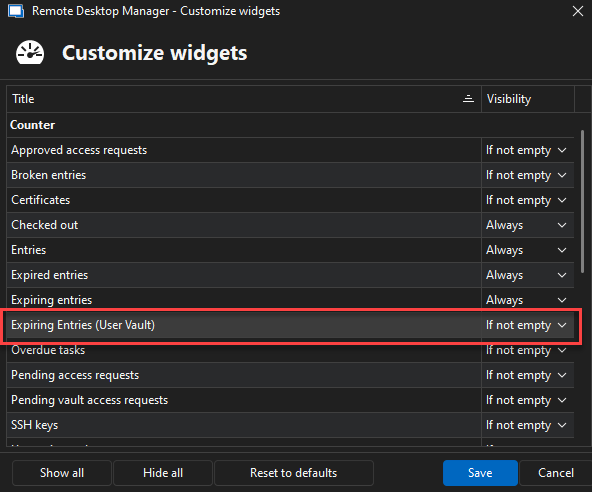
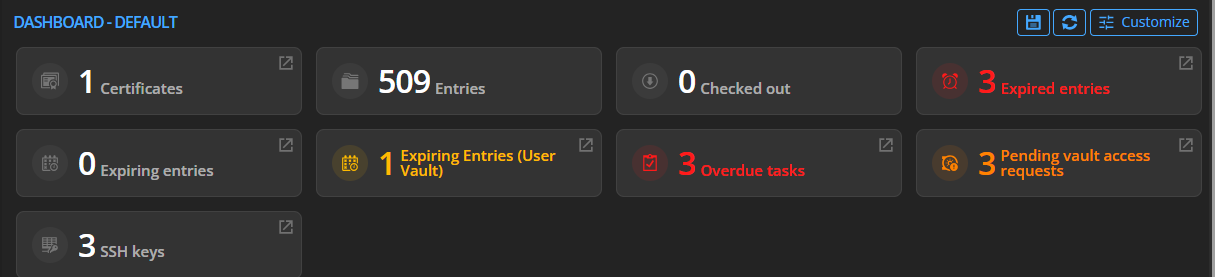
Best Regards,
Michaël Beaudin
6760b4de-1e67-47cb-94e1-cfbf52a80139.png
6c870007-3753-486d-ad7e-f4e6288ecba9.png
BEAUTIFUL!!!!!! That will help a lot of your Shared environment users tramendously!
--- Chuck
Overgaard, AZ (-7 MST / Zulu Year-Round)
RDM Version: 2026.3.2.0 64-Bit - Free
Great to know that this will work well for you. We will make this thread as resolved.
Best Regards,
Michaël Beaudin
@Michael Beaudin could we expand on this slightly:
1) Add an equivalent "Expired entries (user vault)" ticker (i.e. show count of already expired user vault entries)
2) Make ticker panels interactive so that when the user clicks on them it takes them to their respective user vault dashboard.
3) Can we expand on this with a detailed list of expired/expiring entries? Pretty much I would want the exact same experience when viewing either vault's dashboard and I don't want the user to have check multiple areas for expired entries.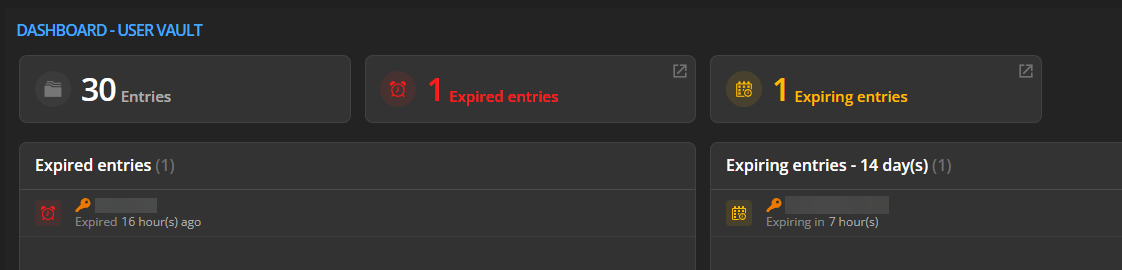
Additionally, when clicking the ticket panel under the user vault, it takes you to the action/notification center, which is fine, except for the fact that it doesn't actually show the expired/expiring user vault entries (just blank). We just updated RDM (now 2025.2.22.0) and previously this worked/displayed fine (prev 2023.2.14.0).
Lastly, regarding that "Customize widgets" window, how can we "push" these settings to each of our users within our organization (RDM self-hosted w/ MS SQL Server)?
50170d97-ad72-4a73-8d4f-6daccbc45bf9.png
Hello,
We should be able to do your first 3 points and will create a ticket for this.
We currently don't have a way to "push" the configs of the widgets to the organization. We had thought about it but decided to go with a per-user approach for a first implementation. This allows us to gauge user demand and build up the feature from there. We will create another ticket internally to add this global configuration possibility.
Question #1 : For the notification center, do you mean that you don't see the user vault entries while in the shared vault or do you not see them even if you are currently in your user vault?
Question #2 : Would your admin need to be able to customize and "push" widget configurations differently on different vaults or do you want to configure this once on the data source level so all vaults show the same widgets on all your users?
Best Regards,
Michaël Beaudin
Answer #1: For example, if I open user vault dashboard, click the expired/expiring entries ticker panel item, it takes me to the "Action Center" (previously notification center?), of which the action center doesn't show anything related to the user vault. Again, it used to show user vault expired/expiring entries in previous RDM versions, but no longer. To my knowledge, there is only one action/notification center, not an individual one for system/user vaults (correct me if I'm wrong). Also, I can confirm that the entries in question where not marked to be excluded. Attached a screen recording to demonstrate the issue.
Answer #2: In my case, I would want consistent behavior for all of my users, so one place to update for all users would be great. I know a more sophisticated answer would probably be flexibility. Perhaps a middle ground would be let the admin set the default at the data source level, but let the user override it if they need to. From my perspective, this is something that should be on by default.
2025-08-04_9-50-12.mp4
Hello,
Thank you for your answers. We have added the information to the opened tickets and will keep you updated on any progress.
Best Regards,
Michaël Beaudin
@Michael Beaudin Just checking to see if there has been any progress on any of these enhancements? I recently just missed the expiration window on some user vault credentials because they were not visible in the "Action Center" like they used to be from prior to our RDM upgrade. Unfortunately, when these particular credentials expire, it becomes a huge pain to rectify, so missing the expiration window is not ideal.
Hello,
Michael is on vacation this week, but we will see if we can fit this for our next major release, 2025.3, later this fall.
As a note for the setting to give users a default dashboard setup, we are tentatively planning this for 2026.1 as we need to align our product development.
Regards,
Hubert Mireault
Appreciate the follow-up. My main grip is this part:
Additionally, when clicking the ticket panel under the user vault, it takes you to the action/notification center, which is fine, except for the fact that it doesn't actually show the expired/expiring user vault entries (just blank). We just updated RDM (now 2025.2.22.0) and previously this worked/displayed fine (prev 2023.2.14.0).
Specifically the underlined part, as this is a regression from the previous RDM version that we heavily relied on.
Thank you for bringing this specific part up again, I think it slipped through a crack. We should be able to fix this specific part of the behavior quickly so it works like it did previously.
I've opened a new ticket just for that and it's assigned to a developer.
Regards,
Hubert Mireault
Hello,
In our next minor version (2025.2.27.0), the action center will take the context of the current vault like it did previously. Meaning, if you're in the shared vault, it will show actions related to the shared vault, but more importantly for your case, while you're in the user vault, it will show actions related to the user vault. This basically restores the previous behavior.
For some background information as to why this happened, when we did our major backend changes to support the "linked (external vault)" feature, we had to make changes in a lot of places to ensure that non-UI vaults would not load their data when unnecessary. A check for this was made in the action center, but it wasn't properly implemented and it excluded the user and system vaults from the action center.
Regards,
Hubert Mireault
Hi Hubert,
Appreciate the follow-up and quick fixes. However I want to challenge the below statement:
In our next minor version (2025.2.27.0), the action center will take the context of the current vault like it did previously... This basically restores the previous behavior.
This actually is not what the previous behavior was (going back to version 2023.2.14.0 at least). The Action center (formerly Notification center) would should all expired entries from all vaults, regardless of which vault was selected. I'm afraid the proposed fix still leaves some room for confusion on the users end.
Let me try with 2023.2.14.0 specifically and get back to you. I tested with 2024.3 which I thought was far enough back.
Regards,
Hubert Mireault
I can confirm what you say, we'll revisit this, I don't think it should be very difficult to change to act this way.
Regards,
Hubert Mireault
Thanks for the confirmation! Nice to know I was not crazy. I was also in the middle of trying with the old version to verify the existing behavior, but you beat me to it. Hopefully something y'all can reincorporate.
So, correcting myself, hopefully for the final time 😄 We've made a change that will make the behavior the same as on 2023.2, which is to say that the context of what section is selected (shared vault, user vault, system vault) will not matter for the action center. The action center will show actions from the current shared vault, the user vault, and the system vault, all together in the same window.
Here's a screenshot to show the behavior. The navigation pane is edited for the sake of this example to show my three different expired entries, and the action center is how it will show with the change: 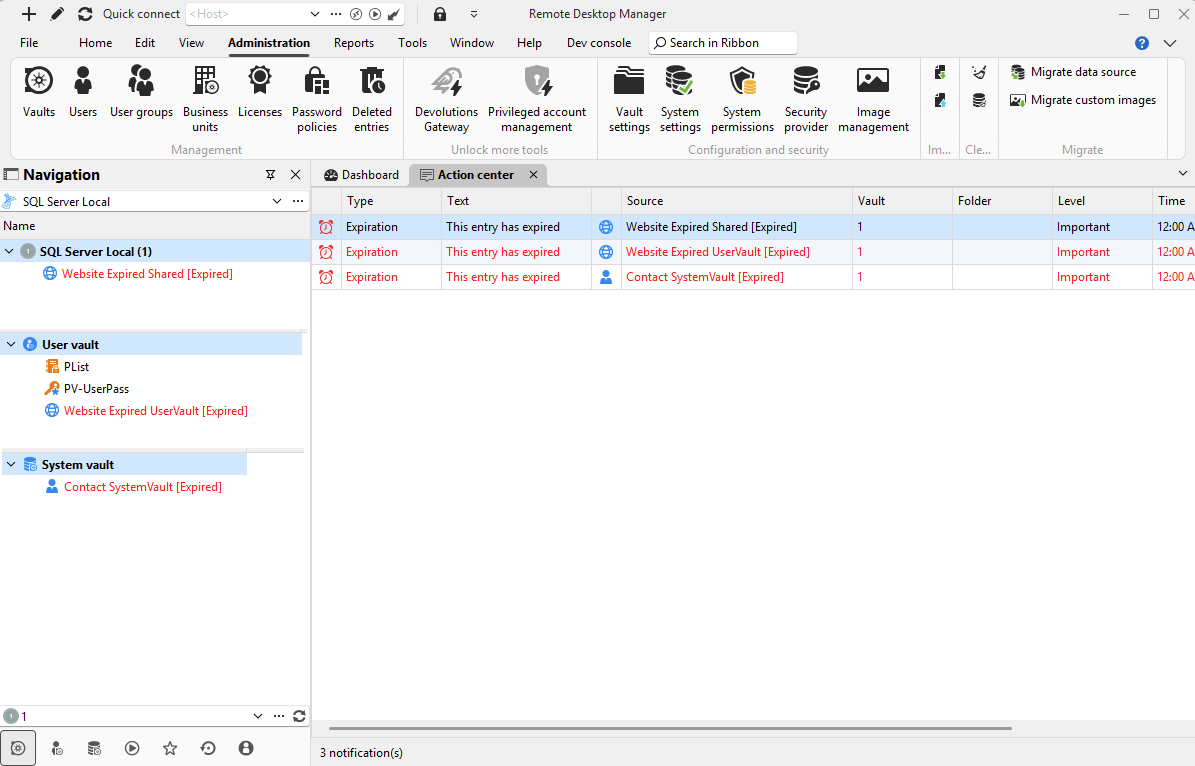
This is still planned for our next minor version, 2025.2.27.0. Let me know if I missed the mark and we'll readjust.
Regards,
Hubert Mireault
5f5a3ab1-1a4e-4167-bde3-cb84656611df.png
Perfect! Thanks for getting this taken care of. This will help us drastically until those other dashboard features can be developed further.
Much appreciated!
Update: Does look like the Action Center is displaying as expected now in latest version, thanks!
That's great, thanks for the positive feedback! Let us know if there's anything else we can help with.
Regards,
Hubert Mireault