Expired/Expiring Notification Improvements
0 vote

Would like to see some improvements to the expired/expiring notification feature:
1) Show a popup when opening RDM that shows all the expired (or expiring soon) notifications. I know that the notification bell will appear in the bottom right corner as well as the dashboard count overview will show orange/yellow, however these are both pretty settle visual queues which a user needs to know to be on the lookout for. Needs to be a little more upfront and center. Probably something that can be toggled off since I'm sure some users might find this annoying.
2) Under the dashboard view that shows a quick count overview of expired/expiring notifications, make it to where the count shown also shows user vault expirations. I realize that you can navigate to the user vault and see it's dashboard count overview, however the default dashboard shown is for the system vault, and the expired connections could be from either side. The user shouldn't have to constantly switch between the two to get this information. However, if you open the notification list popup, it DOES show notifications from both vaults, so does look like these lists are already merged at some point. FYI, the report "Expired Entry List" is also separated, but probably not as important to be show both (for my use case at least). Either way it would be nice for all three of these areas to be standardized and show all relevant notifications.
3) We often have RDP connections set up in the system vault that then have a credential entry that points to the user vault by name. If I mark the RDP entry as expired, the next time I open that entry it will prevent me from opening it and show an expiration popup message. If instead I mark the user vault credential as expired, no expiration popup message appears. It would be nice to have this built into the product. Additionally, if we could have a warning popup when the connection/credential is nearing expiration to more easily keep the user informed so that they can change the password PRIOR to expiration (since sometimes you have to jump through major hurdles to get a password reset with some vendors). I know that entry expired notifications apply to more than just credential entries, but I think all of them could benefit from this warning feature.
4) This other request that was just created would also be nice: https://forum.devolutions.net/topics/38790/exclude-notification-or-enable-all-notification-for-all-entries
Thanks!
HB
All Comments (28)
Hello,
Thank you for the requests, I'll go over your points in order.
1. We will open a ticket for this. Would it be alright to have an option that you need to configure for this? As you say I feel like the majority of users may not like having it prompt automatically, so it would make more sense not to have that behavior by default.
2. We will open a ticket. I think the goal would be to have a dropdown in the dashboard with the following options:
- Current (shared vault in shared vault, user vault in user vault)
- Current shared + User vault (combines both into one, what you're asking)
The three places we will try to standardize:
- Dashboard list of expired/expiring
- Notification window
- Reports for expired/expiring
We will have to see if these three places can be changed in the same way, but ultimately we will do what is more logical for each of them.
3. We will open a ticket to add the same handling of statuses (which includes expiration) when using a linked credential. I think it's a good idea but I will discuss with our teams in case there's a reason why we haven't implemented it that way to start with.
3.5. We already have a 'warning' before entries expired, they show up in the notification window like this:
If this is not what you mean, could you describe how you would like to see this warning?
4. I've responded in that thread and we have increased the priority for this request as well.
I hope this covers everything.
Regards,
Hubert Mireault
1) Yes, having to opt in for that feature is perfectly fine with me. Although, for better exposure of that feature, I would suggest a) updating y'alls documentation to indicate the alert is available, and b) making it easily toggleable from the existing notification list.
2) That would be fine, as long as I can choose to have it show BOTH on the same dashboard, I'd be happy.
3) Thanks, it would be welcome change.
3.5) In this case, I defer to 1), it's out of the way and easily overlooked. By default expiration's are listed in the notification with 30 days prior to expiration, so again I can see how this would be annoying to constantly see this as a popup alert, however the user also has the option to adjust that expiration lead time. For example, I changed mine to 14 days which I think is much more in line with when I need to be warned to change that password.
Mostly what I am trying to get out of this is similar to how you can set a "Warning" status on a connection that prompts you with the warning message when opening BUT still lets you proceed (unlike the Expired status), so when a user actually opens a connection they will be prompted with a "Warning" of credential expiration, but in this case related to the linked user vault credential. Hope that makes more sense.
4) Thanks, much appreciated!
1. Noted and added to the ticket.
2. We will focus on improving the dashboard, in this case.
3+3.5. So from what I understand, your use case would be covered with the following:
- Implement #1 which is having an option to prompt the notifications on start up if there are any
- Implement status 'verification' on linked credentials usage, in the same way that it is for session entries
I'm not sure if we want to allow connecting for non-administrators despite expired credentials/if the entry is expired. I believe we have the "warning" status to get a behavior like that, but it's obviously not linked to the expiration feature.
Would implementing just the above two points work for you, or is it also necessary to allow non-administrators to connect despite the entry / credentials being expired?
Regards,
Hubert Mireault
Hi Hubert,
3.5) I think those two points sum it up nicely. However, just to be clear I am not looking for allowing non-admins to proceed with opening a connection that is marked or identified as being expired (whether that be at the entry or credential level), matter of fact, the end goal being the opposite, with the addition of not only prompting on when expired but also when nearing expiration (again similar to the "warning" status that can be set on an entry already).
So, in summary:
- If identified as expired (entry/credential), then the same behavior as today: prompt and prevent user from opening the connection.
- Or if identified as nearing expiration (entry/credential), then prompt but allow the user to proceed with opening the connection as normal.
HB
Thank you for the clarification, I see the distinction now! Perfect, I've noted this and we will see what we can do for that.
Regards,
Hubert Mireault
Hi,
Just adding my voice to the case, what would be great is the possibility to receive an email notification when an entry is about to expire. This way (for token, certificates, ... ) we can be informed and renew the entry before it's too late.
Thanks and regards,
Jérémie
Hello,
Thank you for your addition. While this is not possible for SQL Server, I will check to see if this is something that DVLS or Hub could have as a feature.
Regards,
Hubert Mireault
Hello,
In DVLS, there is a report you can schedule to receive (for example weekly) for your expiring entries. You can find more information about it here: https://forum.devolutions.net/topics/42216/email-notification-on-entry-expiration#193358
For Hub we don't have this report but it's on our todo list.
We will also see about improving this flow to fit with the notification system in DVLS and Hub.
Regards,
Hubert Mireault
Hello,
With the latest 2025.1 version of Hub Business, it is now possible to generate reports for expiring/expired entries. Our new service is required to access these reports. Please visit the following link to learn more: Scheduled reports - Devolutions Documentation
Have a great day!
Maxime Morin
@Maxime Morin per your last comment, that's Hub specifically, right? Anything we can do to automate report delivery our of RDM self-hosted (via MS SQL Server)?
Additionally, been a while since I created this post, anything new in this area in the current version of RDM (expanding on notification expirations/warnings?). With the latest version (2025.2.22.0), I am still seeing some shortcomings and even some regressions (see here), so I think there might still be some room for improvement. My main goal is making it easy for a typical user to see their expired/expiring entries as well as for them to be actively notified when possible (i.e. when opening RDM or opening an affected/linked entry).
@hbas Yes, my previous comment is for Hub Business only. As for SQL-Server, have you looked at this article? https://docs.devolutions.net/rdm/commands/reports/export/ It's probably the closest thing to automated reports via SQL. It would allow you to export reports by running RDM. It's clearly more work, but the alternative is to use Devolutions Server or Devolutions Hub Business.
Maxime Morin
No I had not seen that, but I'll keep it in mind. Although I'm not sure it'll cleanly accomplish what I was looking for, which was for users to receive automatic reports (emails/popup notifications) of their expiring/expired entries. This sort of approach would require manual setup for every user, on each machine. A bit too cumbersome.
In RDM today, is there any sort of feature for say executing a certain script on a schedule (i.e. I can store a PS script at the data-source level, bind it to a trigger that get's executed down stream for each user to do/show something)?
Alternatively, do you know if it's possible to install RDM as a windows service (or maybe as a docker container), so that I can have RDM running in the background on cloud hosted server and trigger a background service to interact with it and do what I need to do with it? In this situation, we'd basically want a headless RDM (no UI), and just want to interact with it as an API service or something. I did find this verbiage when reviewing the latest powershell cmdlets docs, making me think that I don't really need to install RDM at all. Thoughts?
... This also means that there is no need to install Remote Desktop Manager on a machine to run PowerShell scripts: the module is now sufficient.
Just looking for ideas that we can implement within our environment (we prefer self-hosted). Of course, I'd prefer as much of this as possible to be done within RDM itself and prevent external solutions.
Hello,
In RDM today, is there any sort of feature for say executing a certain script on a schedule (i.e. I can store a PS script at the data-source level, bind it to a trigger that get's executed down stream for each user to do/show something)?
Not within RDM on SQL Server. There are ways to achieve this in Devolutions Server with its scheduler service, but when using SQL Server as a backend, there's no application inbetween the client and the server to perform these requests.
It's possible to configure entries in your vault to run a script before opening the entry, but I don't think this is what you're looking for, since you're talking about reports.
Alternatively, do you know if it's possible to install RDM as a windows service (or maybe as a docker container), so that I can have RDM running in the background on cloud hosted server and trigger a background service to interact with it and do what I need to do with it? In this situation, we'd basically want a headless RDM (no UI), and just want to interact with it as an API service or something. I did find this verbiage when reviewing the latest powershell cmdlets docs, making me think that I don't really need to install RDM at all. Thoughts?
It don't believe it's possible to install RDM as a headless service, but as you mention, the Powershell module might be what you're looking for in this case. As mentioned in our documentation, you shouldn't need to install RDM on that machine to have the scripts be functional.
Regards,
Hubert Mireault
@Hubert Mireault could you help me figure out how to use the powershell cmdlet w/o installing RDM? I couldn't quite figure it out and the RDM documentation just mentions it but doesn't show how to actually do that.
Hello,
To use the Devolutions.PowerShell module, you can install it directly from the PowerShell Gallery using the following command:
Install-Module -Name Devolutions.PowerShell -Repository PSGallery
If no instance of Remote Desktop Manager (RDM) is installed, the module will automatically create its configuration files. Running Get-RDMCurrentDataSource should return a default Local Data Source. Your next step is to create a data source using the New-RDMDataSource cmdlet. You can save it using the -Set parameter. This only needs to be done once. You can refer to this documentation.
If you need more help, let us know.
Best regards,
Maxime
Appreciate the assist. For those of you interested, my goal was to run some sort of headless RDM automation within a docker container (we already had a docker host). Below is a starting docker compose & PS script (for SQL server instances):
docker-compose.yaml
version: '3.9'

services:
  rdm:
    image: mcr.microsoft.com/powershell:7.5-ubuntu-24.04
    command: pwsh /workspace/run.ps1
    volumes:
      - ./:/workspace
    environment:
      RDM_SQL_USER: ${SQL_USER}
      RDM_SQL_PASSWORD: ${SQL_PWD}
      RDM_SQL_SERVER: ${SQL_SERVER}
      RDM_SQL_DB: ${SQL_DB}
run.ps1
Install-Module -Name Devolutions.PowerShell -Force

$pwd = ConvertTo-SecureString -AsPlainText $env:RDM_SQL_PASSWORD -Force

$ds = New-RDMDataSource -SQLServer -Database $env:RDM_SQL_DB -Password $pwd -Server $env:RDM_SQL_SERVER -Username $env:RDM_SQL_USER -Name "RDMDB"

Set-RDMCurrentDataSource $ds

$ds

Get-RDMEntry | select Name -First 10

# TODO: generate expired entries report/notifications
I can confirm that the Devolutions.PowerShell cmdlets were all that was needed. The RDM desktop app did NOT need to be installed (yay!).
Next part will be to pull a list of expired/expiring entries and report on that based on a trigger somehow...
@RDM Folks,
Using "Get-RDMUserVaultSession" I can get the current user's vault sessions and their expiration dates, however how can I retrieve the sessions out of other user's private vaults and check their expiration dates? I am using a global admin account, so in theory I should have access to see all this info.
I did try reviewing the output of the "Export-RDMPasswordAnalyzerReport" command, which does have a "-Private" switch, but it doesn't really seem to return the expected results.
The "Expired entry list" report (id: ConnectionExpiredEntry) within RDM is kind of what I'm looking for, just need to be able to execute it for all users and via this powershell module ideally.
Initially I was attempting to pull this data out of the raw SQL database (since we host it), however looks like y'all encode/encrypt this data now (compared to previous RDM versions), so the metainformation column isn't updated, hence why I need one of the above approaches to work.
Let me know if y'all have any ideas on how I could accomplish this.
Hello,
At the moment, it is not possible to fetch the user vault of another user. The current behavior is designed to mirror the way the RDM application functions—each user can only access their own vault. That said, I’ll bring this up for discussion internally to explore whether this might be feasible in the future. However, I can't make any guarantees at this time.
Best regards,
Maxime
Thanks @Maxime Bernier. Just remember, the main goal here is to report on and automatically alert user's of their expiring user/private vault entries.
FYI, I mentioned this briefly above, but I did devise the below SQL query to pull this data directly:
;with t1 as (
select c.Name,
	coalesce(IIF(u.FullName = '', null, u.FullName), u.Name) as FullName,
	cast(cast(metadata as varchar(max)) as xml).value('(//Expiration)[1]', 'date') as Expires
from RDMConfig.dbo.Connections c
left join RDMConfig.dbo.UserInfo u on u.ID = c.RepositoryID
-- either tied to active user or part of system data source
where c.RepositoryID = '00000000-0000-0000-0000-000000000000'
	or exists(select ID from RDMConfig.dbo.UserSecurity
		where HasAccessRDM = 1 and Assigned is not null and ID = u.ID)
) select * from t1
where Expires <= dateadd(day, 8, getdate())
order by Expires
However, that [Connections].[metadata] column doesn't seem to be updated regularly anymore (for me it's out of sync with live data). The ones that do output valid expiration dates are the ones modified prior to our recent RDM upgrade (from 2023.2.* to latest 2025.*). There is a [Connections].[Data] column that looks to be encoded/encrypted, which is what I was hoping the Powershell module would help me with deciphering.
Ultimately, I don't care if my solution is a powershell one, a SQL one, or a bit of both, right-now I can't even get the correct data points out of the system to move forward with this workflow.
@Maxime Bernier Just checking to see if there was any movements on this?
Hello,
I'd like to discuss this internally with a colleague who is currently on vacation. He'll be back next week, so I’ll follow up with you after that.
Best regards,
Maxime
Understood. Please let me know if you need further clarification until then.
Thank you.
Hi,
I discussed this feature request with Maxime, the security team, product managers, and a few other developers.
The conclusion: we can’t implement it with the SQL Server data source.
Going forward, you have two options:
- We implement the requested feature in DVLS. With DVLS, the server has access to all vaults (shared & user), so generating the report in DVLS is possible.
- Stay with the SQL Server data source, disable user vaults, and create a shared vault for each user. By default, the visibility of a shared vault is Private, so you’ll need to assign each user their own vault, other non-admin won't see these vaults. As for admins, they will be able to see the content, including expiring/expired entries allowing you use the current expired entries report to get what you want.
Why is the Meta field no longer updated/used?
For security reasons. While the data in the Meta field might have looked “non-sensitive,” some clients stored sensitive information there. This could have led to issues. Now, everything in the session is encrypted.
Best regards,
Stéfane Lavergne
1) While this doesn't benefit me directly, I would think this would help your other customers.
2) I'll have to explore this idea, but it does seem quite a bit overkill for what I'm trying to do here. I'll keep this approach in mind, thanks.
Understood on the meta field limitation. Makes perfect sense and pretty much what I expected. Although I still feel that as an Admin user, I should be able to use the powershell lib to pull the encrypted column data from the database and decrypt it. If you have any recommendations on that, I'd appreciate it. If not, again I understand. Although I must say it's a little bit frustrating to self-host the data and not have full access to the underlying data in some way (SQL, PS, or otherwise).
I understand the frustration. The core issue is that RDM was never designed to decrypt user vaults outside of its own. Implementing that now would require extreme caution, and I’m not prepared to take that risk at this time.
Thinking out loud...
One possible approach might be to introduce a customization option that allows an administrator to configure their RDM (with SQL Server data source) installation to "Meta" only the specific fields they choose.
For example, in your case, you could configure it to Meta just the expiration date and nothing else. This would maintain the security benefits of removing unnecessary metadata while still giving admins control over which non-encrypted values remain accessible. With this method, the admin would assume the risk of exposing sensitive data.
The challenge, however, is that I currently don’t have a clear path for how such a feature could be implemented.
Best regards,
Stéfane Lavergne
Hi Stéfane,
I understand and appreciate you sharing your thoughts on the topic. I'm glad to hear that some thought is being given for how something like this could be achieved, and the approach you've outlined does seem beneficial & desirable for my use case. If it ever comes to light (and I realize that doesn't mean there is any sort of concrete timeline), I'll be eager to test it out.
Thanks!
I think I might have the craziest idea. We could use XSLT to generate the meta field, customized with only the fields you want or need. So I asked ChatGPT because no one in their right mind wants to write an XSLT manually. Here’s what it would look like:
Input:
<RDMOConnectionMetaData>
  <ConnectionMasterSubType>Certificate</ConnectionMasterSubType>
  <ConnectionType>Document</ConnectionType>
  <Expiration>2020-11-28T00:00:00-05:00</Expiration>
  <Group>All Types\All Types 5\Document</Group>
  <Name>Certificate</Name>
  <Status>{7B926104-9C7E-4c91-BDAC-DFCCC36B8D70}</Status>
</RDMOConnectionMetaData>
XSLT
<?xml version="1.0" encoding="UTF-8"?>
<xsl:stylesheet version="1.0" xmlns:xsl="http://www.w3.org/1999/XSL/Transform">
  <xsl:output method="xml" indent="yes"/>

  <!-- Match the root element and keep only Expiration -->
  <xsl:template match="/RDMOConnectionMetaData">
    <RDMOConnectionMetaData>
      <xsl:copy-of select="Expiration"/>
    </RDMOConnectionMetaData>
  </xsl:template>
</xsl:stylesheet>
Output
<RDMOConnectionMetaData>
  <Expiration>2020-11-28T00:00:00-05:00</Expiration>
</RDMOConnectionMetaData>
The next step is to get this approved for development.
Best regards,
Stéfane Lavergne
Crazy indeed, but in a good way I believe lol.
Another crazy idea would be to consider using XQuery, which IMO, reads and writes a LOT better than XSLT. For example, to produce the equivalent output to the above:
<RDMOConnectionMetaData>
    { //Expiration }
</RDMOConnectionMetaData>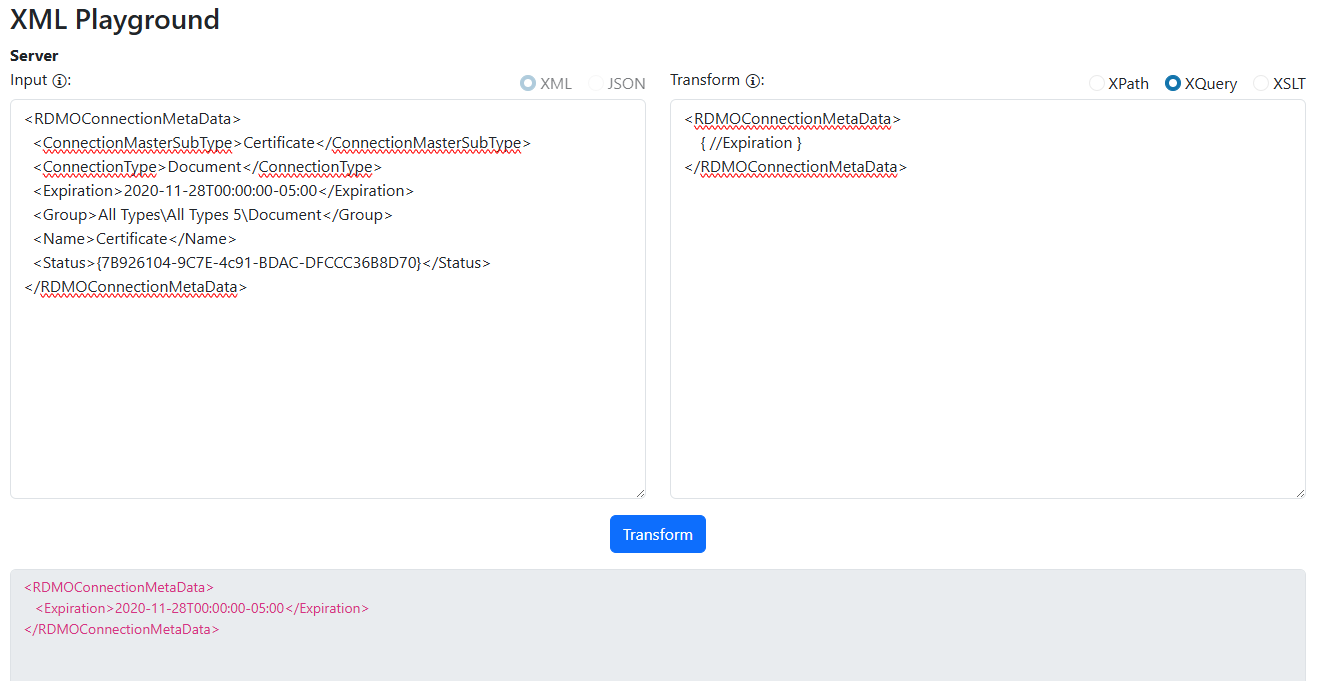
Or perhaps simply use a list of XPath's, and store a list of <Key, XPath> in the settings UI: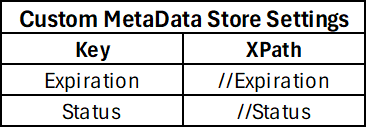
And translate those into the stored metadata column.
Personally I like the XQuery approach, but that tends to require adding another third party dependency to the stack since it's not natively supported in .NET (I like to use Saxon.NET). But If it comes down to XPath or XSLT, I'll take whatever approach y'all decide. Just my two cents.
1edcec75-bec0-4e1f-9732-72061c4b79a8.png
aaf462d5-ad49-47ee-be5f-bafe910df447.png