
Sime3000
Switch to free version
Thanks Maurice,
My current licensed installation is version 2020.3.13.0.
The database appears to be SQLlite (file ends in .db)
What are my options to migrate my configuration to the current free version? fwiw, the entries are primarily rdp, vmrc and web browser.
Switch to free version
What do I need to know to switch from the licensed version to the free version of RDM ? Do I just install the current free version over top of the licensed version ? Are all of my current folders and objects retained ?
Support for Android as target for RDM for WIndows
Hello,
Just wondering again if there is any news re managing Android devices from the RDM Windows client?
Thanks
Edge Web Browser ?
Hello David,
... at long last ....
When you install the RDM free beta and use it to connect to a website using the Edge browser, you are prompted to install Microsoft Edge WebView Runtime
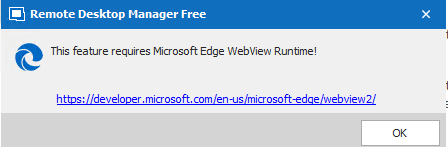
That link takes you to Webview2 - Microsoft Edge Developer . where there are a lot of different options for the download.
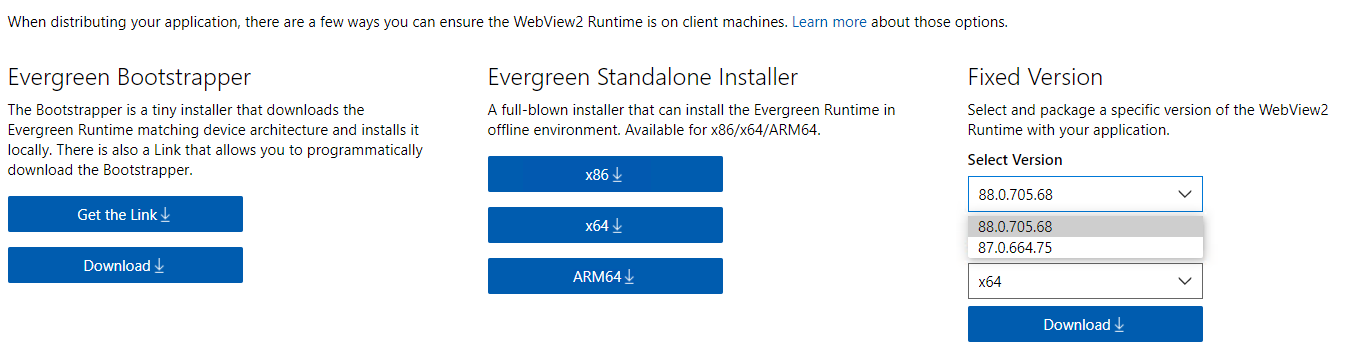
Can you explain exactly which options and version you want us to select for the download?
Thanks
Sam
uptime function in Dashboard
Still no uptime function after requesting it over a year ago ? :-(
Seems like it would be very easy to add here .......
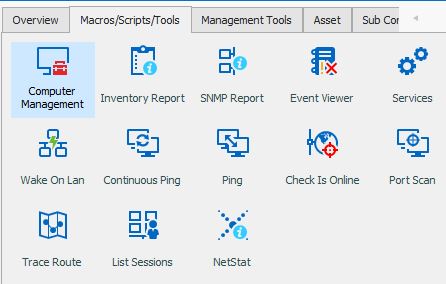
uptime function in Dashboard
Still no uptime function after requesting it over a year ago ? :-(
Seems like it would be very easy to add here .......
Beta updates remove shortcut from Windows taskbar
Thank you for your reply David. https://stackoverflow.com is a 3rd party website (not Microsoft) and as such can contain misinformation especially in their forums which are mostly just user opinion.
Do you have an official Microsoft reference stating that there is no possible way for a program to create a taskbar shortcut in any current version of Windows 10 ?
Please see the following Microsoft link which seems to say that it is possible to do this programmatically: https://docs.microsoft.com/en-us/uwp/api/windows.ui.shell.taskbarmanager?view=winrt-19041 Why cant a Taskbar checkbox be added to the Configure Shortcuts screen ?
Proxy Master configuration with proxy server
Hello Etienne,
I am now on version 2020.2.12.0 and this is still not working for me.
Still don't see how to specify a gateway server in the Proxy Gateway entry in the screen shot above.
Please advise,
Beta updates remove shortcut from Windows taskbar
Hello David,
This is still a problem in every release. The taskbar icon is removed and you have to recreate it.
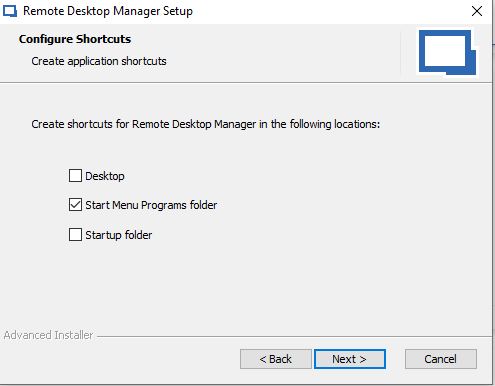
How about if in the setup wizard when you get to the Configure Shortcuts screen you add an option to create a taskbar shortcut in addition to the other 3 shortcuts you offer the installer??
Proxy Master configuration with proxy server
Etienne,
If the fix hasn't appeared in any release up to the current 2020.2.7.0 and you cant tell me when it will appear why would I "give it a try in order to see if everything works as intended" ?
Proxy Master configuration with proxy server
Hello Etienne,
I see that there have been 3 new updates since you posted that and its up to version 2020.2.7.0 but I don't see this as being fixed in the release notes. Did I miss it?
Proxy Master configuration with proxy server
Thank Etienne. What is the target release # and date for that version ?
Proxy Master configuration with proxy server
Hello Etienne. Can you please confirm the status of the fix ?
Proxy Master configuration with proxy server
Thanks for the update Etienne.
Proxy Master configuration with proxy server
Hello Etienne,
Yes, it works outside of RDM without issue. From my workstation (that is also running RDM) I connect to the proxy master server which allows us to open a proxy session from my workstation to the target Windows machine. So that all works and we have a large group of support people that do this on a daily basis. This is the first time we've tried this via RDM.
1) What is responsible for populating the "Proxy gateway" field in your screenshot so that RDM can use it?
2) Can the field be populated via RDM ? If so how?
Proxy Master configuration with proxy server
Hello Etienne,
That the point. This is the first time we've tried this.
1) What is responsible for populating that field so that RDM can use it?
2) Can the field be populated via RDM ? If so how?
Proxy Master configuration with proxy server
Hello Etienne,
That registry path exists but there is nothing in it. This is our first time trying this so we are not sure what populates this field. What we do normally to establish a proxy session is go to the web interface on our Proxy Master host, search for the target machine and connect to it. So I'm not sure what would populate this entry in the registry of the machine that RDM is running on. Maybe there are some basic instructions that we are missing?
Proxy Master configuration with proxy server
Thank you Etienne.
Proxy Master configuration with proxy server
Hello Etienne,
I am unable to share a recording due to security issues however I could arrange a remote session if necessary.
However the problem is straightforward and there would be really nothing to demonstrate, There is nothing in the "Proxy Gateway" field and nothing to pull down. My assumption is that this would be a reference to the Proxy Master proxy server but I don't see where that server gets configured in RDM and you cant add it to the pull-down. The RDM version is now 2020.1.16.0
Proxy Master configuration with proxy server
Yes, I'm referring to the drop-down in your screen shot.
RDM version is 2020.1.14.0
Thanks
Proxy Master configuration with proxy server
Trying to configure a connection in the current version of RDM using the Proxy Networks - Proxy Master Add On. The Add On has been enabled in RDM.
On the General tab I enter the target host name. I would like to enter the "Proxy Gateway" name but I don't see how to do it. It seems like there should be a pull down list under "Proxy gateway" but there are no items in that list and I don't see where you would configure a gateway value.
Am I missing something ?
Exchange Management Shell session from RDM
Hi Erica,
I could not get this to work with the PowerShell entry type and the After Connect Option - it complained that it couldn't find my PowerShell script even though I definitely pointed it to the right file. I was able to get it to work though using the "Embedded Script" option on the General Tab of the PowerShell entry type.
Thanks
Exchange Management Shell session from RDM
Looking for guidance in connecting a RDM PowerShell session to a local Microsoft Exchange (2016) server and invoke the ability to run Exchange Management Shell commands.
No issues setting up an RDM remote console session to the Exchange server but fumbling with the rest of the sequence and how best to automate it in RDM.
(Similar post here for connecting to Office 365 https://forum.devolutions.net/topic4978-connecting-to-office--powershell.aspx . Microsofts guidance re remote execution of Exchange commands https://docs.microsoft.com/en-us/powershell/exchange/exchange-server/connect-to-exchange-servers-using-remote-powershell?view=exchange-ps )
Thanks
Beta updates remove shortcut from Windows taskbar
Hi David,
I read through that info and in not sure that I'm following it 100%. Is it not possible during the setup wizard on the screen where you offer the user the option of creating a desktop shortcut, etc, to prompt the user if they want to add a taskbar shortcut, then add it ?
I didn't realize initially that RDM setup is uninstalling/installing RDM rather than performing an in-place upgrade of the current installation.
The last link you referenced doesn't seem to work (https://www.advancedinstaller.com/forums/viewtopic.php?f=2&t=26249&p=109998#p109998)
Beta updates remove shortcut from Windows taskbar
Hello,
This is still a problem with every new RDM update including 2019.2.21
Any news on getting this resolved ?
Thanks