Beta updates remove shortcut from Windows taskbar
I have RDM pinned to my taskbar.
I've noticed that for the last several updates the installer removes the shortcut from the taskbar and I have to re-add it after every installation. Can this behavior be rectified?
This occurs consistently on three different Windows 10 machines and is the only app I've ever seen that removes a user created taskbar entry during an upgrade.
All Comments (24)
Hello,
I opened a ticket to our engineering department.
The ticket number is RDMW-3390.
On a side note, which version of RDM are you running and what type of data source are you using?
Best regards,
Jeff Dagenais
Running the current release - 2019.1.41.0 . If I remember correctly this has been an issue with every 14.X version installation.
Hello,
Thank you for your quick reply, I have been able to reproduce this behavior by updating from RDM 14.1.3.0 to RDM 2019.1.41.
This information has been provided to our engineering department.
I will be in touch as soon as I will have an update on that matter.
Best regards,
James Lafleur
Thanks and to correct my last statement I should have said this has been an issue with every 2019.X version installation. Any 2019.X version listed in Change History that I have installed has removed the shortcut that I added to the taskbar,
Hello,
I've tried something. We will see if this fix the problem.
Regards
David Hervieux
Thanks David,
Not sure I follow your last post but I note that I just upgraded from 2019.1.41.0 to 2019.2.3.0 and it removed the RDM shortcut from the Windows taskbar again.
Hello,
I've tried to play with the installer setting with no success. Honestly I don't have a solution. Could you try to create shortcut to the executable in a completely different folder. Pin this one to make sure it's not removed by the installer during the update process. This could be a workaround in the meantime.
Regards
David Hervieux
Hi David,
I created a shortcut to the RDM executable in C:\temp and pinned that shortcut to the taskbar.
I then upgraded from 2019.2.3.0 to 2019.2.4.0 and the aforementioned shortcut in the taskbar was again removed during the update process.
Do you pin RDM 32 or 64 bits?
Regards
David Hervieux
64
Hello,
Could you try one last test? It's a strange one but I want to know the result. Could you try to create a batch file to invoke RDM and pin this batch file? You can change the icon to link it to RDM.
Regards
David Hervieux
Hi,
That worked but there is no surprise there.
Is the reported problem in ticket number RDMW-3390. going to be rectified at some point? Can you confirm that you are also seeing the behavior on Windows 10 with the current RDM builds ?
Thanks
Hello,
I still don't understand the problem and I will continue to investigate.
Regards
David Hervieux
Hello,
This is still an issue with every new RDM update. Any news on getting this issue resolved ?
Thanks
Hello,
This is still a problem with every new RDM update including 2019.2.21
Any news on getting this resolved ?
Thanks
Indeed. I tried to find a solution with no success. Windows is removing the shortcut when it detects that application is uninstalled. The installer removes the current installation to install the new one. I tried to play with the different settings in Advanced Installer.
You can tried to backup this folder and restore it after the installation:
%appdata%\Microsoft\Internet Explorer\Quick Launch\User Pinned\TaskBar
I'm really sorry but for now I unable to find any solution. I know that it might sound
You can see that Windows is restricting the pin action:
https://www.reddit.com/r/PowerShell/comments/6d8jo5/pin_to_taskbar_windows_10/
I even posted this morning on their forum and we will see what they answer
https://www.advancedinstaller.com/forums/viewtopic.php?f=2&t=26249&p=109998#p109998
Regards
David Hervieux
Hi David,
I read through that info and in not sure that I'm following it 100%. Is it not possible during the setup wizard on the screen where you offer the user the option of creating a desktop shortcut, etc, to prompt the user if they want to add a taskbar shortcut, then add it ?
I didn't realize initially that RDM setup is uninstalling/installing RDM rather than performing an in-place upgrade of the current installation.
The last link you referenced doesn't seem to work (https://www.advancedinstaller.com/forums/viewtopic.php?f=2&t=26249&p=109998#p109998)
Here is the link:
https://www.advancedinstaller.com/forums/viewtopic.php?t=26249
About the in place update, it's something that I've tried but it was unsuccessful as well.
David Hervieux
Hello David,
This is still a problem in every release. The taskbar icon is removed and you have to recreate it.
How about if in the setup wizard when you get to the Configure Shortcuts screen you add an option to create a taskbar shortcut in addition to the other 3 shortcuts you offer the installer??
There is no API to do that since Windows 10:
https://stackoverflow.com/questions/1968137/windows-7-taskbar-pin-or-unpin-program-links
David Hervieux
Thank you for your reply David. https://stackoverflow.com is a 3rd party website (not Microsoft) and as such can contain misinformation especially in their forums which are mostly just user opinion.
Do you have an official Microsoft reference stating that there is no possible way for a program to create a taskbar shortcut in any current version of Windows 10 ?
Please see the following Microsoft link which seems to say that it is possible to do this programmatically: https://docs.microsoft.com/en-us/uwp/api/windows.ui.shell.taskbarmanager?view=winrt-19041 Why cant a Taskbar checkbox be added to the Configure Shortcuts screen ? 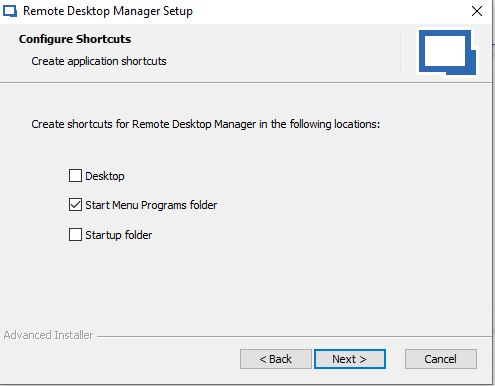
RDM.JPG
Hello,
This is an API in UWP and I doubt that the installer has access to that. UWP is a sandboxed framework. I will do some test and check if it's possible to leverage this API. Thank you for the link.
Regards
David Hervieux
I would love a fix to this as well. I opened a ticket with support. They referred me here.

Hi, just chiming in to say that I've been plagued by this issue for months on the latest stable version of Remote Desktop Manager Free.
Each time I update the program, I need to unpin the old broken shortcut from the taskbar, right click the start menu entry, and repin the entry to the taskbar.