
andreas05
Personal Vault with Different Offline Retention Than Standard Vaults
We need to limit the offline retention period for our vaults to 7 days.
For reasons that are completely unclear to me, this restriction also applies to the Personal Vault. The Personal Vault should be decoupled from this setting.
Employees store information in their Personal Vault such as the password required to access the other vaults.
Therefore, restricting the offline availability of the Personal Vault makes little sense.
Since it is a personal vault, it should be up to each individual user to decide how long it remains available offline.
best regards
Andreas
DVLS Version number in RDM
Hello Hubert,
this looks nice to me.
Thanks and regards
Andreas
DVLS Version number in RDM
Hello Hubert,
yes, this is a nice idea, to show it only, when you over over the green globe.
best regards
Andreas
DVLS Version number in RDM
Hello Devolutions Team,
Would it be possible to display the DVLS server version directly in RDM,
for example in the lower-right corner next to the globe/connection status icon?
Thank you for considering this enhancement.
Kind regards,
Andreas
Ability to Execute PowerShell Scripts on Selected Entries in RDM
Hello Team,
I would like to request a feature that allows PowerShell scripts to be executed directly against the entries currently selected in RDM.
For example, something along the lines of:
$Entries = Get-RDMSelectedEntries
foreach ($Entry in $Entries)
{
# Process selected entries
}
This would enable administrators to first select the desired entries through the GUI and then run a PowerShell script only on that specific selection.
Currently, many bulk modifications require searching through entire data sources, filtering entries manually, or building custom logic to identify the correct objects.
Working with the currently selected entries would be significantly easier, safer, and more efficient.
Typical use cases include:
Bulk updating connection properties
Modifying custom fields
Updating ZOC "Other Parameters"
Renaming or standardizing entries
Adjusting settings for a specific customer or device group
This feature would greatly reduce the risk of unintended changes because administrators could visually verify and select the target entries before executing a script.
While PowerShell already provides powerful automation capabilities, direct access to the current GUI selection would make these capabilities much more practical for day-to-day administration and bulk-editing tasks.
Thank you for considering this enhancement.
Kind regards,
Anfdreas
Action Icons without Text
Hello Team,
Please give us the option to display the icons in the action bar without text labels.
Like This:

I am aware that the action bar can be resized until only icons are shown. However, in that mode, the icons become very small and are difficult to use on large displays.

A much better solution would be to allow users to display the icons without text while keeping the larger icon size that is normally used when the labels are visible.
Ideally, the icon size should even be configurable, allowing each user to choose the size that best fits their screen and personal preferences.
This would improve usability, make better use of available screen space, and provide a more modern and flexible user experience.
Kind regards,
Andreas
Remote Windows Services
Hello Michaël,
the Performance profling says the same.
[21:51:38.645546] - Size is different... Current: {Width=421, Height=1172} Expected: {Width=422, Height=1172}
[21:51:38.685745] - Silent: Devolutions.NetworkManagement.WinRM.WinRMLoginException: Invalid username or password, or access denied.
at Devolutions.NetworkManagement.WinRM.Transports.WinRmTransport.SendHttp(XmlElement soapRequest)
at Devolutions.NetworkManagement.WinRM.Transports.WinRmTransport.SendHttp(XmlElement soapRequest)
at Devolutions.NetworkManagement.WinRM.Transports.WinRmTransport.OpenShell(G...
[21:51:59.733328] - Silent: System.Net.Sockets.SocketException (10060): Ein Verbindungsversuch ist fehlgeschlagen, da die Gegenstelle nach einer bestimmten Zeitspanne nicht richtig reagiert hat, oder die hergestellte Verbindung war fehlerhaft, da der verbundene Host nicht reagiert hat.
at Devolutions.NetworkManagement.WinRM.WinRMHttpClient.InitConnection(Uri uri)
at Devolutions.NetworkManagement.WinRM.Tran...
[21:51:59.743526] - Silent: Devolutions.NetworkManagement.WinRM.WinRMLoginException: Invalid username or password, or access denied.
at Devolutions.RemoteDesktopManager.Business.PowerShellClient.CreateCustomPowerShellClient(String host, String login, String password, String domain, String webSocketProxyUrl, Boolean useSSL)
at Devolutions.RemoteDesktopManager.Business.PowerShellClient.TryCreatePowerShellCli...
[21:52:27.256163] - Size is different... Current: {Width=631, Height=1172} Expected: {Width=630, Height=1172}
[21:52:58.706173] - Silent: Nager.PublicSuffix.Exceptions.ParseException: Cannot parse domain to an uri
at Nager.PublicSuffix.DomainParser.Parse(String fullyQualifiedDomainName)
at Devolutions.RemoteDesktopManager.Business.HttpBrowserLinker.IsUrlMatching(String urlRequest, String sessionUrl, BrowserExtensionLinkerCompareType browserExtensionLinkerCompareType, String mainRegex)
[21:52:58.716025] - Silent: Nager.PublicSuffix.Exceptions.ParseException: Cannot parse domain to an uri
at Nager.PublicSuffix.DomainParser.Parse(String fullyQualifiedDomainName)
at Devolutions.RemoteDesktopManager.Business.HttpBrowserLinker.IsUrlMatching(String urlRequest, String sessionUrl, BrowserExtensionLinkerCompareType browserExtensionLinkerCompareType, String mainRegex)
But the User ist the local Administrator.
The same with a Domain Admin.
And when I use a RDP Session, only with an username, the "Remote Service" don't ask for the Password.
best regards
Andreas
Remote Windows Services
Hello,
Thanks for keeping us up to date. Since this already works for you we won't create a ticket to add a new entry type for this.
If we see more interest by our users for this in the future we will revisit this case and create a ticket for a new entry type that works directly instead of through the tools of RDP.
Best Regards,
@Michael Beaudin
Hello Michael,
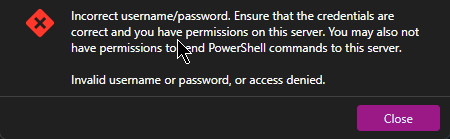
Would it be possible to receive more detailed error messages when an operation fails?
For example, I am trying to query the Remote Services.
However, I am unable to do so either from an RDP session using a local Administrator account or from an RDP session using a Domain Administrator account.
In addition, when using the Domain Administrator account, I do not even receive a credential prompt that would allow me to authenticate with different credentials.
Could you please provide more detailed information about the reason for the failure?
At the moment, the error message does not provide enough detail to determine whether the issue is related to permissions, authentication, network connectivity, UAC, or another underlying cause.
A more descriptive error message would make troubleshooting much easier.
Kind regards,
Andreas
Search keyboard shortcut not working after updating to 2026.1.11.0 on windows
Hi Jeff,
it is now working for me as well.
At first, we thought it would not work with the new versions either, but that was due to the “magnet” being turned off.
best regards
Andreas
Search keyboard shortcut not working after updating to 2026.1.11.0 on windows
Hello Devolutions,
I've the same problem.
Also in 2026.1.11.0 to 2026.1.14.0.
No F2 to rename, no ctrl-d to duplicate.
best regards
Andreas
Blocking updates with a higher version than the first two digits of the version number.
Hello Hubert,
yes, this looks good.
best regards
Andreas
Blocking updates with a higher version than the first two digits of the version number.
Hello Hubert,
yes, we use version management.
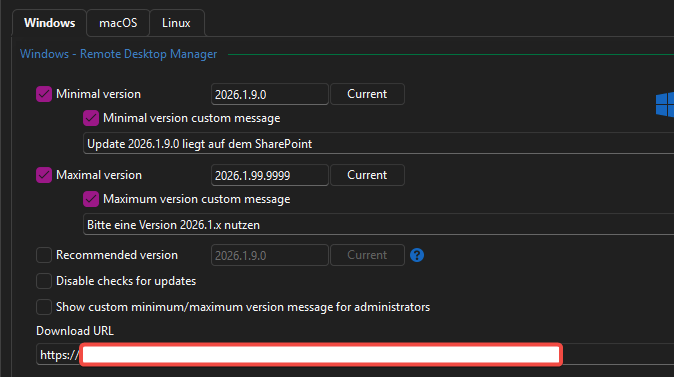
But this works only when the user goes online. But the users works often offline.
And the RDM/DVLS doesen't run in the same domain as the pcs. We have no control over the computers. Some of them even belong to our system partners.
best regards
Andreas
Blocking updates with a higher version than the first two digits of the version number.
Hello,
since it is not possible to access a DVLS if the first two numbers of the version do not match, I would like to suggest the following:
When using a DVLS, there should be an option to define in RDM the maximum version for the first two numbers.
Example:
DVLS is at 2025.3.x
RDM is at version 2025.3.x.
If RDM is offline, it is offered version 2026.1.x as an update.
This must be prevented. When an RDM connects to DVLS, the version number 2025.3.x has to be transmitted and stored.
RDM should then only accept update versions 2025.3.x.
Only when DVLS is updated to 2026.1 and RDM connects the next time should it receive the new version number and from then on be allowed to install any 2026.1.x version.
A 2026.2.x version should also only be offered once the server runs that version.
Since we run our DVLS in a highly secure environment, users only connect to the environment and DVLS via VPN from time to time.
RDM therefore always starts offline. In our case, offline vaults are only retained for 7 days.
Best regards
Andreas
Password Template with Comment
Hello Devolutions,
can we have a comment/description field in the Password Templates entries.
Thanks and best regards
Andreas
Update to 2024.1.25.0, same problem like the update to 2024.1.24.0
Hello,
2024.1.27.0 fix the problem.
"Fixed offline not loading dashboard"
best regards
Andreas
Help with update
Thanks for the link, but it ask me for an account and doesn't let me in, even if I create a new account.
my old account also didn't work. And with a new one, no access :-(
Update to 2024.1.25.0, same problem like the update to 2024.1.24.0
We have more and more User.
After the update to 2024.0.25.0 is the Dashboard empty.
Uninstall and install 2024.0.23.0 works.
We have an open case and wait for an answer.
best regards
Andreas
Update to 2024.1.25.0, same problem like the update to 2024.1.24.0
Hello,
You could try to install the latest version from the zip file side by side. You will need to export/import the data source configuration but will be able to have both installed. I'm asking this because I'm unable to reproduce it.
Regards
Hello David,
in the portable version, it works.
On .24. and .25.
Only in the installed version, we have the missing dashboard.
Something must be changed between .23. and .24.
When we uninstall .24. or .25. and reinstall .23., it works.
But it's an open case and Gerhard is working on it.
best regards
Andreas
Update to 2024.1.25.0, same problem like the update to 2024.1.24.0
Hello David,
I sent an e-mail to the support.
And we can't see anything in the moment.
We all must go back to 2024.1.23.0, then we must work.
best regards
Andreas
Update to 2024.1.25.0, same problem like the update to 2024.1.24.0
Hello Devolutions,
what is the problem with your last updates ?
Every update up to 2024.1.23.0 worked great.
2024.1.24.0 Update, Empty RDM, no Dashboard.
You then withdrew the update.
Today the update to 2024.1.25.0.
The same problem.
On my rdm and on all coworker they updated the rdm.
uninstall and install 2024.1.23.0 and it works.
best regards
Andreas
ConsoleZ with Arguments
Hello Richard,
ok, this works.
But, why you have the other option, when it don't work :-)
Thanks for your help.
Best regards
Andreas
ConsoleZ with Arguments
Hello Richard,
I get this as output :
$USERNAME$:$PASSWORD$ $COMPUTER_IP$
And my settings look different.

Best regards
Andreas
ConsoleZ with Arguments
RDM 2022.2.26.0
DVLS 2022.2.11.0
Hello Support,
we have a Tool to access Extreme Networks Switche.
ACLI. It's a perl Tool based on ConsoleZ.
http://www.oranda.fr/ACLI-terminal/
You have no AddOn for ConsoleZ and now we want to use the Command line (Macro/Script/Tool) to execute this.
Normally we call the Tool like this:
"C:\Program Files\ACLI\acligui.bat" -u username:password ipAddress
The Entry for this ACLI is a entry under a Folder (Type Device)
In this Folder we have the $COMPUTER_IP$ and the username and Password.
In Subentries ssh,web, zoc it works fine.
How we can use the Folder Credentials and IP in this CLI Entry ?
Second: This entry works only with "Run as Administrator". Otherwise it didn't finde the folder. why ?
Best regards
Andreas
"The URL is not valid" when you use the variable $COMPUTER_IP$ in web connection
Hello Support,
we use many variables like $CUSTOMER_NAME$, $COMPUTER_NAME$ and $COMPUTER_IP$.
But when you use $COMPUTER_IP$ in a web connection like "https://$COMPUTER_IP$", the error message "The URL is not valid" comes up.
The connection works, but this message is a little bit confusing to our users.
Can you please fix this ?
Kind regards
Andreas
You push RDM update for 2022.2.12 but you don't have the GA for the 2022.2 DVLS. Whats wrong ?
Now it seems, a GA 2022.2 is ready.
I'm wrong.
There is no update for DVLS to 2022.2.
When can we expect this version GA ?
Andreas