Remote Windows Services
2 votes

it would be really nice if we got a new type of Entry to manage remote Windows Servers Services, instead of opening that server via RDP and manage its service within the session,
All Comments (9)
Hello,
Good news - this is already possible! 😎
You can find this section in the Macros/Scripts/Tools Dashboard of the respective session.
Regards,
Min
Hello,
Good news - this is already possible! 😎
You can find this section in the Macros/Scripts/Tools Dashboard of the respective session.
Regards,
Min
@Min Destens
thanks for your interest, but what i'm looking for is to manage services for Remote Server/PC
Hello,
I just want to confirm the behavior of what you want with you.
If you follow the following steps:
- Create a working RDP
- Go in Macro/Script/Tools in the dashboard
- Click on the remote tools such as "Remote service", "Terminal Services console" and "Remote Task Manager" is it doing everything you want from the entry? I assume you are mostly interested in the "Remote service" functionnality?
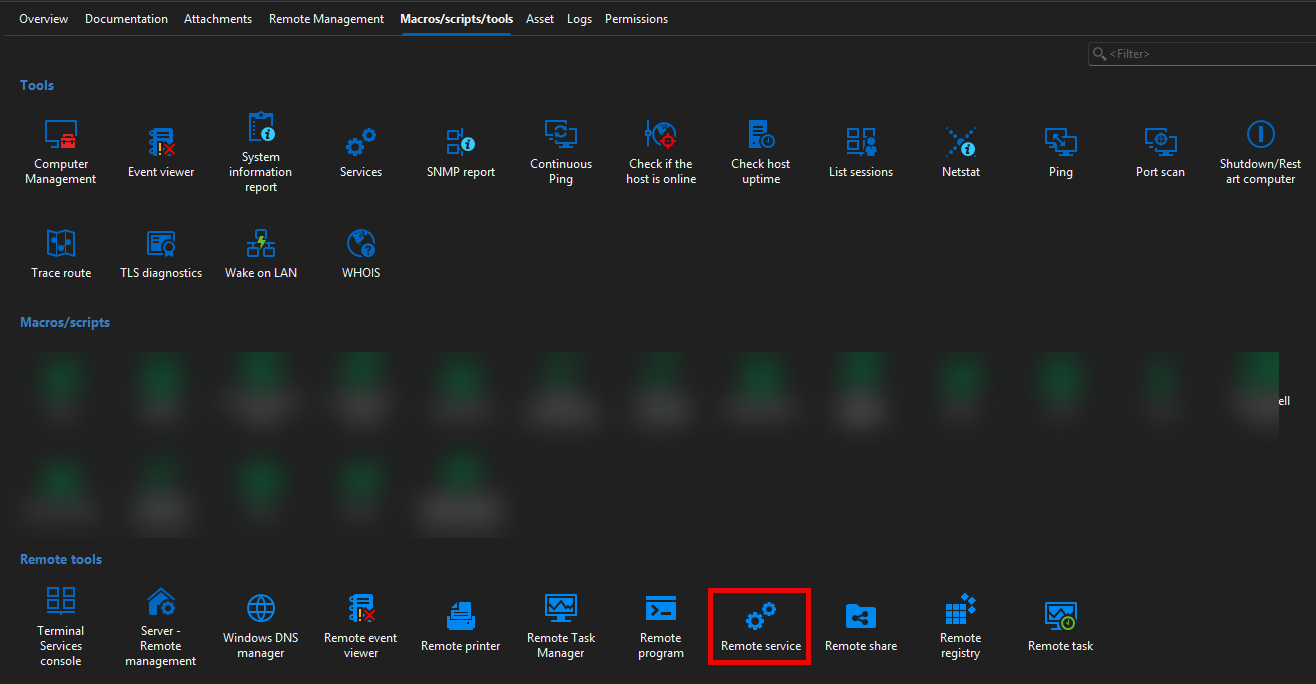
If that works as you want it to can I understand it that you have certain PCs that you will never want to RDP to so you want us to create an entry that does exactly what "Remote service" does in this section of our RDP entries but instead of being in the macro section it would be the main "Open session" action?
Best Regards,
Michaël Beaudin
9a989988-5f92-418d-a40f-e9294368addc.png
this is great , its fine , i thought its should be in a somehow seperate way/item, but this is fine ,
yes you are correct , i'll never RDP to that Server, i just want to check services remoteley
Hello,
Thanks for keeping us up to date. Since this already works for you we won't create a ticket to add a new entry type for this.
If we see more interest by our users for this in the future we will revisit this case and create a ticket for a new entry type that works directly instead of through the tools of RDP.
Best Regards,
Michaël Beaudin
Hello,
Thanks for keeping us up to date. Since this already works for you we won't create a ticket to add a new entry type for this.
If we see more interest by our users for this in the future we will revisit this case and create a ticket for a new entry type that works directly instead of through the tools of RDP.
Best Regards,
@Michael Beaudin
Hello Michael,
Would it be possible to receive more detailed error messages when an operation fails?
For example, I am trying to query the Remote Services.
However, I am unable to do so either from an RDP session using a local Administrator account or from an RDP session using a Domain Administrator account.
In addition, when using the Domain Administrator account, I do not even receive a credential prompt that would allow me to authenticate with different credentials.
Could you please provide more detailed information about the reason for the failure?
At the moment, the error message does not provide enough detail to determine whether the issue is related to permissions, authentication, network connectivity, UAC, or another underlying cause.
A more descriptive error message would make troubleshooting much easier.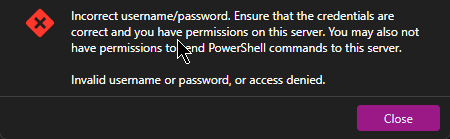
Kind regards,
Andreas
Senior Network Consultant
Ostertag DeTeWe GmbH
grafik.png
Hello,
Could you try to
- Open Help -> Performance profling and set the level to 1 then hit the "clear" button and keep the profiler open on the side.
- Do the action that causes your error
- Check the profiler to see if any errors appeared. If they did you can let us know. Also, go in Help -> Application logs and check if any errors were logged there as they could provide more clues
There may end up being nothing caught there but we sometimes catch some errors in those places that can help debug. And if that's the case we may be able to use those errors to do a more targetted error message for your case.
If nothing comes up let us know as well as we'll have to see a bit more blindly if we can improve the error messaging with whatever return we get which can often be quite limited.
Best Regards
Michaël Beaudin
Hello Michaël,
the Performance profling says the same.
[21:51:38.645546] - Size is different... Current: {Width=421, Height=1172} Expected: {Width=422, Height=1172}
[21:51:38.685745] - Silent: Devolutions.NetworkManagement.WinRM.WinRMLoginException: Invalid username or password, or access denied.
at Devolutions.NetworkManagement.WinRM.Transports.WinRmTransport.SendHttp(XmlElement soapRequest)
at Devolutions.NetworkManagement.WinRM.Transports.WinRmTransport.SendHttp(XmlElement soapRequest)
at Devolutions.NetworkManagement.WinRM.Transports.WinRmTransport.OpenShell(G...
[21:51:59.733328] - Silent: System.Net.Sockets.SocketException (10060): Ein Verbindungsversuch ist fehlgeschlagen, da die Gegenstelle nach einer bestimmten Zeitspanne nicht richtig reagiert hat, oder die hergestellte Verbindung war fehlerhaft, da der verbundene Host nicht reagiert hat.
at Devolutions.NetworkManagement.WinRM.WinRMHttpClient.InitConnection(Uri uri)
at Devolutions.NetworkManagement.WinRM.Tran...
[21:51:59.743526] - Silent: Devolutions.NetworkManagement.WinRM.WinRMLoginException: Invalid username or password, or access denied.
at Devolutions.RemoteDesktopManager.Business.PowerShellClient.CreateCustomPowerShellClient(String host, String login, String password, String domain, String webSocketProxyUrl, Boolean useSSL)
at Devolutions.RemoteDesktopManager.Business.PowerShellClient.TryCreatePowerShellCli...
[21:52:27.256163] - Size is different... Current: {Width=631, Height=1172} Expected: {Width=630, Height=1172}
[21:52:58.706173] - Silent: Nager.PublicSuffix.Exceptions.ParseException: Cannot parse domain to an uri
at Nager.PublicSuffix.DomainParser.Parse(String fullyQualifiedDomainName)
at Devolutions.RemoteDesktopManager.Business.HttpBrowserLinker.IsUrlMatching(String urlRequest, String sessionUrl, BrowserExtensionLinkerCompareType browserExtensionLinkerCompareType, String mainRegex)
[21:52:58.716025] - Silent: Nager.PublicSuffix.Exceptions.ParseException: Cannot parse domain to an uri
at Nager.PublicSuffix.DomainParser.Parse(String fullyQualifiedDomainName)
at Devolutions.RemoteDesktopManager.Business.HttpBrowserLinker.IsUrlMatching(String urlRequest, String sessionUrl, BrowserExtensionLinkerCompareType browserExtensionLinkerCompareType, String mainRegex)
But the User ist the local Administrator.
The same with a Domain Admin.
And when I use a RDP Session, only with an username, the "Remote Service" don't ask for the Password.
best regards
Andreas
Senior Network Consultant
Ostertag DeTeWe GmbH
Hello,
Thanks for this. I've opened a ticket and we'll see if we can improve the error message.
We'll keep you updated on any progress.
Best Regards,
Michaël Beaudin