Blocking updates with a higher version than the first two digits of the version number.
Blocking updates with a higher version than the first two digits of the version number.
1 vote

Hello,
since it is not possible to access a DVLS if the first two numbers of the version do not match, I would like to suggest the following:
When using a DVLS, there should be an option to define in RDM the maximum version for the first two numbers.
Example:
DVLS is at 2025.3.x
RDM is at version 2025.3.x.
If RDM is offline, it is offered version 2026.1.x as an update.
This must be prevented. When an RDM connects to DVLS, the version number 2025.3.x has to be transmitted and stored.
RDM should then only accept update versions 2025.3.x.
Only when DVLS is updated to 2026.1 and RDM connects the next time should it receive the new version number and from then on be allowed to install any 2026.1.x version.
A 2026.2.x version should also only be offered once the server runs that version.
Since we run our DVLS in a highly secure environment, users only connect to the environment and DVLS via VPN from time to time.
RDM therefore always starts offline. In our case, offline vaults are only retained for 7 days.
Best regards
Andreas
Senior Network Consultant
Ostertag DeTeWe GmbH
All Comments (5)
Hello Andreas,
Thank you for the suggestion.
First, I want to say that what you're looking for doesn't already exist, and I think it would be a great improvement, so we will be opening an internal ticket for this.
I wanted to ask if you've used the version management settings located in DVLS to possibly improve the experience for your users? You can find them in Administration > System settings > Version management: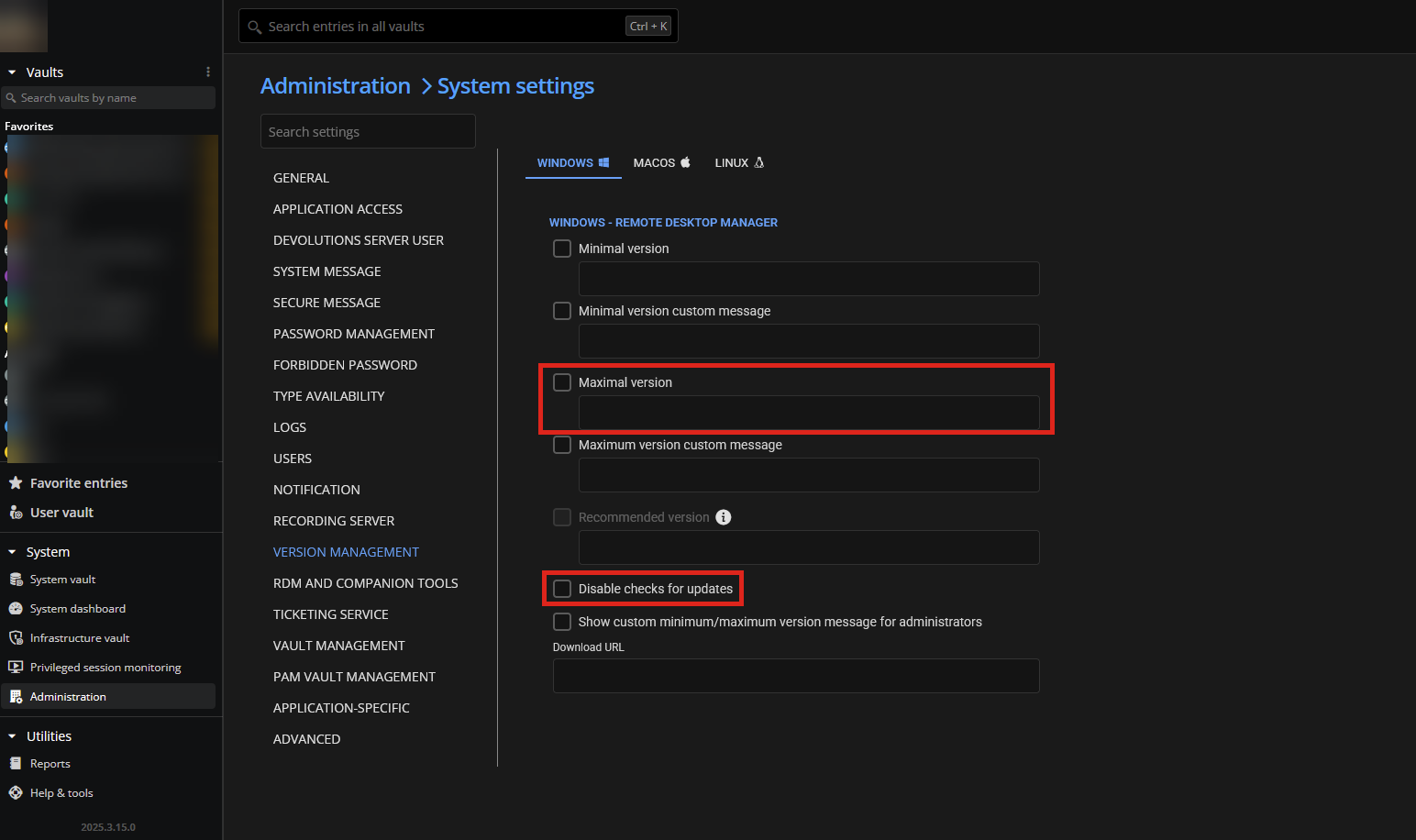
From there, you can configure a maximal (or minimal) allowed version for each platform. You can also disable update checks for the clients, so your users don't try to update RDM by themselves. This works well when you're pushing application updates through something like Intune or SCCM.
Maybe, in the mean time, this is something you could configure if it would work well in your environment and with your software distribution methods.
As for the requested feature, I would see it working in tandem with these minimal/maximal version settings, where RDM would never try to automatically update to a version outside of that range. What do you think?
Regards,
Hubert Mireault
e0470873-7d94-4be3-afe7-a00f475a61ae.png
Hello Hubert,
yes, we use version management.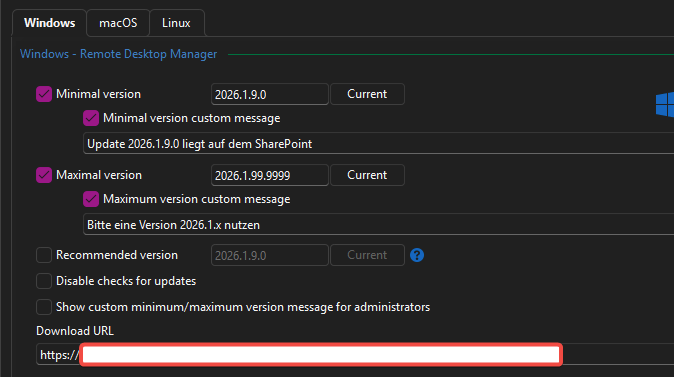
But this works only when the user goes online. But the users works often offline.
And the RDM/DVLS doesen't run in the same domain as the pcs. We have no control over the computers. Some of them even belong to our system partners.
best regards
Andreas
Senior Network Consultant
Ostertag DeTeWe GmbH
grafik.png
Thank you for the clarification, I honestly thought this worked even while offline. It feels like it should and it's an oversight of the feature. When you connect to the data source and it generates the offline files, we keep the system settings in there as well, so this information is definitely available to the application when you then go offline.
We'll have to analyze this and see if we could improve the behavior. So, I would see two different improvements/changes here:
- When offline, take into account the version management settings to properly forbid access if you're outside of the allowed range
- When checking for updates in RDM, if you're connected to a DVLS data source, don't prompt to update if the server's major version (the first two numbers) are below the suggested RDM update version
I think this should cover your scenario. Let me know what you think.
Regards,
Hubert Mireault
Hello Hubert,
yes, this looks good.
best regards
Andreas
Senior Network Consultant
Ostertag DeTeWe GmbH
Perfect, I've opened a ticket on our end so we can improve this.
Regards,
Hubert Mireault