
hoppe
duplicate entry fails with "you don't have edit permission"
Hi,
i have some entries that are linked to two folders, on one folder i have full access, on the other folder i have only read access.
When i try to duplicate an entry i edit the folder in the "add copy" form, select only the folder i have write access to and try to save that new entry, but then i get the "you don't have permission" error
i can create new entries in that folder without error.
why does the copied entry check the permission of the source entry?
#edit 1#
copying the entry with an user that has full access to both folders works
#edit 2#
the problem only happens with RDM 2026.1.15, using the web interface of Devolution Server 2026.1.12 works
move folder to different vault fails
Hello Samuel,
these moves are from one specific vault to another specific vault
these are old entries that are not longer used, but i do not want to delete, and i want to reduce the number of items in the vault.
move folder to different vault fails
Hi Samuel,
just updated to 2025.3.25, still not working.
This test was a single credential entry (username and password)
The previous tests with the folder contained credentials and RDP session
move folder to different vault fails
Hi,
i'm trying to move a folder with some entries in it to a different vault.
RDM 2025.3.21.0, Logged in as admin user, Datasource Devolutions Server 2025.3.8
select a folder, click on menu -> edit -> move to vault, select target vault, click on transfer, ab boix "transfering" is shown, then the error is shown
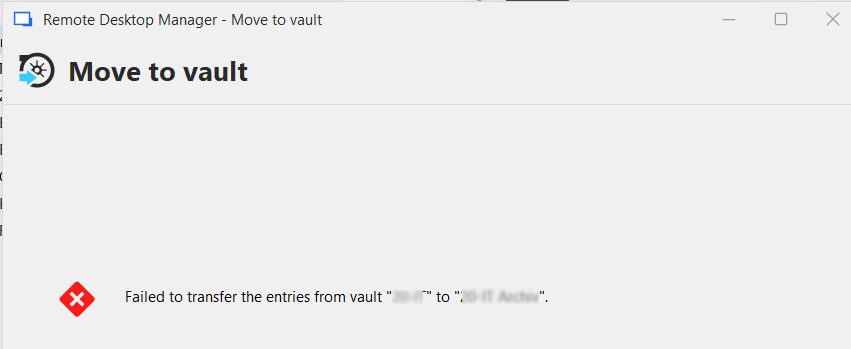
same operation in the Devolutions web frontend is working...
SBOM download link outdated
Hi,
the download link for the SBOM is pointing to an old version of the file...

Connected user list - show RDM Version number
The connected user list shows RDM as a login source with client IP.
Would be nice to see the RDM version, to tell from the server side if the clients needs an update.
Some of our clients are managed and cannot update themselves, or update feature of RDM is disabled for other reasons (like no internet access)
Currently running DVLS 2025.1.9.0
Connect to Devolution Server via Application identities
Hello Patrick,
could you post that override script you mentioned above?
We recently had to do an update to DVLS 2025, and i'm trying to get everything running again...
Right now when i set up a connection in RDM with TenantId und Secret, it redirects me to the browser to log on
(Authentication modes Domain and Devolutions Server, with domain as primary method)
Feature Request for Smart Folder
Hello Hubert,
thank you for the feedback. Would be a nice feature to have, especially if one where able to manage permissions with it.
Like a group gets only read permission to a smart folder, and therefore can read or use the credentials, but not change it.
And one last question : support in the powershell module would also be great. Modifying a smart folder is one part, accessing the search result of a smart folder would be really great.
Regards
Andreas
Advanced search in RDM 2025.1
Search options, tags included :

Advanced search in RDM 2025.1
Hello Samuel,
yes DVLS was updated to 2025.1.4.
Screenshots both were taken the updated server.
I'll check with the colleagues,,,
Advanced search in RDM 2025.1
Hi,
just updated to RDM 2025.1.29, and the advanced search for tags is not working :
This is what it looks like in 2024.3.31 (Portable)

In 2025.1.29 the tag selection is empty :

same DVLS data source
Feature Request for Smart Folder
Hi,
can the smart folders be used in Devolutions Server in the web gui or in the workspace app?
Or is this something restricted to RDM ?
Because i have created a a smart folder in RDM and can see it in the web gui, but there are no entries shown in the web gui, only in RDM
Devolutions Password Manager browser extention
Hello Olivier,
ok that is a little bit hard to find if you don't know it, but yes that is exactly what i was looking for.
Thank you very much.
Devolutions Password Manager browser extention
Hello Olivier,
datasource is a Devolutions Server (v2024.3.10.0).
Do you mean that if a Website entry is linked to specific credentials, it should adopt the username format from the linked credentials rather than the format set in the Website entry itself or the other way around?
Yes, the website entries are linked to credential entries. I can change the format in the credential entry, but that is not adopted.
But i don't see a way to change that in the website entry?
Devolutions Password Manager browser extention
update : Workspace extension only works when i set the username field in the duplicated credentials entry to domain\username, the advanced setting seems not to be used
Devolutions Password Manager browser extention
Hello,
I would like to see an option to change the username format when using a credentials entry.
Credentials entry has the advanced option to change username format when copying, like username only, domain\username, user@domain etc.
When i use the browser extension it takes the username as configured in the advanced settings, but on some sites i need just the username, on other sites the login is like domain\username.
Would be a nice feature to have the configuration of the username with the entry that uses it, not only with the one that stores it.
As a workaround i tried to duplicate the credentials, one with format username, the other with format domain\username, but that does not seem to be working
VMware / Omnissa Horizon Client
Hi Samuel,
yes that works.
Thank you.
VMware / Omnissa Horizon Client
Hello,
with the latest update 8.14 the Horizon Client is renamed from VMware to Omnissa.
Changing the installation path in RDM is not working, because it is looking for a vmware-view.exe, but in the new version the executable is named horizon-client.exe now.
get rdm user info by powershell
Hello Patrick,
thanks for your reply, i got it working with the Get-DPSUser call.
I have other scripts with Get-RDMxxx calls, should i start switching them to Get-DPSxxx ?
get rdm user info by powershell
Hello, i'm trying to get some user information with the powershell module
DPS Instane 2024.3.11.0
Devolutions.Powershell 2024.3.11
PS 7.5.0
$user = Get-RDMUser -Name 'xxx'
$user.HasPrivateVault
$user.UserInfo.UserAccount.HasPrivateVault
both show false, but user definitely has a private vault
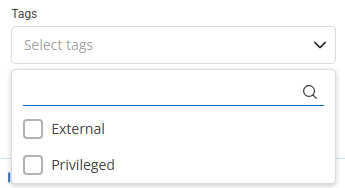
And where to find an assigned tag like "External" ?
separate web and database backup
Hello,
i would like to see a modification of the backup routine.
The web backup is an archive of the web root folder.
That content only changes when you update the site.
Only thing that changes between updates id the APP_Data sub folder with the logs, and maybe the App.config file?
So maybe this could be split in a backup of the "static" web content, and the "dynamic" configuration and logging.
An other problem is that the web backup is created in the system temp folder, and therefore inherits the permissions of that folder when it is moved to the specified backup location. That is a problem when a non privileged user needs to access or move the files.
It would also be nice to have different schedules to do a database backup more frequent than the web backup.
and maybe a pre / post script option to do things before or after the backup.
DVLS web backup
Hello,
i have some questions about the backup manager, or maybe a feature request :
This is a archive of the web root folder. Only thing that changes between updates is the App_Data sub folder, and maybe the App.config.
So every backup is about 300MB, while less than 1MB is changed...
Is there a way to separate that ?
Take a full backup after an Update, and do a backup of the modified files on the repeated backup ?
Or have different schedules for database and web ?
An other thing i am struggling with right now is the folders that are being used.
The ZIP file is created in c:\windows\temp, and then moved to the destination folder.
This way the file inherits the permissions of the temp folder, with is the expected NTFS behavior.
But i want to copy the files to an other system, and use an account with limited permissions for that job, who can not access the web backups.
Easiest would be to copy the archive from temp to destination, and then delete in temp
Windows warns me to change permission on c:\windows\temp, so is there a way to use a different temp folder for web backup?
Microsoft Authentication
Hi, another problem with the new server.
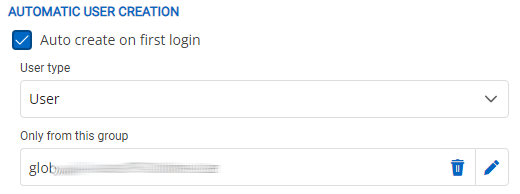
Authentication is set up via Microsoft Authentication, which is working.
But i want to limit the users who can log on to the server.
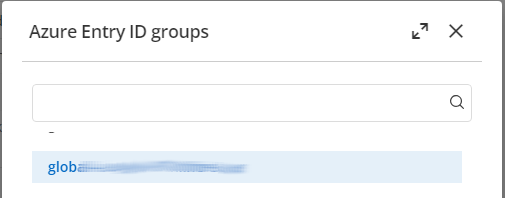
I think this would be the way :
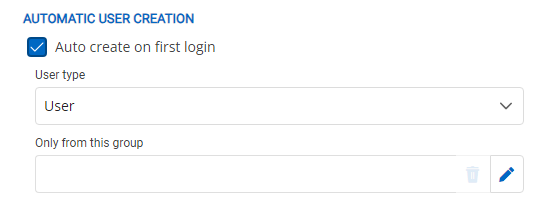
The search dialog does not work correctly.
When i start to type no entry is listed, when i paste the complete name of the group the entry is not displayed
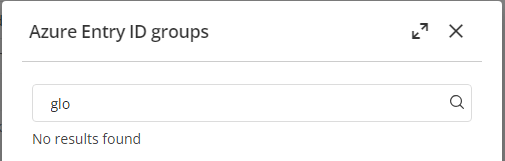
when i clear the search box and scroll down in the list i can select a group
warning message 'appettings.json' file on update to 2024.3.8.0
Hi, i'm trying to set up a new DVLS server
running so far, but having some problems with scheduled backups.
Now the console notified me of a new update, and when installing this i got this message
Setting rights on appettings.json file...
Some or all identity references could not be translated.
Done

There is a file appsettings.json (with an additional "s") in the web root directory...
where does this name come from, nothing i could change during setup...
one problem with scheduled backups : every time i open the settings, the black disk icon is highlighted, as if there are changes. and leaving the page ask if changes are to be saved, even if nothing is changed.
manual backup from the page works, after saving the non existent changes...
Rest API Documentation
tested some more with powershell
looks like setting the content type in the header is not enough, i had to add the -ContentType parameter to the Invoke-Restmethod
Invoke-RestMethod -Uri $UrlBuilder.Uri.AbsoluteUri -Method Post -Headers $headers -Body $body -ContentType $JsonContentType