
Nicolas Girot
EntraID App Proxy config not working with RDM
Excellent! I'm glad to hear that it's working on your end.
I will invite the person in charge of documentation to review the thread and add the missing details.
Thank you for your valuable feedback.
Nicolas
EntraID App Proxy config not working with RDM
Thank you for the detail Joe!
Regarding your four points mentioned above,
Indeed, however, all the modifications need to be applied for compatibility.
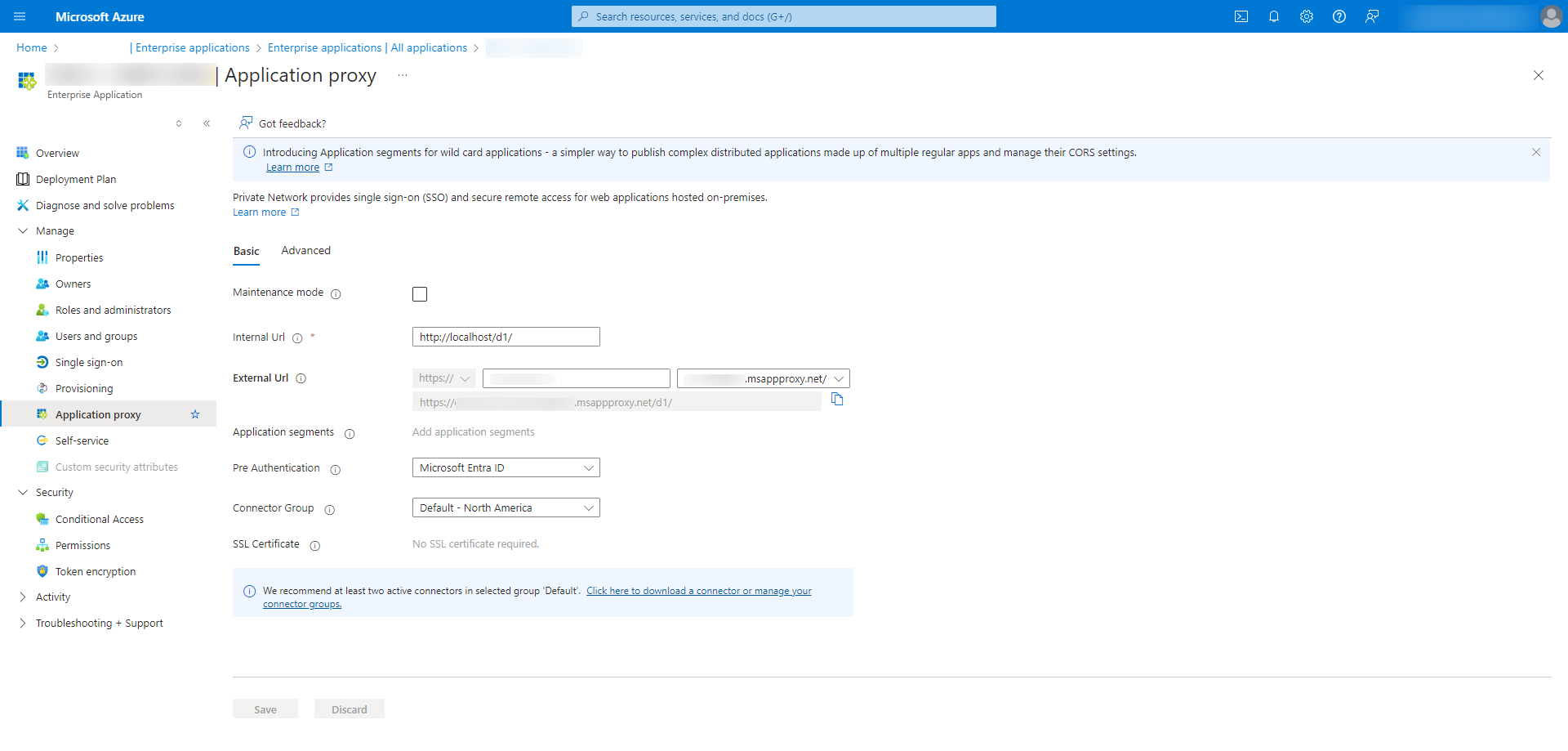
For the access URI, the important thing is that the URL used to reach the DVLS server is there. So if the URL entered in the browser is https://dvls-customer.msappproxy.net/dvls, then it must indeed be present in the accessUri list. If you also plan to connect to your DVLS via, for example, http://localhost/dvls, then it must also be part of the list.
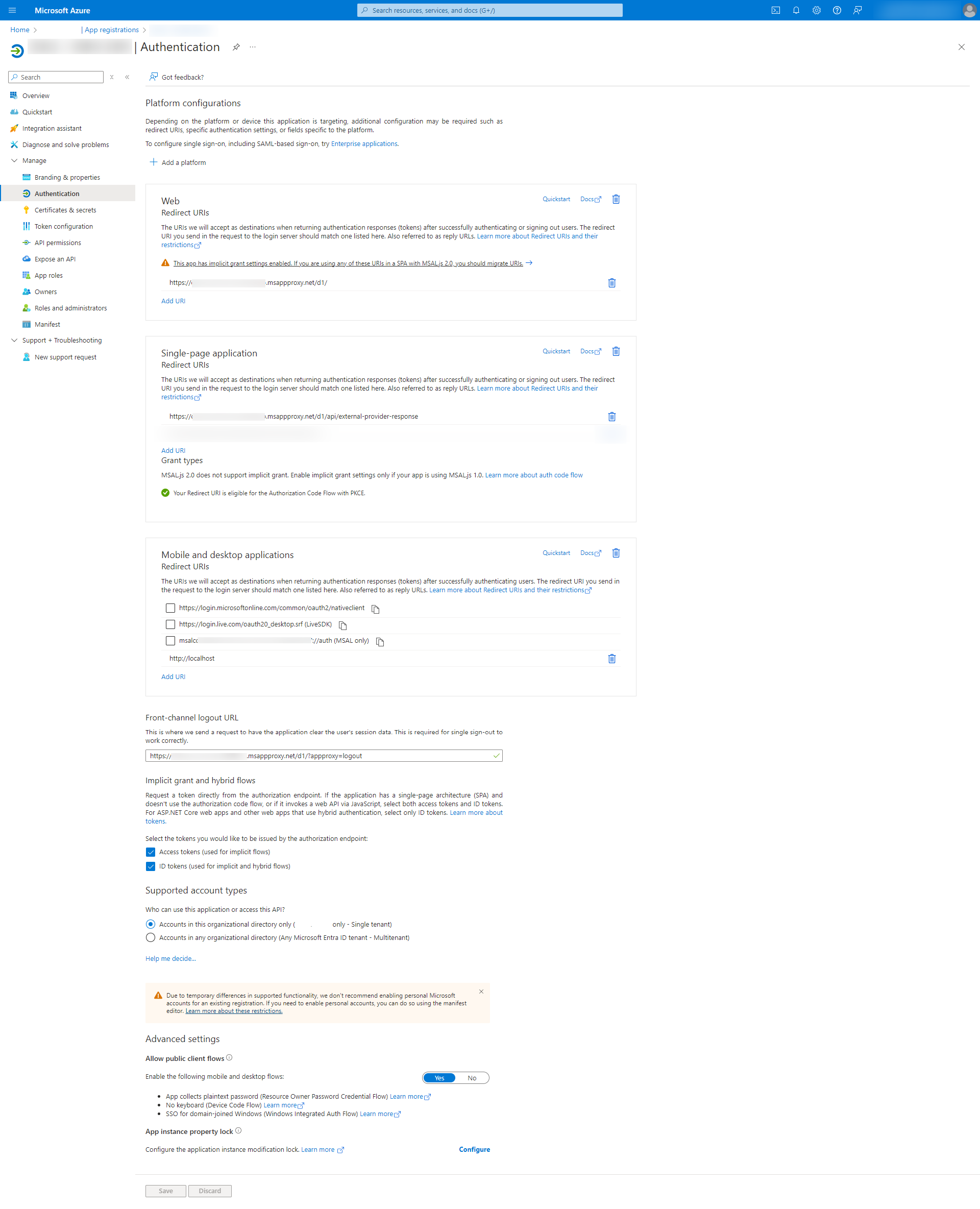
Indeed, it is an error in the screenshot; it should be "http://localhost" - Note that this is localhost alone without a base URI (/dvls) because we are talking here about the RDM machine and not the DVLS one. This part specifies to Azure where to send the response once connected.
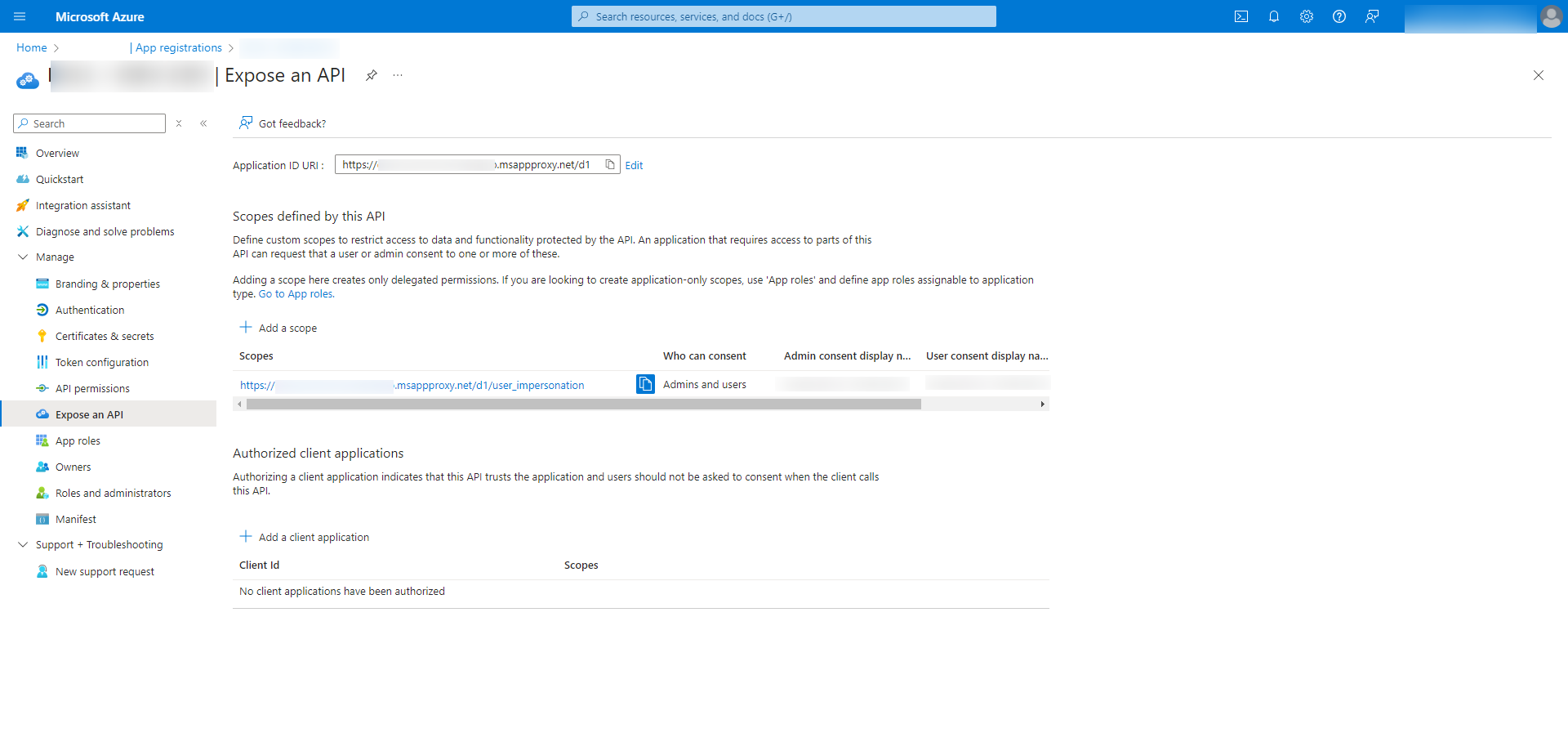
The Application ID URI was indeed with your /dvls.
What is important in the configuration is that when we talk about the URL, if it contains an extension to /dvls, then it must always appear. "https://dvls-customer.msappproxy.net/dvls" should be considered as the URL in its entirety.
Possibly, based on the error you mentioned, I would lean towards a configuration issue on the App Registration -> Expose an API page, either with the application ID URI not properly reflecting the proxy URI or the scope not being suitable, but that's just a guess, not a certainty :)
I am attaching some screenshots from one of my configurations for you to compare if necessary.
If everything looks good we will investigate further
Thanks,
Nicolas
EntraID App Proxy config not working with RDM
Hello Jm2,
Before investigating further, I would like to confirm the version of RDM you are currently using. I had a problem with URL reconstruction in RDM that was fixed in version 2024.2.7.0, so if you are using an earlier version, it is very likely that the problem stems from there.
Sorry for the inconvenience,
Nicolas Girot
Use Remote Desktop Manager with Azure AD App Proxy Pre Auth and Devolution Password Server
Hello,
I'm just checking in on the progress. Indeed, I'm still working on it :) The problem turned out to be much more complex than anticipated, and I have come to a solution that I hope will be suitable. We should be entering the testing phase soon. After that, we should be able to build a new version of both RDM and DVLS containing the new elements necessary for the pre-authentication process using Azure Proxy.
Best regards.
Use Remote Desktop Manager with Azure AD App Proxy Pre Auth and Devolution Password Server
Hello Sredlin,
Sorry for the delay, I was away last week due to the school break. I'm still working on this task this week, as the implementation is requiring considerably more work than initially anticipated, involving several sensitive aspects of authentication.
I'm optimistic about finalizing it this week and then passing it on to QA. Following that, we will release a minor update with the feature.
Devolutions PowerShell Module - See Last Login of User
Hello timhauptmann,
I'm not one of the experts on the PowerShell module, but after a quick look, here is what I've come up with. If this isn't sufficient on your end, please don't hesitate to let me know.
[string]$username = $env:DS_USER
[string]$password = $env:DS_PASSWORD
[string]$dvlsurl = $env:DS_URL

[securestring]$securepassword = ConvertTo-SecureString $password -AsPlainText -Force
[pscredential]$creds = New-Object System.Management.Automation.PSCredential ($username, $securepassword)

Write-Host "Connect to dvls..."
Write-Host

New-DSSession -Credential $creds -BaseURI $dvlsurl -AsApplication

Write-Host "Get Users..."
Write-Host

$res = Get-DSUser -All
$userlist = $res.Data

Write-Host "Check users last login..."
Write-Host

$today = Get-Date
foreach ($user in $userlist) {
	if ($user.LastLogindate) {
		$diff = $today - $user.LastLogindate
		Write-Host $user.Name : $diff.Days days ago.
		#Do what you want
	} else {
		Write-Host $user.Name : Never connected;
	}
	Write-Host
}Analyseur de sécurité des entrées : possiblité d'ajout de l'attribut "étiquettes" pour l'export
Bonjour Arnaud,
Je vais créer un ticket pour analyse. Cependant, je ne peux, pour ma part, vous donner de délai ni d'affirmation quant au fait que cela soit inclus dans une prochaine mise à jour pour le moment.
Afin d'être bien sûr de votre besoin, vous souhaitez avant tout exclure de votre rapport des entrées basées sur leur étiquette.
Si cela venait a etre fait a l'export de votre rapport est ce que ce serait plus simple / plus direct ou vous preferez pouvoir les inclures dans vos rapport csv absolument?
Use Remote Desktop Manager with Azure AD App Proxy Pre Auth and Devolution Password Server
Hi there!
I haven't forgotten you :)
I will personally start working on this feature tomorrow.
Thanks!
"deploying" RDM versions the right way
Hello Guenther,
The issue has been fixed in the latest release of RDM (2023.3.37.0 as of January 18th). Since the issue was on the client side, you will need to update it manually. However, subsequent versions will no longer have this problem.
Have a great day.
"deploying" RDM versions the right way
Hello Guenther!
It does indeed seem that there is a problem between RDM and DVLS for the update. Our teams are currently trying to reproduce the problem in order to find out where it comes from. I will get back to you when I have more information on this subject.
Best regards,
Nicolas
Auditing PAM credential access
I have discussed with the person in charge of the PowerShell module, and we should have something to help you out by the end of next week. However, I do have some reservations about this timeline considering the upcoming end-of-year holidays and some ongoing priorities.
Thank you for your patience :)
Auditing PAM credential access
Hello Joe,
yes this includes both users and applications added explicitly, however, I must admit that the information is not very clear on display.
Regarding the resolution of users belonging to the group in the UI, there indeed is no shortcut.
I will also ask the person in charge of the Pwsh module to add, if possible, a command to retrieve the result of this endpoint.
I understand that this is not ideal, but it should address your issue within a reasonably short time frame.
In this case, through PowerShell, you should be able to list your PAM credentials and then retrieve the information for each of them using the said command.
With the information received, you should also be able to resolve the users belonging to the group.
On my end, I will create a ticket for analysis, to request an improvement of the view and the creation of a feature to list the information for a set or subset of PAM credentials. However, I cannot give you a timeline for when this will be added to our queue.
Thank you very much for your feedback,
I will get back to you as soon as I have news regarding the addition of the command in PowerShell.
Best regards,
Nicolas
Auditing PAM credential access
Hello Joe!
After some research on my side, it indeed seems that there is no PowerShell command available to achieve what you are looking for.
However, does the information that you can access by going to a PAM credential, clicking on the three small dots at the top right, and selecting "View Resolved User Groups" correspond to the information you want (considering that you want it for all your PAM Credentials)?
Based on that, I will check on my side with the people in charge of the PowerShell module when and if it is possible for them to integrate this information.
Sincerely,
Nicolas
Use Remote Desktop Manager with Azure AD App Proxy Pre Auth and Devolution Password Server
Hello sredlin,
the fix is well scheduled for the upcoming release 2024.1, which is set to be released in February.
However, development related to this specific issue will only commence in mid-January, unless other features planned for this release progress ahead of schedule.
Thank you again for your patience, everyone.
Kestrel Web Server: Can't get it to work
Hello Benno1,
Indeed, using Kestrel is currently more of a personal choice. It's particularly useful for reducing the DVLS installation footprint, especially on servers where IIS is not installed, and in cases where you don't need to manage an application pool. Kestrel is a much lighter web server, but it comes at the cost of some additional features provided by IIS that you might want to use.
Also, the Kestrel version is still relatively new and has a significant limitation for some users - it doesn't yet support Windows authentication. However, please note that support for this feature should be arriving soon.
Documentation regarding installation via Kestrel is still being written. However, if you wish to use Kestrel, I'd be happy to assist you!
During the instance installation, it's generally simpler to select "SQL Server Authentication" rather than "Windows Authentication" to use a user who already has rights on your database. Additionally, when selecting the service user for your Kestrel instance, I would recommend creating a dedicated user in advance (though a local service user or another should also work).
To facilitate debugging, once the instance is installed, go to the installation folder and give your service user read and write permissions on the "AppData" folder. This will allow the application to generate certain logs in a file named DPS_MAIN.log during startup.
You can also check the application's general logs by clicking the "Logs" button in the installation console (please note that these are not the same as DPS_MAIN logs).
Lastly, the Windows event log could also guide us in identifying what is not working.
Thank you for your interest.
Nicolas.
Select multiple items
Hello Daniel, indeed, it's a feature that would be very interesting for user convenience on the DVLS side. I am quickly creating a ticket on our end to analyze what it would require in terms of effort, hoping to include it in an upcoming release for you :)
Use Remote Desktop Manager with Azure AD App Proxy Pre Auth and Devolution Password Server
We will integrate this for our next development cycle. A 2023.3 version should be released in a few weeks, and the next cycle should bring 2024.1 in February. However, as soon as we have made the necessary changes to support this feature, there is a strong likelihood that we will also include it in an update of the 2023.3 version.
Thanks again for your feedback. Please don't hesitate if you have any questions.
Nicolas
Use Remote Desktop Manager with Azure AD App Proxy Pre Auth and Devolution Password Server
Hello Henrik, rest assured that this is a feature I will push to have integrated as quickly as possible.
Yours sincerely.
Nicolas.
Use Remote Desktop Manager with Azure AD App Proxy Pre Auth and Devolution Password Server
Hello Sredlin,
I have started to study the problem in detail, and unfortunately, I won't have an easy solution as I initially hoped.
Currently, our server validation system prevents me from implementing a simple solution, and we will need some time to invest in revising our authentication mechanism from the RDM server to support pre-authentication through a proxy.
I am opening a ticket for the request with a high priority level so that we can determine when we can proceed with the improvement in our planning. I would have really preferred to offer you a quick solution and fit it in between tasks :(.
Best regards,
Nicolas Girot
Use Remote Desktop Manager with Azure AD App Proxy Pre Auth and Devolution Password Server
Good evening Sredlin,
I apologize once again for the delay. Unfortunately, I missed an email from the IT department several days ago, which informed me about issues with setting up the instance. I have taken the opportunity to review my email rules to ensure that I do not overlook such things in the future.
We have finally managed to create an instance today that replicates the conditions of the bug and reproduce it. Therefore, I will start working on fixing it tomorrow and will get back to you with concrete results soon.
I'm truly sorry for the inconvenience and for my mistake, which significantly slowed down the process.
Best regards,
Nicolas Girot
Use Remote Desktop Manager with Azure AD App Proxy Pre Auth and Devolution Password Server
Hello Stefan. To be honest, I haven't had the time to look into this yet. I will check with the IT team to set up an environment similar to yours. Thanks for the reminder, I will make an effort to free up some time next week at least to investigate the issue.
Best Regards!
Use Remote Desktop Manager with Azure AD App Proxy Pre Auth and Devolution Password Server
Hello, I am a bit surprised and sorry that it is not working. I will see if I can possibly improve the support for pre-authentication in a future version.
Thank you for reporting the issue, and I will keep you informed of any progress.
Best regards
Okta Authentication - DVLS Beta 2022.3.0.0
Thank you for your support Lani !
I finally found the problem and I can now say without a doubt that it's fixed haha!
However, since there is a workaround for the moment, I don't know when and if, we will release a new beta. But, for sure, the fix will be in the next version (beta or release).
Okta Authentication - DVLS Beta 2022.3.0.0
First I apologize for making you think that the bug was fixed.
In reality after comparing the previous beta instance and my latest version I thought that this one was fixed because my context was different which was actually hiding the problem.
Temporarily I propose you the following workaround:
- Activate the option "Authenticate with Microsoft user" in Settings => Server Settings => Authentication. There is no need to fill the information related to this one. Just activate the option.
- Re-import an okta group. The ones already imported will magically attach themselves to okta...
After that and as long that you don't reimport another group, you can deactivate "Authenticate with Microsoft User".
I'm now working on solving this strange problem to avoid this bypass.
Okta Authentication - DVLS Beta 2022.3.0.0
Hello ksilva,
The new beta version containing the correction for your problem is now online.
Don't hesitate to send me a feedback about your experience with our okta integration, I will be happy to answer you :)