"deploying" RDM versions the right way

hi!
we have a DVLS datasource set to the following but connected clients with version 2023.3.28.0 checking for updates get a popup saying they are on the current version.
Is it a bug or wanted behaviour?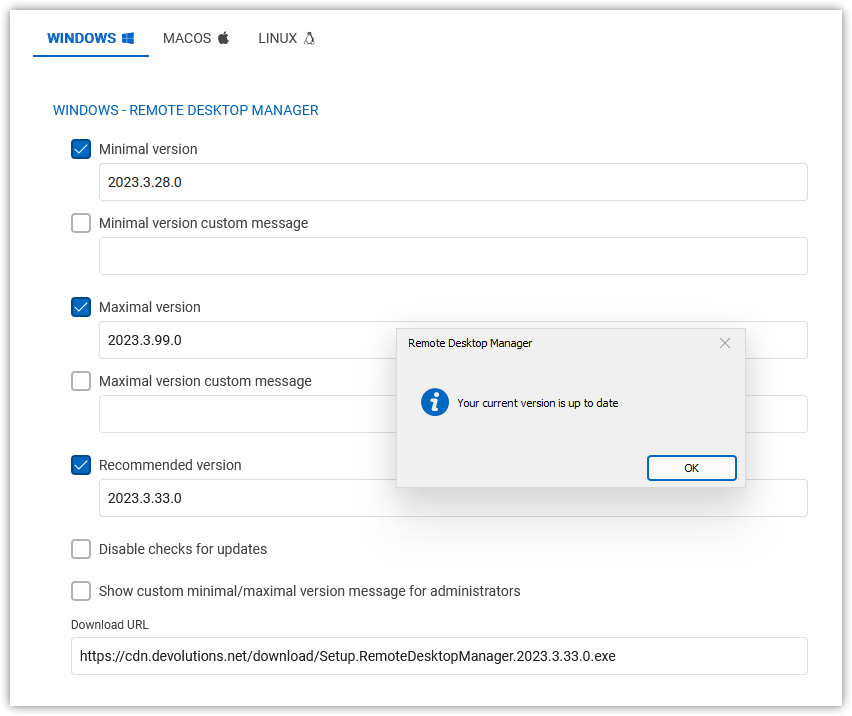
KR
G.
8913355a-2e00-427c-8c74-81c5e4bc8fba.png
All Comments (5)
Hello Guenther!
It does indeed seem that there is a problem between RDM and DVLS for the update. Our teams are currently trying to reproduce the problem in order to find out where it comes from. I will get back to you when I have more information on this subject.
Best regards,
Nicolas
Nicolas Girot
hi Nicolas,
any news on this?
We finally disabled the setting for maximum version - the disabled option (value like in the screenshot) was not respected before re-enabling the option and clearing the value field.
KR
G.
Hello Guenther,
The issue has been fixed in the latest release of RDM (2023.3.37.0 as of January 18th). Since the issue was on the client side, you will need to update it manually. However, subsequent versions will no longer have this problem.
Have a great day.
Nicolas Girot
Hi Nicolas,
could you please also confirm this is fixed in MacOS and Linux - I am assuming the latest ".3"-versions on these platfroms have the fix implemented?
KR
G.
Hello, the fix have been implemented on the MacOs and Linux versions so
everything should work alright.
Best regards,
Michel Lambert