
RokB
Devolutions Gateway Certificate could not be verified after the DVLS upgrade
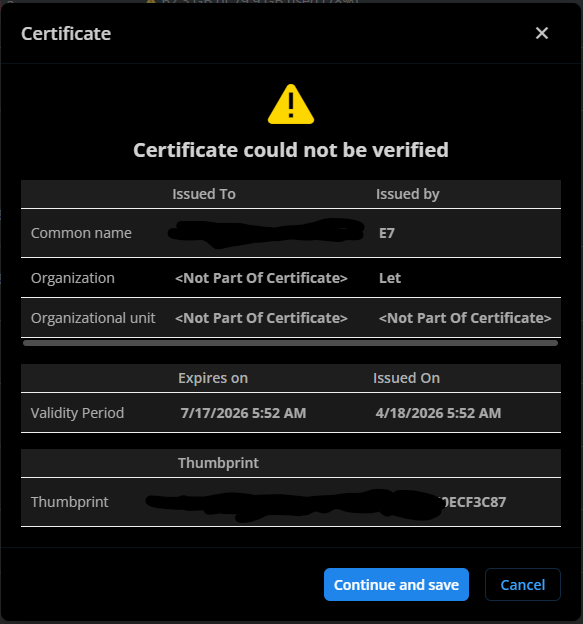
After upgrade of dvls from 2025.1.x to 2025.3.18 our gateways started to have issues with certificate verification. Gateways are marked as down and when we do the Ping Certificate warning pops up. Workaround is to click Continue and Save but we are curios why, both sides should have access to CRLs, certs are valid and created by trusted CA.
Export-PrivateVault
Testing the script, looks very promising, thank you Christian!
I will report back if I get it working
Best regards,
Rok
Export-PrivateVault
Hi, I am looking for a solution to be able to move a lot of users from existing DVLS data source to a new one.
I don't wont to write instructions to users how to export the private vault and import it (and not include credentials, setting a weak passwords, files lying around), is there a way to script Get-RDMPrivateSession to dump the whole private vault in way to be able to import it?
Cleanup of ConnectionHistory
Hi,
are there any updates on possible maintenance task to ConnectionHistory table? Or at least some tested sql script that removes all modifications prior to the last one (addon: if the modifications are older that x months)? This would be very useful especially for database copy we use in a test environment (where we don't care about loosing previous versions of connections)
Best regards,
Rok
Even worse, most of entries in the connectionhistory are changes to connections modified by PAM... How do we handle that?
Cleanup of ConnectionHistory
Hi,
are there any updates on possible maintenance task to ConnectionHistory table? Or at least some tested sql script that removes all modifications prior to the last one (addon: if the modifications are older that x months)? This would be very useful especially for database copy we use in a test environment (where we don't care about loosing previous versions of connections)
Best regards,
Rok
Changing credential in offline mode
Thank you Stéfane, we will try to get up to date with our installation.
Changing credential in offline mode
Hi,
I got a report from one of the users that she updated few entries of credentials in her private vault and all the changes were somehow lost. I actually could at some point recreate the scenario, my RDM allowed the open properties and edit credential at the moment I put RDM in offline mode, once I got back online the change was lost and since all logs are read from database I cannot find any traces I did the change. Is it possible to fetch the activity logs from RDM app - the profiler was set to default level 1. Caching mode is file.
Is there any setting that could cause undesired write mode of cache - setting on both users for offline mode is read-only.

RDM: 2024.3.31
DVLS: 2024.3.13
Best regards,
Rok
Direct link to Documentation tab
Hi Hubert,
yes, exactly what we need - we use links to access entries directly from other systems, would be nice to have functionality to show the specific tab directly (I thought that documentation tab already has this feature since it can create some kind of links)
Best regards,
Rok Berlec
Direct link to Documentation tab
Hi,
I am trying to find in documentation how/if we can use Copy Link to Page to create direct links to Documentation tab in RDM:

Is it possible to use "ref page ID" to create URLs in such way - we already use WebUrl links to sessions, is it possible to use it to link directly to documentation tab?
DVLS: v 2022.3.6.0
RDM: 2022.3.18.0
Best regards,
Rok Berlec
Microsoft Authentication - UPN change not reflected correctly in 2022.3.6
Hi,
this may be a known issue.
After UPN change in AzureAD authentication the AAD groups are not mapped correctly. I can see some parameters are updated in user properties (Full Name and email) but not the username (still shows old value and this may be the cause that this user does not get the existing groups)). I haven't tried to clear cache yet, do you think this would help?
Azure sync seems to work OK:
2023-03-06 08:42 Update Azure cache end Scheduler Debug Devolutions Server - 00:50:56:AA:92:25
2023-03-06 08:41 Service - AzureAD - Domain: Azure Active Directory - Extract all group names Finish Scheduler Debug Devolutions Server - 00:50:56:AA:92:25
2023-03-06 08:41 Service - AzureAD - Domain: Azure Active Directory - Extract all group names Start Scheduler Debug Devolutions Server - 00:50:56:AA:92:25
2023-03-06 08:41 Service - AzureAD - Domain: Azure Active Directory - Assign groups to users Finish Scheduler Debug Devolutions Server - 00:50:56:AA:92:25
2023-03-06 08:30 Service - AzureAD - Domain: Azure Active Directory - Assign groups to users Start Scheduler Debug Devolutions Server - 00:0C:29:EA:4D:5D
2023-03-06 08:30 Service - AzureAD - Domain: Azure Active Directory - Link existing users from DB Finish Scheduler Debug Devolutions Server - 00:0C:29:EA:4D:5D
2023-03-06 08:30 Service - AzureAD - Domain: Azure Active Directory - Link existing users from DB Start Scheduler Debug Devolutions Server - 00:0C:29:EA:4D:5D
2023-03-06 08:30 Service - AzureAD - Domain: Azure Active Directory - Get all users Finish Scheduler Debug Devolutions Server - 00:0C:29:EA:4D:5D
2023-03-06 08:30 Service - AzureAD - Domain: Azure Active Directory - Get all users Start Scheduler Debug Devolutions Server - 00:0C:29:EA:4D:5D
2023-03-06 08:30 Service - AzureAD - Domain: Azure Active Directory - Get all groups Finish Scheduler Debug Devolutions Server - 00:0C:29:EA:4D:5D
2023-03-06 08:30 Service - AzureAD - Domain: Azure Active Directory - Get all groups Start Scheduler Debug Devolutions Server - 00:0C:29:EA:4D:5D
2023-03-06 08:30 Update Azure cache start Scheduler Debug Devolutions Server - 00:0C:29:EA:4D:5D
Best regards,
Rok
Microsoft user unable to sign in
Hi,
we are using Azure AD authentication and one new user cannot sing in (user not created yet but we have autocreate enabled). User is present in DomainUsers table, I have completed Reset Cache ...
In datasource logs I can find a message:
NullReferenceException - Object reference not set to an instance of an object. at Devolutions.Server.Managers.AuthenticationProvider.SkipAuthentication(LoginContext loginContext) at Devolutions.Server.Managers.AuthenticationProvider.AuthenticateUser(LoginContext loginData, String userName, String password) at Devolutions.Server.Managers.AuthenticationProvider.ValidateUser(LoginContext loginData, String userName, String password, LoginAttemptEntity loginAttempt) at Devolutions.Server.Controllers.APIControllers.V2.BackendApiController.DoLogin(ISessionContext context, ParsedLoginParameter loginParameter, LoginContext& loginData)
I think this is the first user to be created since we upgraded from 2020.3.18. Anyhow in test environment (which is already on 2022.3.6) it worked (most of users are disabled there). Is it DVLS limitation, I see it says 50 users license (we have 858 users)...
DVLS: 2022.3.4
Best regards,
Rok
Message Prompt sometimes hard to find
Hi,
this is probably more of a GUI issue but we use message pompt on some sessions and it is sometimes hard to find - it seems it pops out on the same screen as users has it's RDM (and the rest of RDM is frozen unil users says OK).

Why is ALT-TAB not showing that pop-up as a separate window, would be much easier to find the pop-up?
Best regards,
Rok Berlec
Version 2022.3.4.0 (November 10th 2022)
Hi Erica,
probably I have found one of the causes and that is that rdi that I exported and created installation with has:
<ProfilerLevel>167</ProfilerLevel>
I know you should always reset the profile level, I have heard that before...
Insteresting though, the username variable didn't jump into config file because I forgot to add that option and this one is presumably one of the exported options every organization needs since you don't have to select anything (and you cannot deselect it either)?
Best regards,
Rok
Version 2022.3.4.0 (November 10th 2022)
Hi,
Can you explain if around 100% more network traffic after upgrade from 2020.3.18 to 2022.3.4 is expected behavior?

We have vaults that are way too large to fetch over VPN even with max timeout 100 if the client's bandwith is not at least 10/10MBit. This was never an issue before.
Best regards,
Rok
Version 2022.3.4.0 (November 10th 2022)
OK, my mistake, I forgot to check Include data source credentials in the rdi...

This is a bit hard to test before you upgrade the servers...
Best regards,
Rok
Version 2022.3.4.0 (November 10th 2022)
Hi,
One more thing I have noticed with shiny new data source config file we have pushed to all our clients.

Of course I cannot check rdi file that I created if I included username variable since it is not readable.
At the same time I exported rdd file and I can see I did have this paramter configured in my data source configuration

Funny thing is that RDM with this new custom rdi works as expected (UPN seems to come to web browser from somewhere, maybe that is the default setting), it is only that users now cannot change their time out parameter (sometimes even 60 sec in not sufficient) since username cannot be blank and they have to fill out that field first...
Yeah, I know it is not a big problem for you, I can instruct all our users to manually edit data source configuration correctly. I guess I must be doing something wrong...
Best reagrds,
Rok
Version 2022.3.4.0 (November 10th 2022)
And the bulk edit that would edit only folders that have no real-value on VPN settings overwrote ALL VPN settings to inherited (seems like in 2022.3.4 vpn.enabled behaves a bit differtnetly)...
if($connection.vpn.enabled -ne $true){
	$connection.vpn.mode = "inherited"
}
$RDM.Save();
Can we see from anywhere what the previous value was?
Version 2022.3.4.0 (November 10th 2022)
Hi,
Another thing that you / we can implement is hard limit of size of vaults (quota)...
In bigger organizations we let departments to create the structure of vaults the way they wanted to. Now we are dealing with the yellow baner. Is there any way to configure the limit so the vaults cannot grow over recommended size. Once they are too big it is not so easy to "undo" the growth. If we move stuff we need to inform responible and the users. How do we inform 500 users that the thing they are looking for was moved to another vault (3 months ago)?
Best regards,
Rok
Version 2022.3.4.0 (November 10th 2022)
Hi Erica,
we created a custom installation, pushed new datasource confgiuration, wrote instructions to users "how can they change parameter by themselves" - because most of the users will not read the instructions and at the same time are they afraid to touch the button saying LOSE MINE. Few hours after upgrade I am mostly dealing with connection timeout (appart from running bulk edit to fix the inheritance problem Devolutions credated with VPN value).
This is probably questions for some architect in your team: Why 15 seconds?
Best regards,
Rok
Typing macro issue
We tried that, doesnt make any diference in behavior and sorry, I guess I was not clear with description:
Typing macro takes the last digit and types it few time (I think 6 times as many times as whole OTP would have digits) so I would guess it is not connected to macro started typing to soon...
Best regards,
Rok
RDM embedded Edge behavior - FortiNet SSL-VPN Portal
Yes, we did as suggest in https://forum.devolutions.net/topics/38256/typing-macro-issue but it does not help. I guess I was not clear with description - typing macro takes the last digit and types it few time (I think 6 times as much as whole OTP would have digits)
Version 2022.3.4.0 (November 10th 2022)
Hi,
Are you willing to create an instalation package with 60 sec as default setting?
If we push new data source confgiuration we will overwrite a bunch of stuff that users have set to fit their needs (https://forum.devolutions.net/topics/34095/custom-path-for-default-installed-addons#168717)...
Best regards,
Rok
custom path, for default installed add-ons
Hi,
if we do not include "Saved installation paths" in our rdi for custom installation - are the installation paths unaffected or reset to default when we do the upgrade of RDM client (if user already has a custome one)?
Best regards,
Rok
RDM embedded Edge behavior - FortiNet SSL-VPN Portal
Hi,
We have noticed that embedded Edge does not open connections on webportal FortiNet SSL-VPN portal 6.0.0.

If Chrome is used or external Edge portal works as it should?
In chrome we have issues with typing macro described here https://forum.devolutions.net/topics/38256/typing-macro-issue
DVLS: 2022.3.4
RDM: 2022.3.18
Best regards,
Rok
Version 2022.3.4.0 (November 10th 2022)
Hi Erica,
We probably will need to adjust the timeout paramter in datasource that you introduced, is there a way to push that settings to all clients?

This is much too low for our way too big vaults,,,
Best regards,
Rok