
chadzero
Add a new connection type for AWS System Manager
Any update on this?
Sync Azure VMs
This would sync only AD joined machines. Is it possible to sync any Azure VM into RDM?
I see VMware synchonizer, EC2 Synchronizer, but nothing for Azure.
Add a new connection type for AWS System Manager
This would be a huge win to get this included and urge you to reconsider. At the moment we cannot use RDM to manage any of our AWS customers as it doesn't meet our MSP partner compliance.
Activity report is UTC
Doh! there is a dropdown box...ignore this. It's Monday...
Activity report is UTC
When I run an activity report, everything is shown in UTC. Is there a way to change this to local time, or a specific timezone?
Run synchronizers via SSH Gateway
Can this be done by either creating an SSH port forwarder and using that setting in the AD Sync tool, or another option which is better imo is to use the VPN/SSH/Gateway settings to connect and then sync
2x SSH tunneling and RDP
Is this similar to my post for multiple ssh tunnel hops?
https://forum.devolutions.net/topics/35355/multiple-ssh-tunnel-hops
Otherwise it is possible to open multiple tunnels manually to assist with the OP.
My post is about automating it by opening a single session end to end rather than keeping that first session always open.
To do the above manually, this should work.
Create SSH tunnel from MSP DMZ SSH Server to Customer DMZ SSH Server using a specific src port (ie: 11111), and dst port 22.
Test this. It should open and display "Listening on 127.0.0.1:11111" in the session window.
Create a new session (RDP, web, anything)
Use the VPN/SSH/Gateway settings
Host: 127.0.0.1
Port: 11111
Mode: Local
Use Dynamic port checked
Source: 127.0.0.1
Force "localhost" = Yes
Destination: Use IP address or other variable. I used $HOST$
First you need to open the initial SSH session. Once that is connected you can open the 2nd RDP/Web session which will automatically open the second ssh tunnel before proceeding to connection.
I hope this helps.
Multiple ssh tunnel hops
So this doesn't open the other tunnel before it unless I open it manually which is what I'm trying to automate.
Multiple ssh tunnel hops
Where is that 2nd screen shot configured? I don't see a 'Settings (SSH)' tab anywhere.
Edit: I see where it is. But this is not using SSH session as per every response above. It's using plain SSH.
I will try if this works and report back.
Multiple ssh tunnel hops
Yes, that's ideal since I can then lookup via dns. If there was an alternative workaround I could look at that.
I used to use the $IP$ variable but even then there is no option I can see to use any variable using this ssh session method.
What does it connect to using this method otherwise?
Multiple ssh tunnel hops
I'm clearly not understanding or doing something right, sorry.
It's not connecting to the destination computer still. I believe it's because it's not using $HOST$ like I previously configured.
btw, it doesn't need to be manual on each entry. In some areas I add it on the top-level folder and it inherits from each entry.
What is $PARENT_HOST$?
How can I make sure that it connects to the destination using the dns name? I previously entered this into the Host entry field so it can lookup from the ssh server.
Multiple ssh tunnel hops
I do mean dynamically-generated port (the option "use dynamic port"). But this requires the SSH tunnel to be setup first in the instructions above so I assumed it also needed dynamic forwarding?
These images show how I currently use a single ssh tunnel.
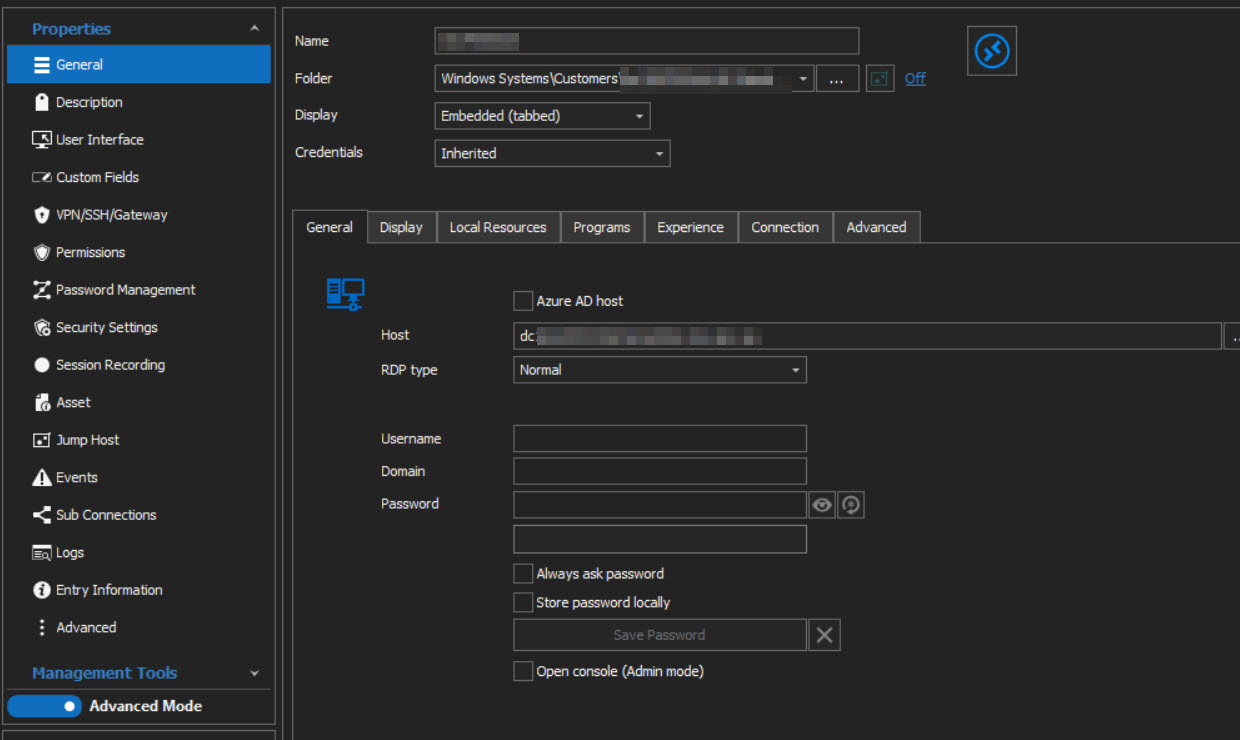
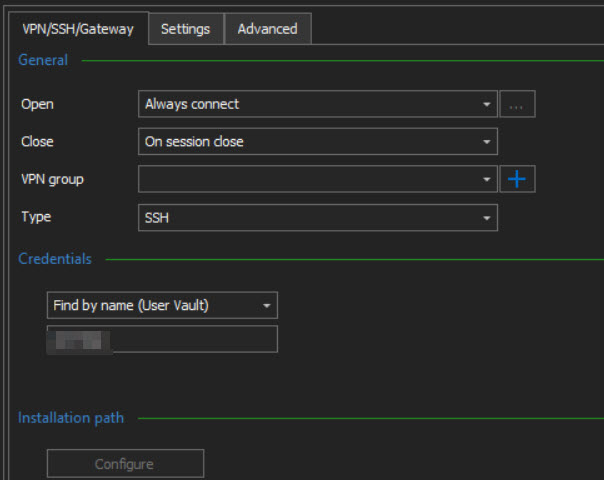
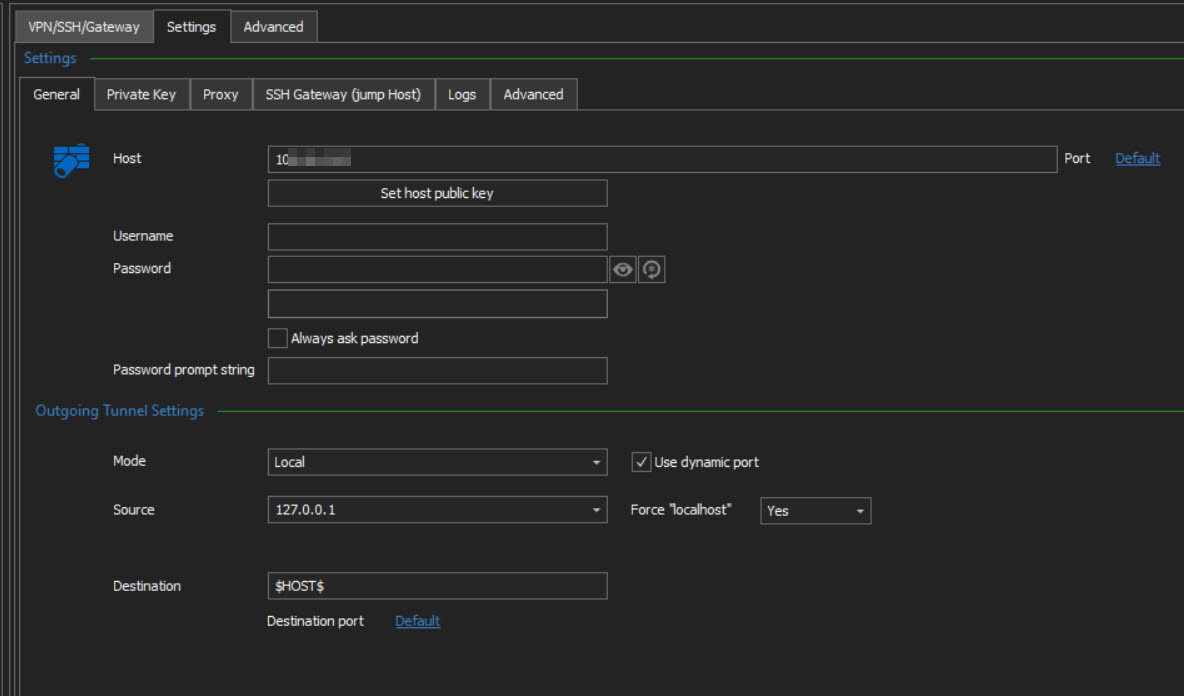
In future I will need this setting to connect after another tunnel is setup to allow it to connect.
Multiple ssh tunnel hops
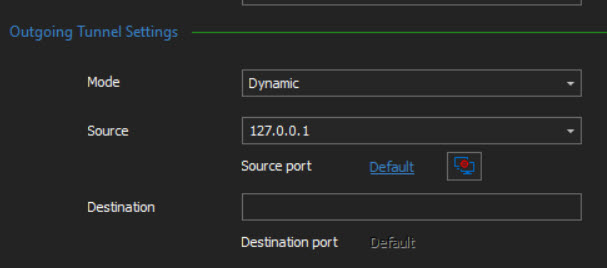
As I have never had to setup an SSH tunnel for this purpose, how do I set it to use a dynamic port?
It defaults to 3390 and the 2nd ssh tunnel doesn't connect even though I select use dynamic port in the VPN settings.
Multiple ssh tunnel hops
I have now upgraded to the latest version and I can see this.
However how do I configure the SSH tunnel to use dynamic port for the RDP session if I use an existing SSH session? This is quite different to how I usually use VPN options.
Edit: I currently use RDM in a way that 1000's of RDP sessions use the dynamic port via VPN settings.
I can't change this to setup a new ssh forwarder for each entry, that's not going to fly. It needs to be dynamic so hopefully it's just something I'm not able to see and can happen
Multiple ssh tunnel hops
I have all of the other options except for that last "Allow VPN chaining with SSH entries"
I assume this was introduced after v2020.1.20 and I will need to upgrade to get it?
Share datasource id
So instead of "C:\Program Files (x86)\Devolutions\Remote Desktop Manager\RemoteDesktopManager64.exe" /DataSource:7bea5029-c29b-4637-b109-c9e605bc2234 /Repository:6f5d1225-6302-4079-9918-4be2a7b82b99 /Session:f2ed07b3-e510-4b96-bd0f-bdbde5ce4b62
I should run
"C:\Program Files (x86)\Devolutions\Remote Desktop Manager\RemoteDesktopManager64.exe" /Repository:6f5d1225-6302-4079-9918-4be2a7b82b99 /Session:f2ed07b3-e510-4b96-bd0f-bdbde5ce4b62
Unfortunately this also doesn't work. It still gives ERROR: Data source not found!
That's ok though as it doesn't perform as I need anyhow. I don't want it to open a new RDM application. I was hoping to open within the same application session.
Share datasource id
As above, v2020.1.20
It will be for RDP or SSH session. We also currently use it for AD sync sessions since we need to establish the ssh tunnel before we run the sync, otherwise it clears all entries.
Unfortunately this means only one user can use it since it links to the datasource id.
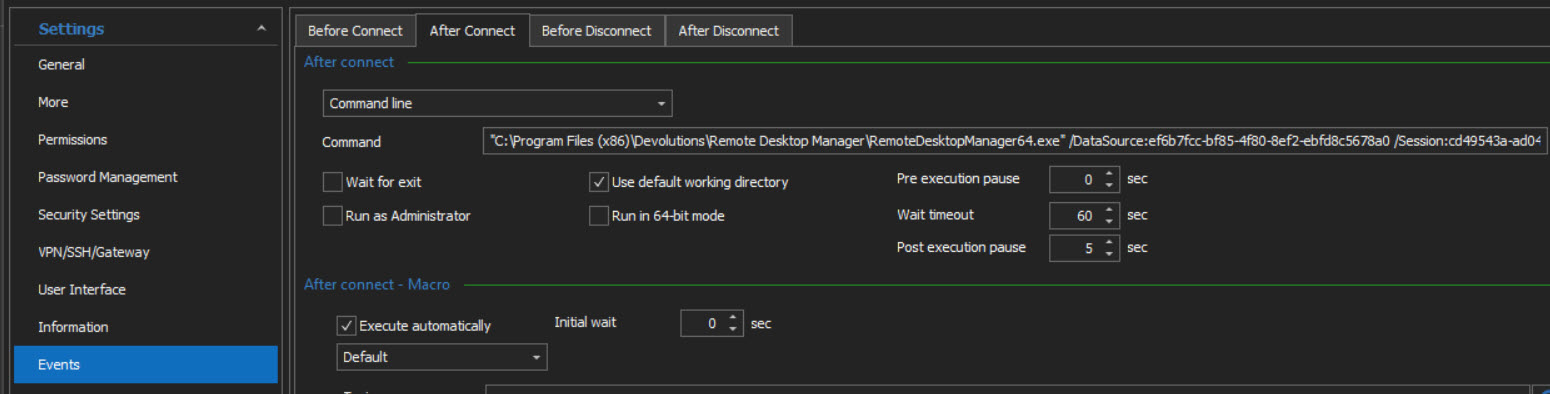
I was also trying to use this for multiple ssh tunnels (see https://forum.devolutions.net/topics/35355/multiple-ssh-tunnel-hops) although it seems that won't work as it opens a new RDM application each time anyhow.
Multiple ssh tunnel hops
Is there any way to make multiple tunnel hops in a single session?
I currently make a single tunnel using the VPN settings, but I have a new customer that requires at least one additional jump point before logging on to the destination machine. Is this possible to automate end to end within RDM?
I thought I could use the 'Before Connect' using the command line option but that opens a completely new Remote Desktop Manager application.
The best I can do it to initiate the first ssh tunnel manually, and then it automatically opens the 2nd tunnel using the VPN settings.
This means I always need to have that first session open during any connectivity to that customers machines. If I close it by accident, everything at the next level disconnects.
Share datasource id
Do I need to change the syntax as well for the command line option?
It doesn't work by swapping the value.
"ERROR: Data source not found!"
I changed /datasource to /database and that doesn't work either.
What's weird is when I copy using the WEB URL it works.
ie: This works
rdm://open?DataSource=BF54252B-87E7-4B7F-8B9B-E0429FEFD123&Repository=6f5d1225-6302-4079-9918-4be2a7b82999&Session=3a762525-f342-494f-b173-da95f2e70d33 This doesn't work
"C:\Program Files (x86)\Devolutions\Remote Desktop Manager\RemoteDesktopManager64.exe" /DataSource:BF54252B-87E7-4B7F-8B9B-E0429FEFD123 /Repository:6f5d1225-6302-4079-9918-4be2a7b82999 /Session:3a762525-f342-494f-b173-da95f2e70d33What I also noticed is that the WEB URL automatically copies using the Database value, whereas creating the desktop shortcut uses the Datasource value and needs to change manually.
btw, I don't have 'Entry Information' in my version. It's all under 'Advanced '
Share datasource id
I'm running v2020.1.20 and using SQL Server as the datasource.
Share datasource id
We are using a shared database to store all rdm sessions so that all users have access to the same sessions if needed.
I'm looking at the advanced options to improve some complex connectivity issues that I'm trying to fix (ie: tunnel within tunnel) and was hoping to use command line to call other sessions in the Before Connect options.
However I have noticed that the datasource id is different for each user. Is this expected?
Is there a way to run the command line for each individual user to call the same session even though the datasource id is different?
The Database ID is the same for all users, it's just the datasource id and session id that are different.
"C:\Program Files (x86)\Devolutions\Remote Desktop Manager\RemoteDesktopManager64.exe" /DataSource:7bea5029-c29b-4637-b109-c9e605bc2222 /Repository:6f5d1225-6302-4079-9918-4be2a7b82999 /Session:3a762525-f342-494f-b173-da95f2e70d33
Ticket # disappearing in logs
I am testing the ticket number option, and while it does request the ticket # upon opening a connection, and it does show the information in the logs while the session is open. As soon as the session is closed, the ticket # disappears from the log entries.
Is this a bug, or am I missing something?
I am running 2019.2.22.0 with SQL database
Cannot find the login for 'DOMAIN\USERNAME', because it does not exist or you do not have permission
Any idea when this will be fixed?
While the workaround does allow the changes to be made, it's super annoying when needing to make changes to multiple users, as you need to exit user management and re-open it for every single user account that needs updating because the screen goes completely blank when you click cancel/ignore the error.
Multiple connections to a session
Perfect!
Thanks Ben05.
I set this in the application options but it didn't seem to make a difference. Once I changed it on the session itself, it worked.
Multiple connections to a session
Hi all,
I wasn't sure if this is a feature request, or support. Depending on whether it's available right now.
I know there are a couple of ways of connecting to a remote session multiple times concurrently, however the two methods I know of aren't ideal.
1. Create a new/duplicate session (if we need to do this to many machine, it will create a mess)
2. Open another RDM instance
Is it possible to open an existing session (that is already open), using the same session name in the navigation panel?
An example of why I want this is where I need to connect to a session using different credentials (using Select Credentials menu item), mainly for testing purposes.
My admin account is generally what I use to connect to a server, but if I make a change or need to see how something affects another user, I want to logon to the same machine concurrently with different credentials.