2x SSH tunneling and RDP

Dear Devolutions,
We are a MSP and run a RDM jumphost with one of our customers to provide access to their servers via RDP. However, we are in the process of replacing the Jumphost for SSH tunneling. There is some complexity in this one, so help is appriciated:)
the traffic will flow as following:
RDM client (laptop)->SSH tunnel->SSH server in MSP DMZ->SSH tunnel->SSH server in customers network->RDP session to destination host in customer network.
So as you can see it's a hop from one ssh tunnel to another one. We have already succesfully implemented the first ssh server in our DMZ, and SSH and Web sessions are working through the first SSH tunnel.
Could you please provide some information on how to configure the second SSH tunnel, and how to hop from one tunnel to the other? How should i configure this in RDM?
And how should i exactly configure the RDP sessions in order to make use of the SSH tunnel?
Thanks in advance.
Kind Regards,
Valid Operations.
All Comments (29)
Hello,
Thank you for contacting us on that matter!
Could you please provide me your RDM version and the type of Data Source you are currently using? In the meantime, I will contact one of my colleague on that matter and see if this can be achieved in RDM.
Best regards,
James Lafleur
Hello again,
After having a discussion with my colleague on that matter, we confirmed that RDM would not allow you to automatically open 2 tunnels, one after the other. You would need to launch the second tunnel manually. That being said, how do you achieve this outside of RDM at the moment? Your current configuration could allow us to see if that is something we could reproduce in RDM.
As per my understanding, you cannot use the first SSH Tunnel to go directly to your RDP session. For this reason, I suspect that you need to first go through 2 firewalls in order to reach it:
Is that correct?
Best regards,
James Lafleur
2SSHTunnel.png
Hello,
As per your description, it looks more like this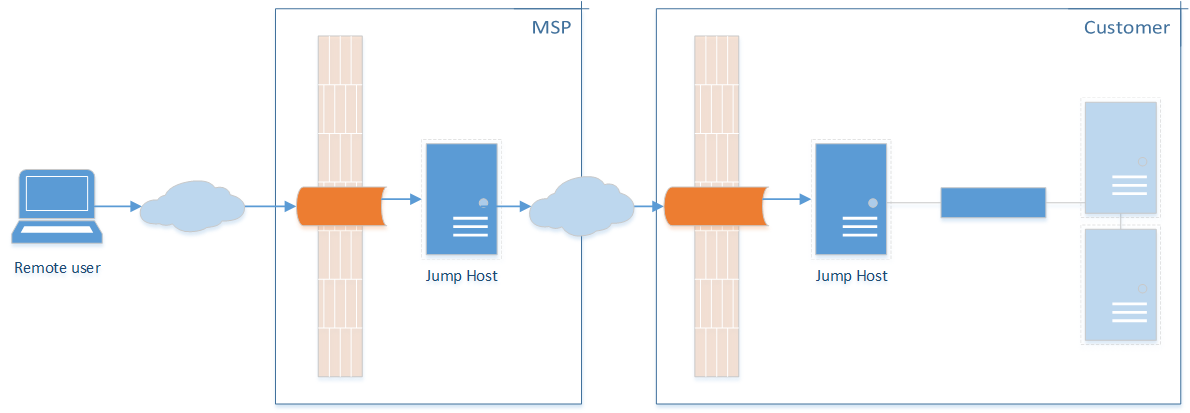
James question still stands though, how are you doing it right now?
SSH -t allows for sending commands to the jump box, which can then open its own tunnel, but there is a concern that the port opened on that server can be used by anyone on that network. I will let you answer before going further
Maurice
SSH successive hops.png
Dear all,
Thanks for answering this topic. The picture of Maurice is correct.
From our DMZ all of our customers networks are reachable. Normally all servers will be acceccible through nat-ting the original ip address. We use a RD gateway to provide RDP access from RDM to the destination servers. For SSH and web (and in the future RDP too) we use SSH tunneling. See the attached picture: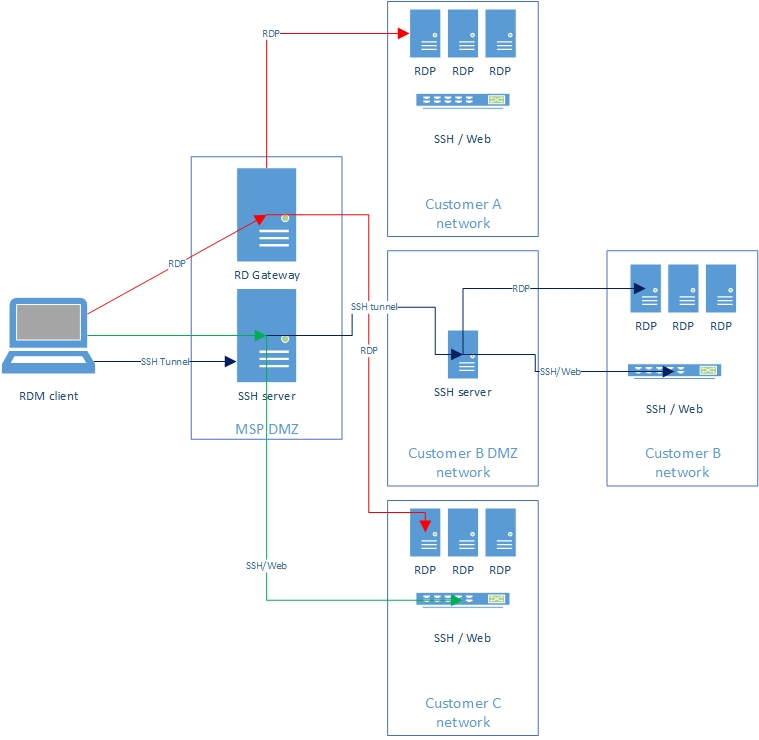
With this particular customer (Customer B in the diagram), we only have a small set of servers we can NAT, because of overlapping nat ranges, and networking difficulties. Thats why we use now RDM Jumphost, to provide access further down in the customers network.
However, we want to replace RDM Jumphost with SSH tunneling because of the broader possibilities, RDS licenses, and employee satisfaction.
Kind regards,
Valid
SSH tunneling.jpg
Hello,
We need to figure out how to do it outside of RDM first, we can then figure out if we have the proper event chaining available to replicate it with RDM.
I have found a few articles that seem promising, most notably
http://sshmenu.sourceforge.net/articles/transparent-mulithop.html
We dont have the setup to test it rapidly but I will open a ticket to our own IT to create a few VMs. If you can test the solutions on your own, please inform us if you find a working solution.
Best regards,
Maurice
Hello Maurice,
Thanks a lot for searching with us for a solution. I will check if we can test the solution on our own environment too.
Let's stay in touch!
Kind regards,
Valid Operations.
Hello Maurice,
We have done some tests with multi hop SSH tunneling, according to the link you mentioned in this thread.
If we do it as explained in the articel, multi hop ssh tunneling works.
However when we try to achieve this with RDM we can't get it to work with event chaining.
We've configured the following:
1 SSH shell session which goes to a switch.
1 SSH tunneling session which goes to our DMZ. (SSH tunnel DMZ)
1 SSH session which goes to the customers SSH server. (SSH Tunnel Customer)
the SSH shell session is configured to first open the SSH Tunnel Customer.
The SSH Tunnel Customer is configured to first open SSH Tunnel DMZ.
The first SSH tunnel to the DMZ is succesfully connected.
The second SSH tunnel to the SSH server can't connect. I suspect something in the settings, because when we do it by commandline like in the above article it works. So the connectivity is there.
Any idea's? Maybe a remote session is possible?
Kind regards,
Valid Operations
Short update, I'm working with Roel on getting this issue fixed, but we haven't found a solution so far. That is, we do not have the knowledge how to build it correctly in RDM.
From my laptop I can open an SSH session to the first jumphost, from there open a SSH session to the jump host at the customer and at that point I can access a switch through ssh. That means that connectivity is there.
I tried re-creating that in RDM, but opening a SSH tunnel with a prerequisite SSH tunnel will not open the second tunnel. It seems that my laptop (rdm client) tries to open both tunnels locallly.
I added an entry in RDM to the jumphost at the client with a SSH Gateway (jump host). This works as expected, but I'm a bit lost how to build/chain everything together. Also, how we can open other applications, like vsphere client, web sites and rdp sessions through this method.
Dear Devolutions,
Do you have a update on this one? Can we "chain" SSH tunnels after eachother?
Thanks in advance.
Hello Frank,
Thank you for joining our chat today on that matter. As mentioned in it, I will contact my colleague about this and we will update this forum thread afterward.
Best regards,
James Lafleur
Hello Frank,
After having a discussion on that matter with both my colleague and our Engineering Department, they told me that a ticket has been opened in order to add a feature that would allow you to do this in RDM. I will inform you once this feature is released.
Best regards,
James Lafleur
Hello James,
could you give us a status update? We're currently trying to decide if we would go ahead with an alternative configuration (not preferable) or if we will wait for this feature.
Thanks for your reply.
Frank
Hello Frank,
According to the information I have gathered on that matter, this should be achievable in the latest Beta of RDM.
If you wish to give it a try, please do so with a portable version of RDM and make sure to use the default local data source that will be created since that latest Beta requires a Database upgrade when used with an Advanced Data Source. To do so, you will need to do the following:
1- Download the .zip file below:
http://remotedesktopmanager.com/Home/Download/#Beta
2- Create a new folder on your Desktop
3- Extract the content of the .zip file into the folder created at #2
4- Go in this folder once the .zip file has been extracted and run remotedesktopmanager64.exe
5- Enter your current serial
Best regards,
James Lafleur
Hi James,
Thanks for the reply. Frank and i have tested the beta version, but we can't find out how to configure multi hop ssh tunneling in the new beta version.
Could you please explain to us how to configure multihop ssh tunneling in the beta version?
Thanks in advance.
Kind regards,
Roel and Frank from Valid IT
Hello Roel and Frank,
I will contact our Engineering Department on that matter to see if I need to enable something, in particular, to make this work on RDM 2021 and create an environment to test it.
Once I am done with my tests, I will provide you more details on how to set this up.
Best regards,
James Lafleur
Is this similar to my post for multiple ssh tunnel hops?
https://forum.devolutions.net/topics/35355/multiple-ssh-tunnel-hops
Otherwise it is possible to open multiple tunnels manually to assist with the OP.
My post is about automating it by opening a single session end to end rather than keeping that first session always open.
To do the above manually, this should work.
- Create SSH tunnel from MSP DMZ SSH Server to Customer DMZ SSH Server using a specific src port (ie: 11111), and dst port 22.
- Test this. It should open and display "Listening on 127.0.0.1:11111" in the session window.
- Create a new session (RDP, web, anything)
- Use the VPN/SSH/Gateway settings
- Host: 127.0.0.1
- Port: 11111
- Mode: Local
- Use Dynamic port checked
- Source: 127.0.0.1
- Force "localhost" = Yes
- Destination: Use IP address or other variable. I used $HOST$
First you need to open the initial SSH session. Once that is connected you can open the 2nd RDP/Web session which will automatically open the second ssh tunnel before proceeding to connection.
I hope this helps.
Hello Roel and Frank,
Sorry for the delay on this case, I was on vacation last week.
That being said, after having a discussion on that matter with our Engineering Department, they mentioned that the only thing that you need to do to use this new feature is making sure that the first SSH Gateway in the list has access to the next SSH Gateway and so on. In doing so, you will be able to jump through your SSH Gateway and reach your final destination.
The option "Connect through SSH Gateway (jump host)" (2) can be found under the "SSH Gateway (jump host)" (1) tab of your SSH Tunnel entry
Best regards,
James Lafleur
Hello James, Chad,
sorry for my delay in response, I had a big project that required all my time.
We've been trying to get this configured, but we still are unable to get everything working.
What we managed so far is setting up the first VPN tunnel. For the second tunnel, we required a connection through the first tunnel, this is also working fine. Next, we setup a SSH session to a different host at the customer through the double tunnel, which is also working as expected.
Next thing we're trying to setup is the RDP session through the tunnel, but I'm a little stuck where I need to enter the settings as suggested by Chad.
Is this in in the tab "VPN/SSH/Gateway"? I'm trying to use "type: session", but I'm unable to find where I need to enter all these settings.
Frank
Hello Frank,
Thank you for your reply! Glad to see that you have been able to configure almost everything you needed.
You are correct, your RDP connection would indeed need to have the SSH Tunnel specified under the "VPN/SSH/Gateway" tab.
I think that what might be missing in your current setup is that you would need to create an SSH Tunnel that would contain the settings of your tunnels. Once this entry is created, you will be able to go into the properties of your RDP entry, under the "VPN/SSH/Gateway" section and use the following configuration:
Then select your "SSH tunnel" entry under the "Settings (SSH)":
Let me know if that helps!
Best regards,
James Lafleur
Hello James, Chad,
I finally got around to doing a good day of testing. Above post of Chad was very helpful indeed.
I made a connection the makes an SSH tunnel to the customer, and has to connect through a gateway of our own network. This double hop is working, when I start it manually, it gives the message listening on 127.0.0.1:5001 (our chosen port).
Next, I made an RDP connection to a host at the customer.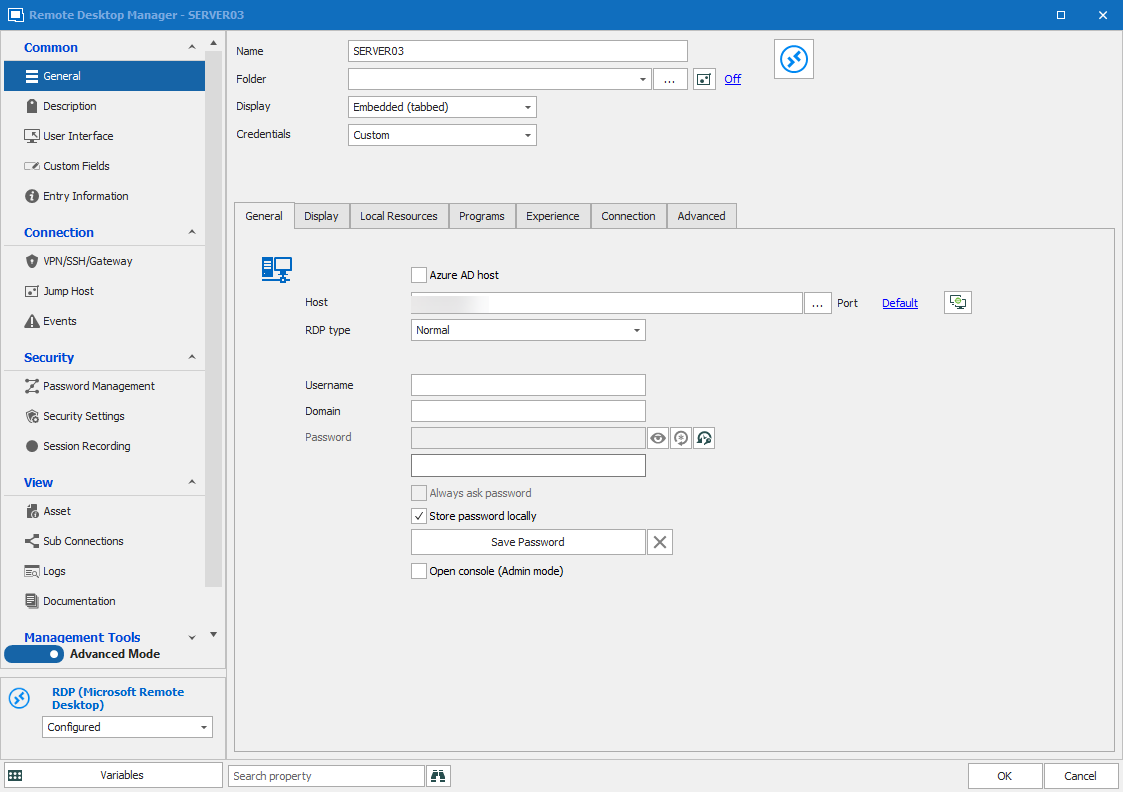
In VPN/SSH/Gateway selected "Configure - SSH". This gave a lot different options than "Existing - SSH".
I used the settings supplied by Chad above and was able to get a connection through RDP, after I opened the tunnel manually first.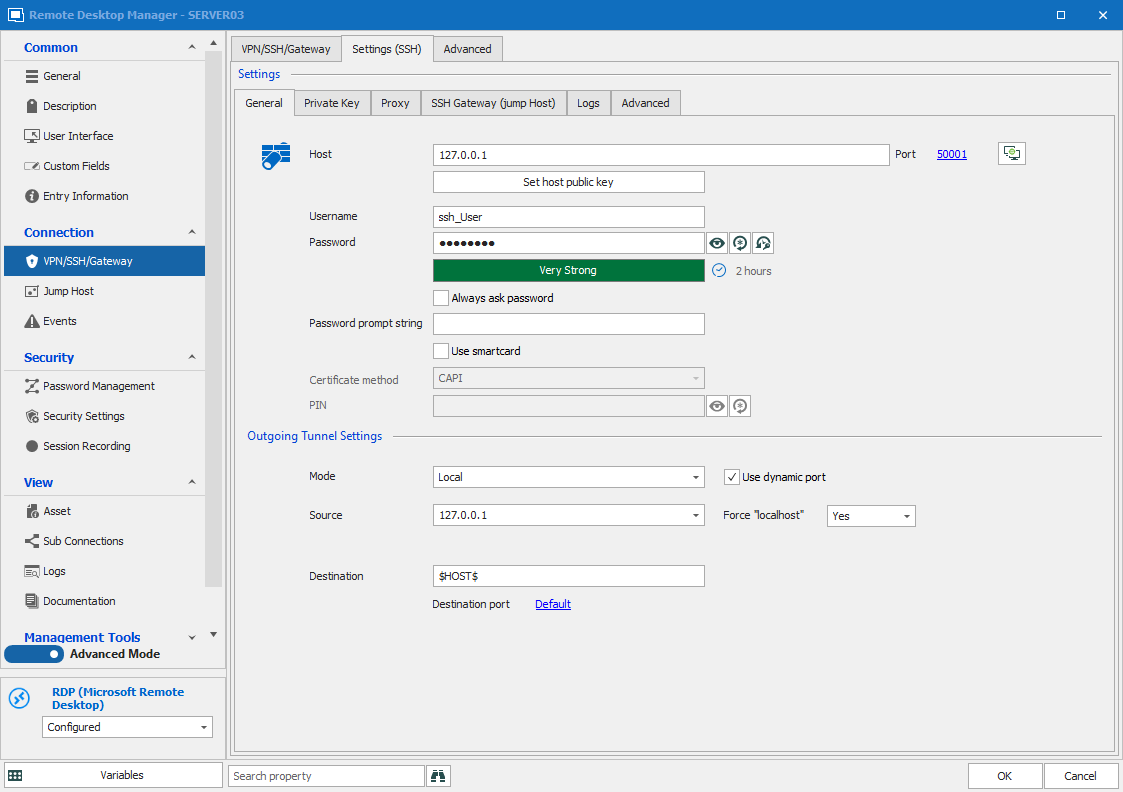
I have two questions remaining.
- Is it possible to open the tunnel automatically on first connect and close after last close?
- I use a specific user to connect to SSH, but use different users when connecting to the Windows Servers. When I right-click the entry and select "Open with Parameters -> Open (Select credentials), Both the SSH authentication and the Windows host try to authenticate with those credentials. Not sure if that's a bug or if that's by design, but would be rather annoying if everybody has to enter credentials every time. For this instance I was using a local data source, but normally we use one central data source and users will "Edit user specific credentials" and store those in private vaults.
Thanks for all your help so far.
Frank
screen2.png
Screen1.png
Hello Frank,
I am glad to see that you have been able to make it work using the information that was provided on this thread.
As for your questions, please find my answers below:
1- Is it possible to open the tunnel automatically on first connect and close after last close?
I will need to pursue my tests on my end to see if it is possible to have both tunnel open automatically. That being said, would it be possible for you to provide me a screenshot of the configuration of the "SSH Gateway (Jump Host)" section of your SSH Tunnel entry?
2- I use a specific user to connect to SSH, but use different users when connecting to the Windows Servers. When I right-click the entry and select "Open with Parameters -> Open (Select credentials), Both the SSH authentication and the Windows host try to authenticate with those credentials. Not sure if that's a bug or if that's by design, but would be rather annoying if everybody has to enter credentials every time. For this instance I was using a local data source, but normally we use one central data source and users will "Edit user specific credentials" and store those in private vaults.
Do you encounter the same issue with your centralized data source and the "User Specific settings"? As I was reading your post, this is the feature I wanted to recommend that you use to see if the issue persisted.
Best regards,
James Lafleur
Hi James,
the tunnel itself is pretty straightforward. 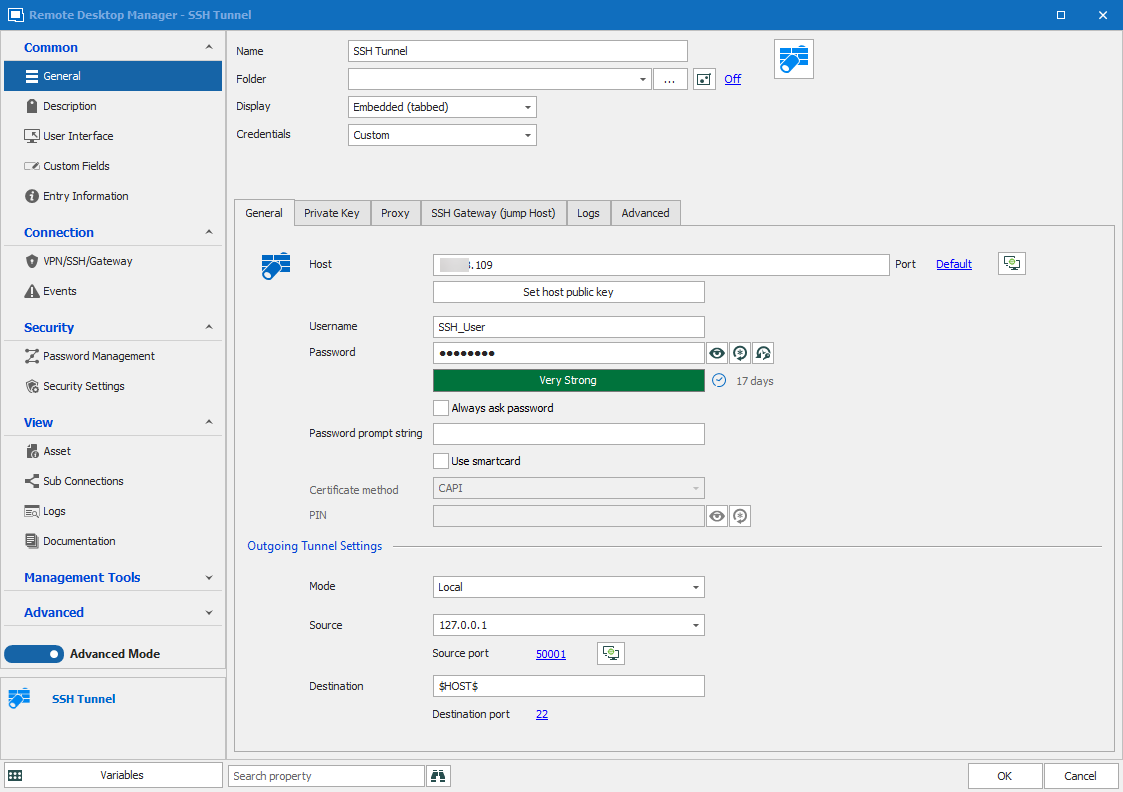
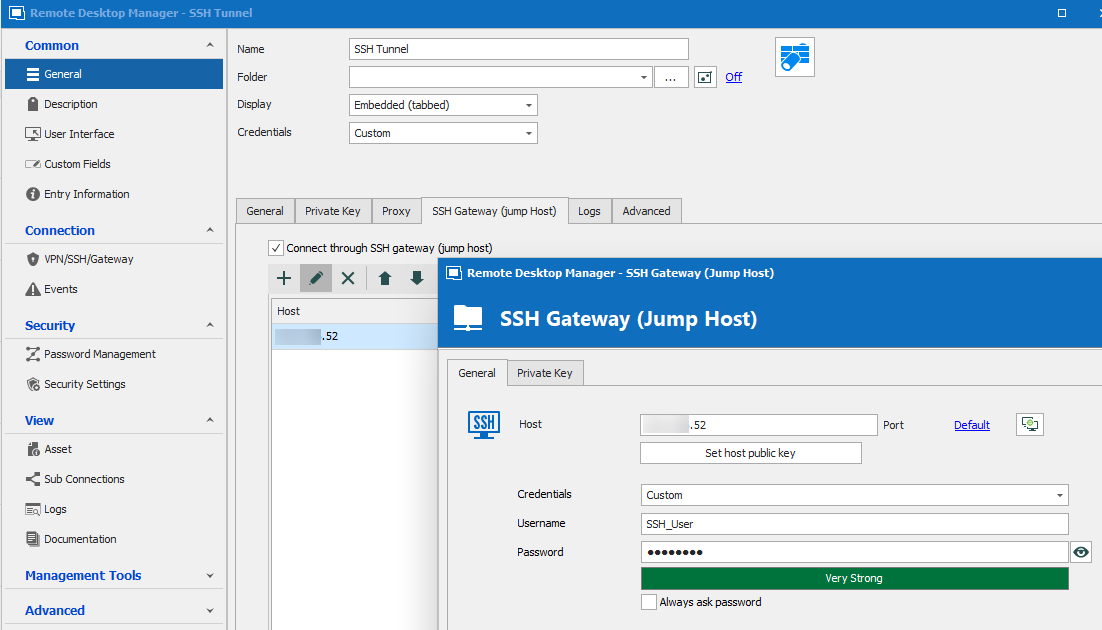
As for testing it in the production environment, that cannot be done unfortunately. That RDM instance is older (2019 version) and does not have the correct options yet.
I'm still doing some testing, hope to get this working soon.
Tunnel2.png
Tunnel1.png
Hello Frank,
Thank you for your reply!
As per my tests, the "SSH Gateway (jump host)" section of your entry should allow you to configure more than one tunnel and have then open one after the other without issues. Since you need to launch the first one manually, I suspect that this might be caused by a connection delay when passing through this host.
As for your second point, since you cannot currently test this in your production environment we will have to wait to see if you encounter the same issue with your centralized data source and the "User Specific settings". I am pretty confident that with this feature, your current configuration will work.
Best regards,
James Lafleur
Hi
I have several SSH Gateways, and when I have several connections using the SSH Gateway is open until the last session is closed, this works very well.
But when I do a double jump like this described in this forum post, the SSH Gateway closes on the first session that closes.
The main differences in this Is SSH Gateway (jump Host) is configured
If I change the close from “On session close” to 

Windows 11
ENTERPRISE EDITION 2021.2.26.0
Data Source: Microsoft Azure SQL
Hello,
Do you experience the same behavior if you choose "Confirm disconnect" instead of "On Session close" under the "VPN/SSH/Gateway" of your SSH Tunnel entry?
Best regards,
James Lafleur
No, then it stays open until I close the SSH GW manually.
Hello,
Thank you for your swift reply!
Would it be possible for you to go under Help -> Submit a support ticket to open a support case with us? Doing so will provide us with more details about your RDM installation and through this ticket, I will be able to request a recording of this issue.
Just make sure to mention this forum topic in the description of your ticket.
Best regards,
James Lafleur
Hi
I was wrong, this has noting to do with doublet jump.
It is when I use SSH GW.
Hello,
Thank you for your reply!
In that case, since the cause of the issue does not seem to be related to what has been discussed on this forum thread, I would recommend opening a support case with us. We will be able to assist you through this ticket. Just make sure to add this forum as a reference.
Best regards,
James Lafleur