
srdan
SSH FAIL_FILE_CORRUPTED
Hello,
I used to have following configuration: SSH keys in RDM have private/public key as usual and assigned username. On OS I would have that username and public key in authorized_keys. That worked.
However, yesterday decided I'll go single key for my homelab, to simplify everything, and while normal shell, like iTerm is working, I simply can't get RDM to connect, I always get the above message.
I would expect it to work like this:
I save the key as usual in RDM, but do not assign a username.
In the session, I configure username/password, then I only set username, and under SSH key I select the key I have saved in RDM.
However, I get the above message.
I have found no other way to get it to work with having one SSH-Key saved in RDM, and using different usernames on servers (since, well, SSHKey is not bound to a username, except that it must be under authorized_keys of that username).
So, maybe it would work if I would create multiple ssh-keys in RDM each with it's own username... but... that is a little weird, isn't it?
EDIT: also tried the alternative method I used before, username in the key-entry, and still getting that error... what is wrong?
Authentik/Bitwarden with RDM
For my private use, I simply found out that using the browser itself works better than in combination with RDM/DVLS. It's just a preferred workflow, which when relying heavily on Bitwarden Extension, two browser profiles in Brave (which is also not supported with RDM), synced between devices, with Authentik in background, and all that, browser wins. But, I still use RDM for RDP/SSH nevertheless.
Compared to my private use though, in a business multi-user scenario, everything in RDM/DVLS definitely wins.
Authentik/Bitwarden with RDM
Hello,
is it possible to use browser extensions in embedded browser in RDM, much like I have Bitwarden Extension in my browser?
The reason behind is that I implemented Authentik in my environment, and it is much more comfy having Bitwarden insert my credentials when required into the Authentik-Fields.
Thanks
Jump Host usage
Assume I am always at the latest version. So, currently 2023.2.10.3.
Datasource: Azure SQL.
Yes, indeed the asked functionality would be the one of the gateway or VPN, however from what I have seen, that will not be possible.
So yes, you answered my question, thank you.
Jump host bug?
Hello,
another issue with jump host usage:
Sometimes, not every time, it will happen that RDM kinda connects to the server via jump host, but the session doesn't appear inside of the jump host. The session is green in the tree, other sessions from the same folder are also green, however visible, but 1-2 sessions might not appear. Sometimes happens with even the first session. There is no regularity. It is highly random and the worst thing is that I can't seem to "find" the session, thus no close it or reconnect. The only way I found to fix the issue is to completely close the jump host connection, which means closing also other sessions that were started via this specific jump host.
Any ideas why this is happening?
Thank you
Jump Host usage
Hello,
here a small usage question:
We are heavily depending on usage of Jump Hosts in my new company.
I have it set up the only way I know: create a session which is a jump host, install RDM on the jump host itself, turn off everything on the jump host visually, and create a 2nd session which connects to the server (RDP) via a jump host, basically in the end, having two visible sessions in RDM, one for the jump host, and a 2nd one inside of the jump host, which is the server I want to connect to.
Simple question:
Can this be more streamlined? Like, can I keep all my sessions on the first host, although the connection goes through the jump host? As in, have a tab per server in the first machine, no matter if it's a jump host or not? We have virtually hundreds of servers, and using multiple visible jump hosts with sessions inside there makes things just that more complicated. Although: better than without RDM, so there's that ;-)
Thank you
Data Source question
I can’t express it enough, how much unfair I find it, that you limit this to licensed users only. Beside the fact that exactly licensed users have NO reason to go for this option, since SQL is completely free to implement. It only really matters for single users like me, who use it at home privately.
RDP Keep Alive no effect?
Hello,
for some reason, keep alive seems to have no effect, the machine goes to login screen after a while.
Maybe important: the connection is done over a jump host, does that maybe impact the functionality?
Thank you
Smart Reconnect with many sessions
Hello,
yesterday, for unknown reason, I got no hangs and background sessions performed as expected.
I will report if things go sideways again.
Thanks
Srdan
Azure SQL and users
While waiting...
We managed to configure it. We now have our Azure accounts logged into RDM, accessing the DB, and each having their own personal vault.
The next thing on the agenda is (and this started just now):
How do we export the configuration for other users, so that each one gets their own Microsoft Azure account into their profile.
Azure SQL and users
Hello,
I am for the first time configuring RDM with Azure SQL database.
I created the SQL DB, created a service account, and successfully connected RDM to it, upgraded the DB and created some entries.
However, what I am currently completely missing, and can't wrap my head around it:
I go into user and security management, go to +, authentication type Microsoft, type in my MS365 username, set user type Administrator...
However, how do I get RDM to start with that user? Currently, RDM shows at the bottom the service user.
The problem I experience is that if I create some entries in the personal vault, he also sees them, since his RDM also shows the service user.
Basically, I want to have same service user for the database connections, but keep personal vaults separate.
Thank you
Srdan
Smart Reconnect with many sessions
Hello,
Let's say I have around 30 sessions open. I also have them set up Display - Screen sizing mode "Smart reconnect", and under Advanced - Reconnect mode "Smart Reconnect".
When I start opening sessions, once the tabs wander into a 2nd/3rd/etc row, apparently all sessions start to reconnect to adjust the screen. I think that is happening, because all sessions hang for a while, however RDM doesn't freeze.
What I would like:
Only to smart reconnect when I click on the tab of the specific session, other tabs should not reload/reconnect in the background.
What do I have to set?
Thank you
Srdan
Azure WVD client
Hello,
I think I know why I get rdpinit sometimes: we use MFA for the administrative login into Azure, and usually need a daily activation, sometimes twice, when starting the session with MSRDCW. Not sure what happens when starting the session with RDP-File directly, I will have to check that. If the behaviour is the same, then the issue is not with RDM itself, but the fact, that RDM doesn't "do" everything that MSRDCW does (and you've mentioned it, that MS doesn't make it easy for you).
BR
Srdan
Azure virtual desktop infrastructure
Hello Patrick,
I don't believe this will be necessary. Besides, I am updating the other topic that deals with this issue.
Thank you
Srdan
Azure WVD client
Hi,
I still have to do more tests, like from one day to another, because Azure turns off the machines automatically, so some get restarted, and I don't always land on the same one. But they are all the same, from a deployed image.
Today I made some tests:
I started the session from RDM and got the rdpinit.exe error. Then I closed the sessions and opened once again from RDM, this time I only had a black screen. Then I started the session from MSRDC, and successfully connected and were able to see the desktop. I just closed the session and opened yet again from RDM, this time I had no black screen and all seemed OK.
I can report with more tests maybe next week.
Have a nice weekend,
Srdan
Azure WVD client
Hello,
thank you for this implementation. I did also get the black screen, but I traced it to another problem:
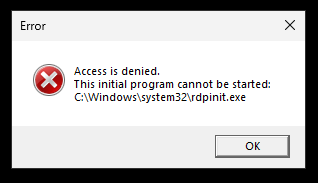
This happens on the first login. If I then close the RDP session and restart it, the screen will go black as described above.
I can still connect normally via "MS Remote Desktop Client".
Any ideas what this is doing?
Azure virtual desktop infrastructure
This thread can be closed, I found exactly what I was looking for:
Azure WVD client (devolutions.net)
Unfortunately, not a solution. But at least it was attempted to implement.
Azure virtual desktop infrastructure
It is not possible to connect to virtual desktops without Azure authentification. So if I type the name of the host into MSTSC, nothing happens, since there is no Azure authentification. And entering it into usual username/domain/password fields in RDM does not work. RDP version (set to MSRDC) itself doesn't change anything.
Azure virtual desktop infrastructure
Hello,
the reason why I posted that link, is exactly the reason that you know what I am using right now: it is not MSTSC, but Microsoft's own application called "Remote Desktop" (msrdcw.exe) - today is the first time I've seen it. When I subscribe in the app to one of my Azure accounts, I then see our host pools in Azure (which are resource groups, with one or more machines).
Currently I can't answer the question about the RDP connection, because I don't think that would even make any sense: my computer (or the application) must check which VM in the host pool is free, and then connect to that machine.
And no, not connecting to Azure SQL as data source, RDM is completely fresh installed on my local computer.
Does an enterprise version offer more in terms of Azure integration? Because according to your comparison, there is no difference there.
I don't need an enterprise test, if it doesn't provide me with more functionality where I need it. As I said: I am a long RDM user, some 10 years now, but did very little in connection with Azure. The new company I am in is using mRemoteNG, but have already asked me if I would take a look at implementation of RDM into our systems and will be looking to equip a team of 10 people - if we can implement it meaningfully.
About your links: I am not trying to create an Azure SQL database source.
Interesting thing would be to replace the aforementioned application, and have these connections open in RDM - however, that is what I am asking of you to answer for me ;-)
Thank you
Srdan
Azure virtual desktop infrastructure
Hello,
new company for me: we use Azure VD infrastructure, and currently I am testing RDM (free) here, if I can implement it (for myself and possibly for others, paid version of course).
Currently this is being used to connect to the VD machines:
Can I access these machines from RDM directly, can this be set up?
Thank you
Srdan
SFTP Session view layout
That goes without saying. Would be nice to see it, however.
SFTP Session view layout
I have to correct myself on behalf of Mac-Version:
It was an user-error, I thought the files should appear in the lower portion of the window, similarly to PC version, however they apparently appear in the tree itself.
But, resizing the window, same as with PC version, also doesn't get saved.
Would it however be possible to get the same kind of view on the Mac-RDM as is on Windows-RDM? Mix of tree and files is terrible. Either separate windows (similar to FileZilla or RDM for Windows) or like WinSCP. Even better, user-configurable.
SFTP Session view layout
2023.2.24.0 on PC, on Mac 2023.2.8.1.
However, the issue here is on PC (on Mac, I don't even see any files)...
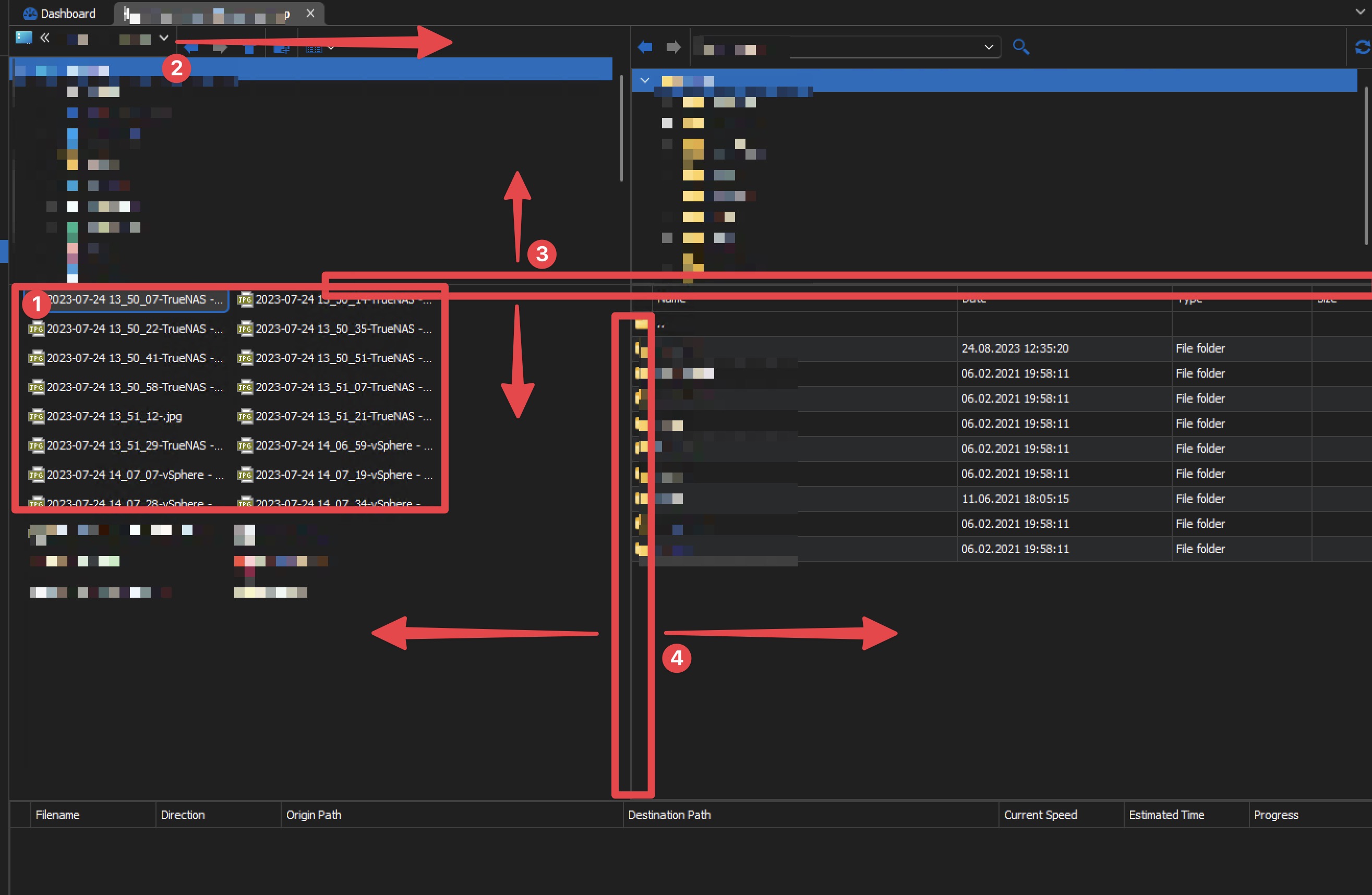
Files are shown as list, that can be changed to detailed list (one file per line, with details)
The line can be moved left-right, to reveal full path
Lines can be moved vertically to adjust the view
Lines can be moved horizontally to adjust the view
Basically all that you see visually. And if I adjust those, and then close the session and reopen, they will open in this (screenshot) exact layout again.
Hope this helps.
SFTP Session view layout
Hello,
when I create "SFTP Session" (as in not Filezilla, or WinSCP, but RMD internal one), default view is somewhat unusable.
So if I get it to show Details in the lower pane, move the bar to show the whole path, and adjust windows, all looks finally... and then, I close the session, reopen it, all is back to the default layout.
Any way to save the layout I create, and preferably use it for all other SFTP sessions?
Thank you
Kosta
Data Source question
Thank you for an update. It would be great if what you said could be implemented.
I'm pretty sure that corruption scenarios pertain to multi-user environment, which is not the case in my case.