
AlexMoucha
DVLS 2026.3 Docker image: DATABASE_TYPE=PostgreSQL found in the binary, but not documented - please confirm usage
Hi Jeremie,
thank you very much for the clear answers on the DataProtection warning and the cipher suites. That answers all my questions. I will keep the nine-suite list and the NOSUPERUSER setup, and I keep a copy of encryption.config outside the volume.
Thanks again,
Alex
DVLS 2026.3 Docker image: DATABASE_TYPE=PostgreSQL found in the binary, but not documented - please confirm usage
Hi Jeremie,
thank you very much for the detailed answers and for reproducing the pg_cast error. I have updated my documentation with your corrections: CREATEDB is not enough for the initial schema creation, the SSL mapping from the docs is correct, upgrades should work with a NOSUPERUSER owner role, and I keep a copy of encryption.config outside the volume.
Two small things: the DataProtection keys warning at startup (keys stored in the container) was not part of your answer, is that harmless as well? And I will keep an eye on the thread for the answer from the Gateway team about the TLS cipher suites. Until then I use the nine-suite list.
Thanks again,
Alex
DVLS 2026.3 Docker image: DATABASE_TYPE=PostgreSQL found in the binary, but not documented - please confirm usage
Hi Jeremie,
as announced, I ran the tests on a separate test installation and rebuilt everything a second time from scratch. Thanks for the answers and for the documentation update, the Docker and PostgreSQL pages now match what I see.
SETUP
- devolutions/devolutions-server:release-2026.3 (the UI shows 2026.3.11.0, sha256:537d0d864ceffab758fba33ad7d79c151075e62607e681a30b0b39b76feb7680)
- postgres:17 (17.11, Debian) and nginx:stable-alpine (1.30.6)
- All three containers share one network namespace (one macvlan IP). nginx terminates TLS (WEB_SCHEME=http, EXTERNAL_WEB_SCHEME=https, EXTERNAL_WEB_PORT=443), DVLS reaches the database on 127.0.0.1, App_Data is a bind mount, DVLS_ENCRYPTION_CONFIG_B64 is not set.
- Roles: pgadmin (bootstrap superuser of the postgres image), dvls_user created WITH LOGIN SUPERUSER, DVLS_INIT=true, then ALTER ROLE dvls_user NOSUPERUSER.
RESULTS
- The init created the database dvls itself, owner dvls_user. Schema: 164 tables, identical in both runs.
- Web login via nginx, forced password change and RDM 2026.3.2.2 (macOS) work.
- Recreate of all containers: all healthy after about 35 s, 164 tables, NOSUPERUSER persists, no new login needed.
- Normal operation after NOSUPERUSER works (start, healthcheck, login, recreate).
- Not tested: a role with CREATEDB only, a schema upgrade without SUPERUSER, a full restore of a dump, the effective SSL mode.
WHERE THE DOCS AND YOUR ANSWER DIFFER
1. Role privileges: your answer says CREATEDB is enough, the updated docs say the account that creates the schema needs SUPERUSER (type casts). Which one is correct?
2. DATABASE_ENCRYPT=false: your answer says no SSL mode is set (Npgsql default Prefer), the docs say SSL Mode=Disable. Which one is correct?
FINDINGS
3. The built-in backup job runs per type. The Database part fails ("Unable to start 'pg_dump'"), the WebSite part succeeds and the request returns HTTP 200, so a 228 MB web files zip is written without a database dump. That zip contains appsettings.json and App_Data/encryption.config. As a workaround I run pg_dump inside the postgres container, the dump validates with pg_restore --list.
4. TLS ciphers: with an RSA certificate, the five-suite list on the DVLS Gateway page leaves only TLS 1.3. RDM 2026.3.2.2 (macOS) uses TLS 1.2 (ECDHE-RSA-AES256-GCM-SHA384) and showed a handshake error when nginx offered only those five suites. The Hub and Cloud pages list nine suites including ECDHE_RSA, and with those it works. Which list applies to DVLS behind a reverse proxy?
OPEN QUESTIONS
5. Can we rely on NOSUPERUSER for future upgrades such as 2027.1, or should the update procedure grant SUPERUSER temporarily if a release changes type casts again?
6. The docs say every runtime start needs DVLS_ENCRYPTION_CONFIG_B64. With a persistent App_Data bind mount, restarts and recreates worked without it. Is that supported?
7. With WEB_SCHEME=http behind a proxy I see the warnings "Failed to determine the https port for redirect" and the DataProtection keys warning. Are both harmless?
Thanks again,
Alex
DVLS 2026.3 Docker image: DATABASE_TYPE=PostgreSQL found in the binary, but not documented - please confirm usage
Hi,
thank you very much for the quick and detailed reply, and for opening the internal ticket for the pg_dump / pg_restore gap and passing the documentation gap on to the docs team. This answers all my questions.
I will probably test it this Sunday (October 25) on a separate test installation, not on my production instance, and report back here with the results.
Best regards,
Alex
DVLS 2026.3 Docker image: DATABASE_TYPE=PostgreSQL found in the binary, but not documented - please confirm usage
Hello together,
DVLS 2026.3 added PostgreSQL as a database backend (release notes 2026.3.5.0, and the blog post "Run Devolutions Server on PostgreSQL" of Oct 14, 2026, which also mentions Linux and Docker deployments). The documentation has not been updated for the Docker image yet:
- "Advanced Docker configuration for Devolutions Server" still lists only SQL Server variables (DATABASE_HOST, DATABASE_PORT with default 1433, DATABASE_ENCRYPT, DATABASE_TRUST_SERVER_CERTIFICATE, AZURE_SQL_*) and describes the "SQL Server connection string".
- "Deploy Devolutions Server with Docker" lists an SQL Server instance as the only prerequisite.
- "Install Devolutions Server for Linux" still uses the SQL Server flow.
- "System requirements" only says "PostgreSQL is supported", without supported versions.
I inspected the image devolutions/devolutions-server:release-2026.3 (digest sha256:755c87a8...) without starting it:
- It ships Npgsql.dll and Npgsql.EntityFrameworkCore.PostgreSQL.dll.
- The entrypoint is the DVLS binary itself (--container-entrypoint), so there is no script that shows the variables.
- Devolutions.Server.dll contains a new variable DATABASE_TYPE and the error message "DATABASE_TYPE must be 'SqlServer', 'PostgreSQL', or 'SQLite'". It also contains DATABASE_PATH, DVLS_PG_DUMP_PATH, DVLS_PG_RESTORE_PATH and DVLS_DATABASE_UPGRADE_ON_STARTUP, plus an embedded PostgreSqlBaseline.sql.
My assumption is that the container is configured like this, but I have not confirmed it:
-e DATABASE_TYPE=PostgreSQL
-e DATABASE_HOST=<host> -e DATABASE_PORT=5432
-e DATABASE_NAME=<db> -e DATABASE_USERNAME=<user> -e DATABASE_PASSWORD=<password>
Questions:
1. Is DATABASE_TYPE=PostgreSQL officially supported with the Docker image? What are the exact accepted values (SqlServer / PostgreSQL / SQLite)?
2. How are DATABASE_ENCRYPT and DATABASE_TRUST_SERVER_CERTIFICATE mapped for PostgreSQL (SSL mode)? Are there PostgreSQL-specific variables?
3. Does the database have to exist before DVLS_INIT=true, or is it created automatically like on SQL Server?
4. DVLS_UPDATE_MODE creates a backup: does this need pg_dump / pg_restore (DVLS_PG_DUMP_PATH, DVLS_PG_RESTORE_PATH), and are these tools included in the image or do I have to provide them?
5. Which PostgreSQL versions are supported?
6. Is there an ETA for updating the Docker and Linux documentation?
Environment: Docker (current version) on a Linux x86_64 host, DVLS release-2026.3 (existing SQL Server instance on 2026.3.10.0, PostgreSQL planned only for a new test installation, no migration).
Thanks!
Best regards,
Alex
Manually created permission sets are not displayed
Hi Alexis,
Thank you very much for your reply.
I'm using RDM version 2026.2.11.0 on Windows.
No, I can't see the permission set in either the WebUI or RDM.
I can see a new permission set that I created as a test in both the WebUI and RDM.
Creating a permission set with the same name worked.
For a second client, I just updated the test environment from version 2026.1.12.0 to 2026.2.9.0.
The update worked there.
Since I only have two permission sets, I can easily transfer them.
Thanks so much in advance for your help.
It turns out it was a mistake on my part after all.
Best regards,
Alex
Manually created permission sets are not displayed
Hi everyone,
I think I've found a bug or an error. Or maybe I just didn't notice the changes.
The day before yesterday, we updated the Devolutions servers from 2026.1.15 to 2026.2.7.0.
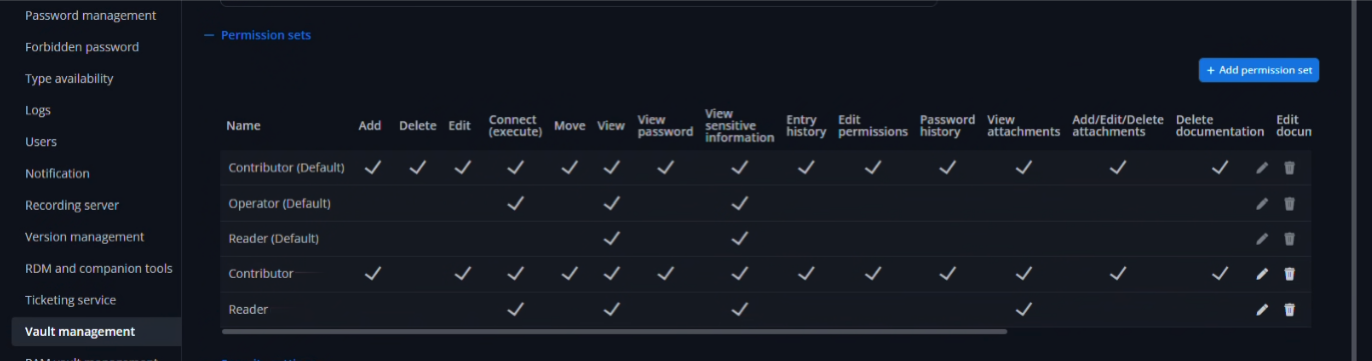
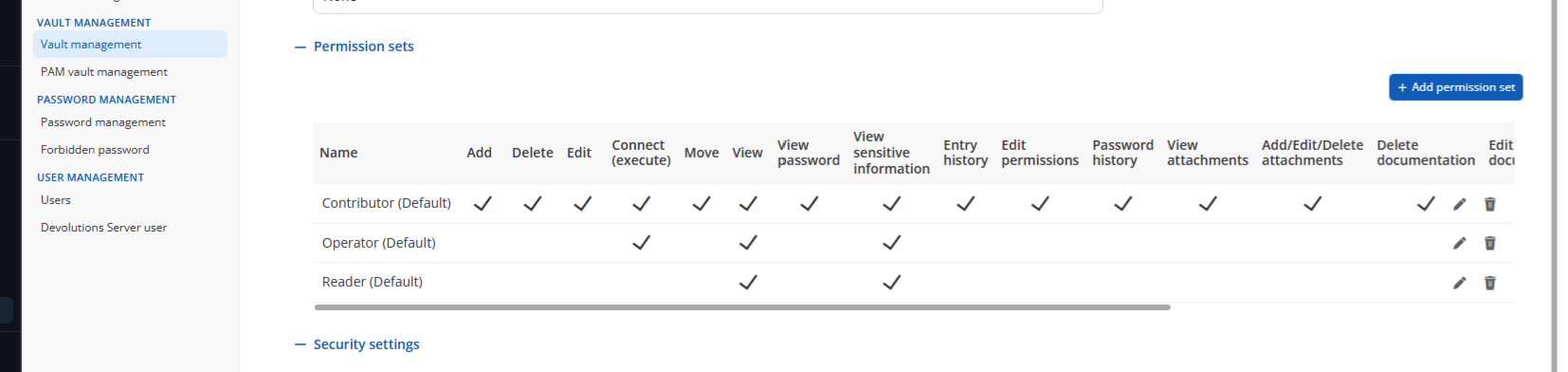
Today I noticed that the permission sets I defined are missing. They aren’t displayed in the WebUI and can’t be selected in RDM.
But I know they’re being applied because I have a clone of “Contributor (Default)” where I simply removed the “Delete” permission.
All permissions are still as they should be, and “Delete” is still prohibited everywhere.
This issue occurs in versions 2026.2.7.0 and 2026.2.9.0.
2025.1.15.0
2026.2.9.0
Thanks und best regards
Alex
System permissions for "Users MFA reset status"
Hi everyone,
I have a small addition to this feature request.
For “Users Unlocked,” there should also be an option to allow Non-DVLS-admins to approve them.
Thanks,
Alex
No connection from RDM to DVLS (including a solution)?
Hello everyone,
I'm currently experimenting with the Devolutions Server via Docker in a test environment.
So far, the environment is running smoothly and without errors via the WebUI with version 2026.1.7.0.
The DPSMain_xxx log appears to be error-free.
However, I am unable to establish a connection from an RDM to the Devolutions Server.
The connection does not work on Windows, macOS, or iPadOS.
In Windows RDM 2026.1.12.0, I receive this error message:
System.Net.Http.HttpRequestException: The SSL connection could not be established, see inner exception.
---> System.Security.Authentication.AuthenticationException: Cannot determine the frame size or a corrupted frame was received.
at System.Net.Security.SslStream.GetFrameSize(ReadOnlySpan`1 buffer)
at System.Net.Security.SslStream.EnsureFullTlsFrameAsync[TIOAdapter](CancellationToken cancellationToken, Int32 estimatedSize)
at System.Runtime.CompilerServices.PoolingAsyncValueTaskMethodBuilder`1.StateMachineBox`1.System.Threading.Tasks.Sources.IValueTaskSource<TResult>.GetResult(Int16 token)
at System.Net.Security.SslStream.ReceiveHandshakeFrameAsync[TIOAdapter](CancellationToken cancellationToken)
at System.Net.Security.SslStream.ForceAuthenticationAsync[TIOAdapter](Boolean receiveFirst, Byte[] reAuthenticationData, CancellationToken cancellationToken)
at System.Net.Http.ConnectHelper.EstablishSslConnectionAsync(SslClientAuthenticationOptions sslOptions, HttpRequestMessage request, Boolean async, Stream stream, CancellationToken cancellationToken)
--- End of inner exception stack trace ---
at Devolutions.Server.ApiWrapper.RDMSWebClient.RunSynchronous[T](Task`1 task)
at Devolutions.RemoteDesktopManager.Business.DataSources.RDMSWebApiClient.ExecuteAnonymousAction[T](Func`2 action)
at Devolutions.RemoteDesktopManager.Business.DataSources.RDMSWebApiClient.GetPublicWebInstanceInformation()
On macOS RDM 2025.3.10.2, I get this message:
Ungültige Protokollversion
net_auth_SSPI
net_http_ssl_connection_failed
I've already imported my license. Unfortunately, it didn't work.
I also tried two different proxies. No luck.
My docker-compose.yaml follows these instructions:
After doing a bit of searching, I found the EXTERNAL_URL environment variable. Once I added this to my docker-compose file, the RDMs (Windows, macOS, and iPadOS) were able to connect to the Devolutions server.
Here's my test Docker Compose file. As I said, I'm still testing it out / playing around with it ;-)
environment:
# Database connection variables
# Web server configuration
HOSTNAME: dvls.domain.tld
WEB_SCHEME: http
PORT: 5000
EXTERNAL_WEB_SCHEME: https
EXTERNAL_WEB_PORT: 443
EXTERNAL_URL: dvls.domain.tld
# TLS certificate configuration
# Operating mode configuration
DVLS_INIT: false
#DVLS_UPDATE_MODE: ${DVLS_UPDATE_MODE}
#DVLS_BACKUP_PATH: ${DVLS_BACKUP_PATH}
# Initialization mode variables
# System configuration
DVLS_PATH: /opt/devolutions/dvls
#DVLS_TELEMETRY: ${DVLS_TELEMETRY}
#DVLS_ENCRYPTION_CONFIG_B64: ${DVLS_ENCRYPTION_CONFIG_B64}
Could it be that this environment variable is missing from the documentation?
Thanks in advance,
Alex
DVLS WebUI unavailable after upgrade to 2026.1.6.0
Hello everyone,
Hello Gerhard,
Thank you again for your very quick response to my inquiry.
I checked the health check that caused the error. However, I cannot find any deviations in my configuration compared to the DVLS documentation.
https://docs.devolutions.net/server/kb/troubleshooting-articles/health-readiness-checks/
In version 2025.3.x.x, the Health Check https://fqdn/dvls/health (or /dvls/ready) redirects me to the login page. In version 2026.1.x.x, the same request returns a blank page.
I have temporarily set the Health Check to “TCP/443 availability.”
Is there a new way to check the health status of the server?
Many thanks in advance,
Alex
DVLS WebUI unavailable after upgrade to 2026.1.6.0
Hello Min,
Thank you for your prompt reply.
No. I get a white screen with only the message “Server unavailable!” in the browser.
I followed the upgrade procedure. I've been doing it this way for years. We've been using the DVLS server for so long; it used to be called DPS (Devolutions Password Server). Since then, we've also migrated the server, etc., and there have never been any problems during upgrades.
Best regards,
Alex
DVLS WebUI unavailable after upgrade to 2026.1.6.0
Hello everyone,
After updating from the latest version 2025.3.15.0 to 2026.1.6.0, I get the message “Server unavailable!” in the WebUI.
Everything worked fine with version 2025.3.15.0. With the current version 2026.1.6.0, the WebUI no longer works.
Everything looks fine in the Devolutions Console.
The scheduler has started correctly.
IIS is working.
.NET 10 Hosting has been installed.
The logs look fine.
According to the DPS.Console log, the update was successful.
Uninstalling .NET 9 (hosting and runtime) was also unsuccessful to get the WebUI functionally.
Reinstalling was also successful.
I would appreciate some help.
Many thanks in advance.
Alex
Add Password policy to folder entry
Hello Jacob,
Thank you very much for your support.
I can hereby confirm that the problem/bug has been fixed in version 2025.3.26.0, or more precisely 2025.3.27.0. The display and password generation are working as expected.
Best regards,
Alex
Add Password policy to folder entry
As a follow-up, I just updated the Devolutions server to 2025.3.11.0. The problem remains unchanged here as well.
Add Password policy to folder entry
Hello Devolutions Team,
I've observed a strange behaviour while using the password management with password-policies.
Our setup:
- Devolutions Server in the currently recent version: 2025.3.10.0
- RDM Remote Desktop Manager in the currently recent version: 2025.3.35.0
In the system configuration in the section password management, I've configured five password policies and definied one of them as default policy (enforce default policy is NOT activated).

In the Web-UI I have configured for the global vault itself the password management as "inherited". Here the configured default policy (FGPP-User) is correctly shown.

For a dedicated folder, I have overriden the default with the concrete "FGPP-Technical".
But here the problem arose: when I create a new password entry and prepare a new password value using the password generator, the globally configured default policy "FGPP-User" is selected.
The password mode "advanced" and the values for length etc. is properly filled, but the selectbox shows the wrong default policy instead of the defined overriden "FGPP-Technical".

So far for the WebUI.
In the Remote Desktop Manager desktop application (Windows), I'm encountering a different behaviour:
Also here the behaviour is wrong, but different.
When creating a new password entry in the dedicated folder (with the oerriden default policy with the concrete "FGPP-Technical"), the correct policy is pre-selected, but the values are completely wrong.
In the folder properties in password managenent for the dedicated folder (with the oerriden default policy with the concrete "FGPP-Technical"), the correct policy is pre-selected, but the values are completely wrong.

As you can see, the symbol characters is active with a minimum of two, which is not the configured setting for the FGPP-Technical.
And when creating a new password using the generator, the selectbox shows "Entry's configured password policy", basically stating the for this entry an unnamed overriden policy is defined, but as previously stated I just selected the different pre-defined FGPP-Technical.
Additionally the mode is defined as "Default", but should be "Advanced", the symbols definition is wrong and the exclude/include lists are missing/wrong.
Nevertheless, the password length, description and expiration setting is correct according the defined "FGPP-Technical" definition.

Am I misinterpreting the intended behaviour or is this a bug ?
Kind regards
Alex
Work with Template groups
Hello everyone,
While rebuilding our vault, I came across a very interesting feature. With “Template Group,” you can quickly store individual connections in folders with the respective entries. I find this very useful, especially in a Linux environment.
However, I have now discovered a problem. Perhaps it is a bug or it is by design.
When I create a system with a finished template group, I create a folder with the hostname of the system as its name. Here, I then store $COMPUTER_NAME$.domain.tld as the host entry in the entries. Next, an RDP entry is created, which is basically inherited from everything else. Including HOST. And here it takes the entry from the parent folder, which contains “$COMPUTER_NAME$.domain.local”. This works as long as I don't use Devolutions Gateway.
When using Devolutions Gateway, $COMPUTER_NAME$.domain.tld is transmitted to the gateway. The connection is interrupted because no connection can be established. Which is understandable.
Here is the gateway log:
ERROR devolutions_gateway::listener: TCP peer failure error="tcp://$COMPUTER_NAME$.domain.tld:3389 failed: failed to lookup destination address: No such host is known. (os error 11001)" client=xx.xx.xx.xx:58896
Is there any way to fix this problem? Or is it a bug? Or have I overlooked something?
And template groups are not yet implemented in Devolutions Server. Am I correct?
Best regards
Alex
Permission "Grant access" in WebUI takes very long in RDM gets timeout or not connection
Hello everyone,
First of all, I would like to thank you for your excellent support. I have always received quick and helpful answers.
I really like the new web interface in version 2025.3.x. I think the similarity to RemoteDesktopManager is very well done.
And that brings me to my problem.
Since we started using 2025.3.x, adjusting permissions in Security -> Permissions -> Grant Access in the WebUI has been very to extremely slow.
In 2025.3.4.0, it takes up to a minute for the “window” for adjusting permissions to open in the WebUI.
In 2025.3.5.0, I have to admit, I have never waited that long for the “window” to open or for a timeout to occur. Here in the WebUI as well.
In RemoteDesktopManager, after a short time, I receive a message saying that no connection to the data source could be established and asking if I want to switch to offline mode. If I confirm with “NO” here:
Error message dialog
Value cannot be null (Parameter 'source')
ArgumentNullException - Value cannot be null. (Parameter 'source')

at System.Linq.ThrowHelper.ThrowArgumentNullException(ExceptionArgument argument)
at System.Linq.Enumerable.Any[TSource](IEnumerable1 source, Func2 predicate)
at Devolutions.RemoteDesktopManager.AvaloniaUI.ViewModels.BatchGrantPermissionViewModel.FillLists(Boolean isHubReportAnIssue, Boolean isHubSendSecureMessage, Boolean isHubGatewayPermissions)
at Devolutions.RemoteDesktopManager.AvaloniaUI.ViewModels.BatchGrantPermissionViewModel.InitializePermissions()
at Devolutions.RemoteDesktopManager.AvaloniaUI.ViewModels.BatchGrantPermissionViewModel..ctor(ConnectionEngine engine, Boolean hasViewPassword, Boolean hasViewSensitive, Boolean hasCustomInherited, Boolean isPam)
at Devolutions.RemoteDesktopManager.AvaloniaUI.ViewModels.PermissionsViewModel.GrantAccess()
at Avalonia.Data.Core.ExpressionNodes.MethodCommandNode.Command.Execute(Object parameter)
at Avalonia.Controls.Button.OnClick()
at Avalonia.Controls.Button.OnPointerReleased(PointerReleasedEventArgs e)
at Avalonia.Reactive.LightweightObservableBase1.PublishNext(T value) at Avalonia.Interactivity.EventRoute.RaiseEventImpl(RoutedEventArgs e) at Avalonia.Interactivity.EventRoute.RaiseEvent(Interactive source, RoutedEventArgs e) at Avalonia.Interactivity.Interactive.RaiseEvent(RoutedEventArgs e) at Avalonia.Input.MouseDevice.MouseUp(IMouseDevice device, UInt64 timestamp, IInputRoot root, Point p, PointerPointProperties props, KeyModifiers inputModifiers, IInputElement hitTest) at Avalonia.Input.MouseDevice.ProcessRawEvent(RawPointerEventArgs e) at Avalonia.Controls.TopLevel.<>c.<HandleInput>b__150_0(Object state) at Avalonia.Threading.Dispatcher.Send(SendOrPostCallback action, Object arg, Nullable1 priority)
------------------------ extended stack ------------------------
at Devolutions.RemoteDesktopManager.Forms.FrmErrorMessage.ShowErrorMessage(ConnectionEngine engine, Exception exception, String message, String title)
at Devolutions.RemoteDesktopManager.Managers.LogManager.HandleException(Exception exception)
at Devolutions.RemoteDesktopManager.Managers.LogManager.OnThreadException(Object sender, DispatcherUnhandledExceptionEventArgs e)
at Avalonia.Threading.Dispatcher.CatchException(Exception e)
at Avalonia.Threading.Dispatcher.Send(SendOrPostCallback action, Object arg, Nullable`1 priority)
at Avalonia.Controls.TopLevel.HandleInput(RawInputEventArgs e)
at Avalonia.Win32.WindowImpl.AppWndProc(IntPtr hWnd, UInt32 msg, IntPtr wParam, IntPtr lParam)
at Avalonia.Win32.WindowImpl.WndProcMessageHandler(IntPtr hWnd, UInt32 msg, IntPtr wParam, IntPtr lParam)
at Windows.Win32.PInvoke.DispatchMessage(MSG* lpMsg)
at Windows.Win32.PInvoke.DispatchMessage(MSG* lpMsg)
at System.Windows.Forms.Application.LightThreadContext.FPushMessageLoop(msoloop uReason)
at System.Windows.Forms.Application.ThreadContext.RunMessageLoopInner(msoloop reason, ApplicationContext context)
at System.Windows.Forms.Application.ThreadContext.RunMessageLoop(msoloop reason, ApplicationContext context)
at System.Windows.Forms.Form.ShowDialog(IWin32Window owner)
at Devolutions.RemoteDesktopManager.Managers.ActionManager.EditConnection(ConnectionEngine engine, IConnectionSource source)
at Devolutions.RemoteDesktopManager.Managers.SessionMenuManager.MnuEditConnection_Click(Object sender, EventArgs e)
at DevExpress.XtraBars.BarItemLink.OnLinkClick()
at DevExpress.XtraBars.BarButtonItemLink.OnLinkAction(BarLinkAction action, Object actionArgs)
at DevExpress.XtraBars.ViewInfo.BarSelectionInfo.UnPressLink(BarItemLink link)
at DevExpress.XtraBars.Controls.CustomLinksControl.OnMouseUp(MouseEventArgs e)
at System.Windows.Forms.Control.WmMouseUp(Message& m, MouseButtons button, Int32 clicks)
at System.Windows.Forms.Control.WndProc(Message& m)
at DevExpress.XtraBars.Controls.CustomControl.WndProc(Message& msg)
at System.Windows.Forms.NativeWindow.Callback(HWND hWnd, MessageId msg, WPARAM wparam, LPARAM lparam)
at Windows.Win32.PInvoke.DispatchMessage(MSG* lpMsg)
at System.Windows.Forms.Application.LightThreadContext.FPushMessageLoop(msoloop uReason)
at System.Windows.Forms.Application.LightThreadContext.RunMessageLoop(msoloop reason, Boolean fullModal)
at System.Windows.Forms.Application.ThreadContext.RunMessageLoopInner(msoloop reason, ApplicationContext context)
at System.Windows.Forms.Application.ThreadContext.RunMessageLoop(msoloop reason, ApplicationContext context)
at Devolutions.RemoteDesktopManager.Program.Main(String[] args)
We use version 2025.3.17.0 or 2025.3.20.0 as RDM; the behavior is identical in both versions.
Best regards
Alex
DVLS Bug: Mail Spam
Hello everyone,
I just updated our test environment from 2025.2.12.0 to 2025.3.2.0.
2025.2.12.0:
Everything is running perfectly. The syslog server is displayed as UP in the system dashboard and the data is flowing smoothly into the syslog server.
2025.3.2.0:
As it stands at the moment, everything looks good. The syslog server is displayed as DOWN in the system dashboard, but in the syslog server setup, there is now a “Test connection” button that indicates a successful connection. The data flowing into the syslog server is also up to date.
So there is only a visual problem on the system dashboard page.
Best regards,
Alex
DVLS Bug: Mail Spam
Hello Marc-Andre,
The bug that caused users to be spammed with emails when the syslog server was unavailable has been fixed.
However, the syslog connection does not work with 2025.2.14.0.
I still have an instance running with 2025.2.12.0, where I receive syslog messages without any issues.
On a 2025.2.14.0 server in the Devolutions Console -> Logs, I found this entry:
SYSLOG_SERVER-ZBX_UNREACHABLE - Scheduler - Error
“Error connecting to host FQDN:1518” Error: “Unable to write data to the transport connection: An established connection was aborted by the software in your host machine..”
When the system was still running 2025.2.12.0, the syslog connection worked.
I don't know whether I should open a new report for this or whether it is related to this problem.
Best regards,
Alex
DVLS Bug: Mail Spam
Hello everyone,
I can confirm this bug. We have switched the SQL server to another node (SQL failover cluster) and are now constantly receiving emails to the Devolutions server administrators stating that the syslog server cannot be reached.
I have already restricted Devolutions server administrators to one user (I am the only one who should now receive emails), but the emails are still being sent to both previously stored Devolutions server administrators.
It almost seems as if DVLS has its own email queue through which emails are sent/forwarded?
I also removed the syslog server. Nevertheless, I am still being flooded with emails.
After removing the mail server connection and reactivating the syslog server, everything seems to be working “cleanly” again.
I will leave the mail server connection disabled for now.
Best regards,
Alex
Monitoring DVLS service Externally
Hello Simon,
I'll answer your question.
You want to use Zabbix to monitor server availability via the “Web Scenario” monitoring feature.
From my own experience, I know that this is not so easy, especially if JavaScript is used on the server.
The fact that you can reach the server is a good sign. Otherwise, you would not get an HTTP 200 response.
If you then want to log in, you will most likely have to work with JavaScript within Zabbix if you are using multiple authentication methods.
However, since Zabbix 7.0, there is another way to monitor websites with Zabbix. - Monitor websites with browser items
https://www.zabbix.com/documentation/7.0/en/manual/guides/monitor_browser
I therefore recommend switching to this Zabbix monitoring. There are many tutorials on the internet that explain how to set this up.
Otherwise, ask in the Zabbix forum.
I hope this helps. Good luck!
Alex
System dashboard show Syslog server as Down
Hello everyone,
Last week thursday I updated the devolutions server from 2025.2.2.0 -> 2025.2.5.0.
Since then the status in the system dashboard for the syslog server is marked as down.
However, the server was up with version 2025.2.2.0.
Currently, however, the data is coming in properly on the syslog server, so I assume a display bug?
Alex
VIM does not work as expected using ssh terminal under version 2025.2.13.1
Hello Carl,
we have tested it with the current 2025.2.16.0 version of the RDM.
Everything works as it should with this version.
Many thanks
Alex
VIM does not work as expected using ssh terminal under version 2025.2.13.1
Hello everyone,
We have the same problem. DVLS 2025.2.3.0 as "data source" and the RDM for Windows 2025.2.14.0.
When editing files with vim and inserting blank lines (press Enter to insert a line), the line that moves down overwrites the line that follows.
But this is only a view problem. Because when I open the file afterwards, everything looks clean. This is my research.
I have made a session recording. trp and rfi are in the attached archiv.zip
However, this problem only occurs in the Windows version. This problem / phenomenon does not occur in the macOS version of RDM 2025.2.6.8. I could not test it in Linux, but I doubt that it occurs there as well.
Many thanks for your help
Alex
Monitoring DVLS service Externally
Hello Michel,
Hello Jakub,
I can recommend the following based on Michel's recommendations:
I am referring to the current Zabbix LTS version at the moment.
DVLS Services: Ensure the Devolutions Server Scheduler service and any related services such as the Gateway are running as expected.
All Devolutions Servers must be monitored individually. To do this, Zabbix Agent 2 must be installed on each server.
The Windows template must be stored in the Zabbix WebUI on each monitoring host. This is also used to monitor the Windows services out-of-the-box, as long as these startup types are “automatic”.
DVLS Web Interface: Regularly verify the availability of the DVLS web UI by checking its URL.
The “Web scenario” is suitable for monitoring the WebUI. A separate template must be created for this, which is adapted to your own environment. This monitors the page call. An alarm can be triggered for HTTP <> 200.
https://www.zabbix.com/documentation/7.0/en/manual/web_monitoring
IIS Application Pool: Confirm that the IIS Application Pool used by DVLS is started and remains in a healthy state.
The IIS template already integrated in Zabbix can be used for monitoring. Only an additional feature for the IIS needs to be installed on the Devolutions Server so that the IIS can be fully monitored.
https://www.zabbix.com/de/integrations/iis
SQL Server: As DVLS relies on SQL Server for its backend, it's important to monitor database connectivity and performance.
There are additional plugins for the Zabbix Agent 2 to monitor the SQL Server. These must be installed on the SQL Server. The SQL template is then stored on the SQL Server monitor host and adapted to the corresponding environment.
https://www.zabbix.com/integrations/mssql
Log Files: Regularly review DVLS logs, especially
Zabbix also has an integrated option for monitoring log files.
https://www.zabbix.com/documentation/7.0/en/manual/config/items/itemtypes/log_items
As the topic of this request is primarily related to Zabbix, I recommend the Zabbix forum. There is also very competent help here.
https://www.zabbix.com/forum/
I hope this helps.
Good luck
Alex