Manually created permission sets are not displayed

Hi everyone,
I think I've found a bug or an error. Or maybe I just didn't notice the changes.
The day before yesterday, we updated the Devolutions servers from 2026.1.15 to 2026.2.7.0.
Today I noticed that the permission sets I defined are missing. They aren’t displayed in the WebUI and can’t be selected in RDM.
But I know they’re being applied because I have a clone of “Contributor (Default)” where I simply removed the “Delete” permission.
All permissions are still as they should be, and “Delete” is still prohibited everywhere.
This issue occurs in versions 2026.2.7.0 and 2026.2.9.0.
2025.1.15.0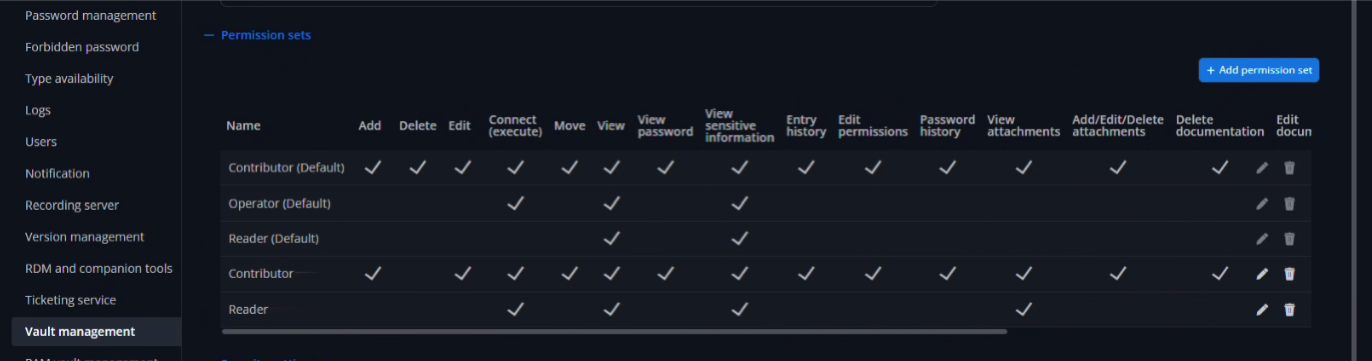
2026.2.9.0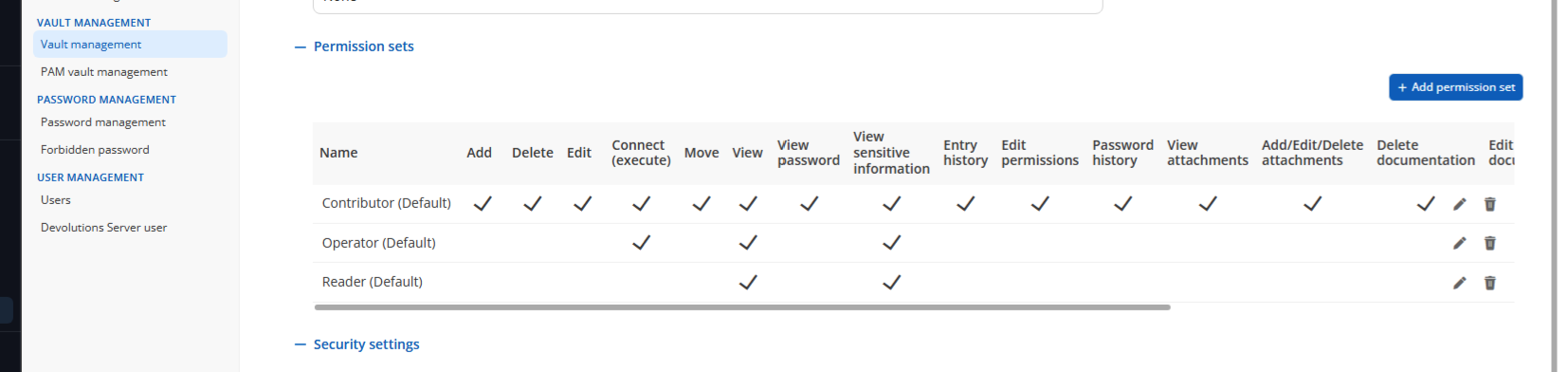
Thanks und best regards
Alex
Screenshot 2026-06-24 at 11.36.59.png
Screenshot 2026-06-24 at 11.37.04.png
All Comments (2)
Hi Alex,
Thank you for reaching out and for the detailed report.
I tried to reproduce the issue on my side: I installed a fresh DVLS instance on 2026.1.15.0, created a custom permission set, and then upgraded to 2026.2.9.0. The permission sets remained visible and selectable after the upgrade, so I was unable to reproduce the behavior you described.
To help us investigate further, could you please confirm the following:
- Which version of Remote Desktop Manager are you using, and on which platform (Windows, macOS, or Linux)?
- When you open a session and edit its permissions, do you see your custom Permission Set listed there, or is it also missing in that view?
- If you try to create a new permission set today on 2026.2.9.0, does it appear correctly in the WebUI and in RDM?
Looking forward to your reply.
Best regards,
Alexis Geller Peiro
Hi Alexis,
Thank you very much for your reply.
I'm using RDM version 2026.2.11.0 on Windows.
No, I can't see the permission set in either the WebUI or RDM.
I can see a new permission set that I created as a test in both the WebUI and RDM.
Creating a permission set with the same name worked.
For a second client, I just updated the test environment from version 2026.1.12.0 to 2026.2.9.0.
The update worked there.
Since I only have two permission sets, I can easily transfer them.
Thanks so much in advance for your help.
It turns out it was a mistake on my part after all.
Best regards,
Alex