
Min Destens
Filter funktioniert nicht mehr wie in den vergangenen Versionen und Befehlsleiste
Hallo,
das Problem konnte inzwischen reproduziert werden. Das Team wurde darüber bereits informiert!
LG,
Min
Filter funktioniert nicht mehr wie in den vergangenen Versionen und Befehlsleiste
Hallo,
danke für die Aufnahme, das Verhalten ist wirklich interessant!
Ich werde ein paar Tests durchführen und prüfen, ob ich das Verhalten ebenfalls reproduzieren kann.
LG,
Min
Filter funktioniert nicht mehr wie in den vergangenen Versionen und Befehlsleiste
Hallo,
das ist interessant! Mit Version .15.0 funktioniert auf meiner Seite wieder alles einwandfrei, sogar die Navigation mit den Pfeiltasten. Ordner werden dabei genauso behandelt wie einzelne Einträge.
Hast du die Navigation so konfiguriert, dass sie automatisch ausgeblendet wird, oder ist sie bei dir dauerhaft eingeblendet?
LG,
Min
Filter funktioniert nicht mehr wie in den vergangenen Versionen und Befehlsleiste
Hallo,
ahh jetzt verstehe ich - beim Werkzeug / Script selbst ist nun ein Doppelklick nötig um diese zu starten - vorher nur ein einfacher.. Guter Hinweis!
Wenn ich die ausgeblendete Navigation anschließend erneut öffne, ohne den Host zu wechseln, ist die Werkzeugleiste verschwunden. Es wirkt so, als hätte dann kein Host mehr den Fokus.
Der Fokus springt zurück auf den Tresor, kann das sein? Falls ja, dann kann ich das ebenfalls reproduzieren.
LG,
Min
SSH Shell terrible slow on 2026.3.5.0 64bit RDM
Hello,
Could you please give 2026.3.8.0 a try? Also, which Workspace are you using?
Maybe the SSH logs can reveal the issue. Please refer to this KB topic for more information.
Regards,
Min
Filter funktioniert nicht mehr wie in den vergangenen Versionen und Befehlsleiste
Hallo,
ich kann das Verhalten mit dem Filter bestätigen und habe es bereits als Bug gemeldet. Dies betrifft sowohl den fehlenden Fokus beim Einblenden der Navigation als auch die fehlende Navigation durch die Ergebnisse mit den Pfeiltasten. Beide Funktionen haben in Version 2026.2.x noch problemlos funktioniert.
Ich gehe daher davon aus, dass es sich um eine Regression handelt und diese Funktionen mit einer der kommenden Aktualisierungen wieder wie gewohnt verfügbar sein werden.
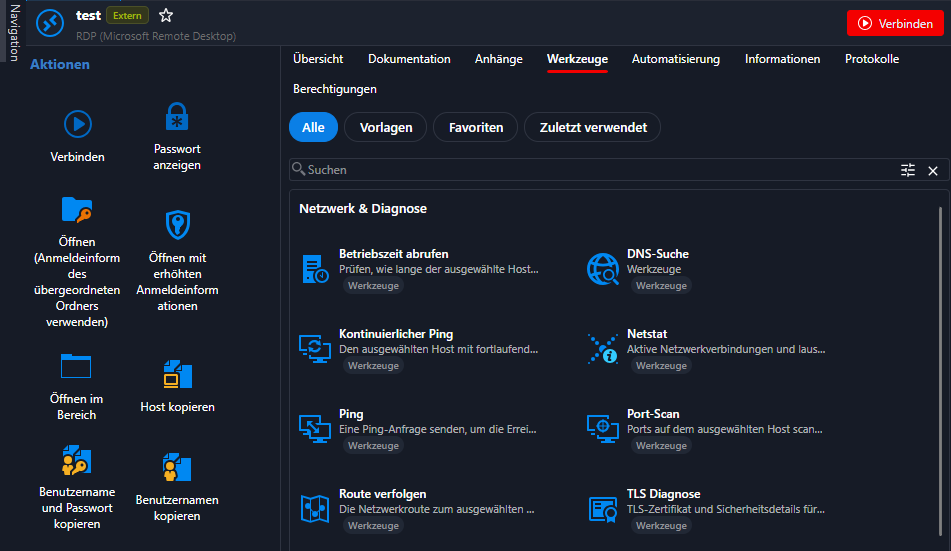
Eine weitere Änderung betrifft die Werkzeuge für einen ausgewählten Host. Bisher war mein gewohnter Ablauf sehr einfach:
Host einmal anklicken → rechts erscheinen die Werkzeuge → gewünschten Befehl auswählen.
Dies funktioniert auf meiner Seite nach wie vor:
LG,
Min
Allow “Send Copy” to External Email Addresses
Hello Julian,
It is also possible to send passwords to external email addresses without requiring the recipient to have a Devolutions account.
More information can be found in this knowledge base article.
Regards,
Min
Anhänge im Offline-Modus anzeigen
Hallo,
das ist korrekt und so vorgesehen. Es nicht möglich, Anhänge im Offline-Modus anzuzeigen, zu bearbeiten oder anderweitig zu verwenden.
Der Hintergrund ist, dass dafür alle Anhänge in die Offline-Datei geschrieben werden müssten. Je nach Anzahl und Größe der Anhänge könnte die Offline-Datei dadurch sehr schnell erheblich anwachsen.
LG,
Min
Tab senden
Hallo,
dies kann mithilfe eines Tastenfolge-Makros realisiert werden.
Die entsprechende Einstellung findest du in den Eigenschaften der Website-Sitzung unter Ereignisse => Nach Verbindungsaufbau => Nach Verbindungsaufbau - Makro
LG
Global control (or Block) of "Local Resources" for ISO 27001 and ENS compliance
Hello,
I would recommend enforcing this restriction through Group Policy (GPO) rather than through RDM. This allows you to disable drive redirection at the operating system level, ensuring that it is blocked for all users. Even if a user enables drive redirection within an RDP session, it will still be prevented by the policy.
If your goal is to apply this restriction regardless of whether users connect through RDM or another RDP client, you should configure it on Windows using the native Group Policy settings:
If you only want to enforce this restriction within Remote Desktop Manager, you can use the DisableLocalDriveSharing policy:
The reason I recommend the Windows policy is that RDM alone cannot fully enforce this restriction. For example, if a user connects using the native Windows Remote Desktop application instead of RDM, they can simply bypass the RDM-specific configuration.
For your use case, I believe the Windows Group Policy approach is the most appropriate solution.
Regards,
Min
Ausgegraute Spalten
Hallo Rainer,
danke für das Feedback! 😉
Ich weiß aus verlässlicher Quelle, dass dieses Feld derzeit standardmäßig nicht von der Suche berücksichtigt wird. Daran wird jedoch bereits gearbeitet. 😎
LG,
Min
Templates is missing from file menu
Hello,
This has been moved to the Administration section.
https://docs.devolutions.net/rdm/ribbon-menu-bar/administration/templates/creating-templates#windows
Regards,
Min
Filter funktioniert nicht
Hallo Fredy,
alles klar, danke für dein Feedback 👍
LG,
Min
Devolutions Server web page is blank
Hello,
Nice, I'm glad to hear! Thanks for your feedback! 😎
Regards,
Min
Devolutions Server web page is blank
Hello,
In this case, you need to adjust the service user also on the IIS application pool, as described in the pre deployment guide:
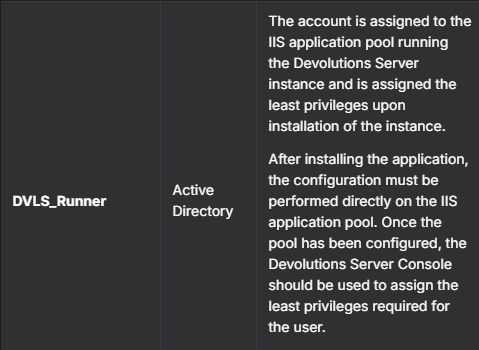
By default, the NETWORK_SERVICE user owns the pool, and this user seems to have no permissions to your database.
For the Scheduler, you need to set up the user in the Windows Services.
Afterward, open the Devolutions Server Console => Edit => Database => Advanced Credentials => Apply least permissions for the Runner and Scheduler account.(greyed out for the user, but it should reflect the two users you already set in the IIS and services)
Finally, perform a Stop / Start Server from the Console
Regards,
Min
Devolutions Server web page is blank
Hello,
Is this the browser running on the server? If so, could you also try accessing it from a browser on your client machine?
Also, which authentication method are you using to connect to the database?
Regards,
Min
Filter funktioniert nicht
Hallo Freddy,
kannst du bitte die portable Version testen, ob hier das gleiche Verhalten auftritt?
LG,
Min
Filter funktioniert nicht
Hallo Fredy,
kannst du bitte versuchen, das Layout für den Filter zurückzusetzen?
Fenster => Layout zurücksetzen => Filtereinstellungen
https://docs.devolutions.net/rdm/knowledge-base/troubleshooting-articles/reset-layout#windows
LG,
Min
Automatische Ansicht der Eigenschaften einer Session via Navigation Tree
Hallo Mike,
meinst du eventuell, dass die Übersicht für die Einträge bei dir nicht mehr angezeigt wird?

Für das Verhalten bei den Favoriten würde eventuell eine kurze Aufzeichnung helfen.
Davor würde ich jedoch empfehlen, auf 2026.2.13.0 zu aktualisieren, da in dieser Version einige Fehler im Zusammenhang mit den Favoriten behoben wurden.
LG,
Min
Automatische Ansicht der Eigenschaften einer Session via Navigation Tree
Hallo Mike,
kannst du bei dir bitte folgende Optionen überprüfen:
Datei => Einstellungen => Baumansicht => Verhalten

LG,
Min
Update RDM to 2025.1.25.0 to get the new license imported but NO - Error
Hello,
I can remember this issue, and it should already be resolved in the latest 2025.1 version.
Would you be able to give it a try?
Regards,
Min
2FA zurücksetzen
Hallo,
kannst du einen Screenshot der MFA-Abfrage posten? Ich denke, dass es sich hier um den Anwendungs-MFA handelt und nicht den MFA von DVLS.
https://docs.devolutions.net/rdm/ribbon-menu-bar/file/settings/security#multifactor-authentication
https://docs.devolutions.net/rdm/knowledge-base/how-to-articles/enable-mfa-for-users
LG,
Min
Search
Hello,
Nice, I'm glad to hear! 😅
I can strongly recommend the Devolutions Docs as well the Devolutions Academy! 😉
Regards,
Min
Search
Hello,
Could you please verify if the option Include host in search is enabled on your side?

Regards,
Min
SSH Shell - An unexpected error occurred. Error code: FAIL_PROTOCOL_ERROR
Hello,
Nice, I'm glad to hear, thanks for sharing the solution! 😎
Regards,
Min