
Didi
MariaDB Benutzer umbenennen um den Zugriff einzuschränken
Nach dem ein SQL Benutzer umbenannt wurde, um den Zugriff einzuschränken, können Objekte nicht mehr bearbeitet, gelöscht oder verschoben werden.
User wurde mit "rename user 'Benutzer'@'%' to 'Benutzer'@'IP-Adresse';" umbenannt
MySqlConnector.MySqlException (0x80004005): The user specified as a definer ('Benutzer'@'%') does not exist ---> MySqlConnector.MySqlException (0x80004005): The user specified as a definer ('Benutzer'@'%') does not exist
  at MySqlConnector.Core.ResultSet.ReadResultSetHeaderAsync (MySqlConnector.Protocol.Serialization.IOBehavior ioBehavior) [0x000b0] in <a77084e444c944289e28ad2a40b4a263>:0
  at MySqlConnector.MySqlDataReader.ActivateResultSet () [0x00079] in <a77084e444c944289e28ad2a40b4a263>:0
  at (wrapper remoting-invoke-with-check) MySqlConnector.MySqlDataReader.ActivateResultSet()
  at MySqlConnector.MySqlDataReader.CreateAsync (MySqlConnector.Core.CommandListPosition commandListPosition, MySqlConnector.Core.ICommandPayloadCreator payloadCreator, System.Collections.Generic.IDictionary`2[TKey,TValue] cachedProcedures, MySqlConnector.Core.IMySqlCommand command, System.Data.CommandBehavior behavior, MySqlConnector.Protocol.Serialization.IOBehavior ioBehavior, System.Threading.CancellationToken cancellationToken) [0x0023f] in <a77084e444c944289e28ad2a40b4a263>:0
  at MySqlConnector.Core.CommandExecutor.ExecuteReaderAsync (System.Collections.Generic.IReadOnlyList`1[T] commands, MySqlConnector.Core.ICommandPayloadCreator payloadCreator, System.Data.CommandBehavior behavior, MySqlConnector.Protocol.Serialization.IOBehavior ioBehavior, System.Threading.CancellationToken cancellationToken) [0x003ba] in <a77084e444c944289e28ad2a40b4a263>:0
  at MySqlConnector.MySqlCommand.ExecuteNonQueryAsync (MySqlConnector.Protocol.Serialization.IOBehavior ioBehavior, System.Threading.CancellationToken cancellationToken) [0x0008e] in <a77084e444c944289e28ad2a40b4a263>:0
  at MySqlConnector.MySqlCommand.ExecuteNonQuery () [0x00012] in <a77084e444c944289e28ad2a40b4a263>:0
  at Devolutions.RemoteDesktopManager.Business.DataSources.DatabaseConnectionDataSource.ExecuteNonQuery (System.String sql, System.Data.IDbTransaction dbTransaction, System.Data.IDbDataParameter[] parameters, System.Int32 commandTimeout) [0x0005b] in <b09d76960b8141528d469666de90947b>:0
  at Devolutions.RemoteDesktopManager.Business.DataSources.DatabaseConnectionDataSource.DeleteConnection (Devolutions.RemoteDesktopManager.Business.Connection connection, System.Data.IDbTransaction dbTransaction) [0x000f0] in <b09d76960b8141528d469666de90947b>:0
  at Devolutions.RemoteDesktopManager.Business.DataSources.DatabaseConnectionDataSource.DeleteConnection (Devolutions.RemoteDesktopManager.Business.Connection connection) [0x0005d] in <b09d76960b8141528d469666de90947b>:0
Wie kann ich einen Benutzer ändern, ohne diesen Fehler zu verursachen?
Wenn ich den Benutzer wieder umbenenne ist der Fehler Weg.
Didi
RDM - Sicherheitsanbieter - Certificate
Oh man, da hätte ich vielleicht auch selber drauf kommen können.
Danke ;-)
Ein Frage hätte ich allerdings noch. Ich will hier ein Zertifikat aus unserer PKI Infrastruktur nehmen,
diese sind 1 Jahr gültig. Was passiert nach einem Jahr, wenn das Zertifikat abgelaufen ist?
Kann ich das dann einfach tauschen?
RDM - Sicherheitsanbieter - Certificate
Ok Danke, nun sind die Bilder auch da.
Der RDM wurde mit der Version 2020.3.14.0 64-Bit aufgesetzt.
RDM - Sicherheitsanbieter - Certificate
Da unsere Datenbank auf MariaDB umziehen soll wollen wir hier den Sicherheitsanbieter "Certificate" nutzen. Leider kann ich den nicht auswählen, siehe Meldung. Die Datenbank ist mit dem Benutzer angelegt, mit der ich auch versuche den Sicherheitstyp zu ändern.


Was muß ich machen, damit das geht.
RDM Version 2020.3.14.0 64-bit
authentication issues with SSH Key
i have send you a privat message
authentication issues with SSH Key
when i save the passphrase, i have the same failure.
The command in the Terminal works.
authentication issues with SSH Key
Yes, Permission now 600 for the privat key.
The LOG File has now entry for my issue. You need a remote session via team viewer?
[09.03.2016 08:28:49]INFO ClearCache - Offline file has been deleted, recreating new file
[09.03.2016 08:28:49]INFO Offline file - Database disk image is malformed, trying to delete the file: /Users/Didi/Library/Application Support/com.devolutions.remotedesktopmanager/AD45880D-1B77-4D90-BF1C-6BB69F49F23E/offline.db
[09.03.2016 08:28:50]INFO ClearCache - Offline file has been deleted, recreating new file
[09.03.2016 09:26:24]ERROR SILENT Failed to connect to the host (131084).
[09.03.2016 10:57:20]ERROR SILENT The peer connection was lost.
[09.03.2016 10:57:20]ERROR SILENT Failed to connect to the host (131084).
[09.03.2016 10:57:25]ERROR SILENT The peer connection was lost.
[09.03.2016 11:56:18]ERROR SILENT The peer connection was lost.
[09.03.2016 11:56:37]ERROR SILENT Failed to connect to the host (131084).
[09.03.2016 15:49:02]ERROR SILENT The peer connection was lost.
[09.03.2016 15:55:46]ERROR SILENT The peer connection was lost.
[09.03.2016 15:55:46]ERROR SILENT Failed to connect to the host (131084).
authentication issues with SSH Key
Yes, and in the external mode I am asked for the passphrase and the error message.
authentication issues with SSH Key
The Permission ist 755.
If I select a file, and click on Start session, nothing happens.
authentication issues with SSH Key
OK, when i use sudo from terminal, it works.
sudo ssh -p 22 -o 'IdentityFile yes' -i /var/folders/64/b_vw_5dx28db2ckrvgftwb1m0000gn/T/tmp3e5417de.tmp.ppk "root@172.16.171.42"
I think that it is a permissions issue. The Key is trying to save to a location, I woch as a normal user does not have rights.
authentication issues with SSH Key
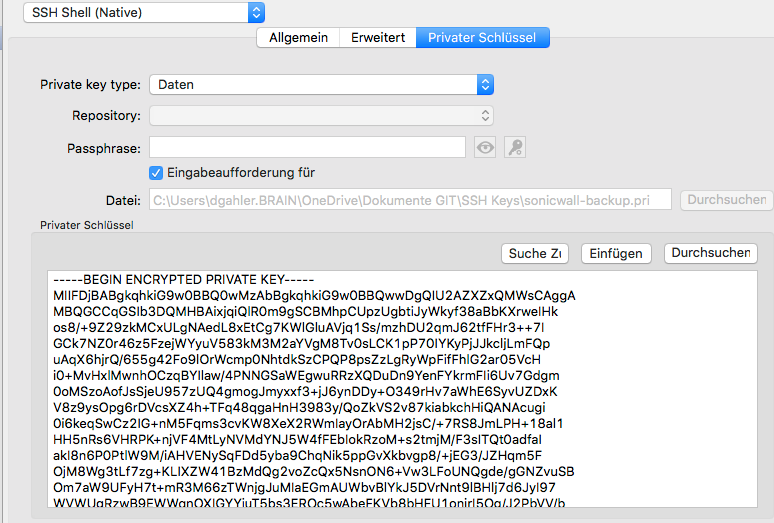
Privat Key
Display changed to external
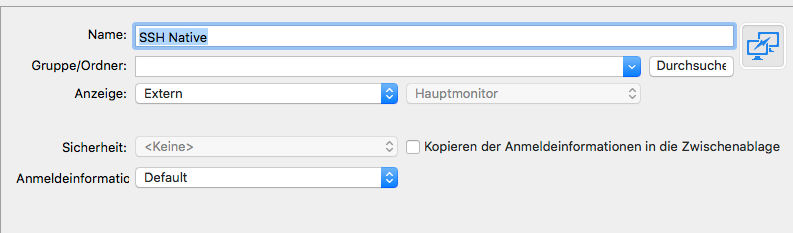
OK, external it doesn't works.
But I will not ask for the passphrase. but is required under Windows RDM.
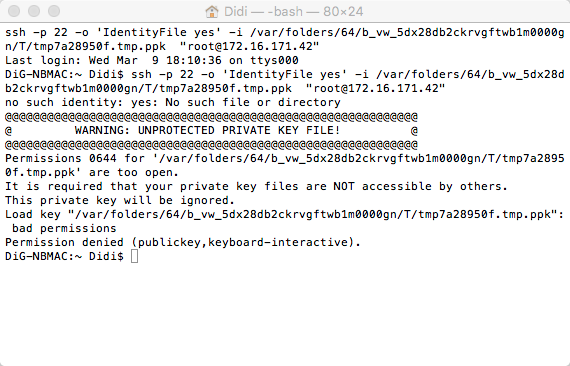
authentication issues with SSH Key
Hi,
It is -> SSH Shell (native)
Host is per VPN reachable. When i disable Key authentication, it works fine.
No DNS issue, i am using IP Address.
authentication issues with SSH Key
authentication issues with SSH Key
I use the same source database on Windows and OSX RDM. But of OSX I can not connect. Under Windows no problem.
RDM message:
Fatal error: Please make sure your connection settings are valid.
I use a 2048-bit RSA key with passphrase
My system
MAC OS El Caption
RDM 3.0.10.0
Destination host OpenSuse 11
RSA Key created using RDM for Windows
Tools -> Remote Management Page
Yes, I want to on the configured properties of the server object, access the ILO address or homepage.
Tools -> Remote Management Page
I use RDM both Windows and MAC. Almost all connections (SSH, browser, RDP ...) I have also registered under the Tools Home Page and iLO. Under the MAC version I have unfortunately since no access.
Is it possible to determine the fields ready?
RDM Enterprise Edition 3.0.10.0