
randy
tab groups
Yes, that's it exactly.
tab groups
Set option for each tab group to be toggled on/off independently.
I would like to activate a tab group and have it added to my currently visible tabs and not have my active tabs hidden. I'm sure many (most?) like it the way it is, but having such an option would be beneficial.
Secret Server
We recently installed Delinea Secret Server. I understand that RDM has a Secret Server Entry, but I cannot locate it.
Unfortunately, I'm relegated to using the Free version of RDM since my company won't pay for licensing, much less the Enterprise version. Is the Secret Server entry not available to the free version? Nothing online indicates such a restriction. If it is available, is there something I need to do to in order to see it?
Tab bar location not responding
Hi Gabriel. I appreciate the instructions to correct the issue. However, before I could do this, a new version of RDM was release and I was updated. This appears to also have fix my issue. Again, thanks for you help.
Tab bar location not responding
Sorry about my delayed response. It appears that responding to the email notification doesn't actually do anything. Now I know.
I tried a Reset Layout, with no joy. It is still firmly planted on the Left side. I even reviewed the Tab location setting in options to make sure it was set to the location I want. I also restarted RDM again just to make sure it wasn't required after the Reset Layout.
Tab bar location not responding
I started to have too many tabs open and am not a fan of multiple rows of tabs, so I wanted to see if setting the Tab location to "Left" was a good solution. I didn't really care for that much either, and have not been able to change the tab location back. I've tried all locations, and it stays stuck at the left side. And before anyone asks, YES, I restarted the application each time. Any suggestion how to get this unstuck?
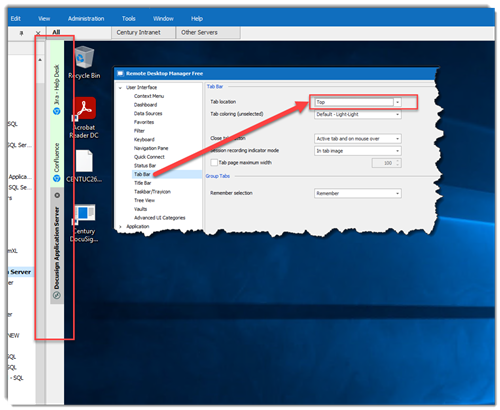
RECOMMENDATION: I tried moving it to the left, hoping it would be like the Edge Browser tabs. When they are placed to the left, the tabs themselves are horizontal, but disappear to just the icon, unless you hover over them. I'd like to request that feature.
Saving External Documents
BLUF: Should the Document Editors ask about saving when closed?
I routinely use two documents through RDM (Spreadsheet Editor and Rich Text Editor) for basic information that I refer back to many times a day. Multiple times during the day I add to or edit both of the documents and often forget to immediately save the changes. As a result, I've sometimes lost data when I've had to shut down RDM (such as during a reboot--or worse yet, when my computer automatically reboots during an OS update). I'm not finding any feature to auto-save (that would be nice), but I'm quite surprised that there is no warning to save changed files when they are being closed. Am I missing something?
(Note: my spreadsheet is linked to an external Excel file, and the RTF document is embedded).
Spreadsheet Editor
I realize that I cannot expect the spreadsheet editor to have the full editing capabilities as MS Excel. So this is not a complaint if the feature doesn't exist here.
In Excel, you can Alt+Enter while editing a cell. This action will add a new line in the cell. Alt+Enter does not do anything in the RDM Spreadsheet Editor. Is there a command or menu option that will create a new line within a cell?
My workaround, if this does not exist, is to edit the original file directly in Excel, but I'm hoping that something exists in the editor.
Citrix NetScaler connection
Thank you for your response. Even though it's not what I wanted to hear.
Citrix NetScaler connection
I've been an RDM user for some time, but now for the first time I'm trying to make a connection to a Citrix desktop. I've been slowly making progress.
Using the NetScaler connection type, I'm able to log into the Citrix Receiver and see the 5 different Desktops we have configured. However, clicking on any of the configured desktops opens the desktop in a typical external Citrix Window. Same behavior I'd get if I started one of the desktops from the standard Citrix Receiver. Is there a way to have the desktop start in a new RDM tab? In fact, I would prefer to set up the desktops as separate connections and bypass (at least visually) the Citrix Receiver altogether. Is this possible?
Options disabled in context menus
Thanks, Mark, for the response. I am on one of the latest versions. This seems to happen about once every week or two and has been going on for a couple of months. I'll try the Ctrl+F5 trick the next time this happens. May I recommend adding a Refresh Data Source button to the UI.
Sonicwall Global VPN Client
Maurice, thank you for your help. I now have it working. I'm actually not sure what I've done differently, but after connecting GVC through the command line, it now connects through RDM. I had to add the full path in the command line, but once I did that, the connection through RDM worked like a charm.
Sonicwall Global VPN Client
Thanks for the information, Maurice. I did not understand that I needed to put the name of the Sonicwall profile into the VPN Name field in RDM. This explains a lot. However, doing so has not helped me to successfully connect. I'm still getting the same result. The result I am getting is the standard messages as follows:

followed by:

I receive no message indicating that the connection was unsuccessful. No logging entries are made in the Sonicwall client, which leads me to believe that RDM is not even seeing GVC. Should there be a warning or something if RDM cannot find the Sonicwall profile? Do you have other troubleshooting advice?
I am able to connect using the Sonicwall client directly, so I know that works.
Sonicwall Global VPN Client
I'm trying to configure a VPN using Sonicwall's GVC. I cannot find the add-on for that specific client. There is an add-on for Sonicwall VPN, but it doesn't seems to have all the options necessary. Is there another add-on specifically for GVC, or am I missing something on the configuration screen. I would have expected either a field for the Host, or a field to select a profile from the installed client.
Screen Resolution bug in Windows 10
Your beta version appears to have corrected the issue I was having. What superior responsiveness to your customers! When would you expect this fix to be out of beta--I don't want to upgrade to a new version that doesn't include this.
Screen Resolution bug in Windows 10
Thank you for the reply. Yes, Smart Sizing is enabled--which I thought meant that the image would be sized properly so that the remote image fills the available space in the RDM window. All of the other screen sizing options produce scroll bars that must be navigated. I have Remote Desktop Size set to current work area size. I have no problem with this connecting to other remote machines. Something is different with the two servers at this one customer of mine.
Is there proper settings that will cause the remote image to fill and not exceed the size of the RDM window?
Screen Resolution bug in Windows 10
I forgot to add that I am using version 11.5.4.0 64-bit.
Screen Resolution bug in Windows 10
I just (finally) upgraded to Windows 10 and have noticed an issue with RDM. When I connect to any server at my main customer, the screen resolution does not draw correctly. The desktop only takes up about 75% of the available space in the RDM window. Screen mapping for mouse click, however, appear to be mapped as if the remote desktop image fills the space completely. In other words, it doesn't match what is on the screen and therefore when you try to interact with the remote desktop using the mouse, the clicks do not correlate to what you actually see.
The good news is that forcing a redraw to the screen by minimizing and restoring RDM corrects the issue. This was not an issue when I was running under Windows 7. Has anyone else run into this problem? Any suggestions as to a fix would be appreciated.
Randy Davis
LogMeIn Connection Error
I'm a relatively new user of RDM, and find it invaluable.
I've created a connection to a server using the LogMeIn connection type. I am having two issues with this connection. One is just an annoyance, the other is a show stopper.
When I connect, I get a script error (looks like Java) stating that the object doesn't support the method 'AddBehavior'. Clicking either yes or no dismisses the error and the app appears to run normally (except for the issue below--I don't know if they are related). This is just an annoyance, but I would like to resolve the cause of the error so I don't have to click through that windows EVERY time.
The second issue is more problematic. Once I click through the above error and have connected to the remote machine, I can no longer interact with any other tab that may be open in RDM. I get a "ding" as an error. No window, just a "ding". There does not seem to be any issues with interacting with the LogMeIn connected machine. Once I close the LogMeIn connection, I am able to immediately interact with other open tabs. There are no errors or problems with connecting to LogMeIn outside of RDM.
Is this an issue with LogMeIn? Have other people experienced it? Is there a fix?
Randy Davis
Denver