Sonicwall Global VPN Client

I'm trying to configure a VPN using Sonicwall's GVC. I cannot find the add-on for that specific client. There is an add-on for Sonicwall VPN, but it doesn't seems to have all the options necessary. Is there another add-on specifically for GVC, or am I missing something on the configuration screen. I would have expected either a field for the Host, or a field to select a profile from the installed client.
All Comments (4)
Hello,
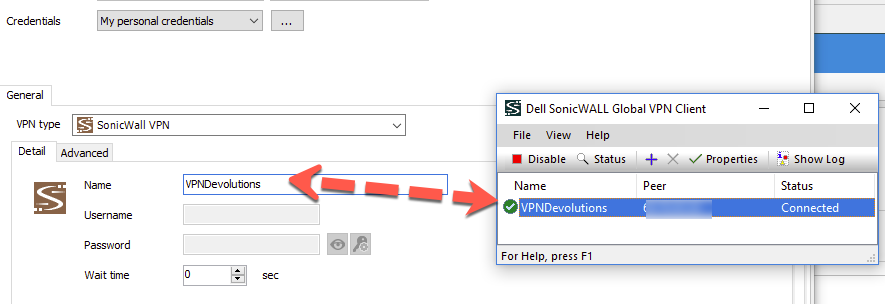
Thats what we use ourselves, you need to type in the name of the profile that is configured in your local installation.
Since we are simply calling the CLI of the Global VPN Client, that is all we can specify apart from the credentials.
Best regards,
Maurice
2017-05-26_22-14-44.png
Thanks for the information, Maurice. I did not understand that I needed to put the name of the Sonicwall profile into the VPN Name field in RDM. This explains a lot. However, doing so has not helped me to successfully connect. I'm still getting the same result. The result I am getting is the standard messages as follows:
followed by:
I receive no message indicating that the connection was unsuccessful. No logging entries are made in the Sonicwall client, which leads me to believe that RDM is not even seeing GVC. Should there be a warning or something if RDM cannot find the Sonicwall profile? Do you have other troubleshooting advice?
I am able to connect using the Sonicwall client directly, so I know that works.
2017-05-27_11-41-20.jpg
2017-05-27_11-38-50.jpg
Hello,
We simply call either SWGVpnClient.exe or SWGVC.exe as follows
swgvc /E "{profilename}" /U "{username}" /P "{password}"
You can turn on the debug mode to see that command line in your application logs
What happens if you type this in a command window?
Best regards,
Maurice
Maurice, thank you for your help. I now have it working. I'm actually not sure what I've done differently, but after connecting GVC through the command line, it now connects through RDM. I had to add the full path in the command line, but once I did that, the connection through RDM worked like a charm.