Tab bar location not responding

I started to have too many tabs open and am not a fan of multiple rows of tabs, so I wanted to see if setting the Tab location to "Left" was a good solution. I didn't really care for that much either, and have not been able to change the tab location back. I've tried all locations, and it stays stuck at the left side. And before anyone asks, YES, I restarted the application each time. Any suggestion how to get this unstuck? 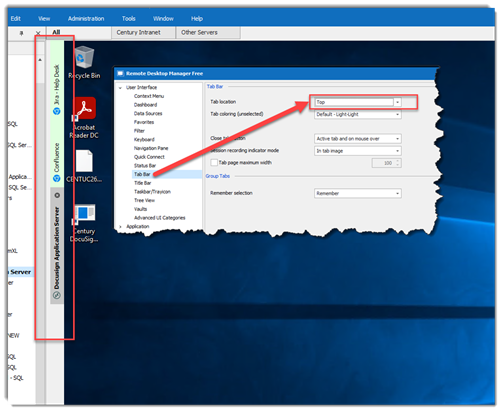
RECOMMENDATION: I tried moving it to the left, hoping it would be like the Edge Browser tabs. When they are placed to the left, the tabs themselves are horizontal, but disappear to just the icon, unless you hover over them. I'd like to request that feature.
2021-09-23_14-57-11.png
All Comments (4)
Hello,
Thank you for contacting us on that matter!
I would like to verify first of all if you are able to reposition the tab to its default location by performing a Reset Layout. The Reset Layout button can be found under the Window tab.
Best regards,
Gabriel Degrandpré
Sorry about my delayed response. It appears that responding to the email notification doesn't actually do anything. Now I know.
I tried a Reset Layout, with no joy. It is still firmly planted on the Left side. I even reviewed the Tab location setting in options to make sure it was set to the location I want. I also restarted RDM again just to make sure it wasn't required after the Reset Layout.
Hello,
Thank you for your response. In that case, if the Reset Layout didn't change this, I suspect there could be something going on with your configuration file. Following the steps below would force RDM to recreate a brand new configuration file, and should normally solve the problem.
1.Close RDM, and make sure it's not running in your Task Manager anymore. Otherwise, the next steps will not work.
2.With the file explorer, navigate to %localappdata%\Devolutions
3.Create a new folder in this location and call it Backup
4.Move all your files from the RemoteDesktopManager folder to the Backup folder
5.Launch RDM. It will automatically recreate all the files that were moved to the backup folder.
6.Register the application
7.Connect to your data source through File > Data Sources and verify if the issue still occurs.
Let me know how that goes!
Best regards,
Gabriel Degrandpré
Hi Gabriel. I appreciate the instructions to correct the issue. However, before I could do this, a new version of RDM was release and I was updated. This appears to also have fix my issue. Again, thanks for you help.