
kongsted
SQL Database Size
If anyone needs to have cleaned up the credentials-setting on the RDPsessions, then this Powershell script can be used.
(Script come without warranty - test it before is executed in production :) )
$moduleTest = Get-Module RemoteDesktopManager -ListAvailable
if ([string]::IsNullOrEmpty($moduleTest)) {
    Write-Output "Installing RDM"
    Install-Module -Name RemoteDesktopManager -Scope CurrentUser -Force
    Import-Module RemoteDesktopManager
} else {
    Import-Module RemoteDesktopManager
}


$credentialsInheritedId = "1310CF82-6FAB-4B7A-9EEA-3E2E451CA2CF"


$sessions = Get-RDMSession | where {$_.ConnectionType -eq 'RDPConfigured'}
foreach ($session in $sessions) {
    Write-Output "###################### $($session.Name) #####################"
    $updateSession = $false

    if ($session.CredentialConnectionID -ne $credentialsInheritedId) {
        Write-Output "Update credentials inherited setting"
        $session.CredentialConnectionID = $credentialsInheritedId
        $updateSession = $true
    }

    if ($updateSession) {
        Set-RDMSession -Session $session -Refresh
    }
}
Other thing can be updated at the same time, if there's a need for more cleanup.
Example of some of the other things I did at the same time:
if ($session.RDP.ScreenSizingMode -ne 'DynamicResolution') {
    Write-Status "Updating screen resolution mode"
    $session.RDP.ScreenSizingMode = 'DynamicResolution'
    $updateSession = $true
}

if ($session.RDP.UsesHardDrives -eq $true) {
    Write-Status "Updating harddrive map"
    $session.RDP.UsesHardDrives = $false
    $updateSession = $true
}

if ($session.KeyboardHook -ne 'OnTheRemoteComputer') {
    Write-Status "Updating keyboard hook"
    $session.KeyboardHook = 'OnTheRemoteComputer'
    $updateSession = $true
}
Br,
Anders
Entry updated with Powershell doesn't update expiration correctly
Hi,
Forgot to reply. The update is working for us. Thank you for fixing the problem. :)
Cheers,
Anders
Database upgrade from 750 to 782 fails
Hi Erica,
Good to hear that the problem has been identified. :)
Br,
Anders
Database upgrade from 750 to 782 fails
Hi Erica,
I have sent the schema through RDM.
//Anders
Connect to RDM on SQL-server wihtout UI
An small update. I was able to register RDM in the right context, after some "cheating"... :)
So as of now, my problem is solved, but I still think the option to silently register with Register-RDMFromDataSource should be available.
Database upgrade from 750 to 782 fails
Hi Erica,
It isn't asking for a DB upgrade next time I'm opening RDM.
The only error in the log is:
System.Reflection.TargetInvocationException: Exception has been thrown by the target of an invocation. ---> System.FormatException: Input string was not in a correct format.
   at System.Version.VersionResult.SetFailure(ParseFailureKind failure, String argument)
   at System.Version.TryParseComponent(String component, String componentName, VersionResult& result, Int32& parsedComponent)
   at System.Version.TryParseVersion(String version, VersionResult& result)
   at System.Version.Parse(String input)
   at System.Version..ctor(String version)
   at Devolutions.RemoteDesktopManager.Business.DataSources.DatabaseConnectionDataSource.IsConfiguredVersionManagementMoreRestrictiveThanProvidedValues(DataSourceSettings dataSourceSettings, Version minVersionFromDBUpgrade, Version maxVersionFromDBUpgrade)
   at Devolutions.RemoteDesktopManager.Business.DataSources.DatabaseConnectionDataSource.ConfigureVersionManagementPrompt(Version minVersion, Version maxVersion)
   --- End of inner exception stack trace ---
   at System.RuntimeMethodHandle.InvokeMethod(Object target, Object[] arguments, Signature sig, Boolean constructor)
   at System.Reflection.RuntimeMethodInfo.UnsafeInvokeInternal(Object obj, Object[] parameters, Object[] arguments)
   at System.Reflection.RuntimeMethodInfo.Invoke(Object obj, BindingFlags invokeAttr, Binder binder, Object[] parameters, CultureInfo culture)
   at Devolutions.RemoteDesktopManager.Business.DataSources.DatabaseUpdater.Upgrade(Boolean silent, Action`1 logMessage)
//Anders
Entry updated with Powershell doesn't update expiration correctly
Hi Erica,
Have you had time to test it? :)
//Anders
Database upgrade from 750 to 782 fails
Hi Devolutions,
I have updated RDM from 2022.1.27.0 to 2022.2.14.0, and as part of that, the database schema has to upgraded from 750 to 782.
We're hosting the database on a Microsoft SQL-server.
The problem is that the schema-upgrade is failing.
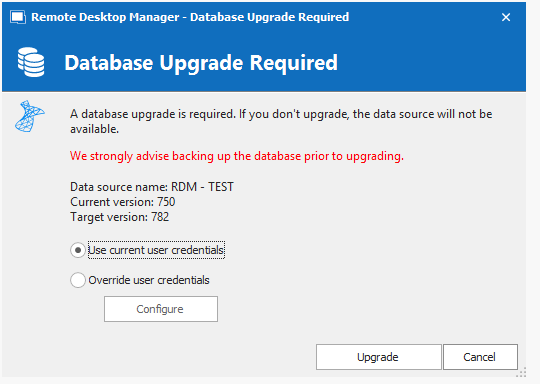
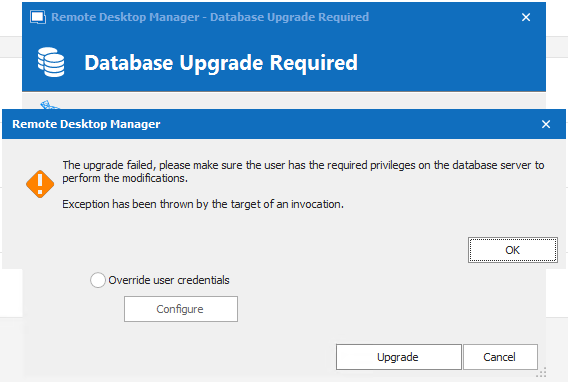
When I click "OK", it goes back to the "Database Upgrade Required", and I can click "Upgrade" again, and then it runs for few seconds, and I'm getting into RDM, and everything seems to work.
When checking data source info, it seems like it's upgraded.
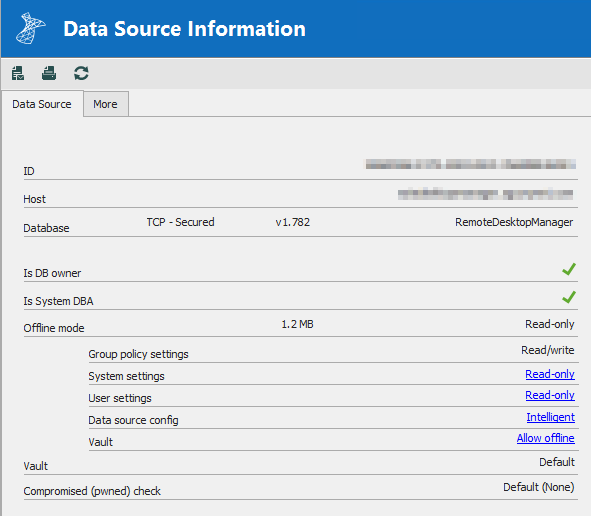
Please let me know, if you need some more logs or something else from me.
Br,
Anders
Connect to RDM on SQL-server wihtout UI
It is remembering the datasource-config, when I have created it. I can see the files in the appdata-folder.
Connect to RDM on SQL-server wihtout UI
I have tried both from another session on the same server without UI, but also from my session on another server, where the RDM UI is installed.
Connect to RDM on SQL-server wihtout UI
There isn't a RDM UI installed on the server, where I'm trying to run the script on.
I'm able to my script on the same server, but in another user-context. So I can run the script on that particular server.
The server is a Windows Server 2019 with English UI/language.
Connect to RDM on SQL-server wihtout UI
When copying file 4 files, I'm getting the following error:
NullReferenceException - Object reference not set to an instance of an object.

   at Microsoft.PowerShell.ConsoleHostUserInterface.PromptForChoice(String caption, String message, Collection`1 choices, Int32 defaultChoice)
   at System.Management.Automation.Internal.Host.InternalHostUserInterface.PromptForChoice(String caption, String message, Collection`1 choices, Int32 defaultChoice)
   at Devolutions.RemoteDesktopManager.Managers.UIManager.ShowConfirmationMessage(String message, Boolean defaultYesButton)
   at Devolutions.RemoteDesktopManager.Business.DataSources.DatabaseUpdater.Upgrade(Boolean silent, Action`1 logMessage)
   at Devolutions.RemoteDesktopManager.Managers.ConnectionManager.LoadConnectionsFromDataSource(ConnectionEngine engine, Boolean hasChanged)
   at Devolutions.RemoteDesktopManager.Managers.ConnectionManager.LoadConnections(BaseConnectionDataSource dataSource)
NullReferenceException - Object reference not set to an instance of an object.

   at Microsoft.PowerShell.ConsoleHostUserInterface.PromptForChoice(String caption, String message, Collection`1 choices, Int32 defaultChoice)
   at System.Management.Automation.Internal.Host.InternalHostUserInterface.PromptForChoice(String caption, String message, Collection`1 choices, Int32 defaultChoice)
   at Devolutions.RemoteDesktopManager.Managers.UIManager.ShowConfirmationMessage(String message, Boolean defaultYesButton)
   at Devolutions.RemoteDesktopManager.Business.DataSources.DatabaseUpdater.Upgrade(Boolean silent, Action`1 logMessage)
   at Devolutions.RemoteDesktopManager.Managers.ConnectionManager.LoadConnectionsFromDataSource(ConnectionEngine engine, Boolean hasChanged)
   at Devolutions.RemoteDesktopManager.Managers.ConnectionManager.LoadConnections(BaseConnectionDataSource dataSource)
NullReferenceException - Object reference not set to an instance of an object.

   at Microsoft.PowerShell.ConsoleHostUserInterface.PromptForChoice(String caption, String message, Collection`1 choices, Int32 defaultChoice)
at System.ManagConnect to RDM on SQL-server wihtout UI
It wasn't the plan to deploy it to multiple machines - at least not this script, but maybe there may come other in the future, so it would be nice to be able to "force" it to register.
I tried to copy the file "RemoteDesktopManager.cfg" from one user on the machine, to the other users "\AppData\Roaming\Devolutions\RemoteDesktopManager", but that just gave an error.
Get-RDMCurrentRepository : Object reference not set to an instance of an object.and
Get-RDMSession : Connection not found.Should I edit something in the cfg file, when copying it between profiles?
//Anders
Connect to RDM on SQL-server wihtout UI
Hi Jonathan,
It was a license-related problem - that wasn't clear. :)
Now is my problem, that I can't pass a "Yes" to the command Register-RDMFromDataSource when I'm trying to run the command in the script.
The command doesn't accept '-Force' or '-Confirm:$true', and I can't open a Powershell in the same context as the script is running.
Any suggestion? :)
Br,
Anders
Connect to RDM on SQL-server wihtout UI
Hi,
I'm trying to make a script, there's connecting to an RDM-database hosted on a Microsoft SQL-server, without I have to set up the connection first in the UI.
My problem is that it's never getting connected to the RDM-database.
Simplified script:
$rdmdataSourceNew = New-RDMDataSource -Name "RDM" -Database "RemoteDesktopManager" -SQLServer -Server "<internal dns-address>" -IntegratedSecurity -SetDatasource
Set-RDMDataSource -DataSource $rdmdataSourceNew
When I'm afterwards are trying to get the datasource with Get-RDMDatasource - I'm getting the following output:
ID          : <a GUID>
IsConnected : False
IsOffline   : False
Name        : RDM
Type        : SQLServer
So it will not connect to the datasource.
I'm using Powershell module version: 2022.2.0.0
Br,
Anders
Entry updated with Powershell doesn't update expiration correctly
Hi Erica,
It's only visible after the record has expired first time. When it is initially created, it isn't a problem.
You can try to reduce the number of days to 1, and then try again the day after tomorrow.
Br,
Anders
Entry updated with Powershell doesn't update expiration correctly
Hi Érica,
I'm using an Microsoft SQL database.
Br,
Anders
Entry updated with Powershell doesn't update expiration correctly
Hi Devolutions,
I'm having a solution where I will update a lot of entries in an RDM vault regularly with Powershell.
To know when then the information is expiring, I'm using the attribute "$rdmSession.MetaInformation.Expiration".
It works fine to set the value with Powershell, and I can read it out again.
The code I'm using is similar to the code here:
$rdmSession = Get-RDMSession -Name <sessionname>
$rdmSession.MetaInformation.Expiration = (Get-Date).AddDays(30)
Set-RDMSession -Session $rdmSession -Refresh
The problem occurs in the UI. The "Expiration Date" is set correctly, but when the entry is expired, it will show as "[Expired]" in the tree-view and in the overview for the vault.
If I open the settings for an entry there is expired, and just clicking "Ok" (without changing anything), it will update the tree-view, and remove the "[Expired]" for that single entry and also remove it from the "Expired entries" in the vault overview.
I'm using RDM version 2022.1.27 64-bit and PS module version 2022.1.3.3
Am I missing something in my update in Powershell, or have I found "an expected feature"? :)
Cheers,
Anders
Batch edit with user-/local-specific settings
Hi,
I know it's possible to batch-edit with user- or local-specific settings (eg. override credentials for connecting to an resource).
The problem occour if I'm selecting a higher level in our structure, and the items below that level contains both sessions (eg RDP) and credential-entries.
Then the personalization I'm trying to do (which should only hit sessions) is also affecting credential-entries, which mean that I can't use the credential-entries before I'm removing - on this case - the local specific setting.
It would be nice if it was possible to select what kind if entries there should be set with a user/local specific setting.
Also if the first entry in a tree-structure is a credential entry, then the window for specific settings has settings for that purpose only, and if first entry in the structure is a session-entry, then the window has different options.
I hope it all make sense - if not, I will do do some screenshots. :)
Best regards
Anders
Multiple contacts on sessions
Just curious (still) - any update on this topic?

//Anders
Cannot find the login for 'DOMAIN\USERNAME', because it does not exist or you do not have permission
Hi,
Everytime I'm creating or editing a user, I'm getting the following error:

It's correct that the user doesn't have an user-object on the SQL-server, as the access to the database is granted with an AD-group.
It doesn't matter if I have unchecked "Create SQL Server Login and User" - it still gives this error.
Could this check of the SQL-user be removed somehow? It's ok, if I have to set an general option, where I'm telling that I want to create SQL-logins manually.
Br,
Anders
Multiple contacts on sessions
Hi David,
Just curious - any update on this topic? :)
//Anders
Create a link/shortcut of a folder???
Hi Érica,
I screenshot of a little of our structure.
All other under "Operations" beside "System 2" must not be accessible by the consultants.
New systems is being added to the list now and then - and it's not only admins, who are adding to that list, so permissions has to be inherit to new systems under "Operation".
//Anders

Error-message when create a new user (RDM database hosted on MSSQL)
Hi again,
My mistake I didn't explain or setup fully. :)
Access to the database is granted with an AD-group, so users isn't created directly on the database + in the SQL-server. That's by design, that we don't want all users to be added as an user in the SQL-server.
This setup has been working for a long time. I think it's with RDM version 14 the problem started.
//Anders
Create a link/shortcut of a folder???
Hi,
I'm having a large folder with a lot of sub-folders, credentials and sessions.
The structure is like:

What I want achive, is to link/shortcut the entire "System 2" to "<ConsultaltCompany>", so it will exist in both places, and preferable can be managed from both locations.
Alternative I need to have a HUGE setup of permissions to who have access to what in the top-folder "Operations".
I hope my description make sense. :)
//Anders