Database upgrade from 750 to 782 fails

Hi Devolutions,
I have updated RDM from 2022.1.27.0 to 2022.2.14.0, and as part of that, the database schema has to upgraded from 750 to 782.
We're hosting the database on a Microsoft SQL-server.
The problem is that the schema-upgrade is failing.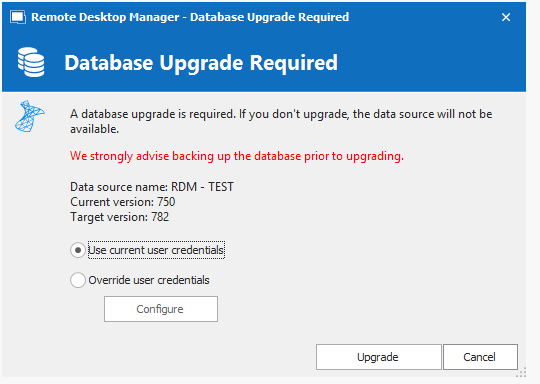
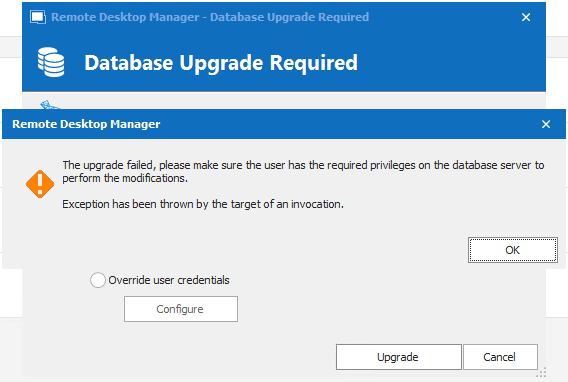
When I click "OK", it goes back to the "Database Upgrade Required", and I can click "Upgrade" again, and then it runs for few seconds, and I'm getting into RDM, and everything seems to work.
When checking data source info, it seems like it's upgraded.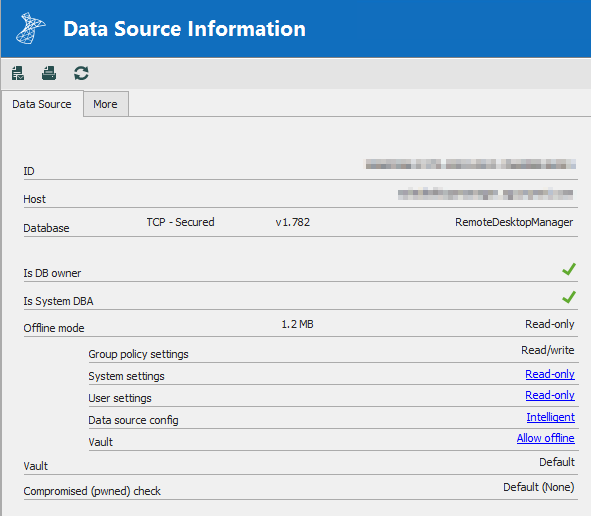
Please let me know, if you need some more logs or something else from me.
Br,
Anders
2022-06-24 08_55_13-Window.png
2022-06-24 08_54_24-Window.png
2022-06-24 08_59_29-Window.png
All Comments (7)
Hello,
Thank you for reporting this behaviour.
When you reopen RDM, do you still get a database prompt?
If not, it seems that on the first database upgrade attempt, something occurs like a problem to recognize your permissions on the database.
You can send us the logs in Help - Application Logs. Be sure to hide any sensitive information before publishing the file on the forum. You can also send it to me in a private message.
Best regards,
Érica Poirier
Hi Erica,
It isn't asking for a DB upgrade next time I'm opening RDM.
The only error in the log is:
System.Reflection.TargetInvocationException: Exception has been thrown by the target of an invocation. ---> System.FormatException: Input string was not in a correct format.
   at System.Version.VersionResult.SetFailure(ParseFailureKind failure, String argument)
   at System.Version.TryParseComponent(String component, String componentName, VersionResult& result, Int32& parsedComponent)
   at System.Version.TryParseVersion(String version, VersionResult& result)
   at System.Version.Parse(String input)
   at System.Version..ctor(String version)
   at Devolutions.RemoteDesktopManager.Business.DataSources.DatabaseConnectionDataSource.IsConfiguredVersionManagementMoreRestrictiveThanProvidedValues(DataSourceSettings dataSourceSettings, Version minVersionFromDBUpgrade, Version maxVersionFromDBUpgrade)
   at Devolutions.RemoteDesktopManager.Business.DataSources.DatabaseConnectionDataSource.ConfigureVersionManagementPrompt(Version minVersion, Version maxVersion)
   --- End of inner exception stack trace ---
   at System.RuntimeMethodHandle.InvokeMethod(Object target, Object[] arguments, Signature sig, Boolean constructor)
   at System.Reflection.RuntimeMethodInfo.UnsafeInvokeInternal(Object obj, Object[] parameters, Object[] arguments)
   at System.Reflection.RuntimeMethodInfo.Invoke(Object obj, BindingFlags invokeAttr, Binder binder, Object[] parameters, CultureInfo culture)
   at Devolutions.RemoteDesktopManager.Business.DataSources.DatabaseUpdater.Upgrade(Boolean silent, Action`1 logMessage)

//Anders
Hi Anders,
Thank you for your feedback.
We will investigate this error and will get back to you if there is anything to do on your SQL data source.
Best regards,
Érica Poirier
Hi Anders,
Sorry for that late reply.
According to the engineer, this issue is related to a problem with the database version number saved in the database. This won't affect your data and you can continue using the updated database without any problem.
He has found the problem and will fix the application to prevent getting this error in the future.
You can send us your databases schema, before an after the update, using the Send Schema to Support button in the Upgrade tab of the data source configuration in RDM so he will confirm the fix he has made.
Thank you for your collaboration.
Best regards,
Érica Poirier
Hi Erica,
I have sent the schema through RDM.
//Anders
Hello Anders,
Thank you for the database schema.
After an engineer has analyzed it, everything is fine so the issue was in the application.
As mentioned in my previous post, the fix for this issue will be in the next RDM version to prevent other customers to experience the same problem.
Thank you very much for your collaboration.
Best regards,
Érica Poirier
Hi Erica,
Good to hear that the problem has been identified. :)
Br,
Anders