
jr_bva
Broken Keeper integration
Thank you for this information. We will test it immediately after release.
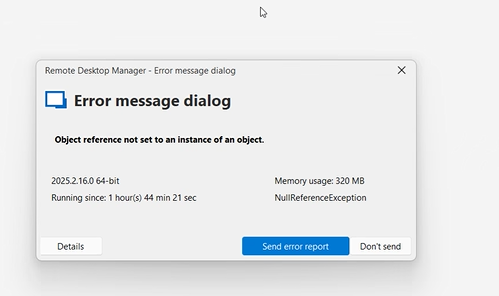
As far as I know, one of our colleagues also has a problem with editing user-specified settings. When he tries to edit some items (but only a few), he gets an error with an incorrect link to the object. See the image.
However, I am not sure if this is a problem related to this version or if it is a longer-standing issue. Perhaps there is something wrong with his records in the data source. This is not such a critical issue, so no one has paid attention to it internally yet.
Thanks
Broken Keeper integration
Hi all.
In the end, the fix usually only helps until the application is restarted :( Then it stops retrieving data from Keeper via SSO again :(
We have partially solved the problem by rolling back the version. But without a solution, we cannot update RDM.
Broken Keeper integration
Since we are upgrading in a controlled manner using Intune, I can determine that most stations were upgraded from version 2025.2.13 to 2025.2.16. It's a shame that our internal update testing and approval process failed and this version was deployed :(
Thank you for your feedback, and I look forward to receiving further information.
Broken Keeper integration
After removing that line and approving MFA and the device in Keeper, nothing changed.
So I removed the entire %localappdata%\Devolutions\RemoteDesktopManager directory, imported the data source, and reapproved MFA and the device. Now everything works as it should. The dialogue box appears, but only for a fraction of a second, and then the connection works.
So far, I have tested this on one computer, but I will try it with my colleagues on other machines as well.
Broken Keeper integration
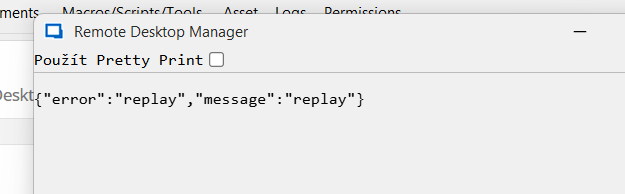
Yes. The SSO window flashes as before. Then the mentioned window pops up, and after a while we get:
Multifactor is currently approved for 30 days. Device is approved.
Most stations are running on Windows 11, but the issue also occurs on Windows 10, from various networks and providers.
Broken Keeper integration
Hello.
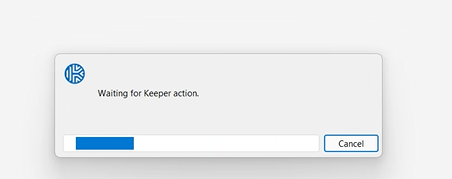
After installing version 2025.2.16, integration with Keeper stopped working. We use Enterprise SSO and Enterprise SSO (domain), and any attempt to connect ends with the message “Waiting for Keeper action.”
This is a huge problem; it has completely shut down the entire department.
In addition, this build is significantly slower than the others.
Cisco Anyconnect - password as second password
Hi.
We need to add a "first password", or perhaps allow the use of a variable in the following field:

Thanks and regards
OpevVPN per user certificate
Hi.
We need to store the certificate in a db, in a user vault, or preferably in Keeper. Using local paths is not possible. These are multiple instances on different devices.
Can variables be used in this case as well?
But could at least $IDENTITY_CUSTOM_FIELDx$ work for the Keeper entry.
Alternatively, are there any other fields that can be transferred for a Keeper record?
Thanks and regards
OpevVPN per user certificate
Hi.
In OpenVPN, we would need to ensure that each user can use their authentication certificate for a given connection, along with a username and password. Each login has its own certificate.
Thanks
Cisco Anyconnect - password as second password
Hi.
We would need to extend the "second password mode" option in the Cisco Anyconnect addon with the password option. This means that the same password as the first password would be filled in. At first glance, this doesn't make much sense, but several of our customers use this setting.
Barracude Network Access 5.0.2.66
Hi
Thank you for your reply. I am also using a workaround using Powershell script on Before_Open and After_Close. The problem is that I need to also pass the VPN username and VPN password from an external credential manager.
And I don't know how to handle that in these scripts.
Barracude Network Access 5.0.2.66
Hi all.
Do you have any news? In my opinion, the latest version of Barracuda NAC does not allow command line control. Probably PowerShell modules can be used instead. If I connect using an imported profile, connecting using the
Connect-VPN -ProfileID 77 -ProfileContext Machine -UserName $Username -UserPassword $Secure_String_Passwordthe connection works.
Disconnecting afterwards is using
Disconnect-VPNThis might be a workable procedure for RDM. I don't know how to do two Powershell commands as a VPN session. I currently use Before-Open and After-Close in Events. But I miss the possibility of saving the login and password somewhere else than directly in the script and mainly the VPN Group.
There is an option to connect without an imported profile. And that's even better in my opinion:
Connect-VPN -ServerAddress VPNaddress -UserName $Username -UserPassword $Secure_String_Password -TunnelMode Hybrid -Description "Barracuda VPN" -EncryptionAlgorithm AES256 -AuthenticationAlgorithm SHA256 -SignatureHash XXXXThe problem is that I have no idea what should be in the SignatureHash parameter. Absolutely no value was taken by the command.
Can anyone advise me for example how to make PowerShell commandlets like VPN session?
Cisco AnyConnect Second Password
Hi Hubert.
I apologize for the late response. For us, the solution for the second password would be either the "password" option (the first password) or a defined string where the session variable password could be used. Is it possible to add this?
Thank you
Cisco AnyConnect Second Password
Hi.
Sorry for reopening the thread, but it seems to me that the question is basically a continuation of the previous debate.
We would need to repopulate the value from the Password field in the Cisco AnyConnect Addon in the Second Password field.
The Password and Second Password are the same, but I don't know how to auto-populate them.
Thanks and regards.
Override Credentials in User Specific Settings keep getting lost
Hi.
We have already encountered this problem once this year during an upgrade. I don't know exactly when it was, but I have a feeling it was sometime in the spring. As described in KB.
What amazed me was that the problem recurred again and this time during a minor upgrade from 2022.3.16 to 2022.3.18
Override Credentials in User Specific Settings keep getting lost
Hi.
I'm another one of those who have entirely lost User Specified Settings.
I updated from 2022.2.20 to 2022.3.16 and everything worked fine. Approximately 3 days after we updated from version 2022.3.16 to 2022.3.18 all my User specified settings disappeared. This happened on 3 machines with Azure SQL database as their data source. And there were hundreds of those settings.
I will admit that the problems with the program keep increasing and it doesn't match the ever-increasing price which is becoming unsustainable.
RDM Keeper SSO Script Error
Hi.
Any updates?
Support for Barracuda NAC VPN Client 5.X.X
I would also welcome the addition of support for Barracuda NAC VPN Client 5.X.X
Bitwarden SSO with key connector
Hey. Hey.
Yes, Bitwarden allows you to run an instance on your own hardware. https://bitwarden.com/help/install-on-premise-linux/
And in the case of such a deployment, the so-called Key connector can be used in the case of SSO, where the user does not have a Master password.
https://bitwarden.com/help/about-key-connector/
This is exactly the configuration under consideration (but not yet decided) for our deployment.
Application log:
PasswordManagerAccess.Common.CryptoException: MAC doesn't match. The vault is most likely corrupted.
at PasswordManagerAccess.Bitwarden.CipherString.DecryptAes256CbcHmacSha256(Byte[] key)
at PasswordManagerAccess.Bitwarden.CipherString.Decrypt(Byte[] key)
at PasswordManagerAccess.Bitwarden.Client.DecryptVault(Vault vault, Byte[] key)
at PasswordManagerAccess.Bitwarden.Client.OpenVaultCliApi(String clientId, String clientSecret, String password, String deviceId, String baseUrl, IRestTransport transport)
at PasswordManagerAccess.Bitwarden.Vault.Open(ClientInfoCliApi clientInfo, String baseUrl)
at Devolutions.RemoteDesktopManager.Managers.BitwardenManager.InitializeAPIKey(String clientId, String clientSecret, String password, String customUrl)
Bitwarden SSO with key connector
We are running a PoC together with Bitwarden company. I don't really know Vaultwarden :)
Bitwarden SSO with key connector
Hello.
We are currently in the process of selecting a login manager for our company. SSO and integration in RDM are conditions, among other things. SSO meets almost all solutions, but integration in RDM together with SSO works flawlessly so far only in beta RDM together with Keeper.
We mainly wanted to test the integration with Bitwarden. In the beta version RDM there is a new option to use API key, but when we use onpremise Bitwarden deployment with Key connector, the data is not loaded. I assume this is due to the missing master password, but when using Key connector the master passrod is not set.
If I use APi together with the cloud version and the master password set, everything works fine.
Keeper login list is empty
Thank you for the information.
I have tried the beta version mentioned above and can confirm that the list is displaying as it should.
Thank you and I look forward to the new version :)
Keeper login list is empty
Hello.
When I try to retrieve a list of logins from Keeper enterprise, the directory list is displayed, but no saved logins are displayed. In the Keeper log, the login is correctly displayed, only an older version is recorded. RDM is reported as version 15.0, web client as 16.4.2, android client version 16.0.
How can I view the login information from Keeper?
Thank you
passbolt integration
Hey. Hey.
Is there any progress in passbolt integration? The product has a documented API, so it should work, or am I wrong?
See e.g. https://help.passbolt.com/api
passbolt integration
Hello.
I would like to add a vote for integration passbolt