Cisco AnyConnect Second Password
0 vote

Is there any chance we can get an option to select canned responses for Cisco's second password field?
The one that we all use here is "push" which pushes a notification to our cell phone that we have to then approve or deny.
Other options that can be put in that field that I know of are, SMS and Call
Also the ability to "prompt" would be handy as well for clients that we have to generate a 6 digit key each time.
I would think a drop down with the following options would handle this really nicely.
Second Password: [Dropdown] --> (Push, SMS, Call, Key)
Push, SMS, and Call, would all just be typed as a response to the Second Password prompt, and Key would just sit there waiting for a user to type in the randomly generated key.
Thoughts?
Cisco Second Password request.jpg
All Comments (31)
Hello,
This is a great idea. We'll put this on our todo list.
Regards,
Hubert Mireault
Hello,
I attached to this post a version of the add-on containing the change for the second password. There will be a combobox where you can choose the mode you want to use. Could you try it out and give us some feedback?
You can install it by dropping the DLL file in %LocalAppData%\Devolutions\RemoteDesktopManager, replacing your previous version of the DLL file.
Regards,
Hubert Mireault
VPN3.0.30.0.zip
Push works perfectly! Thank you guys for that!
SMS and Call had issues. With SMS, it will text you a group of codes, and you need to enter one of them, so basically like "Custom"
Call didn't work, but I think it might be with the client that I'm testing with. I will setup VPN information for another client that I KNOW allows the "Call" feature and report back.
I just wanted to give feedback that the Push feature, which we all use countless times a day, works perfectly. :)
That's great!
For "call" and "sms", could you tell me what normally happens on the client's end? Should it send the string "sms" or "call" and then wait for user input? This would be an easy change to make.
Regards,
Hubert Mireault
Yes, SMS, pausing for user input would be exactly what needs to happen. I just got the other client setup, and am about to test the "Call" feature right now.
First off, let me apologize, it's not "Call" it's "Phone". Sorry about that.
Here's a quick link to the options. https://guide.duo.com/anyconnect
"Phone" works pretty much like "Push". What it does is calls the users phone, and says if you didn't request this, just hang up, but if you did, press any button to authenticate your connection.
Thank you for the link, this is very useful. I've been working on a new version of the add-on today, I'll be ready to send you a new one Monday for testing.
Regards,
Hubert Mireault
Hello,
I attached a new version of the add-on to this post, it fixes a couple things:
- Changed "call" to "phone"
- The workflow for the "SMS" mode has been changed since it works differently when requesting the SMS passcodes and actually using them
- Allows selecting the device number with SMS, Phone and Push modes
You can install it the same way as last time. Feedback is appreciated as always since we cannot test it in our environment :)
Regards,
Hubert Mireault
VPN3.0.31.0.zip
Testing right now! :)
The Device number is great to have. Thank you for adding that!
I will test the "Phone" and "SMS" later today.
The SMS window is great! It would also be a great window to link when you do "custom" in the drop down.
However, the "Get Code" button is not working correctly. It does tell the system to sent me codes to my phone via SMS, but when I put them in the window, it opens a second command prompt, and then instantly errors out as it sees the AnyConnect client is "open" already from the first box.
What probably needs to happen when you press "Get Codes" is it gets as far as inputting "SMS" for the second password prompt, and then kill the window, so the user can put the code in the GUI window and start a new command window with the code for the second password prompt.
Let me know if you need more information or screenshots.
SMS Window.png
Thanks for the feedback. I attached a new version of the add-on to the post as usual. It should kill the process after it sends the "sms" message. Could you check if it works? I'm worried it might kill it too fast. If that is the case, we could add a configurable delay before killing the process.
Regards,
Hubert Mireault
VPN3.0.33.0.zip
Seems to be working great! Thank you.
Is there any other testing you would like me to do for this VPN update?
I would appreciate if you could test the phone mode too as well as the device number if possible, but if you don't have the necessary setup that's fine. It should work according to the info you have given us, but I like double checking just in case.
Thank you for your proactive help in testing the feature :) We'll publish the latest version I sent you to our website today.
Regards,
Hubert Mireault
Oh, I'm sorry, I've already tested the phone/device number field the same day you included it, and I have to say, it works AMAZINGLY well; for all options, Push, SMS, and phone.
Great news then :) Thank you Derek.
Regards,
Hubert Mireault
Hi
Is it also possible to make a "Key" input to "Second Password Mode"
It should then be possible to enter this "Key" in "Add Credential Entry" and to automatically retrieve it from there and insert the Second Password Key.
We have many customers who use a fixed Second Password Key.
The automatic login disappears a bit here as we still need to find the customer documentation to find the Second Password Key.
Best regards
Jan Iversen
Hello,
What is the workflow for the "key" mode? Do you for example enter the word "key" press enter then input the required key?
We can't test the Cisco add-on in our environment so we appreciate all the help you can provide.
Regards,
Hubert Mireault
Hi there
In our company we are 12 employees in the Surveillance Department, which constantly logs on different servers.
In order to automate as much as possible, I wish the following.
Let me give an example.
Here is one of ouer Customer in RDM.
They use 2 factor confirmation on the AnyConnect VPN
Figure 1
First let me show the "Morsø Forsyning - VPN"
It contains the username "Administrator" and the Password for the AnyConnect connection.
Figure 2
Now let's see the configuration of the "VPN AnyConnect"
Figure 3
Figure 4
Okay, let's connect to DC1.
It automatically launches to open an AnyConnect.
First, the user name "Administrator" is retrieved from "Morsø Supply - VPN"
It then retrieves the password "*********" from "Morsø Supply - VPN"
Now the 2nd validation key must be entered.
Figure 5
The validation code is static for this customer.
I then go to our SharePoint ,, Finds the Customer, Opens Customer Documentation, and finds 2. Validation Key.
I manually enter the 2. Validation key in the Answer: VPN field. and the connection is established.
Figure 6
As you can see in Figure 3, I have chosen "None" in "Second Password Mode".
That is because there is no "Static Key" to choose as I want.
Credintials in Figure 2 must have a "Static Key" location.
When AnyConnect requests the 2nd Validation key, it must retrieve the "Static Key" from "Credentials" Figure 2 and automatically place it as it does with Administrator and Password.
Hope you understand my wishes.
Yours sincerely
Jan Iversen
Hello,
For some reason the forum didn't properly upload the images, but I think I understand what you mean.
Basically what you need is a way to specify a constant string that will be input as a second password (which is the "static key" you mention). What I could do is add a new second password prompt for "Key" like you said, and it would allow you to input a specific key. I don't think we're able to use a value from the credential repository though, since Cisco AnyConnect is an add-on and it's less flexible than an integration in RDM, but I may be wrong.
Is my summary right?
Regards,
Hubert Mireault
I am trying to setup 2nd password mode, but we use SecureAuth OTP. Can we have a box pop up user to enter the code they receive from SecureAuth OTP or Google Authenticator? We have tried push and custom, neither one offers a pop up to enter the 2nd password.
Hello,
I think for your case the "custom" mode is what's appropriate. It gives you X amount of time (the "wait after second password" time) to enter any value you like, which in your case would be your one time password.
I understand it's not the most user-friendly method but we wanted to have a "catch-all" mode. We could add an option to prompt for the code before connecting so RDM could input it itself. Do you think that would work?
Regards,
Hubert Mireault
Hi Hubert
Regarding: Posts: 1567
Sorry for my late post.
But you are absolutely right.
That is exactly what I / we need.
If you make this "Key" it will solve a daily annoyance.
I'm looking forward to having it.
Best regards
Jan Iversen
Hello,
Thank you for letting us know. We'll add this to our todo list then :)
Regards,
Hubert Mireault
Hi.
Sorry for reopening the thread, but it seems to me that the question is basically a continuation of the previous debate.
We would need to repopulate the value from the Password field in the Cisco AnyConnect Addon in the Second Password field.
The Password and Second Password are the same, but I don't know how to auto-populate them.
Thanks and regards.
I am also trying to get the second password field to be auto populated.
I have OTP added to the session, but I can not get it pass through without failing.
Prompt - Waits for me to maunaly enter the code into the session.
Push - Also waits for me to maunally add the code, I don't know what "Device Number" does?
User Input - Box appears for me to enter password but if OTP is entered fails to connect.
Thanks
Iain
Version 2026.2.13.0 64-bit
Data Source SQL
@jr_bva: At the moment it's not possible because there's no mode that lets you enter a predefined string. We could add a mode for this and a text field exactly like the "second username". Would this work for you?
@iaing80: Right now the OTP section is not linked to the opening commands of Cisco AnyConnect. Before opening a ticket to add support for this, though, we would need to find a way to confirm at what step the OTP is required to be entered. Does the Prompt or User Input mode work? If they don't work, is it because it's not sent at the proper time in the login process? Are you able to perform this login manually by using the vpncli executable yourself?
Unfortunately, the Cisco AnyConnect integration is very limited, as there is no good way to feed the input only when required. We rely on the assumption that the login steps happen in a certain order, and feed the commands that way. In addition to that, we don't have a test environment for this VPN, so we need our user's feedback to be able to improve the way it works.
Regards,
Hubert Mireault
Hubert,
I opended a seperate thread https://forum.devolutions.net/topics/40707/otp-issue-with-vpn-session
Shows the current steps taken.
Regards
Iain
Thanks
Iain
Version 2026.2.13.0 64-bit
Data Source SQL
Iain: Thank you, I've notified Zachary, who is in charge of the other thread, of the information you've posted here as well. For that specific issue/request, the discussion will be contained to the other thread.
Hubert Mireault
Hi Hubert.
I apologize for the late response. For us, the solution for the second password would be either the "password" option (the first password) or a defined string where the session variable password could be used. Is it possible to add this?
Thank you
Hello jr_bva,
If you need the prompt to be exactly when we send the second username, you could put the value $PASSWORD$ in the second username, and make sure you have "allow password in variables" checked in your entry as well as the linked credential if that's how your entry is configured.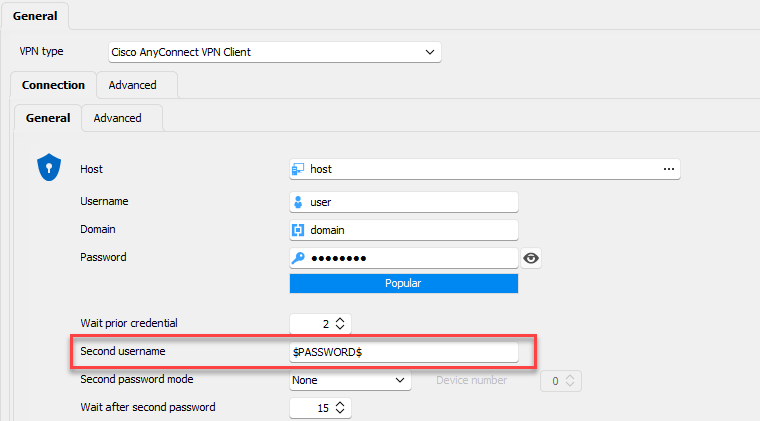
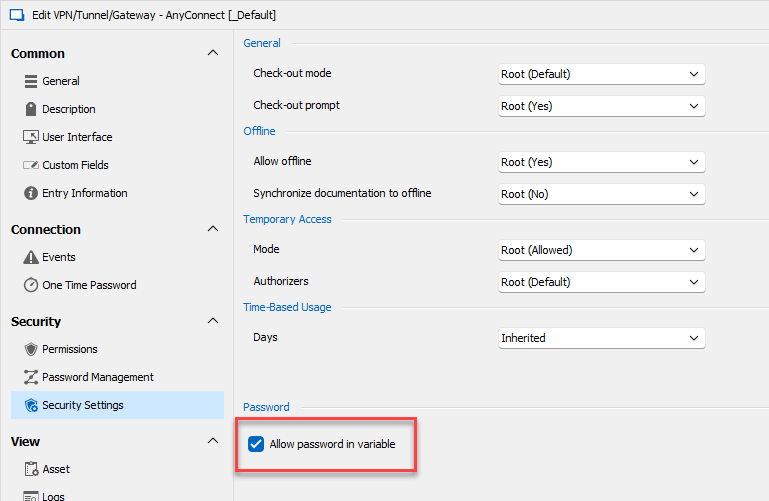
On my end, configuring the entry like this sends the same password as configured in the password field, at the time RDM tries to send the second username.
Regards,
Hubert Mireault
6d8a5ac9-44c9-44fc-a54d-3fcde72a39da.png
ed604e1e-fce0-4846-b0af-fe7a93cbd7aa.png