
wboyles
Cmder Integration
Hi,
I recently stumbled upon a product called Cmder which is a console emulator and I've fallen in love and its completely replaced my other shells as this does just about everything from pre-defined tasks, multi pane windows, tabs etc. which for someone who works from the command line a lot and remotes into Linux machines via SSH saves a ton of time.
The website is here http://cmder.net/ and has full documentation etc.
Do you think it would be possible to get proper integration with RDM and have this as an embedded window being able to pass in the Task name you want to run etc. from the session properties?
Right now I can get it to work by using a Command Line session and launching it manually (externally) but proper integration would be awesome if its even possible.
Thanks as always for a great product!
Popup When Launching RDM
Hi,
In the last couple of updates, I can't remember specifically when this started occurring, I'll get a popup stating 'Host, username and password are required.' - I click OK about 5 - 6 times and it goes away and stays away unless I close and re-open RDM. It's as if it's trying to connect to a session.
I initially thought this was something with the Quick Connect box so I disabled that and removed it from the title bar. However, the popup still appears although it's not immediately at start, it will appear within a couple of minutes and again take 5-6 clicks to remove it.
Currently running RDM Enterprise 12.0.6.0
[Feedback] Thank You!
Sorry for posting this here, I wasn't sure where else to put it.
I have been using RDM for the last 3 (I think) years and NEVER hesitate to renew the license. I still haven't discovered all of the features and I'm starting to use new things as I find them (yeah I'm slow sometimes!) but my day revolves around RDM. Anything I can create an entry for, is in there. Anything that's missing you guys are and have always been willing to consider it and be open about it. I've always got a detailed explanation for why something couldn't be done and you just don't find that level of communication with other software companies.
As it's December and we're surrounded by family festivities and fun stuff I wanted to take the time to say Thank you to the entire team, Marketing, Development, Management, the Janitor for making this one of the best products it could possibly be and treating your clients with a level of respect I've never had before. For a company to actually listen to our feedback and then see it get implemented is amazing to me. I have worked with so many vendors and although they say their listening you can tell is PR Spin - that's not the case here.
So from me - a VERY happy RDM Enterprise user who's trying to convince the rest of the company (we're only small, 5 users) to purchase licenses so we can start sharing sessions (I'm working on it guys) thank you for everything you do and keep doing what you're doing - it not only works, but it's what sets you apart from other companies.
Happy Holidays!
ScreenConnect Synchronizer
Fantastic, thank you!
ScreenConnect Synchronizer
Hello,
For the idea you had with the filter, do you mean in the synchronizer specify "starts with ACME" for example, and it would only synchronize these sessions? If so, that doesn't sound too difficult to add and it would add more flexibility to the synchronizer.
Regards,
Yes that would be perfect! If I click on the Clients group, it lists every single session, so if there was a way to have the synchronizer filter out what we don't want and only include 'ACME*' or ACME% - whatever wildcard you'd want to use then we'd be in business.
All of our sessions actually end in a client code so each session is actually ComputerName-UserName-ClientCode so the filter would actually be '*-CODE' or "ends with CODE" and it would pull everything that ends with that code.
ScreenConnect Synchronizer
So for a start, I can't believe I've been manually adding my ScreenConnect sessions... I am now fully in love with the Synchronizer :) However I have a problem / question that hopefully you can help me with.
Our ScreenConnect sessions are grouped using sub groups. This is perfect for what we do as we have the following setup:
Internal Servers
Internal Hyper-V Servers
Clients
[Subgroup of Clients] Client 1
[Subgroup of Clients] Client 2
However, from RDM it only sees the 'Clients' group. Even if I type Clients\Client 1 it doesn't work. Is there a way to access those sub groups? If not, is there a way to filter by session name maybe? If I can get everything from 'Clients' which shows all servers, can I from RDM say filter on sessions like 'ACME*' so it only grabs any sessions beginning with ACME.
Hopefully that all makes sense. The Synchronizer is going to make my life a lot easier with over 500 sessions I need to add, and if I can just get this part figured out then
Edit 1: Latest Stable Release of ScreenConnect (self hosted) with Plugin installed. RDM Enterprise 12.0.3.0
Dashboard Formatting Should Honor Entries Formatting
Thanks for the reply David. Good to hear - can we assume this will be on the 'to-do' list? :) (Not that It's long enough already I'm sure!).
Again - amazing product, I use this every day and couldn't work without it and being able to style the description on the dashboard page would actually help us quite a lot (other than using the description pane).
Dashboard Formatting Should Honor Entries Formatting
Thanks David.
Knowing that's HTML I thought I'd try and use the standard html bold tags and to some degree it does work. It doesn't stand out as well as bold text should but you can see a difference so it seems as if those tags are being parsed although maybe the style is being overwritten. In the attached picture the first line is bold, the second line only the second word is bold.
It's no huge deal - I can for sure use the description pane. However, knowing those HTML tags work - maybe down the road it would be possible to allow us to include the basic HTML formatting tags in there (bold, color, italic etc. strip out dangerous stuff like JavaScript etc.)
Thanks for your quick responses as always!
Dashboard Formatting Should Honor Entries Formatting
Hello Wayne,
Do you have a print screen with an example? Do you mean in the html overview? For this case we are unable to convert the rtf to html.
Regards
Hi David,
Please see attached screenshots. Hope that helps clarify.
Dashboard Formatting Should Honor Entries Formatting
Hello,
I am hoping this would be a quick fix for you guys - but say I create an entry of type Account. I add some information to that entry in the Description field using the RTF option and I bold certain words / keywords, maybe change the color etc. of things I need to stand out. That's great but when you select that entry in RDM and just view it from the dashboard the RTF formatting is not honored and it's just plain text, you have to actually go to the properties / edit the entry to get that formatting.
Is that something we could have show on the dashboard view?
As always, thanks for a great product! (Using Enterprise 11.7.2.0)
BeAnywhere Integration
Thanks David.
BeAnywhere Integration
I am not sure if this is possible at all but recently we have started using remote management software called BeAnywhere. We really like it over ScreenConnect but it's not web based so it may not be something that's possible.
They do have an SDK / API that you can develop with but I haven't dug in to see what you can do (launch sessions etc.).
I am more than happy to provide any information you may need to see if this is even possible to integrate with RDM so please just let me know what you need for me or if you think it's just not a viable feature.
ScreenConnect Not Working
Hello,
I do have the extension installed and active within ScreenConnect. After looking a little deeper I believe the problem may be on our end. We recently switched firewalls and I don't think it's relaying the data correctly.
Sorry for the false report but I appreciate the reply.
ScreenConnect Not Working
RDM Enterprise 11.0.1.0
ScreenConnect 5.4.9675.5750
I am getting the following error when trying to create a ScreenConnect Session, or rather when trying to connect to the session or populate the sessions:
Server connected successfully but unable to retrieve server informations
The following is logged in the application log:
[10/6/2015 7:14:01 PM - 11.0.1.0 - 32-bit] Error Silent: GetServerResponse uri= url=Service.ashx/GetHostSessionInfo requestBody=["All Sessions","","",0]
Followed by:
[10/6/2015 7:14:01 PM - 11.0.1.0 - 32-bit] Error Silent: System.NullReferenceException: Object reference not set to an instance of an object.
at Devolutions.RemoteDesktopManager.Business.Helpers.ScreenConnect.ScreenConnectHelper.c806ca9c37977f2694ab50d9983cf9406(Uri c5037b87218d33968ed5997f1e6129673, String ce3fdffbfdaf778b0b6e1bed746c5e5f0, String c5f4fb67d45af188491bb0f4d5eff06d8)
Online Drive
Hello - yes, Allow Offline Mode is checked. I am currently running 10.9.0.0 Enterprise
Online Drive
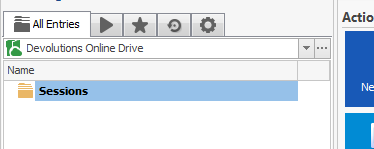
I am trying out the Devolutions Online Drive to store my sessions / credentials and have a problem where if you try and make a change to an entry (just right click -> edit...) the sessions disappear and I'm left with an empty list (see screenshot). I have tried switch data source and switch back as well as refresh data source but the only thing that brings it back is to exit out of RDM and open it back up.
Feature Request: Install For All Users / Me Only
Hello,
Would it be possible to modify the installer to have the option to install in startup for All Users or just the current user? I always want it to run on start but only for my user profile and at the moment other users get confused on what's popping up when they login.
Not a huge deal but wasn't sure if this was maybe something you could add easily.
In-Private / Incognito Browser Sessions
Thanks for having this added. I am now running 9.1.7.0 and see that both external Internet Explorer and external Chrome now do indeed have options that can be enabled which does cause them to launch with InPrivate/Incognito sessions. Much thanks. FYI, the Change History page http://remotedesktopmanager.com/Home/ChangeHistory implies it only works for Chrome, but indeed it has been added for both Internet Explorer and Chrome.
Regards,
swregs
IE Isn't working for me. Chrome is working and opening an Incognito window but it doesn't give you the option to auto-fill the form fields with credentials from RDM. IE does give you that option but it isn't opening an InPrivate window when it's launched. Ive tried the no merge option as well but it results in a regular IE session opening.
As mentioned in the notes this was for Chrome so maybe IE is still being implemented?
RDM Not Responding
If I click Start -> Logoff on the remote computer that I am connected to then yes - that is when this happens. In fact up until now I didn't notice there was a Logoff button on the RDM toolbar itself... I just tried that and got the error in the screenshot attached (again - Application Log is completely empty)
RDM Not Responding
That's correct. If I X out of the tab it works fine - but logging off of the RDP session is what causes the lockup. But like I mentioned previously not all the time, I haven't been able to make it happen on purpose.
RDM Not Responding
No, the application log doesn't show anything at all. I cleared it this morning in hopes it would log something when it happened but after the crash I opened it back up and it was still blank.
RDM Not Responding
Hi,
Currently using RDM 9.1.6.0 but this has been happening for a number of versions now. What happens is when I have an RDP session open and I use the Log Off or Disconnect option within that session, RDM will freeze and come up with the (Not Responding) message in the title bar. I have given it a few minutes to see if it will fix itself but it never does. I have attached a screenshot so you can see at what point it freezes.
Note that this doesn't happen all the time - it seems completely random. The systems I am generally RDP'ing to are Server 2008 R2 and Server 2012 / Server 2012 R2 if that makes any difference.
ScreenConnect Feature
I am not sure if ScreenConnect expose much of an API that you can tap in to, but in their latest version (released a little while ago now) within the portal they show you the username of the person signed in as well as the idle time. That is very useful if we are trying to make sure the computer isn't in use before connecting. Is there any way of getting that information to display within RDM so we can have everything in one location?
Tablet / Surface Features
Hi, yes the tree would be the biggest thing although not really sure what you could do much differently. Just spacing in general is a little hard to hit the correct thing with your finger sometimes on the tree tabs - one example would be trying to resize the tree panel, its quite hard to 'grab' the bar and stretch out that side of the UI.
Tablet / Surface Features
After playing around for a while with RDM installed on a Surface Pro 2 I have noticed some things are hard to control or manipulate, mainly because of how close together everything is. While it works great with a keyboard and mouse, touch is a little clunky (not meant in any disrespectful way as my whole day revolves around working from RDM and I'm sure it was never developed with touch in mind).
That said, after I installed Office 2013 on here, I noticed within Outlook (and maybe other apps) they have an option that automatically detects that you are using a touch based system and spaces things out a little differently which definitely makes things easier to use.
Just wanted to mention and see if this is something you guys could take a look at as I see myself carrying this Surface around a lot more than my Laptop now when I'm on site and being able to do everything via touch would be awesome.