
zhopkins
Feature Request - Markdown/Documentation Tab as an Entry Type
Thanks, Hubert! I missed that entry type when I was looking through the list.
Aside from having to "open" it (to switch from the overview to the actual content), that is exactly what we are looking for!
As you mentioned, I would love to see what it looks like if it opened straight into the content, but I am also curious as to how others are using this entry type and what their expectations are.
Thank you!
Feature Request - Markdown/Documentation Tab as an Entry Type
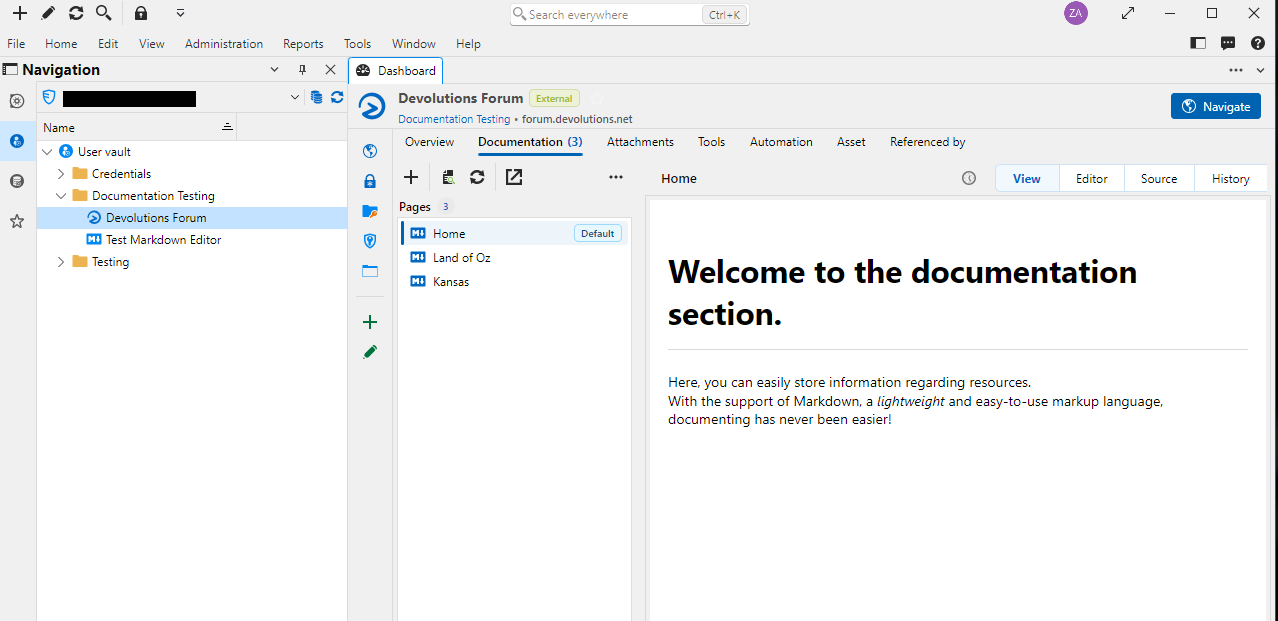
The current per-entry Documentation tab is very useful, but switching back and forth between it and the actual entry (RDP/SSH/etc) is cumbersome. Even more so if you are trying to read the documentation from one entry while using another (there is lots of scrolling and clicking involved).
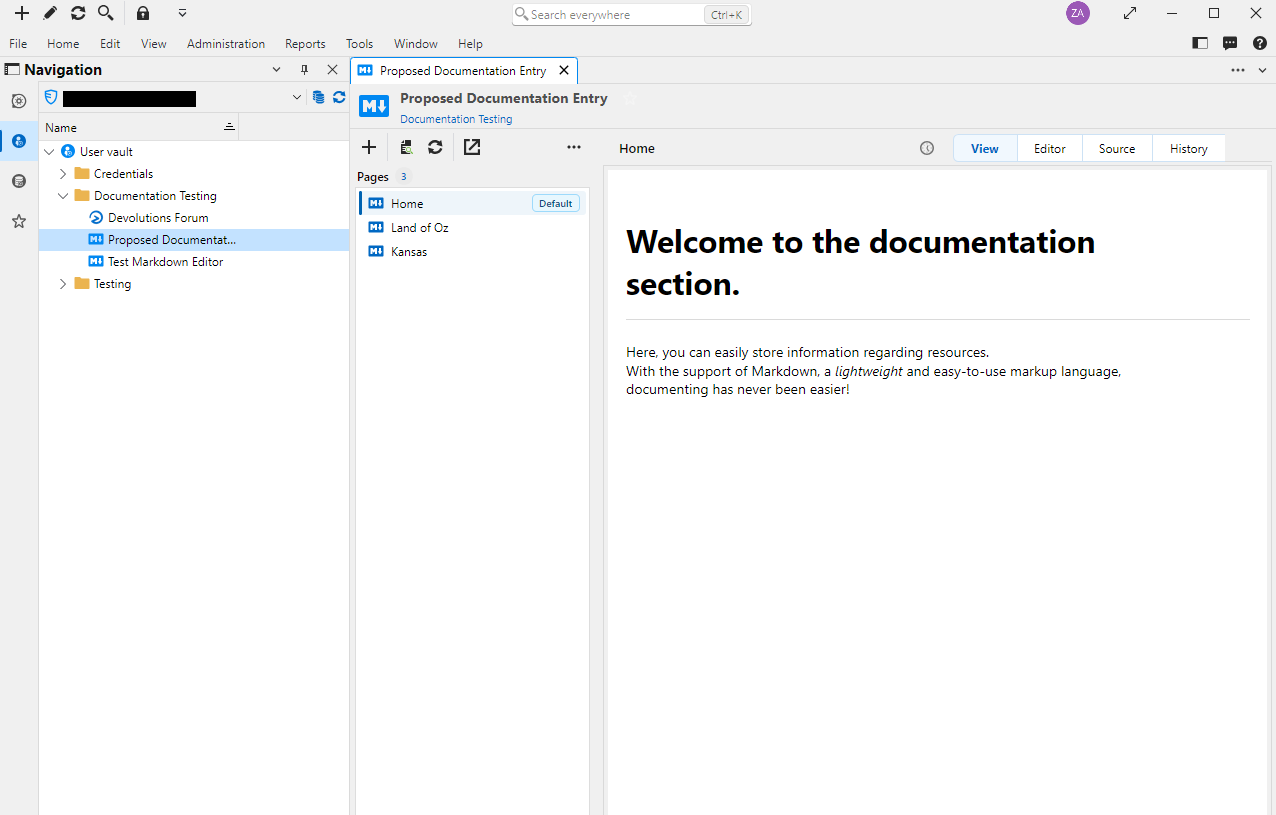
It would it be nice to have an entry type that replicates the functionality of the Documentation tab, and eschews some of the other normal entry functionality. An entry that when you click on it, brings up a list of pages and the content of the current page. No overview, no tools, no attachments, no landing page to have to click through, just content.
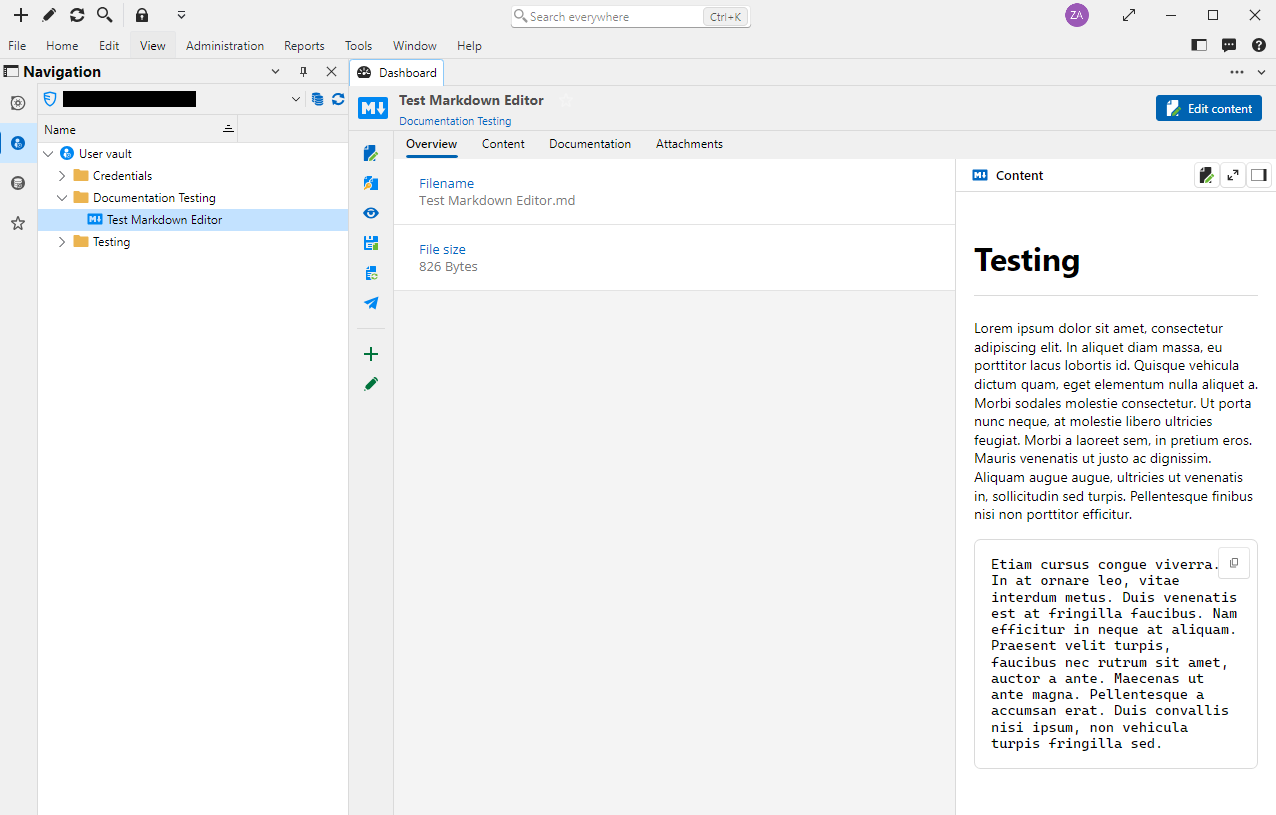
I know that there is an existing Markdown entry type, but this doesn't support multiple pages, and you still hit an overview/landing page every time you open it.
Current Markdown Entry:
Current Documentation Tab:
Proposed Documentation Entry:
Thank you for the consideration!
Offline Documentation
Jonathan,
Just confirming that with RDM updated to 2026.3.12.0, the offline documentation is now working as expected!
Thank you,
--Zachary
Offline Documentation
Jonathan,
Thanks for the update! And you are correct - explicitly changing that setting off of the default option works as expected.
Thank you!
Offline Documentation
Hey all, hoping you can help me figure something out. Is documentation (the literal "Documentation" tab for each entry that uses markdown) supposed to be available in Offline mode?
The Devolutions KB articles say that functionality is available, and I have our vault configured to allow it, but whenever I go offline, the Documentation tab always disappears (using RDM 2026.3.10.0).
We have several instances in which we need to have the information on these markdown pages available during planned outages (i.e. "Going offline in advance") or unplanned outages (i.e. "the world's on fire and we need the documentation to fix it"), so I'd love to get this figured out.
Thanks!
MS SQL Server Remote Management Session Type not working as expected
Thanks Maxim and team for working on this!
MS SQL Server Remote Management Session Type not working as expected
@Paul Dumais Just circling back around. Any chance you all might have an ETA for this to be fixed? Thank you!
MS SQL Server Remote Management Session Type not working as expected
Hello @zhopkins ,
Thank you for reporting these issues, I have logged a ticket and we will fix all these issues asap.
Regards,
Paul
@Paul Dumais
Thanks, we appreciate it!
MS SQL Server Remote Management Session Type not working as expected
The recently added MS SQL Server Remote Management session (RDM 2025.2.x versions) doesn't seem to work correctly when trying to use user vault credentials.
When I create a new session in the following configurations, the session does not work as expected
Scenario 1:
Credentials: "Username and password"
Host: Server's FQDN
Login Mode: "Integrated Security (Active Directory)"
Result: Session opens as the same user running RDM, with no database or management access.
Scenario 2:
Credentials: "Find by name (user vault)"
Host: Server's FQDN
Login Mode: "Database login" (this is the default, and it is greyed out unless "Username and password" is selected like in Scenario 1)
Result: Login attempt uses username from the user vault, but doesn't recognize it as an Active Directory login, so the login fails.
Scenario 3 (Desired configuration):
Credentials: "Find by name (user vault)"
Host: Server's FQDN
Login Mode: "Integrated Security (Active Directory)" (I tried setting this before changing the other drop-down off of "Username and password")
Result: Logged in as the same user running RDM, with no database or management access. It doesn't use the user vault credentials at all.
We're running RDM 2025.2.14.0 on Windows, attached to Devolutions Server 2025.2.2.0. Is there any way to get this session type to use Active Directory Authentication with the user vault credentials?
Thank you!
RDM Variables and Entry Data in Documentation Tab
Thanks for the consideration, Hubert.
RDM Variables and Entry Data in Documentation Tab
Is it possible to use RDM variables and entry data inside of the documentation tab? We're currently embedding Confluence pages as our documentation, but that ultimately means that we're doing double-work, maintaining software and hardware lists inside of both RDM and Confluence. It would be really great if we could use RDM's internal documentation pages to combine all of the different information that RDM has collected about a given server into a single nicely formatted page (everything from host name to IP address, OS details, processor, memory, disk info, installed software, warranty details, etc). I've tried searching the KB and forums, but haven't been able to find any information about using the variables, only past requests for this functionality.
Thank you!
Dashboard Auto-focused when opening new RDP session
Thanks, Marc. It was checked. I thought I had disabled that while testing a previous bug, so I'm not sure how it got re-enabled, but hey, it's an easy fix! Thanks again! :)
Dashboard Auto-focused when opening new RDP session
In version 11.6.7.0, whenever I click on an RDP session to open it, the RDP session opens in a new tab, but the interface then quickly re-focuses the dashboard. A quick video recording is attached that demonstrates the issue. Has anyone else seen this?
Windows 7 64-bit
RDM 11.6.7.0 (x86)
On logoff of session, flashes back to Dashboard even after going to a different session
David, Beta 11.6.4.0 has resolved the issue for me as well. Thank you!!
On logoff of session, flashes back to Dashboard even after going to a different session
David,
The issue does not present for me with the Classic UI (running 11.6.2.0 now). Using the newer UI with the dashboard hidden, the issue still presents itself, but the focus is given to the first open session tab, rather than the absent dashboard.
On logoff of session, flashes back to Dashboard even after going to a different session
I will second this issue with 11.6.1.0. I have even tried disabling the "Auto Focus Dashboard" option, but to no avail.
Issues with Details view (RDM 11.5.1.0)
David,
I have gone through the View menu and switched between all available choices. Whenever I switch back to the Details option, I get what is seen in the screenshot.
Issues with Details view (RDM 11.5.1.0)
In the latest 11.5.1.0 update, I've noticed two small issues with the Details view. On application launch, all of the tiles/headings are missing from the list. Pressing F12 to change the view will restore them again until RDM is closed and re-launched. Additionally, the spacing seems off - there is far more space between list items now that seems to result in a lot of wasted space. Would it be possible to have an option to adjust this spacing, similar to the option that exists for the Tree view? Thank you!
Bitvise SSH Client: Private Key Support
André, enabling the registry option seems to do the trick! This new option, combined with the Bitvise profile stored in the RDM session, and the session being configured to use the RDM credential repository, works outstandingly well for us. All we have to do is launch the session and put in the password for our key pair and we're up and running! Thank you for your assistance with this issue!
Bitvise SSH Client: Private Key Support
Testing now, will let you know how it goes!
Bitvise SSH Client: Private Key Support
Awesome, thank you!
Bitvise SSH Client: Private Key Support
Even when run as administrator, the "User Keypair manager" option in the Bitvise SSH client window that is launched remains greyed out. Launching Bitvise on its own, it works fine. And I know that the Tunnelier add-on is still available, but its kinda messy having to create a junction point on every workstation for RDM to be able to find the newer Bitvise SSH Client (in its new directory, with a different executable name).
Bitvise SSH Client: Private Key Support
I am extremely happy to have offical support for the latest version of the Bitvise SSH Client (formerly Tunnelier). Unfortunately, the new add-on fails to work in our environment. We are required to use public/private keypairs for authentication, and when using this new add-on, it does not load or allow access to any of the keys that we have stored in the installed Bitvise SSH Client application, so we are unable to authenticate using the add-on. The previous version of this add-on, named "Bitvise Tunnelier VPN", allowed this functionality.
Multiple VPN (Tunnelier) sessions opened
alphanimal, as previously indicated that did not work, unfortunately.
Multiple VPN (Tunnelier) sessions opened
Since ICMP and ping requests don't use ports, I don't believe that they can be forwarded through an SSH tunnel - I'd just get a response from the localhost, which would always reply.