RDM Variables and Entry Data in Documentation Tab
0 vote

Is it possible to use RDM variables and entry data inside of the documentation tab? We're currently embedding Confluence pages as our documentation, but that ultimately means that we're doing double-work, maintaining software and hardware lists inside of both RDM and Confluence. It would be really great if we could use RDM's internal documentation pages to combine all of the different information that RDM has collected about a given server into a single nicely formatted page (everything from host name to IP address, OS details, processor, memory, disk info, installed software, warranty details, etc). I've tried searching the KB and forums, but haven't been able to find any information about using the variables, only past requests for this functionality.
Thank you!
All Comments (9)
Hello,
Thank you for reaching Devolutions Support.
Currently, there is no way to use RDM variables and entry data inside the documentation tab.
However, this is a good idea. I will forward this forum to our feature request thread, and our developers will review your suggestion.
Best regards,
Carl Marien
Hello,
Thank you for your request. We will have to think on how best to implement this. I don't think it's realistic implementing a variable every single field, but there might be other ways if your goal is to have all of this information, for example generating a report from a click. For now we will wait for additional feedback from our community to gauge interest in this feature and help us prioritize this.
Regards,
Hubert Mireault
Thanks for the consideration, Hubert.
Agreed, I was looking into this feature as well since it would be nice to auto-populate documentation with some entry information so we don't need to update it multiple locations.
Hello,
Thank you for the additional feedback.
Version 2024.3 now allows resolving certain variables (for example, $DESCRIPTION$) in the documentation pages. It's not the same thing that was asked for originally, but hopefully it can be a first step that helps simplify your workflow.
Regards,
Hubert Mireault
Hello,
I'm not sure if this is along the same lines, but it would be really helpful if certain asset fields could be inherited from the parent.
An example would be the Domain field in the Asset/Network tab.
If inheritance is too difficult, then being able to resolve the $PARENT_*$ variables (specifically $PARENT_MACHINE_DOMAIN$) would be very helpful.
Thank you,
Jeff Phelps
Hello Jeff,
I tested on my end and it works well, both with PARENT and FOLDER variables.
In my example, my folder has the MACHINE_DOMAIN set to "domain-From-Folder", and the first website (the parent) has the value "domain-From-Website".
In my sub-entry, which can 'reach' both of these values through the PARENT and FOLDER variables with the matching name, everything resolves as expected.
The first image is the editor tab, so the values I've entered, and the second is in the view tab, which resolves the values.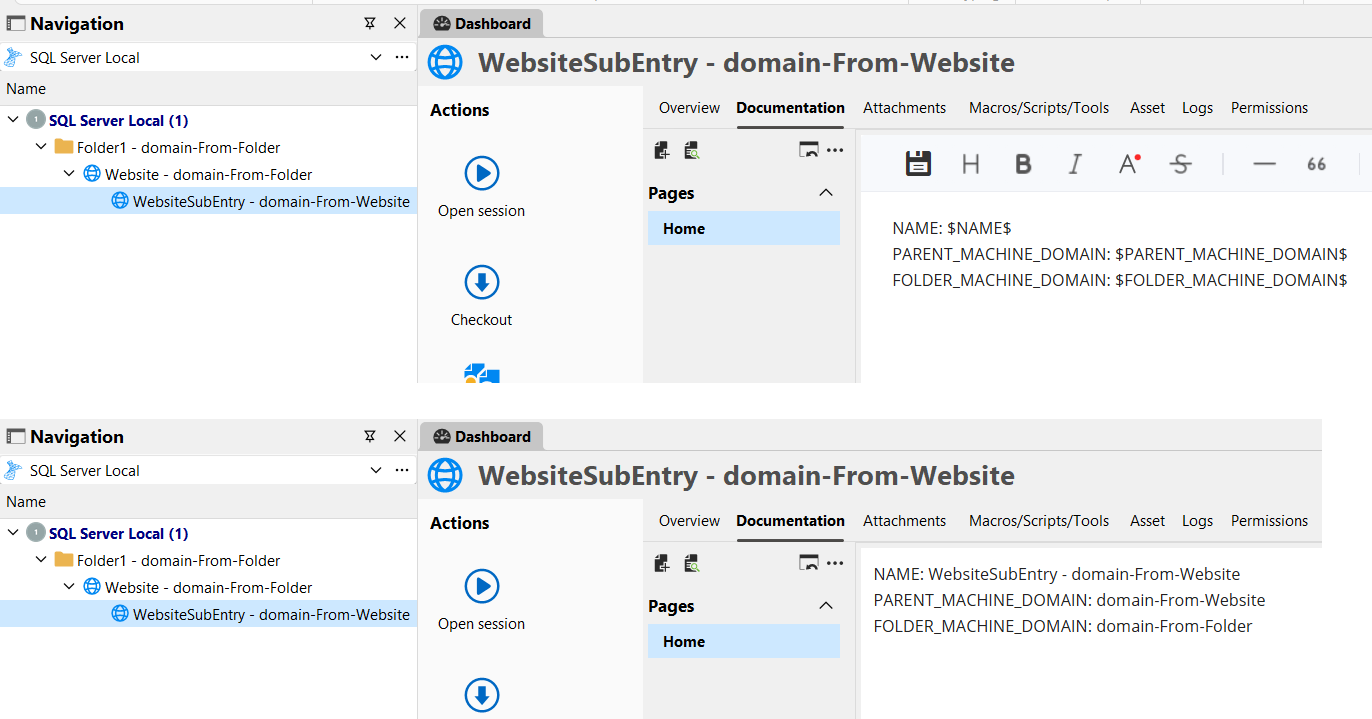
If this doesn't work for you, we would need to have more information as to how to reproduce your environment. It's possible there may either be a bug or a misconfiguration.
Regards,
Hubert Mireault
f5129e11-abbb-48d8-a719-460d0cc9fb0e.png
This is more along the lines of what I was trying to do: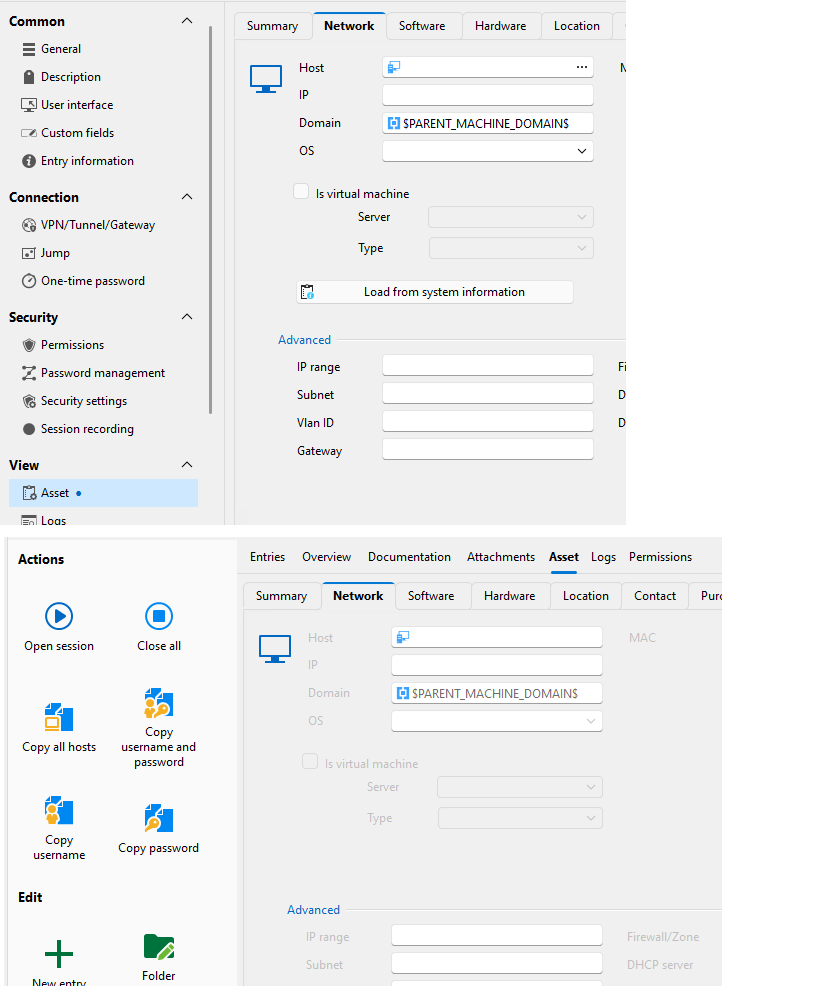
The idea was that I would use this: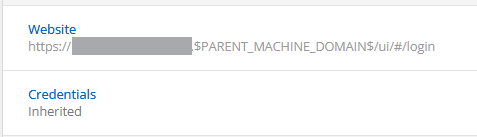
Hope this helps to make more sense of what I was trying to do.
Screenshot 2025-06-05 111821.png
Screenshot 2025-06-05 111114.png
I think there are two things here.
The first, the "asset" tab in the dashboard is meant to show the values as-written in the entry, not the resolved values. This is why it shows the name of the variable rather than the resolved value. This would be considered normal at the moment.
The second, I think there's a misconfiguration on your end, as the scenario works for me. Are you sure your entry is a sub-entry? The PARENT variables are made for sub-entries. If you are trying to inherit the value from a folder, you should use the appropriate folder variable, for which the prefix can vary depending on the type of folder it is.
I changed my test to showcase it more in-depth as well.
In my sub-entry, I've configured the website to use the $PARENT_MACHINE_DOMAIN$ variable in the URL: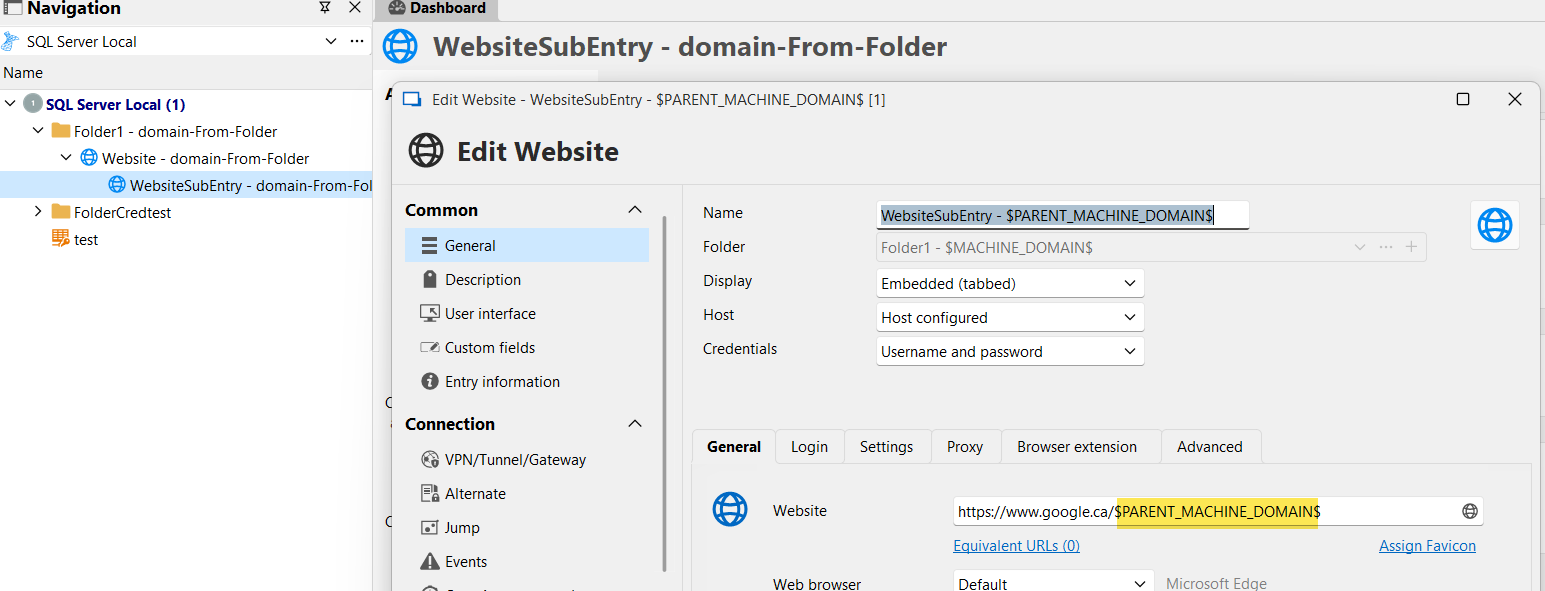
In its parent entry, I've set the domain to be $FOLDER_MACHINE_DOMAIN$.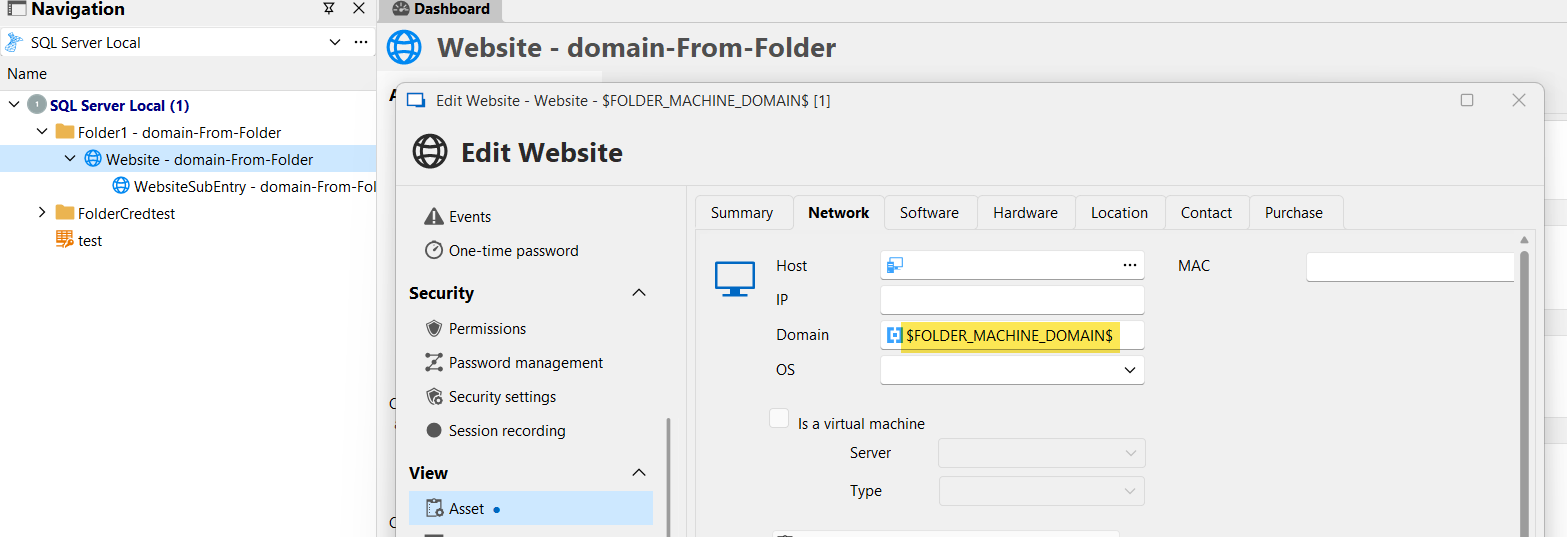
The folder itself has the value "domain-From-Folder" in its domain.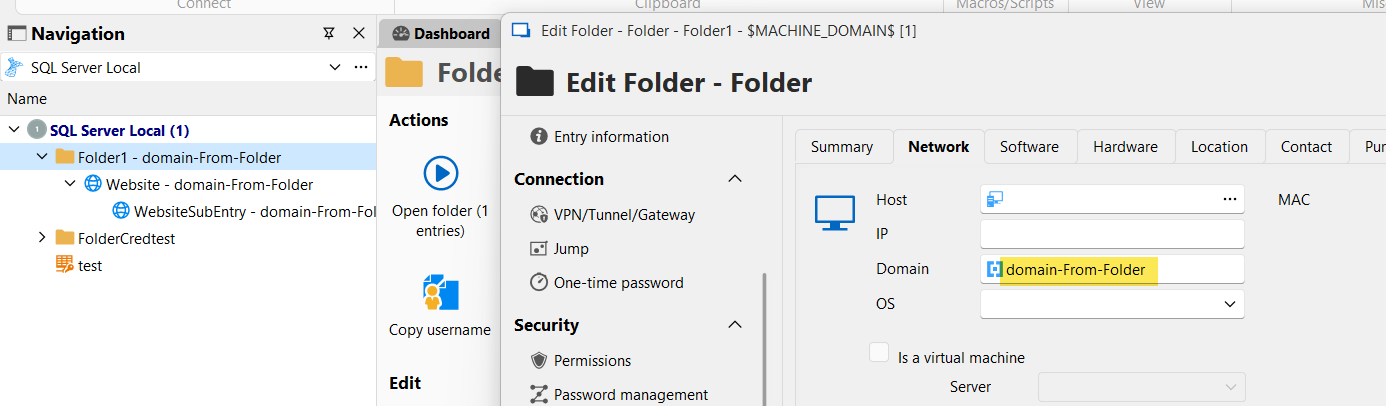
In my sub-entry, it correctly resolves the chain: $PARENT_MACHINE_DOMAIN$ checks its parent, whose value is $FOLDER_MACHINE_DOMAIN$, and that value resolves to the value in the folder, which is "domain-From-Folder".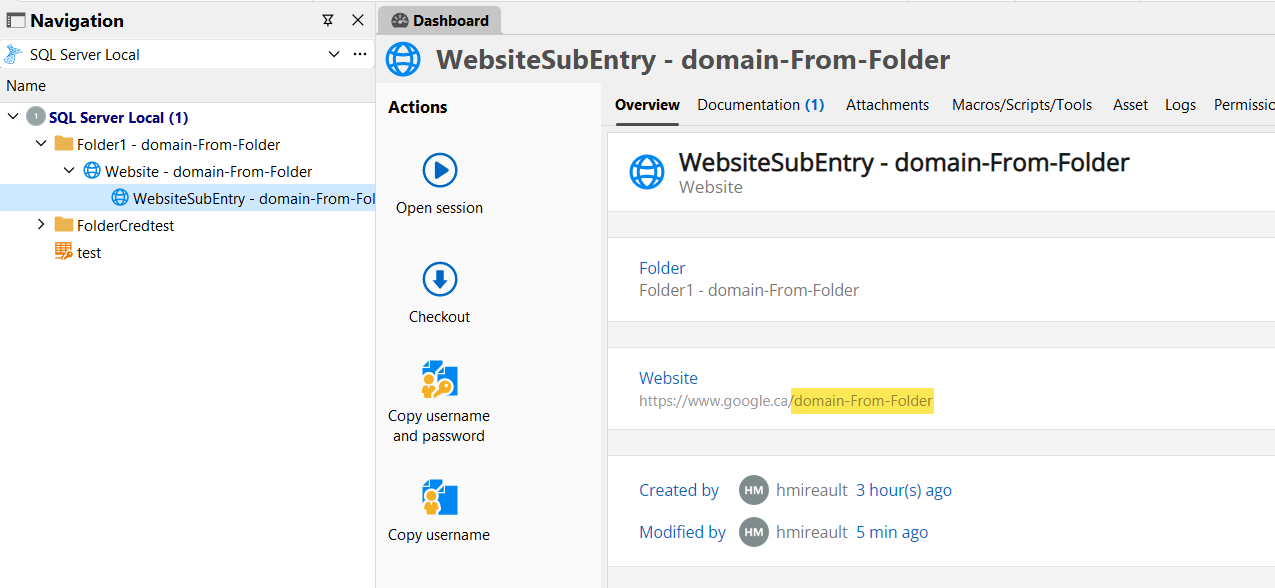
If this still doesn't work for you, it might be best to schedule a call with you so we can check what is wrong in the configuration, or confirm if there is a bug. It's not very easy to diagnose that kind of problem through the forum.
Regards,
Hubert Mireault
8e2e15ba-bc00-49f0-bda3-0614094b9f46.png
e19ffa50-659b-4656-a73e-35e1d6a12348.png
e2062214-bc6b-4932-a549-48173a9d023c.png
be240be6-6c62-4a12-8415-69e401ed1b12.png