
aparrish
Post updates I am not subscribed to
Ever since I created a topic a week or two ago, I have been getting updates on unrelated, new topics. It almost seems like the forum software is sending me all new updates on everything. If I go into my account profile, I don't have the option to unsubscribe, because it doesn't show I am subscribed to the topics that I am receiving. Have you had any other reports of this?
Entry History
Thank you very much!
Entry History
Perfect! Now, as far as the scope of the data set returned ... when you say "all the entries YOU have created" does that mean entries created by the user doing the searching, or entries created by anyone?
Entry History
Does PVM have the ability to show me what entries were created within a certain time frame? For example, suppose I know that I created something I need within the last week, but I can't remember how I titled the account or object. If I could run a report that showed me all newly created objects/entries to PVM within the last week, I could easily recognize what I need.
Thanks,
Andrew
Migrating Google Authenticator to new install (same key)
That worked great! Thank you very much.
--Andrew
Migrating Google Authenticator to new install (same key)
It is configured on the application, and my data source is Microsoft SQL.
Migrating Google Authenticator to new install (same key)
Hey guys,
I have my Password Vault Manager protected with Google's 2FA. I got a new laptop and am slowly building up the new machine. I would like my existing Google auth to work with the new install during the migration period (so I don't have to use different rolling Google codes depending on which laptop I am using.
I see under the security options the ability to "Override account name" as well as the note "If you change the account name, you will have to reconfigure Google Authenticator." Does "account name" (in my case) refer to my signed in Windows account since I am using Integrated Authentication?
Thanks,
Andrew
Reconnect not functional
Thanks, Jean-Francois and David. The reconnect works properly with the change from Default to Full, however, I also agree with Michael's opinion that the prior behavior was more desirable.
Reconnect not functional
I just upgraded RDM to version 11.7.2.0. I have noticed now, that the option of right-clicking on an embedded tab connection and choosing "Reconnect" no longer logs me in.
In prior versions, when presented with the lock screen on the RDP session of the tab in question (where the connection was running Windows), I could simply right click on the tag, choose reconnect, and I would be logged in.
What happens now is for a very brief second (barely enough time to read), a dialog box appears that says I have lost my connection to the session. I am then presented with the lock screen again, and after about 10-20 second, the tab just closes on its own--almost like a timeout waiting for input from the user.
If I X out of the tab and re-open the session, I am logged in just fine.
Username or password incorrect
Today, like most days, was nothing special. I simply opened the program and started using it. As far as when the problem first happened--I don't recall anything specific. I am not even sure that this started happening when I changed my password.
I take it this is an issue of the local cache not being updated. There have been several problems caused by local cache mis-behaving in the past. How important is it to have the local cache at all? Is it possible to turn it off?
Username or password incorrect
Indeed. Ctrl+Refresh fixed the issue without have to restart the application. Given this seems to be an intermittent problem, would you expect this to keep coming back?
Username or password incorrect
Ah, good call. I see what is happening now, but not why. When I copy the password out, it is my previous password (not my current). This must have something to do with Offline/Online and not having my offline copy of the database updated.
What is strange is that is showing me as being Online right now. All connections and credentials are stored in a remote SQL database.
I guess this explains why, if I close and re-open it, my connections work.
I tried the previous connection that worked when I first opened the program, and that one is failing now too, so RDM has started using my old password.
Username or password incorrect
Nothing in the logs from today (System.Data.SQLite.SQLiteException (0x80004005): database disk image is malformed
database disk image is malformed from yesterday).
Changing the connection from Embedded to External results in the same behavior ("Your credentials did not work ...")
Username or password incorrect
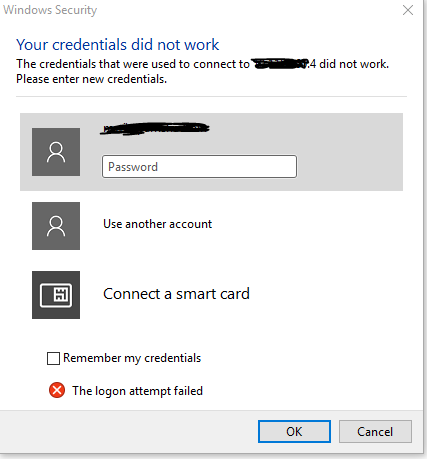
FYI: It is happening again right now, if you want me to test anything. Some connections work, others do not. If I quit and open the program, it will work fine (which I haven't done yet). If I type in my credentials manually, I can connect just fine.
Username or password incorrect
Embedded
Username or password incorrect
No logs for the last 10 days ...
Username or password incorrect
If it helps with this concern, I experienced it this morning right after opening the application and trying to use the very first connection (so it hadn't been open long and there were no other RDP sessions running). Do I need to enable logging? Where are the log outputs?
Username or password incorrect
I am running RDM v 11.1.0.0, and I have noticed that at what seems to be random intervals, I get "Username or password incorrect" when connecting to Windows based servers through RDM. If I close the RDM application and open it again, and try again on the same server, I login just fine.
My environment consists of Enterprise edition running in SQL 2014. We have "generic placeholder" credentials where each administrator sets "User Specific Setting" to enter his own credentials. We have hundreds of Windows systems that are organized into folders, where each folder has a credential set for that generic placeholder, and each specific entry inherits the authentication settings from the parent folder.
Have you guys heard of credentials not working, then suddenly working by simply quitting the application and trying again?
URGENT - All Connections' Credentials Overwritten
I suppose it is possible, and have no evidence against that theory (although he claims he did no such thing). I just wanted you guys to be aware should this issue pop again elsewhere. Thanks for the help.
URGENT - All Connections' Credentials Overwritten
Ok, I have looked at it. It shows the same user whose account was used to replace all the connections with his account credentials explicitly. I know he didn't go through hundreds of entries and manually update each and every one. Is there some kind of batch process he could have accidentally done via the client?
URGENT - All Connections' Credentials Overwritten
I do have a copy of the database before it was restored. Where do I look for this?
URGENT - All Connections' Credentials Overwritten
Update: I suspect the rollback of the database was actually working. Once I installed a client on a new system, connection properties were correct. Of course, this pointed me to some kind of caching issue, and upon clearing my client cache the correct settings were back in place.
So the lingering question is how something like this could have happened (but the answer to this is not nearly as urgent now).
Thanks,
Andrew
URGENT - All Connections' Credentials Overwritten
Hey guys,
Yesterday, we upgraded to 11.1.0.0. I don't know if this upgrade is responsible or not (but the timing is suspicious).
We have setup a "generic" credential, <Your Admin Account> where multiple users each edit their local user settings to input their own password. This <Your Admin Account> is set as the parent credential for all of our folders, and each connection object in that folder inherits from the parent.
This morning, we noticed that every single object in every single folder (hundreds of them), are now set with Credentials = Default, with an explicit username, password, and domain for the Logon Settings (in the lower half of the object's properties).
At first, I was unconcerned, because we are very protective of this database, and have weeks of maintenance plan full backups of it (this is in an MSSQL 2014 Environment). When I restore the database, however, no matter how far back, this "corruption" remains. I can't imagine that information about connection properties is stored somewhere besides the database. I have also made sure I am NOT in offline mode in my client. Our next move is to install the RDM client to a fresh machine to see if that makes any difference.
Please help!
--Andrew
Hyper-V Console Connect to Shutdown VM
Below is the screenshot from Remote Desktop Manager
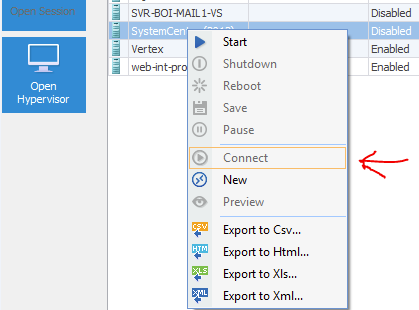
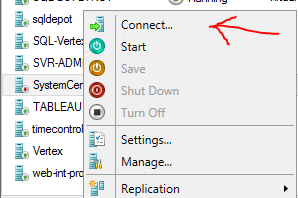
Here is the same VM, but from the Server 2012 R2 server itself using the native Microsoft tool. Option to connect is available ...
Offline mode security
Hey guys,
I have been looking through the documentation, but I haven't yet encountered anything about how the security of Offline Mode works. Obviously, a concern is that administrators could become so dependent on this software that should the infrastructure that supports it (in my case SQL) that we are in real trouble if we need to access the content to fix the problem to access content :-)
To answer that question, I see a few solutions
1. automatic database replication to a 2nd environment and set that up as a secondary datasource within PVM
2. do periodic exports within PVM to some format (your export to HTML is pretty nice)
3. configure PVM to allow offline read-only mode
Probably, doing all three will be the likely answer, but I know I will get asked about how the security works for #3. We plan to force two-factor authentication (Google Auth) with PVM. Should a laptop get lost or stolen that has PVM installed with local data access enabled, what kind of protections are in place? I am sure it is locally encrypted - I just need to find something that talks about this scenario to assure upper management and auditors.
Thanks!
edited by aparrish on 5/19/2015