Hyper-V Console Connect to Shutdown VM
0 vote

Hello,
I would like to suggest adding the feature of being able to connect to a shutdown VM via the Hyper-V Console. I needed the ability to do this today because of the following scenario:
Server: 2012 R2
My workstation: Windows 7 SP1
A Windows 7 box cannot use native Microsoft Hyper-V console client to connect to 2012 R2, so I was hoping to use yours. It worked (after I discovered you have to enter the OS information in the connection), but I discovered that when a VM is shutdown the option to connect to console is greyed out. In my situation, I needed to send an F8 keystroke to the VM to make it boot into Safe Mode, but since your refresh is too slow, I can't issue the keystroke in time.
The native Microsoft client (running via RDP on the 2012 R2 server itself), does allow a connect to shutdown to VM, btw.
Thanks!
I am my own subnet ::1/128
All Comments (5)
Hi,
I will verify if it's only have a UI limitation and I will let you know.
David Hervieux
Could you post a print screen of the disable connect to console? We are not sure where to look for it.
Regards
David Hervieux
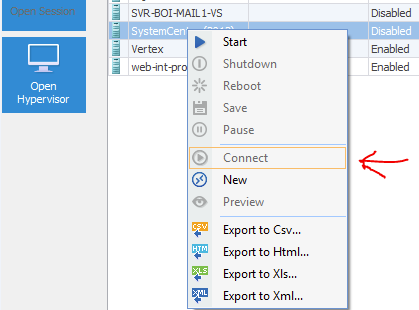
Below is the screenshot from Remote Desktop Manager
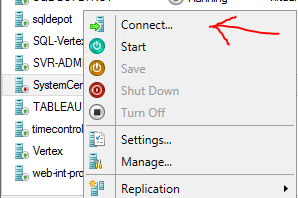
Here is the same VM, but from the Server 2012 R2 server itself using the native Microsoft tool. Option to connect is available ...
I am my own subnet ::1/128
Hyperv-MSFT.PNG
Hyperv.PNG
Thank you. We will give it a try.
David Hervieux
Hello Andrew,
This feature will be available in the next Beta version of RDM. When it's live, could you give it a try and see if it works for your situation?
Regards,
Hubert Mireault