Username or password incorrect

I am running RDM v 11.1.0.0, and I have noticed that at what seems to be random intervals, I get "Username or password incorrect" when connecting to Windows based servers through RDM. If I close the RDM application and open it again, and try again on the same server, I login just fine.
My environment consists of Enterprise edition running in SQL 2014. We have "generic placeholder" credentials where each administrator sets "User Specific Setting" to enter his own credentials. We have hundreds of Windows systems that are organized into folders, where each folder has a credential set for that generic placeholder, and each specific entry inherits the authentication settings from the parent folder.
Have you guys heard of credentials not working, then suddenly working by simply quitting the application and trying again?
I am my own subnet ::1/128
All Comments (17)
Hello Andrew,
As far as I know we are not aware of a problem like that but I've seen that sometime with RDM 32 bit we reach a memory limit and RDP is very memory intensive since RDP 8.
Could you verify if you see anything in the application logs?
Regards
David Hervieux
If it helps with this concern, I experienced it this morning right after opening the application and trying to use the very first connection (so it hadn't been open long and there were no other RDP sessions running). Do I need to enable logging? Where are the log outputs?
I am my own subnet ::1/128
You can check the default logs in Help->View application logs. Just make sure to load the log for today only.
Regards
David Hervieux
No logs for the last 10 days ...
I am my own subnet ::1/128
Small question: Do you open your connection in external mode or embedded?
David Hervieux
Embedded
I am my own subnet ::1/128
FYI: It is happening again right now, if you want me to test anything. Some connections work, others do not. If I quit and open the program, it will work fine (which I haven't done yet). If I type in my credentials manually, I can connect just fine.
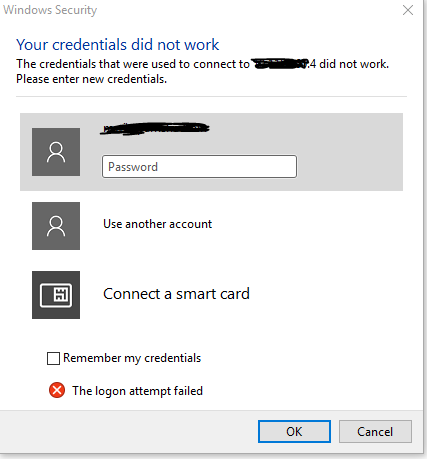
I am my own subnet ::1/128
Capture.PNG
Could you verify if you see anything in the logs? Could you try to open the connection in external?
David Hervieux
Nothing in the logs from today (System.Data.SQLite.SQLiteException (0x80004005): database disk image is malformed
database disk image is malformed from yesterday).
Changing the connection from Embedded to External results in the same behavior ("Your credentials did not work ...")
I am my own subnet ::1/128
This is really strange because in external mode we send the credential to mstsc. Do you store you credential in the database or locally? Could you try a Ctrl+Refresh?
David Hervieux
One last thing. Does it copy the right username and password if you use the Copy to Clipboard?
David Hervieux
Ah, good call. I see what is happening now, but not why. When I copy the password out, it is my previous password (not my current). This must have something to do with Offline/Online and not having my offline copy of the database updated.
What is strange is that is showing me as being Online right now. All connections and credentials are stored in a remote SQL database.
I guess this explains why, if I close and re-open it, my connections work.
I tried the previous connection that worked when I first opened the program, and that one is failing now too, so RDM has started using my old password.
I am my own subnet ::1/128
Ctrl+Refresh should help in this case.
David Hervieux
Indeed. Ctrl+Refresh fixed the issue without have to restart the application. Given this seems to be an intermittent problem, would you expect this to keep coming back?
I am my own subnet ::1/128
I suspect that we have a case where the password is changed directly in the session instead of the cloned session. We clone the connection to manipulate it like injecting the user specific settings.
Do you remember what operations you did before it started to fail?
David Hervieux
Today, like most days, was nothing special. I simply opened the program and started using it. As far as when the problem first happened--I don't recall anything specific. I am not even sure that this started happening when I changed my password.
I take it this is an issue of the local cache not being updated. There have been several problems caused by local cache mis-behaving in the past. How important is it to have the local cache at all? Is it possible to turn it off?
I am my own subnet ::1/128
You can turn off the local cache if you don't have too many sessions. Its used to speed up the application load.
Regards
David Hervieux