
perler
High memory use of embedded web tabs
I run Remote Desktop Manager 2026.3.15 / 2026.3.16 on a few Windows 11 ARM64 VMs (Parallels on Apple Silicon, 8-10 GB RAM). The VMs are used only for RDM, with several Website entries opened as embedded tabs. Most of the memory and CPU goes to the embedded browser, and I would like to understand what RDM does there and what I can safely tune.
What I measured:
- Right after start RDM has about 10 msedgewebview2 processes below it (1 browser, 4 renderers, 1 GPU, 3 utility, 1 crashpad). After two days with the tabs open it is 13 processes using about 2.1 GB, and RDM itself is at about 0.9 GB working set (574 MB private) with roughly 4,500 handles. On 2026.3.15 I saw RDM growing by about 5.6 GB over roughly 4 days.
- One renderer hosting a KVM video (WebRTC) tab used about 12.6 hours of CPU time in 2 days while the stream was open. A tab with a busy web app (an RMM web console) kept another renderer at about 40 % of one core plus about 20 % in the GPU process, around the clock, while nobody touched it.
- The WebView2.Cache folder was 13.4 GB on disk: about 100 stale WV2Profile_* folders (about 11 GB) in an old EBWebView folder that is no longer used, plus a separate user data folder for each distinct browser-argument set.
- Updating the Evergreen WebView2 Runtime from 145 to 156 reduced RDM's WebView2 private memory by about 120 MB (604 to 482 MB). Adding --disable-features=SpareRendererForSitePerProcess through the AdditionalBrowserArguments policy for RemoteDesktopManager.exe gave nothing measurable (same renderer count, memory within noise).
Questions:
1. Does RDM set CoreWebView2.MemoryUsageTargetLevel to Low, or call TrySuspendAsync, on web tabs that are not visible? If not, is that something you could add, perhaps as an option per entry or globally?
2. Is one CoreWebView2Environment shared by all web entries, or does RDM create one per distinct browser-argument set or profile? In my case each argument set seems to get its own browser process tree. Can all entries be made to share one environment?
3. Does RDM ever clean up or cap the per-entry WV2Profile_* folders under WebView2.Cache? Is it safe to rename or delete the old folder while RDM is closed, and what is lost besides saved web logins and cookies?
4. Is there a supported way to limit the number of renderer processes or to suspend idle tabs, and are there browser arguments you support for web entries? Does RDM honour the WEBVIEW2_ADDITIONAL_BROWSER_ARGUMENTS environment variable?
5. Which entry types or panels are known to keep a renderer busy in the background (web-app logins, WebRTC/KVM video, the dashboard)? I have not verified this, but would the "Use embedded Microsoft Edge for overview panel" setting under File > Settings > Advanced make a difference to memory or CPU?
6. Are there known memory leaks in RDM itself that are still open after 2026.3.16, or fixed in a later build? If it helps, what should I capture (dump at a given size, ETW trace, logs)?
7. For a VM dedicated to RDM with no real GPU, which settings do you recommend to keep memory and CPU low (rendering and performance options, which WebView2 runtime version, how many web tabs)?
Thanks a lot for any hints. Happy to share more numbers or test a build if that helps.
Selecting a closed entry in the tree does not show its dashboard while another session is open
Ah.. Dashboard was disabled. I would never have found this :D
Selecting a closed entry in the tree does not show its dashboard while another session is open
RDM 2026.2.19 (Windows 11). When an embedded session is open and I click a different entry in the navigation tree that has no open session, the view stays on the open session. I would like the main view to switch to the dashboard of the selected entry instead.
I have set File > Settings > User interface > Tree view > "Auto-focus dashboard" to "Always", but nothing changed: the open session keeps the focus and the dashboard of the selected entry is not shown.
Is there another setting that controls this, or is this expected behaviour when a session tab is open? I am fairly sure I had this working on a previous setup.
Thanks!
Native Passkey Support in Embedded Browsers for Microsoft Admin Center
Our use case is a little bit different: We are running RDM inside a Parallels VM on Macs, and Apple does not funnel the fingerprint reader through to this VM. So our only way to have passkeys inside these VMs would be a third‑party passkey provider like Bitwarden.
SSH Shell terminal receives a spurious F1 when the VM window regains keyboard focus
ok, the allmighty claude had an idea which actually worked. In its own words:
Workaround for anyone hitting this in a Parallels VM — disable the Num Lock key inside Windows
itself, at the keyboard class driver level, so the event Parallels sends on focus never reaches
the terminal. In an elevated PowerShell in the guest:
 $k = "HKLM:\SYSTEM\CurrentControlSet\Control\Keyboard Layout"
 $bytes = [byte[]]@(0,0,0,0, 0,0,0,0, 2,0,0,0, 0,0,0x45,0, 0,0,0,0)
 New-ItemProperty -Path $k -Name "Scancode Map" -PropertyType Binary -Value $bytes -Force
Then reboot Windows — the map is read by the keyboard class driver at boot, so nothing changes
until it restarts.
Scancode 0x45 is Num Lock and 0x0000 means "no key", so the key is simply gone. On a Mac keyboard
without a numeric keypad there is no Num Lock key to lose in the first place.
To undo:
Remove-ItemProperty -Path "HKLM:\SYSTEM\CurrentControlSet\Control\Keyboard Layout" -Name "Scancode Map"and reboot again. There is normally no such value, so removing it restores stock behaviour.
This is a guest-side workaround, not a fix. The underlying issue is still that the terminal
reacts to a Num Lock event, which PuTTY and MobaXterm in the same VM do not.
SSH Shell terminal receives a spurious F1 when the VM window regains keyboard focus
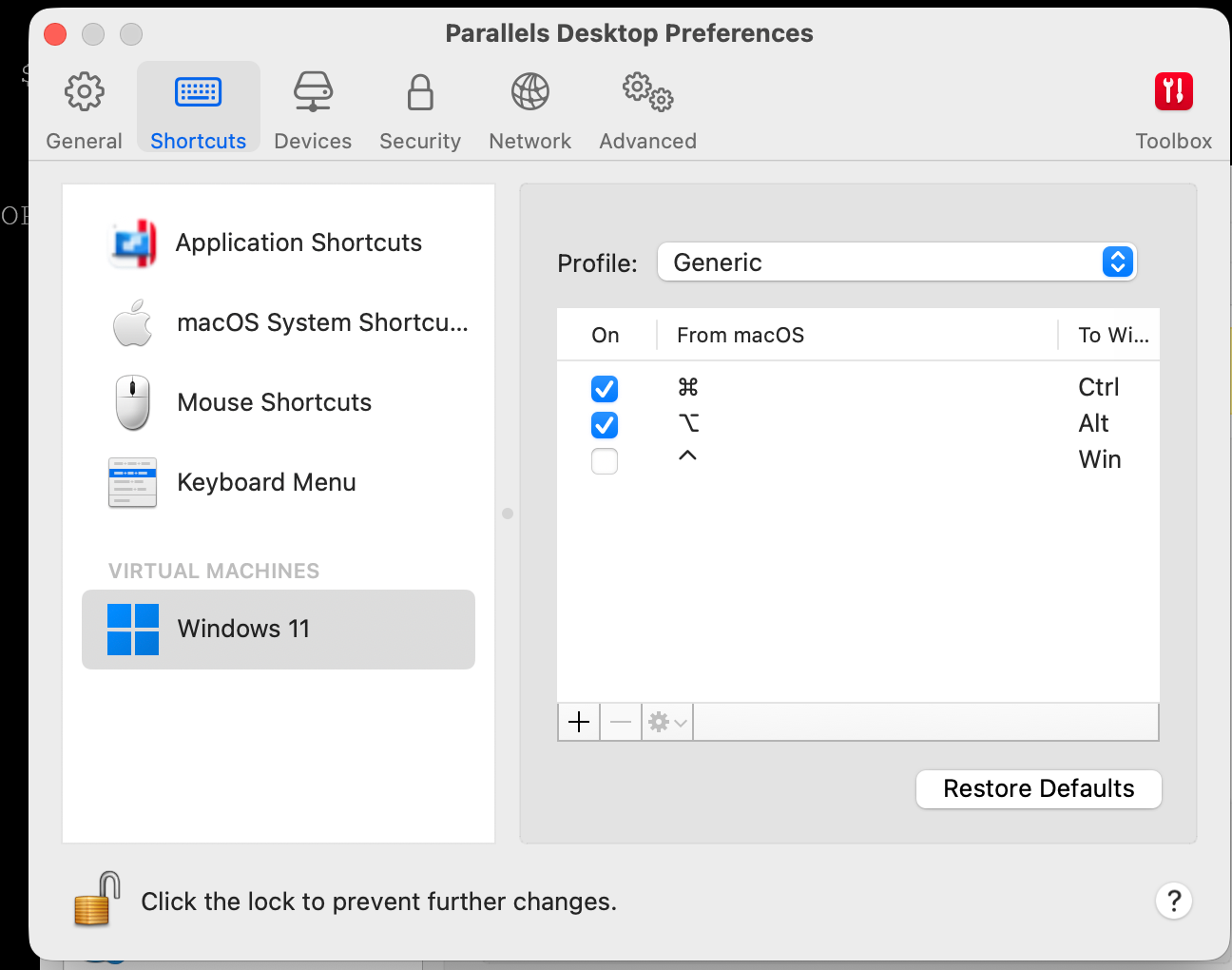
ok, which setting exactly do you mean? This does nothing:
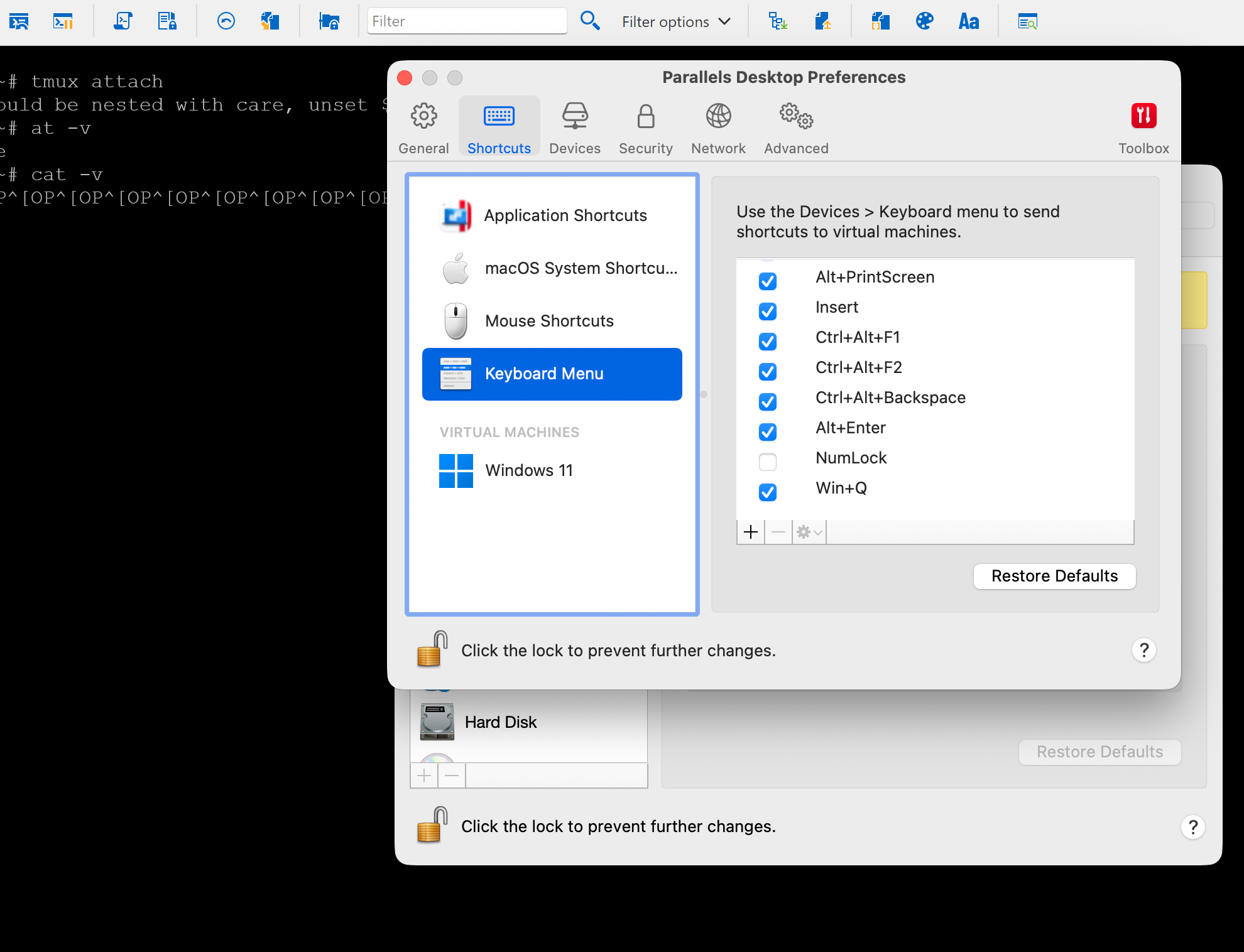
and if you mean to map NUMLOCK to "nothing" I have trouble pressing NUMLOCK to fill the "from" field here:
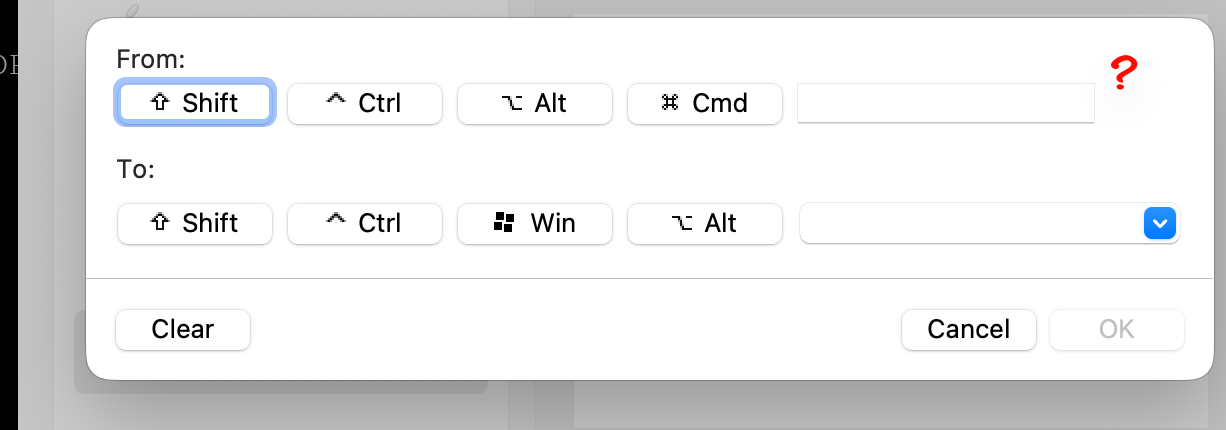
because as you can see, there is no NUMLOCK entry by default..
SSH Shell terminal receives a spurious F1 when the VM window regains keyboard focus
Ok, this is a very specific one, but maybe someone has the same problem:
Environment
Remote Desktop Manager 2026.2.17.0 (Windows), Devolutions.TerminalControl.dll 2026.6.10
Windows 11 ARM guest under Parallels Desktop 26.4.1, macOS 26.5.2 host
Entry type: SSH Shell, connecting to an Ubuntu server
Every time the Windows VM regains keyboard focus from the Mac, the open SSH Shell session receives a spurious F1 keypress. In Midnight Commander this pops up the Help screen on every switch.
What I measured
Running cat -v in the SSH session prints ^[OP (SS3 P = F1) each time the VM regains focus. So a real F1 is being sent by the terminal, not a stray Escape (^[), not a mouse report (^[[<...M), not a focus event (^[[I).
It is not a guest-wide key injection by Parallels. With Notepad focused instead of RDM, switching focus produces nothing at all -- and pressing F1 in Notepad manually does open its help page, so an injected F1 would have been visible.
It is not plain window activation either. Alt+Tab between RDM and another Windows application inside the VM never reproduces it.
It happens in both Coherence mode and full-screen VM mode.
The entry has no custom key mappings and no macros apart from a single after-connect command. Function keys mode is "Common". Nothing in the entry can send an F1.
So it only occurs at the point where the VM window takes back the keyboard from the host, and only in the Devolutions terminal control -- other Windows apps in the same guest see nothing.
Chat says: Possibly related to 2026.2.11.0, "Fixed SSH Shell issue where selecting the tab did not properly focus the terminal". But I don't think this is it because I have this problem for quite a while.,I'm quite sure before this version..
switch between tailscale networks?
this would definitely be helpful and as the accounts are stored somewhere (in the registry I assume) you could pre-populate the list..
switch between tailscale networks?
That's the how part of the question :) - So I need to to use the "tailscale switch user@account.com" command?
switch between tailscale networks?
is there a way to switch between tailscale networks and if so, how?
re-authentication problem
no, I have this setting for ages, never did anything but popping up an embedded browser instead of an external but thanks, if you fix this once and for all I am happy :)
re-authentication problem
ah, ok, but I see the described behaviour since I switched to Devolution * Hub one or two years ago. The sequence is:
RDM starts
Auth against Hub (pop up window external/internal browser)
"disconnect" event (network change/sleep/logoff)
go to 2 but credentials are stored.
Step 4 is the annoying step. My problem is not, that I need to re-enter credentials (I don't) but that a browser window pops up which I then are allowed to close, so what is the point? When the browser pops up all kinds of windows resize, menus get grey/black, logins not working things happen until reauth is finnished and this is the part that needs to be reworked IMO.
Are you saying that step 4 will be gone when you fix it?
re-authentication problem
Thanks for investigating, but I am under the impression that you are just investigating the symptoms and not the source of the problem.
My question is: why are we re-authenticating at all? Take as an example Bitwarden browser extensions. You authenticate with whatever authentication method you have enabled once, and, if you choose so, when the browser restarts, this is fair. The idea is that you prove that you are allowed to access the secrets store, and once you have done so, you yourself are responsible to secure the access to your device. So you put a security measure in front of your login as every sane person is doing, and your secrets within Devolutions Business Hub are still secure, no need to reauth.
re-authentication problem
This is about the constant re-auth requests when using Personal/Business Hub. I think with the 2024 or 2025 versions, you introduced a new way to authenticate against this data source where a browser window pops up. It is quite a bother since then, I opened tickets and you told me, that it is here to stay but can I ask again to overthing the conept? I understand security is important, but there must be a better way to do this.
Every network change (very common when working in the field on a notebook and troubleshooting network issues) brings up the pop up, takes away 10-15 seconds and people are loosing focus.
When working in the office, everytime the PC goes to sleep and re-awakens, the damn pop up comes up again.
We don't see any such behaviour in other apps..
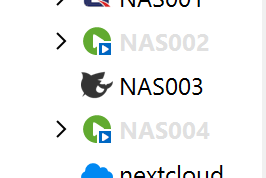
"in use" color in RDM
I switched from Hub Personal to Hub Business and now I have an extra color in RDM tree list where sessions are marked that are in use on other devices.
It's quite unreadable, where can I change it?
web sessions, clear cache on close broken?
hi,
That application which was a little bit stuck. We are using "advanced -> profile name" with a special name for this session. We clicked the "clear cache on close" menu entry and closed the session. We reopened, but the session was still stuck. The profile name came back up again, so it had a fresh profile. We then switched back to the old name. It was stuck again. We then set the option "Clear Cache" in Settings. We reconnected to the session and suddenly it worked again. So the clear cache worked when this setting was set, but not when we used the menu "clear cache on close".
All this on the latest version of RDM, but it happened on the latest 2025 version as well, because we were afraid to update beforehand ;)
Complete list of built-in ImageName values for Devolutions Cloud PowerShell module?
ok, markup posting doesn't seem to work, but anyways, you get the gist :) thanks!
Complete list of built-in ImageName values for Devolutions Cloud PowerShell module?
The `GetCustomLargesImages()` method from `CustomImageManager` didn't work for me — it's only available in the RDM desktop application, not in the
PowerShell module. But I found another way to get the full list using just the `Devolutions.PowerShell` module. The module ships with
`Devolutions.Image.dll` which contains all 1,327 SVG icons as embedded resources. Run this to list them:
```powershell
Import-Module Devolutions.PowerShell
$modPath = (Get-Module Devolutions.PowerShell).ModuleBase
$asm = [System.Reflection.Assembly]::LoadFrom((Join-Path $modPath 'Devolutions.Image.dll'))
$asm.GetManifestResourceNames() | Where-Object { $_ -like '*.svg' } | ForEach-Object {
$_ -replace '^Devolutions\.RemoteDesktopManager\.Resources\.Svg\.','' -replace '\.svg$',''
} | Sort-Object
The ImageName format is Sample<BaseName><Color>, where colors are: Black, Blue, Forest, Green, Grey, Orange, Purple, Red, Royal, Yellow. For example:
SampleServerBlue, SampleSwitchBlack, SampleDesktopOrange.
```
Complete list of built-in ImageName values for Devolutions Cloud PowerShell module?
Hi,
I'm using the Devolutions.PowerShell module to programmatically manage entries in Hub Business. I'd like to set
icons on entries via the Connection.ImageName property.
Through trial and error, I've found some valid names like:
- SampleServerOrange
- SampleDesktopBlue
- SampleLaptopBlue
- SampleWindowsOrange
- SampleCloudBlue
- SampleBookBlue
- SampleHourglassBlue
- SampleActiveDirectoryControllerYellow
- Color-only names like [Red], [Green], [Purple]
The naming pattern seems to be Sample{Type}{Color}, but the ImageName property is a plain string, not an enum, so
there's no autocomplete or discoverable list.
Question: Is there a complete list of valid built-in ImageName values? Or is there a method in the assembly to
enumerate them? I found CustomImageManager.Definitions and ImageManager.GetDefaultSvgName() in the
Devolutions.RemoteDesktopManager.Business namespace but couldn't extract the full list.
Kerberos/CredSSP/NTLM issue
Yes, it looks a little bit like a caching issue because another server in the same network with the same FQDN suddenly connects successfully when using the linked credentials. the one with the credentials set in the session did not, but when i switch it to the linked creds as well it works again. so, thanks, everything is fine now! :)
btw, please remove the real-life domain names from your post, just for privacy reasons. I thought I cleaned it up in my post but obviously did not..
Kerberos/CredSSP/NTLM issue
This is what we did and the consequences are a little bit strange:
First we connected via a port forward in our router, the credentials are saved in RDM. It's worked without flaw.
Then we switched to Tailscale and now tried to connect via IP. Here, the first login failed with wrong credentials. When I then entered the password manually it connected.
3. Then we added split DNS to Tailscale and we can now address the servers by FQDN. now we get this error when using our RDM entry
Remote Desktop Connection
An authentication error has occurred. The token supplied to the function is invalid
Remote computer: srv003.ad.domain.com
^ Hide details OK
Error code: 0x0 Extended error code: 0x0 Timestamp (UTC): 03/09/26 05:16:13 PM Activity ID: 56faf5ba-9430-4510-b12c-cefee05f0000
Press Ctrl+C to copy. e
But when we use quick connect with the IP or FQDN and enter the credentials manually we can login..
Kerberos/CredSSP/NTLM issue
hi,
we are streamlining out RDP sessions and found that we have trouble when we are trying to log in with FQDNs instead of IPs. Claude advises us:
When you connect by FQDN (srv003.ad.domain.com), RDM attempts Kerberos authentication. When you connect
by IP, it falls back to NTLM. The PC isn't domain-joined, so it can't obtain a Kerberos ticket, and the token is
invalid.
The fix is in RDM's connection settings. For this connection entry:
1. Open the connection properties in RDM
2. Look for Authentication or Security settings
3. Set Network Level Authentication (NLA) to use NTLM instead of Kerberos (or "Negotiate")
4. Alternatively, some RDM versions have a setting called "Authentication Level" or "Credential Security Support
Provider (CredSSP)" — set it to not require Kerberos
I can't find these settings in RDM..
webview2 dropdown issue
sure, but I wrote it in the very first sentence ;)
webview2 dropdown issue
I only had this problem when running in a parallel VM on a Mac. On original Windows, I have not seen this problem.
webview2 dropdown issue
Sorry, I removed already the macOS version. I can't really say anymore.