"in use" color in RDM

I switched from Hub Personal to Hub Business and now I have an extra color in RDM tree list where sessions are marked that are in use on other devices.
It's quite unreadable, where can I change it? 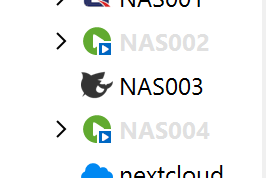
6a7c4856-9135-46a8-8497-1f728df0caea.png
Recommended Answer
Hello,
The color you are seeing in the tree is the “in use” highlight. You can change it here:
File – Settings – User interface – Tree view – Custom color when in use
Adjust that color to something more readable (or revert it, if applicable), and it will change how entries are highlighted when they are in use on another device.
Documentation:
https://docs.devolutions.net/rdm/commands/file/options/user-interface/tree-view/ (see “Custom color when in use”)
greetings
Stephan
All Comments (1)
Hello,
The color you are seeing in the tree is the “in use” highlight. You can change it here:
File – Settings – User interface – Tree view – Custom color when in use
Adjust that color to something more readable (or revert it, if applicable), and it will change how entries are highlighted when they are in use on another device.
Documentation:
https://docs.devolutions.net/rdm/commands/file/options/user-interface/tree-view/ (see “Custom color when in use”)
greetings
Stephan