
Guenther Schmitz
broken link
hi,
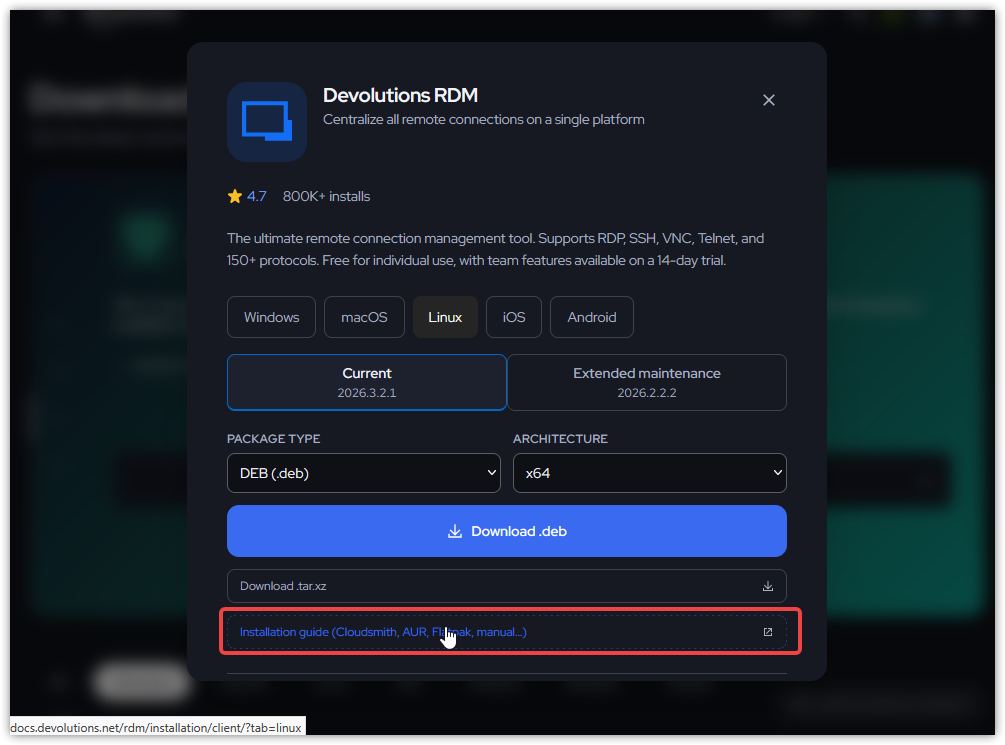
just wanted to let you know that the link to https://docs.devolutions.net/rdm/installation/client?tab=linux seems broken.
Wanted to look up howto Flatpak 🧑💻
KR
Guenther
pre-filtered table
hi @rubentapia,
I came up with this solution - not as elegant as I wanted it to be, but a working solution for now.
New-UDPage -Url '/test' -Name 'Test' -Content {
    New-UDCard -Title 'a demo table' -TitleAlignment center -Content {
        New-UDDynamic -Content {
            $Session:TableData = 1..10 | ForEach-Object {
                [PSCustomObject]@{
                    CustomerDisplayname            = "Customer $_"
                    RelationshipEndDateTime        = (Get-Date).AddDays($_)
                    RelationshipAutoExtendDuration = 'PT{0}D' -f $_
                    RoleAssignmentName             = "Role $_"
                    SecurityGroupName              = "Group $_"
                    Status                         = (Get-Random -Minimum 0 -Maximum 2) -eq 0 ? 'Active' : 'Disabled'
                }
            }

            $Data = $Session:TableData | Where-Object { $_.Status -eq 'Active' }

            New-UDElement -Tag 'div' -Id 'switchWrapper' -Content {
                New-UDSwitch -Id 'activeSwitch' -Checked $false -CheckedLabel 'show all' -UncheckedLabel 'show only active' -OnChange {
                    Show-UDModal -Persistent -Content {
                        New-UDTypography -Text 'Updating table to ...' -Variant h4
                        New-UDProgress
                    }

                    if ((Get-UDElement -Id 'activeSwitch' -Property 'Checked')) {
                        $Data = $Session:TableData
                    } else {
                        $Data = $Session:TableData | Where-Object { $_.Status -eq 'Active' }
                    }

                    Set-UDElement -Id 'aTable' -Properties @{
                        data = $Data
                    }

                    Hide-UDModal -All
                }
            }

            New-UDParagraph -Content {
                New-UDTable -Id 'aTable' -Data $Data -Columns @(
                    New-UDTableColumn -Property 'CustomerDisplayname' -Title 'Customer Display Name' -ShowFilter -ShowSort -DefaultSortColumn $true
                    New-UDTableColumn -Property 'RelationshipEndDateTime' -Title 'Relationship End Date Time' -ShowSort -OnRender {
                        $EventData.RelationshipEndDateTime.ToString('yyyy-MM-dd HH:mm:ss')
                    }
                    New-UDTableColumn -Property 'RelationshipAutoExtendDuration' -Title 'Relationship Auto Extend' -OnRender {
                        if ($EventData.RelationshipAutoExtendDuration -eq 'PT0S') {
                            New-UDIcon -Icon 'close' -Color 'red'
                        } else {
                            New-UDIcon -Icon 'check' -Color 'green'
                        }
                    } -ShowFilter -ShowSort -FilterType select
                    New-UDTableColumn -Property 'RoleAssignmentName' -Title 'Role Assignment' -ShowFilter -ShowSort -Render {
                        New-UDLink -Text $EventData.RoleAssignmentName -Url "#"
                    }
                    New-UDTableColumn -Property 'SecurityGroupName' -Title 'Security Group' -ShowFilter -ShowSort -Render {
                        New-UDLink -Text $EventData.SecurityGroupName -Url "#"
                    }
                    New-UDTableColumn -Property 'Status' -Title 'Status' -ShowFilter -ShowSort -FilterType autocomplete
                ) -ShowPagination -PageSize 25 -StickyHeader
            }
        }
    }
} -AutoIncludepre-filtered table
hi Ruben,
the table and the multiselect feature did work just fine with the old version and also do still work with the new version.
The multiselect filter lists all different values for "status" and also the "all" option is listed.
What I wanted to ask for was if it would be possible to have the multiselect filtered right on first load.
So if a user navigates to the page with the table the first time the entries only show the ones with states "active". The user should then be able to use the filter and select "all" or any other status available.
I am making this parameter FilterSelect up - but this is what I was looking for:
New-UDTableColumn -Property 'Status' -Title 'Status' -ShowFilter -ShowSort -FilterType multiselect -FilterSelect 'Active'As of now the table is loaded unfiltered and users will have to select the state manually.
KR
G.
pre-filtered table
hi @rubentapia,
as of yesterday evening we are now running 2026.3.3
KR
G.
pre-filtered table
hi @rubentapia,
I did mean to create an example with multiselect - I overlooked the filtertype (actually because I based the example on a different - simpler - table 🫣).
Please do use multiselect.
KR
G.
pre-filtered table
hi @rubentapia,
we are still on PSU v4.5.6
Please find hereunder a minimal example (where you can see that I use -Data).
$Data = 1..10 | ForEach-Object {
	[PSCustomObject]@{
		CustomerDisplayname            = "Customer $_"
		RelationshipEndDateTime        = (Get-Date).AddDays($_)
		RelationshipAutoExtendDuration = 'PT{0}D' -f $_
		RoleAssignmentName             = "Role $_"
		SecurityGroupName              = "Group $_"
		Status                         = (Get-Random -Minimum 0 -Maximum 2) -eq 0 ? 'Active' : 'Disabled'
	}
}

New-UDParagraph -Content {
	New-UDTable -Data $Data -Columns @(
		New-UDTableColumn -Property 'CustomerDisplayname' -Title 'Customer Display Name' -ShowFilter -ShowSort -DefaultSortColumn $true
		New-UDTableColumn -Property 'RelationshipEndDateTime' -Title 'Relationship End Date Time' -ShowSort -OnRender {
			$EventData.RelationshipEndDateTime.ToString('yyyy-MM-dd HH:mm:ss')
		}
		New-UDTableColumn -Property 'RelationshipAutoExtendDuration' -Title 'Relationship Auto Extend' -OnRender {
			if ($EventData.RelationshipAutoExtendDuration -eq 'PT0S') {
				New-UDIcon -Icon 'close' -Color 'red'
			} else {
				New-UDIcon -Icon 'check' -Color 'green'
			}
		} -ShowFilter -ShowSort -FilterType select
		New-UDTableColumn -Property 'RoleAssignmentName' -Title 'Role Assignment' -ShowFilter -ShowSort -Render {
			New-UDLink -Text $EventData.RoleAssignmentName -Url "#"
		}
		New-UDTableColumn -Property 'SecurityGroupName' -Title 'Security Group' -ShowFilter -ShowSort -Render {
			New-UDLink -Text $EventData.SecurityGroupName -Url "#"
		}
		New-UDTableColumn -Property 'Status' -Title 'Status' -ShowFilter -ShowSort -FilterType autocomplete
	) -ShowPagination -PageSize 25 -StickyHeader
}
KR
G.
pre-filtered table
I've found this - but no information how it has eventually been implemented and which filtertypes it supports (issue on github talking about "autocomplete" - me using "multiselect") 🙃
https://github.com/ironmansoftware/powershell-universal/issues/1182
pre-filtered table
hi,
I have a dashboard/app that shows data in a table with the option to filter the columns.
I have a column "status" which can be "active", "disabled", "pending" or "deleted" with the filtertype "multiselect" it works fine.
What I want to achieve is that the table when loaded shows the entries with the status "pre-filtered" to "active".
Can this be done?
KR
G.
Copy entries from one vault to another
Thanks @Jacob Lafrenière!
This is working \o/
KR
G.
PS: Maybe you can edit you post as the last line "New-DSEntryBase..." is not displayed in the code block but with the remarks to "important note"
Copy entries from one vault to another
hi @Jacob Lafrenière ,
the goal was not to move an entry but to create the very same entry from a "template vault" in another newly created vault.
For example we have a template vault with one RDP session.
If I run the script the first time it finds the entry in the template vault and stores it in $entry and then the $copyEntry gets created in the destination vault.
If I then try to get the $entry again I get the "not found" error.
This is what I meant with "the first time it works, every other time it fails" because it does no longer retrieve the "source" entry which I want to be replicated in another vault.
The error appears when I click on the RDP session entry in the template vault in the web browser (RDM on windows - maybe due to local caching still shows it correctly - even lets me edit it). I only have to click on the entry - not open the session itself or its properties.
The entry in the destination seems to be OK/valid.
KR
G.
Copy entries from one vault to another
hi @Jacob Lafrenière,
while this works fine when running it the first time - every other run fails.
The source entries are corrupt after that and Get-DSEntry -EntryID $idToCopy -VaultID $sourceVault.ID as well as using the browser to navigate to the source vault return "Object not found".
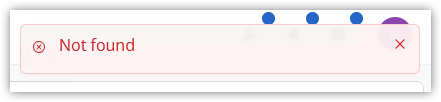
Can this be fixed somehow? maybe the Data property has to also be manipulated?
KR
G.
Copy entries from one vault to another
hi,
is it possible to get entries from one vault (using Get-DSEntry) and "import" them into another one? using New-DSBaseEntry maybe?
I tried the following but get an error: New-DSEntryBase: Object reference not set to an instance of an object
$copyEntry = Get-DSEntry -EntryId $idToCopy
$copyEntry.repositoryId = $destinationVault.ID
New-DSEntryBase -JsonBody (ConvertTo-Json -InputObject $copyEntry -Depth 10)
KR
G.
Autocomplete but with more "loose" filtering
hi Ruben,
thanks for you reply.
While the PowerShell code itself is working the UD Autocomplete item is not.
It seems to me that the $Body variable is only present after an item is selected so the list is not filtered while typing (using this parameter); also the list always shows "No options" when a user clicks on the Autocomplete element itself. Items are only shown when anything (matching) is entered (e.g. e will list both entries; a shows the second).
Do you know if this behaviour has changed with the latest version?
KR
G.
Autocomplete but with more "loose" filtering
hi Ruben
I am still on 4.5.6 (about to update to the latest version anytime soon - but until then stuck with it).
KR
G.
Autocomplete but with more "loose" filtering
hi,
I am trying to use Autocomplete so that users may also enter parts of an entry.
e.g. the Autocomplete options are "super duper" and "mega giga"
What I am looking for is that a user may enter "sup dup" and still get the option "super duper" displayed.
Is this possible at all?
KR
G.
Can deleted vaults be restored?
When deleting entries, those can be restored. How about vaults? Is there any way to restore those?
KR
G.
Update Entra Id group name to Devolutions User group
hi,
we are using Entra Id groups and are adding them to our Devolutions Server as "User group".
I noticed that when the Entra Id group name changed this is not reflected in the Devolutions Server unless the group is deleted and added (with the new name) again.
Is there some way to update/synch the group name?
KR
G.
set default credentials for root object
hi @Patrick Ouimet,
thanks! that is working as expected.
KR
G.
set default credentials for root object
hi @William Alphonso,
I get another error now:

KR
G.
set default credentials for root object
hi @William Alphonso,
I just tried what you posted but get the following error:

Devolutions.PowerShell module version 2025.3.4 (DPS 2025.3.19).
KR
G.
set default credentials for root object
hi,
When creating a new vault we want to set the credential-configuration of the vault to 'My personal credentials' (instead of 'Username and password').
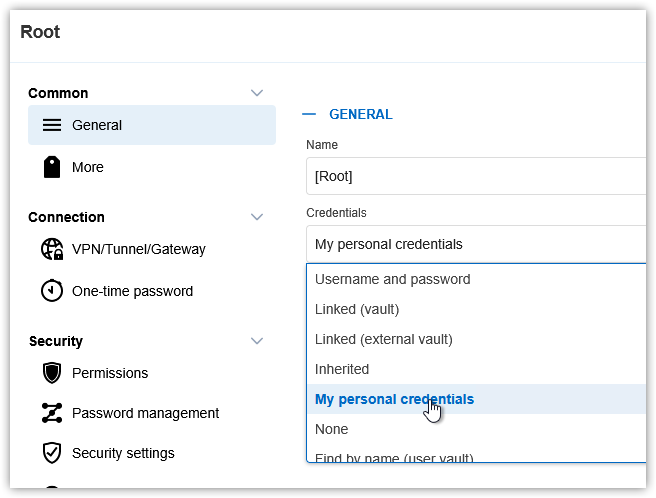
How can this be done with PowerShell? or is it possible to set this in Devolutions Server (as default for every new vault)?
KR
G.
client specific overwrites for connection types (for all vaults)
Thanks @Samuel Dery!
We overlooked the "File" > "Settings" configuration. This was what we were looking for.
KR
G.
client specific overwrites for connection types (for all vaults)
hi,
with a lot of vaults one must update each and every (new) entry to match personal preferences.
Is it possible to say "on my machine any RDP session shall be opened on my second screen" in the client once instead of every entry in every vault?
KR
G.
Disable/hide "request vault access"
hi Jacob,
temporary access is set to 'Default (Denied)' for the vaults in question 🤷🏻
Users don't recall how they requested it.
KR
G.
Disable/hide "request vault access"
hi @Jacob Lafrenière
I talked to the colleague today but unfortunately he doesn't remember the steps to re-create the issue.
Can I configure DPS to send out an email if a user manages to send an "access request"?
KR
G.