set default credentials for root object

hi,
When creating a new vault we want to set the credential-configuration of the vault to 'My personal credentials' (instead of 'Username and password').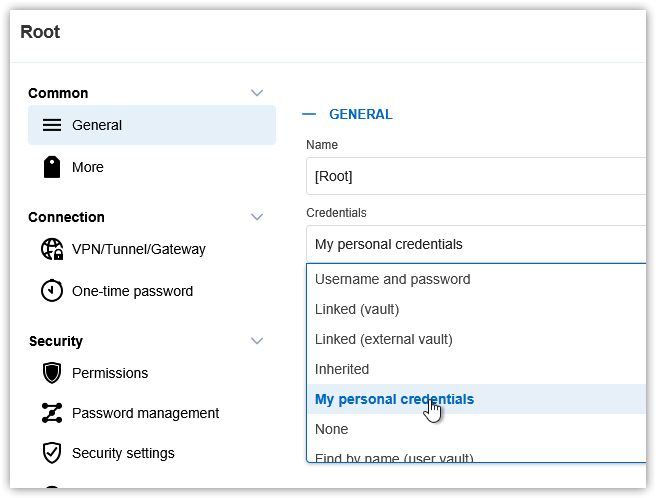
How can this be done with PowerShell? or is it possible to set this in Devolutions Server (as default for every new vault)?
KR
G.
96bba542-f225-410a-a608-929fdba6b988.png
All Comments (6)
Hello G.,
Thank you for your question.
I can confirm that there are currently no Devolutions Server setting to automatically set My personal credentials as the default credential configuration for every newly created vault.
However, this can be done with PowerShell after the vault is created by updating the root entry of the vault. Here is an example:
# Create the vault
$vaultName = "My new vault"
New-DSVault -Name $vaultName

# Retrieve the vault
$vault = Get-DSVault -All | Where-Object { $_.Name -eq $vaultName } | Select-Object -First 1

# Get the root entry of that vault
$root = Get-DSRootSession -VaultID $vault.Id

# Retrieve the root entry as an RDM connection object
$rootEntry = Get-DSEntry -EntryId $root.Id -VaultID $vault.Id -AsRDMConnection

# Set credential configuration to "My personal credentials"
$rootEntry.CredentialConnectionID = [Devolutions.Generated.Models.Connection]::MyDefaultCredentialConnectionID

# Save the change back to Devolutions Server
Update-DSEntryBase -FromRDMConnection $rootEntry
Please make sure the PowerShell session is already authenticated to your Devolutions Server instance and that the account running the script has sufficient permissions to create and modify vaults.
Best regards,
hi @William Alphonso,
I just tried what you posted but get the following error:
Devolutions.PowerShell module version 2025.3.4 (DPS 2025.3.19).
KR
G.
b763bfe4-4705-45d1-9965-ce3c7f09612a.png
Hi G.,
Thank you for testing this and for the details.
You are correct. The error is caused by this part of the script:
[Devolutions.Generated.Models.Connection]::MyDefaultCredentialConnectionID
That type may not be available in the Devolutions Server PowerShell session, depending on the PowerShell context/module being used.
Please use the well-known GUID for My personal credentials instead:
# Set credential configuration to "My personal credentials"
$rootEntry.CredentialConnectionID = "9F3C3BCF-068A-4927-B996-CA52154CAE3B"
So the full example would be:
# Create the vault
$vaultName = "My new vault"
New-DSVault -Name $vaultName

# Retrieve the vault
$vault = Get-DSVault -All | Where-Object { $_.Name -eq $vaultName } | Select-Object -First 1

# Get the root entry of that vault
$root = Get-DSRootSession -VaultID $vault.Id

# Retrieve the root entry as an RDM connection object
$rootEntry = Get-DSEntry -EntryId $root.Id -VaultID $vault.Id -AsRDMConnection

# Set credential configuration to "My personal credentials"
$rootEntry.CredentialConnectionID = "9F3C3BCF-068A-4927-B996-CA52154CAE3B"

# Save the change back to Devolutions Server
Update-DSEntryBase -FromRDMConnection $rootEntry
Sorry for the confusion in the previous example. The original line works in some RDM PowerShell contexts, but for this Devolutions Server workflow, using the well-known GUID directly is the better approach.
Best regards,
hi @William Alphonso,
I get another error now:
KR
G.
c6a9d6fb-5f5e-4f6e-b5b4-6a0206fa3c94.png
Hello Guenther Schmitz,
Thank you for this feedback.
Here is the new script to create a new vault and set the root folder to the desired CredentialID:
$env:DS_URL= "<DVLSURL>"
$env:DS_USER = "<AppID>"
$env:DS_PASSWORD = "<AppSecret>"


[string]$Username = $env:DS_USER
[string]$Password = $env:DS_PASSWORD
[string]$DVLSUrl = $env:DS_URL

[securestring]$SecPassword = ConvertTo-SecureString $Password -AsPlainText -Force
[pscredential]$Creds = New-Object System.Management.Automation.PSCredential ($Username, $SecPassword)

$Response = New-DSSession -Credential $Creds -BaseURI $DVLSUrl -AsApplication
$response

$vaultName = "My new vault"
$credentialConnectionId = "9F3C3BCF-068A-4927-B996-CA52154CAE3B"

New-DSVault -Name $vaultName

# Retrieve the vault
$vault = Get-DSVault -All |
    Where-Object { $_.Name -eq $vaultName } |
    Select-Object -First 1

if (-not $vault) {
    throw "Vault '$vaultName' was not found."
}

# Get the root entry of that vault
$root = Get-DSRootSession -VaultID $vault.Id

# Retrieve the root entry as an RDM connection object
$rootEntry = Get-DSEntry -EntryId $root.Id -VaultID $vault.Id -AsRDMConnection

# In your module version, Get-DSEntry -AsRDMConnection returns a wrapper.
# Update-DSEntryBase wants the actual ConnectionInfoEntity.
$connection = if ($rootEntry.PSObject.Properties["ConnectionInfo"]) {
    $rootEntry.ConnectionInfo
} else {
    $rootEntry
}

# Edit the XML payload
[xml]$xml = $connection.Data

$connectionNode = $xml.SelectSingleNode('/Connection')
if ($null -eq $connectionNode) {
    throw "Invalid entry XML: /Connection node was not found."
}

$node = $xml.SelectSingleNode('/Connection/CredentialConnectionID')

if ($null -eq $node) {
    $node = $xml.CreateElement('CredentialConnectionID')

    # Put it after ConnectionType when possible, matching the usual XML shape.
    $after = $xml.SelectSingleNode('/Connection/ConnectionType')

    if ($null -ne $after) {
        [void]$connectionNode.InsertAfter($node, $after)
    } else {
        [void]$connectionNode.PrependChild($node)
    }
}

$node.InnerText = $credentialConnectionId

# Save XML back onto the actual ConnectionInfoEntity
$connection.Data = $xml.OuterXml

# Persist the modified entry
Update-DSEntryBase -FromRDMConnection $connection
Best regards,
Patrick Ouimet
hi @Patrick Ouimet,
thanks! that is working as expected.
KR
G.